1. تعارف
The Browning Defender 850 (BTC-9D) is a high-performance trail camera designed for capturing wildlife images and videos. Featuring 20-megapixel resolution, Full HD video recording, and advanced infrared technology, it provides clear and detailed footage day or night. Its compact, camouflage design allows for discreet placement in various outdoor environments. This manual provides essential information for setting up, operating, and maintaining your camera.
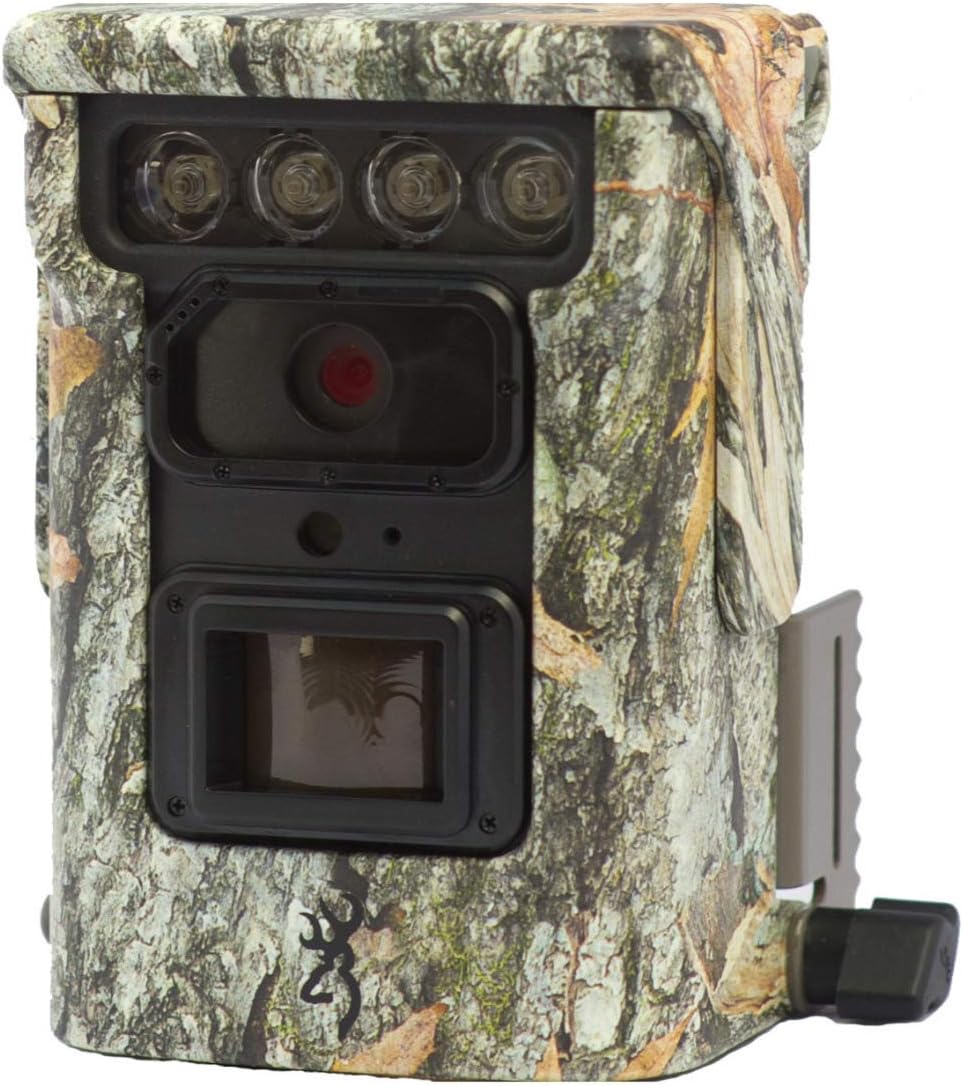
تصوير 1.1: سامهون view of the Browning Defender 850 trail camera, showcasing its lens, IR emitters, and camouflage casing.
2. پيڪيج مواد
مھرباني ڪري تصديق ڪريو ته ھيٺ ڏنل سڀ شيون توھان جي پيڪيج ۾ شامل آھن:
- 1x Browning Defender 850 Trail Camera (BTC-9D)
- 4x CR123 Lithium Batteries
- 1x 16GB SDXC SD Card
- CD with 'Time Lapse Viewer' Software
3. اهم خاصيتون
The Browning Defender 850 is equipped with several advanced features to enhance your trail monitoring experience:
- هاءِ ريزوليوشن اميجنگ: Captures still images at 20 Megapixels.
- مڪمل HD وڊيو: Records 1920x1080 Full HD videos with sound.
- تيز ٽرگر اسپيڊ: Ultra-fast 0.4-second trigger speed to capture fast-moving subjects.
- Invisible IR Flash: Features 850 nm infrared flash for silent, nearly invisible night illumination up to 36 meters (120 feet).
- WiFi & Bluetooth Connectivity: Allows for wireless viewing and management of photos and videos via the Browning Trail Camera app on your smartphone or tablet.
- Multiple Capture Modes: Supports Photo, Video, Time-lapse, and Time-lapse Plus modes.
- برسٽ موڊ: Captures 1-8 photos per trigger, with a fast burst option of 8 photos in 2 seconds.
- ڊيٽا اوورليه Images and videos include time, date, camera ID, moon phase, and temperature stamps.
- ڪمپيڪٽ ڊيزائن: Small and discreet camouflage housing.
4. سيٽ اپ گائيڊ
4.1. بيٽري لڳائڻ
The camera requires 4x CR123 Lithium batteries (included). To install:
- ڪيمرا تي بيٽري جي خاني کي ڳولھيو.
- ڪمري جو دروازو کوليو.
- Insert the 4 CR123 batteries, ensuring correct polarity (+/-) as indicated inside the compartment.
- بيٽري جي ڪمري جو دروازو محفوظ طور تي بند ڪريو.
4.2. ايس ڊي ڪارڊ داخل ڪرڻ
A 16GB SDXC SD card is included. The camera supports up to 128GB SDXC cards. To insert:
- ايس ڊي ڪارڊ سلاٽ کي ڳوليو، عام طور تي بيٽري جي ڪمري جي ويجهو.
- Insert the SD card with the label facing the front of the camera until it clicks into place.
- ڪڍڻ لاءِ، ڪارڊ کي نرميءَ سان اندر دٻايو جيستائين اهو ٻاهر نه اچي.
4.3. ڪئميرا لڳائڻ
The Defender 850 features a 1/4" tripod thread for versatile mounting options. It also comes with an integrated mounting bracket.
- Use the included strap or a compatible mounting accessory to secure the camera to a tree or post.
- Ensure the camera is stable and pointed towards the desired monitoring area.
- For optimal performance, position the camera at a height of approximately 1-2 meters (3-6 feet) from the ground.

تصوير 4.1: پاسي view of the Browning Defender 850, illustrating the integrated mounting bracket.
5. آپريٽنگ هدايتون
5.1. پاور آن/آف
Once batteries and SD card are installed, the camera will enter a ready state. Most configuration and operation are managed through the Browning Trail Camera app.
5.2. Connecting via WiFi and Bluetooth
The Defender 850 utilizes WiFi and Bluetooth for seamless connectivity with your smartphone or tablet.
- سرڪاري ڊائون لوڊ ڪريو Browning Trail Camera App توهان جي ڊوائيس جي ايپ اسٽور (iOS يا Android) تان.
- پڪ ڪريو ته توهان جي اسمارٽ فون / ٽيبليٽ تي بلوٽوت فعال آهي.
- Open the Browning Trail Camera App and follow the on-screen instructions to discover and connect to your BTC-9D camera via Bluetooth.
- Once connected via Bluetooth, the app will guide you to establish a WiFi connection for faster data transfer and live viewing (if supported).
5.3. ڪئميرا موڊ ۽ سيٽنگون
Through the Browning Trail Camera App, you can configure various settings:
- ڪيپچر موڊ: Select between Photo, Video, Time-lapse, or Time-lapse Plus.
- فوٽو حل: Set to 20 Megapixels for highest quality.
- Video Resolution & Length: Choose 1920x1080 Full HD. Adjust video length (5/10/20/30 seconds, 1/2 minutes).
- Trigger Delay/Image Delay: Set the delay between detections (5/10/20/30 seconds, 1/5/10/30/60 minutes).
- Burst Settings: Configure the number of photos taken per trigger (1-8 photos).
- Time-lapse Interval: Define the interval for time-lapse captures (5/10/20/30 seconds, 1/2/5/10/30/60 minutes).
- IR Flash Power: Adjust the infrared flash power (Power Save, Long Range, Fast Motion) based on your needs.
- تاريخ ۽ وقت: Synchronize the camera's clock with your device.
- ڪئميرا جي سڃاڻپ: Assign a unique ID to your camera for easier identification if you operate multiple units.
5.4. Viewانتظام ۽ سار سنڀال Files
اپليڪيشن توهان کي اجازت ڏئي ٿي view captured images and videos directly on your device without retrieving the SD card.
- Browse thumbnails of captured media.
- Download selected photos or videos to your device.
- ناپسنديده ختم ڪريو files SD ڪارڊ مان.
- For time-lapse sequences, use the included 'Time Lapse Viewer' software on a computer for optimal playback.
6. سار سنڀال
Proper maintenance ensures the longevity and optimal performance of your Browning Defender 850 camera.
- صفائي: Gently wipe the camera lens and IR emitters with a soft, lint-free cloth. Avoid abrasive materials or harsh chemicals. Keep the casing clean from dirt and debris.
- بيٽري جي سنڀال: Replace batteries when the low battery indicator appears in the app. Remove batteries if the camera will be stored for an extended period to prevent leakage.
- ايس ڊي ڪارڊ انتظام: Periodically format the SD card using the camera's app or a computer to maintain optimal performance and prevent data corruption. Back up important files فارميٽ ڪرڻ کان اڳ.
- اسٽوريج: جڏهن استعمال ۾ نه هجي، ڪئميرا کي سڌي سج جي روشني ۽ انتهائي گرمي پد کان پري ٿڌي، سڪل جاءِ تي رکو.
7. مسئلا حل ڪرڻ
If you encounter issues with your Browning Defender 850, refer to the following common troubleshooting steps:
- ڪئميرا آن نه آهي:
- پڪ ڪريو ته بيٽريون صحيح پولارٽي سان صحيح طرح سان داخل ڪيون ويون آهن.
- Replace with fresh CR123 Lithium batteries.
- ڪابه تصوير/ وڊيوز نه ورتي وئي آهي:
- Check if the SD card is properly inserted and not full.
- Ensure the SD card is formatted correctly (FAT32 or exFAT, depending on card size).
- Verify camera settings (e.g., trigger delay, operating schedule) via the app.
- Confirm the camera is in an active capture mode (Photo, Video, etc.).
- خراب تصوير/وڊيو معيار:
- Clean the camera lens and IR emitters.
- Ensure the camera is not too close or too far from the subject.
- Check IR flash settings for night captures.
- Cannot Connect via App (WiFi/Bluetooth):
- Ensure Bluetooth and WiFi are enabled on your smartphone/tablet.
- Make sure the camera is powered on and within range.
- Restart both the camera (by removing/reinserting batteries) and your smartphone/tablet.
- Update the Browning Trail Camera App to the latest version.
- وقت گذرڻ Viewer Software Issues:
- Ensure your computer meets the minimum system requirements for the software.
- Reinstall the software from the provided CD.
If problems persist, contact Browning customer support for further assistance.
8. وضاحتون
Detailed technical specifications for the Browning Defender 850 (BTC-9D) trail camera:
| خاصيت | تفصيل |
|---|---|
| ماڊل نمبر | بي ٽي سي-9 ڊي |
| تصويري قرارداد | 20 ميگا پکسل |
| وڊيو قرارداد | 1920x1080 Full HD with Sound |
| ٽرگر جي رفتار | 0.4 سيڪنڊ |
| IR Flash Type | 850 nm Infrared (Invisible) |
| IR فليش رينج | 36 ميٽر (120 فوٽ) |
| طاقت جو ذريعو | 4x CR123A Lithium Batteries (included) |
| خارجي طاقت | 12 وولٽ ڪنيڪشن |
| ميموري ڪارڊ سپورٽ | Up to 128GB SDXC (16GB included) |
| رابطي | WiFi, Bluetooth, USB, TV Out |
| طول و عرض (HxWxD) | 127 ملي ميٽر x 102 ملي ميٽر x 64 ملي ميٽر (تقريبن 5 x 4 x 2.5 انچ) |
| وزن | 453.59 گرام (تقريبن 1 پائونڊ) |
| رنگ | ڇنڊڇاڻ |
| آپريٽنگ جي درجه حرارت | Not specified, typical for outdoor use. |
9. وارنٽي ۽ سپورٽ
The Browning Defender 850 (BTC-9D) trail camera comes with a 24-مهيني وارنٽي خريداري جي تاريخ کان، پيداوار جي خرابين کي ڍڪيندي.
For technical support, warranty claims, or further inquiries, please contact Browning customer service. Refer to the official Browning website or product packaging for the most up-to-date contact information.
نوٽ: وارنٽي جي تصديق لاءِ خريداري جو ثبوت رکو.


