تعارف
This manual provides comprehensive instructions for the setup, operation, maintenance, and troubleshooting of your beats by Dr. Dre beatsX Wireless In-Ear Headphones. Please read this guide thoroughly to ensure proper use and to maximize your listening experience.

Image: The beatsX Wireless In-Ear Headphones in black, featuring the flexible neckband design and magnetic earbuds. The headphones are shown in a typical wearing position around the neck.
دٻي ۾ ڇا آهي
Verify that all the following items are included with your beatsX Wireless In-Ear Headphones:
- beatsX earphones
- Four different sized eartips (various sizes for optimal fit)
- Removable secure-fit wingtips (for added stability during activity)
- Pocket-sized carrying case
- USB-A چارجنگ ڪيبل ڏانهن روشني

Image: The included Lightning to USB-A charging cable and the compact, black oval carrying case for the beatsX headphones.
سيٽ اپ ڪريو
1. پنهنجا هيڊفون چارج ڪرڻ
Before first use, fully charge your beatsX headphones. A full charge provides up to 8 hours of playback. The Fast Fuel feature allows for 2 hours of playback from a 5-minute charge when the battery is low.
- Connect the Lightning end of the charging cable to the charging port on your beatsX headphones.
- Connect the USB-A end of the charging cable to a USB power adapter or a powered USB port.
- The LED indicator light will show charging status. It will turn white when fully charged.
2. توهان جي ڊوائيس سان جوڙو ٺاهڻ
The beatsX headphones utilize Apple's W1 chip for seamless pairing with Apple devices and standard Bluetooth for other devices.
For Apple Devices (iOS 10 or later):
- Ensure your iPhone, iPad, or iPod touch is unlocked and near your beatsX headphones.
- Press and hold the power button on your beatsX headphones for 1 second.
- A setup animation will appear on your iOS device. Follow the on-screen instructions.
- Your beatsX headphones are now connected and set up with all Apple devices signed into iCloud.
For Other Bluetooth Devices:
- Press and hold the power button on your beatsX headphones for 5 seconds until the LED indicator light flashes white. This puts the headphones in pairing mode.
- پنهنجي ڊوائيس تي، بلوٽوٿ سيٽنگز ڏانهن وڃو ۽ پڪ ڪريو ته بلوٽوٿ فعال آهي.
- Select "beatsX" from the list of available devices.
- Once paired, the LED indicator light will stop flashing and remain solid white.
3. Finding Your Optimal Fit
Proper fit is crucial for sound quality and comfort. Experiment with the included ear tips and wingtips.
- ڪن جي صلاح: Choose the size that creates a comfortable seal in your ear canal. This helps with sound isolation and bass response.
- Wingtips: If desired, attach the secure-fit wingtips for added stability, especially during physical activity.
توهان جا هيڊفون هلائڻ
The RemoteTalk control on the left cable allows you to manage music, calls, and Siri.
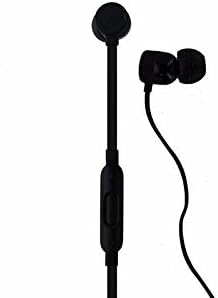
تصوير: هڪ تفصيلي view of the beatsX earbud and the in-line RemoteTalk control, which features volume buttons and a multi-function button.
RemoteTalk Controls:
| عمل | فنڪشن |
|---|---|
| Press center button once | Play/Pause audio, Answer/End call |
| Press center button twice | اڳتي وڌو |
| Press center button three times | پوئتي هٽڻ |
| Press and hold center button | Activate Siri or voice assistant |
| Press volume up button | حجم وڌايو |
| Press volume down button | حجم گھٽايو |
پاور آن / آف:
- To power on, press and hold the power button until the LED indicator light illuminates.
- To power off, press and hold the power button until the LED indicator light turns off.
مقناطيسي ائربڊس:
The earbuds are magnetic, allowing them to snap together when not in use. This helps prevent tangling and keeps them securely around your neck.
سار سنڀال
Proper care will extend the life of your beatsX headphones.
- صفائي: Use a soft, dry, lint-free cloth to clean the headphones. Do not use abrasive cleaners or solvents.
- ڪن جي صلاح: ڪنن جا ڪنارا وقت بوقت هٽايو ۽ انهن کي اشتهار سان صاف ڪريوamp ڪپڙو ۽ هلڪو صابڻ سان، پوءِ ٻيهر ڳنڍڻ کان اڳ چڱيءَ طرح ڌوئي ۽ سڪايو.
- اسٽوريج: When not in use, store your headphones in the provided carrying case to protect them from dust and damage. The magnetic earbuds help keep them tangle-free.
- پاڻي جي مزاحمت: هي هيڊفون آهن پاڻي جي مزاحمت نه ڪندڙ. Avoid exposure to excessive moisture, rain, or submersion in liquids.
- گرمي پد: هيڊ فونز کي انتهائي گرمي پد تي بي نقاب ڪرڻ کان پاسو ڪريو.
مشڪلاتون
If you encounter issues with your beatsX headphones, try the following solutions:
- طاقت ناهي:
- Ensure the headphones are charged. Connect them to a power source using the Lightning to USB-A cable.
- نقصان لاءِ چارجنگ ڪيبل ۽ پاور اڊاپٽر چيڪ ڪريو.
- جوڙي نه ٿو سگهجي:
- Make sure the headphones are in pairing mode (LED flashing white).
- Ensure Bluetooth is enabled on your device and it is within range (typically 30 feet or 10 meters).
- پنهنجي ڊوائيس تي بلوٽوٿ کي بند ڪري ٻيهر آن ڪرڻ جي ڪوشش ڪريو.
- جيڪڏهن اڳ ۾ جوڙيل هجي، ته پنهنجي بلوٽوٿ سيٽنگز ۾ ڊوائيس کي "وسارڻ" جي ڪوشش ڪريو ۽ ٻيهر جوڙيو.
- ڪوبه آواز يا خراب آواز جي معيار:
- Check the volume level on both your headphones and your connected device.
- پڪ ڪريو ته هيڊفون صحيح طرح سان جوڙيل ۽ ڳنڍيل آهن.
- Try different sized ear tips to ensure a proper seal in your ear canal.
- Clean any debris from the ear tips and speaker grilles.
- مداخلت کان بچڻ لاءِ پنهنجي ڊوائيس جي ويجهو وڃو.
- RemoteTalk Not Responding:
- پڪ ڪريو ته هيڊفونز آن آهن ۽ توهان جي ڊوائيس سان ڳنڍيل آهن.
- پنهنجي ڳنڍيل ڊوائيس کي ٻيهر شروع ڪريو.
If issues persist, you may need to reset your beatsX headphones. Consult the official beats support website for specific reset instructions.
وضاحتون
| خاصيت | تفصيل |
|---|---|
| ماڊل نالو | beatsX Wireless In-Ear Headphones |
| ماڊل نمبر | MLYE2LL/A |
| برانڊ | beats by Dr. Dre |
| رنگ | ڪارو |
| رابطي ٽيڪنالاجي | Bluetooth (Class 1 with Apple W1 chip) |
| وائرليس ڪميونيڪيشن ٽيڪنالاجي | بلوٽوٿ |
| بيٽري جي زندگي | 8 ڪلاڪ تائين |
| Fast Fuel Charging | 5 منٽ چارج تي 2 ڪلاڪ پلے بیک |
| ڪنٽرول قسم | RemoteTalk (in-line control) |
| ڪن جي جڳهه | ڪن ۾ |
| فارم فيڪٽر | ڪن ۾ |
| شور ڪنٽرول | آواز جي اڪيلائي |
| پاڻي جي مزاحمت جي سطح | نه پاڻي مزاحمتي |
| شيءِ جو وزن | 3.52 اونس |
| يو پي سي | 817689015474 |
وارنٽي ڄاڻ
As this product is a renewed item, warranty coverage may vary. Please refer to the specific warranty details provided by the seller at the time of purchase. For standard manufacturer warranty information on new products, please visit the official beats by Dr. Dre webسائيٽ.
حمايت
For further assistance, technical support, or additional product information, please visit the official beats by Dr. Dre support website or contact their customer service. You can typically find support resources, FAQs, and contact options on their official webسائيٽ.
For issues related to your renewed product purchase, please contact the seller directly.


