تعارف
Thank you for choosing the Dörr 204473 8 MP Snapshot IR TFT Trail Camera. This camera is designed for versatile surveillance, offering high-quality images and videos both day and night. Its robust, weatherproof design makes it ideal for outdoor use, capturing wildlife or monitoring property with its motion detection capabilities. Please read this manual carefully before operating the camera to ensure proper use and to maximize its performance.
حفاظت جي ڄاڻ
- ڪئميرا کي گهڻي وقت تائين انتهائي گرمي پد يا سڌي سج جي روشنيءَ ۾ نه رکو.
- Ensure the battery compartment is securely closed to maintain water resistance.
- Use only recommended battery types (AA batteries). Do not mix old and new batteries, or different types of batteries.
- ڪئميرا کي مضبوط مقناطيسي ميدانن کان پري رکو.
- ڪئميرا کي ڌار ڪرڻ يا تبديل ڪرڻ جي ڪوشش نه ڪريو. اهو وارنٽي کي رد ڪري ڇڏيندو.
- مقامي ضابطن جي مطابق بيٽرين ۽ اليڪٽرانڪ حصن کي ذميواري سان ختم ڪريو.
پيداوار ختمview
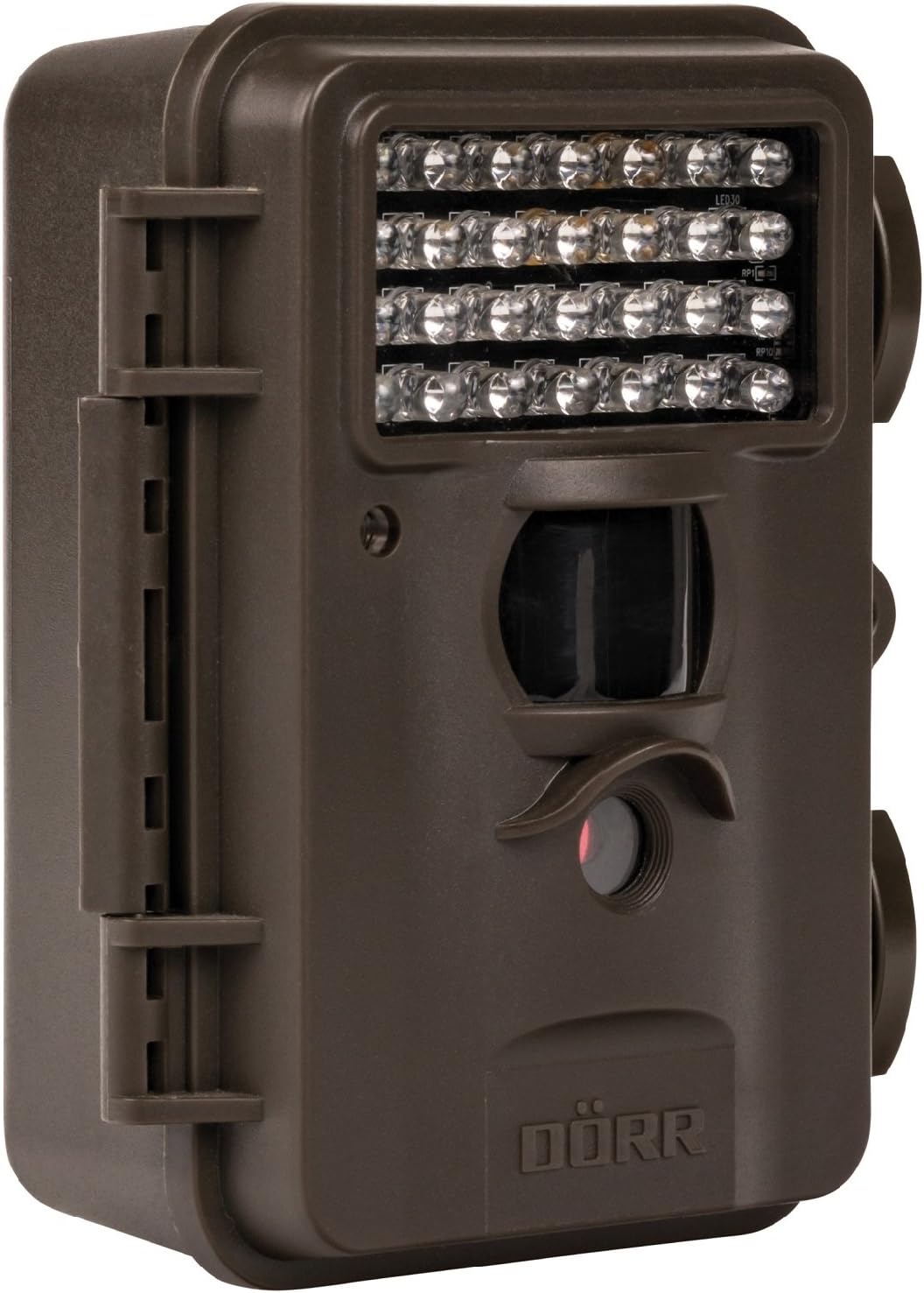
This image displays the front of the Dörr 204473 Trail Camera. Visible features include the array of 28 infrared LEDs at the top, the passive infrared (PIR) motion sensor below the LEDs, and the camera lens at the bottom. The camera has a rugged, dark brown, weatherproof casing with a latch on the left side.
The Dörr 204473 camera features a compact and durable design. Key components include:
- Infrared LEDs: 28 nearly invisible LEDs for night illumination up to 15 meters.
- پي آءِ آر موشن سينسر: Detects movement to trigger photo or video capture.
- ڪئميرا لينس: Captures 8MP still images and video.
- TFT ڊسپلي: مينيو نيويگيشن لاءِ ۽ viewing captured media (located inside the camera).
- ڪنٽرول ڪي پيڊ: For setting up and operating the camera.
- موسم کان بچاءُ وارو هائوسنگ: Protects the camera from environmental elements.
سيٽ اپ ڪريو
1. بيٽري لڳائڻ
- Open the camera housing latch on the side.
- بيٽري جي ڪمري کي ڳولھيو.
- Insert 4 or 8 AA batteries, ensuring correct polarity (+/-).
- بيٽري جي ڪمري واري ڍڪ کي محفوظ طور تي بند ڪريو.
2. ايس ڊي ڪارڊ لڳائڻ
- With the camera housing open, locate the SD/SDHC card slot.
- Insert an SD/SDHC memory card (up to 32 GB) into the slot until it clicks into place. Ensure the card is inserted in the correct orientation.
- ڪڍڻ لاءِ، ڪارڊ کي نرميءَ سان اندر دٻايو جيستائين اهو ٻاهر نه اچي.
3. ڪئميرا لڳائڻ
The camera can be mounted using a strap or a wall mount. Ensure the camera is positioned to capture the desired area without obstructions. The mounting type is wall mount.
- پٽي لڳائڻ: Thread the provided strap through the slots on the back of the camera and secure it around a tree or pole.
- ڀت لڳائڻ: Use appropriate screws and anchors (not included) to secure the camera to a wall or flat surface.
آپريٽنگ هدايتون
1. پاور آن/آف
- پاور آن ڪرڻ لاءِ، پاور سوئچ کي 'آن' پوزيشن تي سلائڊ ڪريو.
- پاور آف ڪرڻ لاءِ، پاور سوئچ کي 'آف' پوزيشن تي سلائڊ ڪريو.
2. مينيو نيويگيشن
Once powered on, the TFT display will activate. Use the keypad buttons (UP, DOWN, LEFT, RIGHT, OK, MENU) to navigate through the settings menu. The menu is available in English and German.
3. سيٽنگ جي تاريخ ۽ وقت
- Enter the menu and navigate to 'Date/Time' settings.
- Use the navigation buttons to set the current date and time.
- Confirm with 'OK'. Each captured image will display the time, date, and temperature in °C.
4. Photo/Video Modes and Settings
The camera supports both still image and video capture. Adjust settings such as resolution, trigger interval, and burst mode via the menu.
- قرارداد: Set to 8MP for still images.
- Trigger Time: The camera has a fast trigger time of 1.3 seconds.
- حرڪت جي چڪاس: Configure the sensitivity of the PIR sensor.
- رات جو خواب: The 28 IR LEDs automatically activate in low light conditions for night vision up to 15 meters.
5. Viewing Files
توهان ڪري سگهو ٿا view captured photos and videos directly on the camera's TFT display or by connecting the camera to a computer via USB (cable not included) or by inserting the SD card into a card reader.
سار سنڀال
- صفائي: Use a soft, dry cloth to clean the camera lens and housing. Do not use abrasive cleaners or solvents.
- بيٽري جي سنڀال: جيڪڏهن ڪئميرا ڊگهي عرصي تائين استعمال نه ٿيندو ته جيئن ليڪيج کي روڪي سگهجي ته بيٽريون ڪڍي ڇڏيون.
- اسٽوريج: جڏهن استعمال ۾ نه هجي ته ڪئميرا کي سڌي سج جي روشني کان پري ٿڌي، سڪل جاءِ تي رکو.
مشڪلاتون
| مسئلو | ممڪن سبب | حل |
|---|---|---|
| ڪئميرا پاور نه آهي | گهٽ يا ختم ٿيل بيٽريون؛ بيٽري جي غلط پولارٽي. | بيٽريون تبديل ڪريو؛ صحيح پولارٽي کي يقيني بڻايو. |
| No images/videos captured | SD card full or not inserted correctly; motion sensor blocked or sensitivity too low. | Insert/replace SD card; format SD card; clear sensor path; increase sensor sensitivity. |
| رات جو خراب تصوير جو معيار | Subject too far from camera; IR LEDs obstructed. | Ensure subject is within 15m range; clear any obstructions from IR LEDs. |
| Camera not detecting motion | PIR sensor sensitivity too low; camera positioned incorrectly. | Increase PIR sensitivity; reposition camera for optimal detection angle. |
وضاحتون
| خاصيت | تفصيل |
|---|---|
| برانڊ | ڊي آر آر |
| ماڊل نمبر | 204473 |
| اڃا به مؤثر حل | 8 ايم پي |
| مؤثر وڊيو حل | 8 ايم پي |
| نائيٽ ويزن رينج | 15 ميٽر |
| IR LEDs جو تعداد | 28 |
| ٽرگري جو وقت | 1.3 سيڪنڊ |
| ذخيرو | SD/SDHC Memory Card (up to 32 GB) |
| طاقت جو ذريعو | 4x or 8x AA Batteries |
| رنگ | ڪارو |
| مواد | ڌاتو |
| شيون طول و عرض (L x W x H) | 10 x 7 x 12.2 سينٽي |
| پاڻي جي مزاحمت جي سطح | پنروڪ |
| چڙهڻ جو قسم | ڀت جبل |
| تجويز ڪيل درخواستون | Motion Detection, Night Vision |
وارنٽي ۽ سپورٽ
For warranty information and technical support, please refer to the documentation provided with your purchase or visit the official Dörr webسائيٽ. ڪنهن به وارنٽي دعوائن لاءِ خريداري جو ثبوت رکو.


