1. تعارف
This manual provides essential information for the safe and efficient use of your Bitmain Antminer Power Supply APW3++. Please read this manual thoroughly before installation and operation to ensure proper functionality and longevity of the unit.
The APW3++ power supply is designed for compatibility with Antminer models including L3+, S9, T9, and D3.
2. حفاظت جي ڄاڻ
- Always ensure the power supply is disconnected from the main power source before performing any installation, maintenance, or troubleshooting.
- Use only a standard PC power cable (C13 type). For high wattage operation (e.g., 1600W at 220V), a 14-gauge or higher rated power cord is recommended to prevent overheating and ensure safety. Do not use a standard computer plug for high-power applications.
- Ensure adequate ventilation around the power supply to prevent overheating. Do not block air vents.
- The APW3++ power supply does not feature an integrated power switch or fuse protection. Powering the unit on or off requires connecting or disconnecting the power cable. A slight spark may occur during connection or disconnection, which is normal due to the absence of a switch. Exercise caution.
- يونٽ کي نمي، مٽي، يا انتهائي گرمي پد جي سامهون آڻڻ کان پاسو ڪريو.
- Do not attempt to open or modify the power supply unit. This will void any warranty and may pose a safety risk.
3. مصنوعات جون خاصيتون
- Designed for AntMiner L3+, S9, T9, and D3 models.
- Equipped with ten 6-pin PCIe connectors for multiple device connections.
- Maximum output of 1200W at 110V-120V input.
- Maximum output of 1600W at 220V-240V input.
- Compact ATX form factor.
- Air cooling method.
4. سيٽ اپ جون هدايتون
- پاور سپلائي کي کوليو: Carefully remove the APW3++ power supply from its packaging. Inspect for any visible damage.
- Prepare the Environment: Ensure the installation area is clean, dry, and has adequate airflow. Avoid confined spaces.
- Connect PCIe Cables: Connect the ten 6-pin PCIe power connectors from the APW3++ to the corresponding power input ports on your Antminer device(s). Ensure all connections are secure.
- Connect AC Power Cable: Insert a compatible C13 power cable (not included) into the AC input socket on the rear of the power supply.
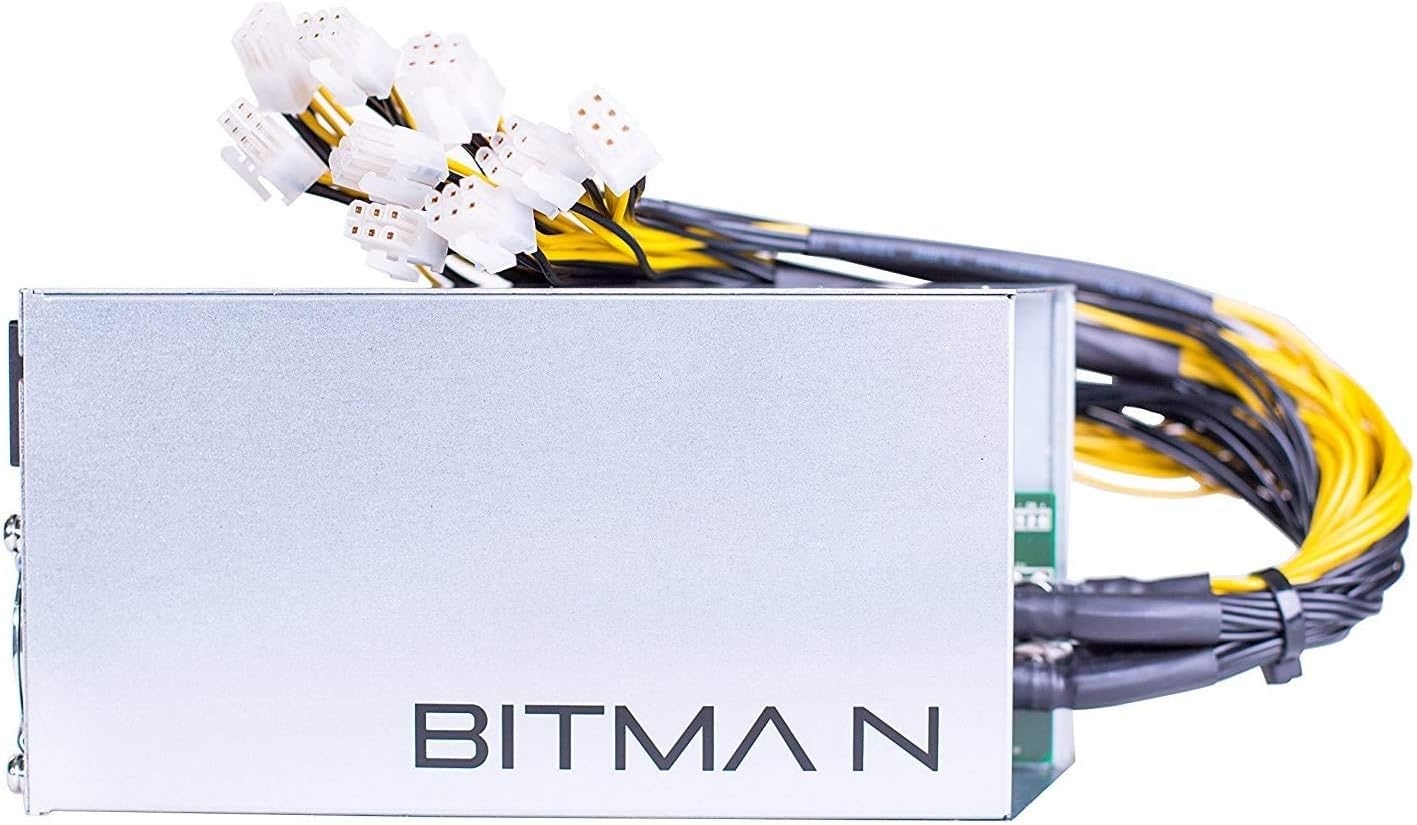
هڪ اوورview of the Bitmain APW3++ power supply unit, showcasing its compact design and the array of ten 6-pin PCIe power connectors extending from one end.

A detailed close-up of the ten 6-pin PCIe power connectors, which are essential for connecting the power supply to compatible Antminer devices.

The rear panel of the APW3++ power supply, featuring the AC power input socket and the cooling fan, which is crucial for heat dissipation.
- وال آئوٽليٽ سان ڳنڍيو: Plug the other end of the AC power cable into a grounded electrical outlet. Ensure the outlet provides the correct voltage (110-120V or 220-240V) for your intended operation.
5. آپريٽنگ هدايتون
- پاور آن: Once all connections are secure and the AC power cable is plugged into the wall outlet, the power supply will activate. There is no separate power switch.
- جلدtage Considerations: The power supply automatically adjusts to the input voltage. For maximum output (1600W), a 220V-240V input is required. At 110V-120V, the maximum output is 1200W. Ensure your electrical infrastructure supports the desired wattage.
- شور جي سطح: The power supply operates with a cooling fan. While the PSU itself has a moderate noise level, the connected Antminer device (e.g., S9) typically produces significantly higher noise levels (e.g., 85-90 dB).
- بجلي بند: To power off the unit, safely disconnect the AC power cable from the wall outlet.
6. سار سنڀال
- مٽي هٽائڻ: Regularly inspect the power supply and its fan for dust accumulation. Use compressed air to gently clean the fan and vents to ensure optimal airflow and prevent overheating.
- هوا جو وهڪرو: Ensure the area around the power supply remains clear of obstructions to allow for proper air circulation.
- فين چيڪ: Periodically check the cooling fan for proper operation. A non-functional fan can lead to rapid overheating and damage to the power supply.
7. مسئلا حل ڪرڻ
- Power Supply Not Turning On:
- Verify that the AC power cable is securely connected to both the power supply and a functional wall outlet.
- Check the wall outlet with another device to confirm it is receiving power.
- Ensure the power cable itself is not damaged.
- گهڻو گرم ٿيڻ:
- Check for obstructions around the power supply's air vents.
- Clean any dust accumulation from the fan and vents.
- Verify that the internal cooling fan is operating correctly. A faulty fan can cause rapid temperature increases.
- Unit Not Providing Full Power:
- تصديق ڪريو ته ان پٽ voltage matches the requirements for the desired output (e.g., 220-240V for 1600W).
- Ensure the power cable used is of adequate gauge (e.g., 14-gauge or higher for 1600W operation).
- Spark When Connecting/Disconnecting Power:
- This is a normal occurrence due to the absence of a power switch. Exercise caution when plugging in or unplugging the unit.
8. وضاحتون
| خاصيت | تفصيل |
|---|---|
| ماڊل نالو | APW3++ |
| ٺاهيندڙ | بٽ مين |
| پيداوار جي ماپ | 13 x 7 x 5 انچ |
| شيءِ جو وزن | 4.6 پائونڊ |
| مطابقت رکندڙ ڊوائيسز | Personal Computer (Antminer L3+/S9/T9/D3) |
| ڪنيڪٽر جو قسم | PCI Express (10 x 6-pin) |
| آئوٽ پٽ واٽtage (110-120V) | 1200 واٽ |
| آئوٽ پٽ واٽtage (220-240V) | 1600 واٽ |
| فارم فيڪٽر | اي ٽي ايڪس |
| کولڻ جو طريقو | هوا |
9. وارنٽي ۽ سپورٽ
This product may be covered by a limited warranty provided by the seller. For specific warranty terms and duration, please refer to the purchase agreement or contact your point of sale. For example, some sellers may offer a 15-day warranty on used units.
For technical support or inquiries, please contact the retailer or seller from whom you purchased the Bitmain APW3++ power supply.


