1. تعارف
This manual provides essential information for the safe and efficient operation of your Amazon Basics 400VA Standby Uninterruptible Power Supply (UPS) with Battery Backup and Surge Protection. Please read these instructions thoroughly before use and retain them for future reference.
2. حفاظت جي ڄاڻ
- لڳائڻ: Do not lie the UPS on its side. Ensure proper ventilation and avoid placing it near heat sources or in direct sunlight.
- شروعاتي چارج For optimal performance, plug in the UPS and allow it to charge for at least 8 hours before connecting devices.
- لوڊ گنجائش: Do not overload the UPS. For optimal system performance, keep the total load below 80% of the unit's rated capacity (255W).
- بيٽري: Contains a sealed lead-acid battery. Do not attempt to disassemble or incinerate. Refer to local regulations for proper battery disposal.
- سرڪٽ خراب ڪندڙ: The unit includes a circuit breaker to prevent overload. If it trips, reduce the load and press the breaker to reset.
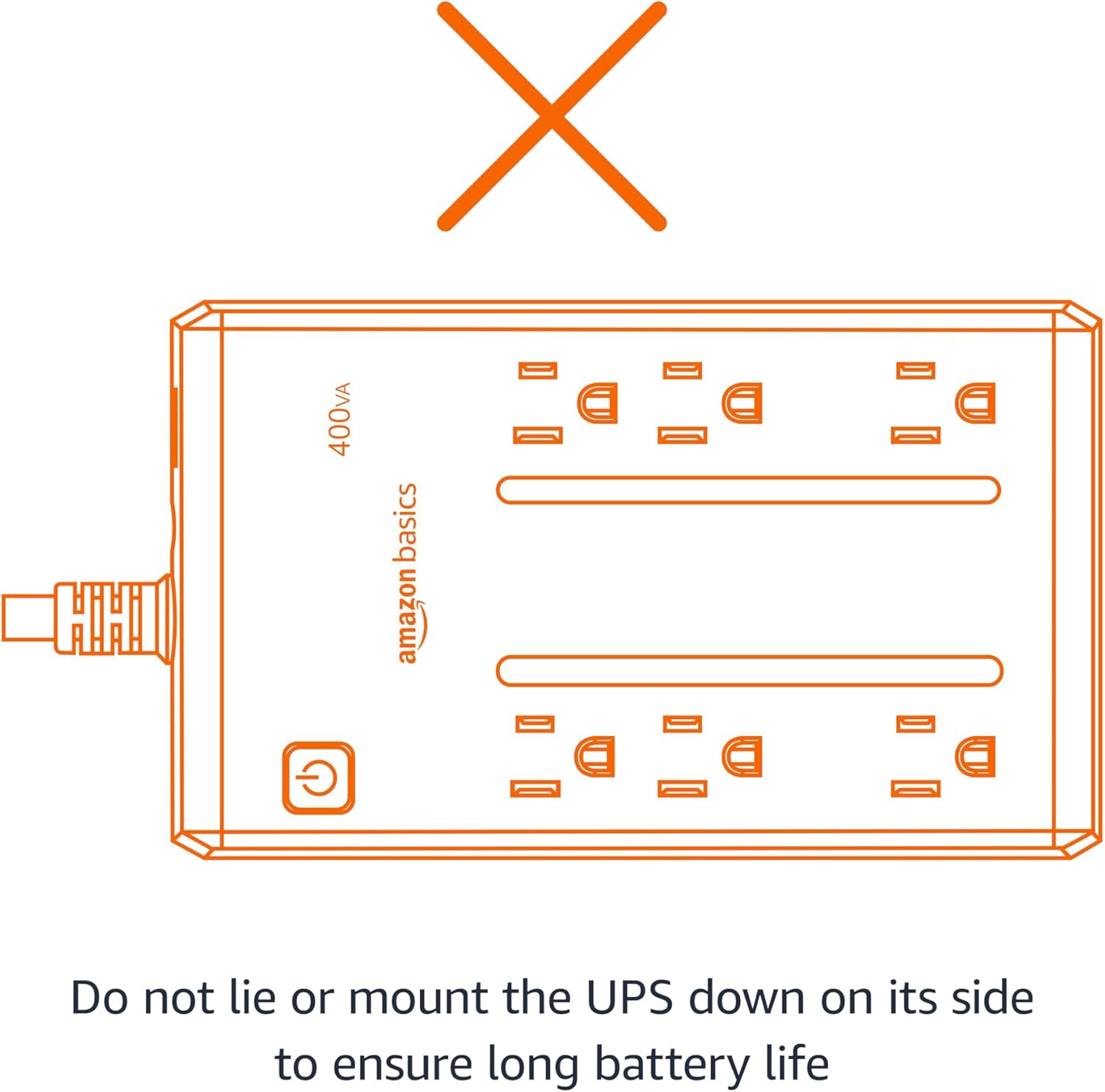
Figure 2.1: Proper orientation is crucial for battery life and unit performance. Avoid lying the UPS on its side.
3. پيڪيج مواد
پڪ ڪريو ته سڀئي شيون پيڪيج ۾ موجود آهن:
- Amazon Basics 400VA Standby UPS Unit
- استعمال ڪندڙ دستي

Figure 3.1: The Amazon Basics 400VA Standby UPS unit.
4. پراڊڪٽ ختمview
The Amazon Basics 400VA UPS features a compact design with multiple outlets for power protection.
- ڪل آئوٽليٽ: 6 (NEMA 5-15R)
- Battery Backup & Surge Protection Outlets: 3 outlets provide continuous power during outages ۽ سرجز کان بچاءُ ڪريو.
- صرف سرج پروٽيڪشن آئوٽليٽس: 3 outlets protect against surges but do not provide battery backup during power outages.
- پاور بٽڻ: Controls the unit's power.
- پاور ڪنڊ: 5-foot cord with NEMA 5-15P right-angle and 45-degree offset plug.

Figure 4.1: Key features and outlet types of the UPS.

شڪل 4.2: تفصيلي view of the UPS outlets, distinguishing between battery-backed and surge-only ports.
5. سيٽ اپ
- پيڪ ڪريو: Carefully remove the UPS unit from its packaging.
- شروعاتي چارج Plug the UPS into a standard wall outlet. Press and hold the power button for 2 seconds to turn the unit on. The green LED indicator will illuminate. Allow the unit to charge for a minimum of 8 hours before connecting any critical devices.
- ڪنيڪٽ ڊوائيسز: Plug your electronic devices into the appropriate outlets. For devices requiring continuous power during outages (e.g., routers, modems, computers), use the Battery Backup & Surge Protection outlets. For devices needing only surge protection, use the سرج تحفظ دڪان
Video 5.1: Demonstrates connecting devices to the UPS, highlighting the distinction between battery-backed and surge-only outlets.
6. يو پي ايس هلائڻ
Once fully charged and devices are connected, your UPS is ready for operation.
- پاور آن / آف: Press and hold the power button for approximately 2 seconds to turn the UPS on or off. The green LED indicates power status.
- پاور اوtage: طاقت جي صورت ۾ outage, devices connected to the Battery Backup & Surge Protection outlets will continue to receive power from the internal battery. The UPS may emit an audible alarm to indicate it is operating on battery power.
- الارم ڪنٽرول: To silence the audible alarm during a power outage, quickly press the power button twice. To reactivate the alarm, press the power button twice again.
- هلندڙ وقت: The battery backup runtime varies based on the power consumption of connected devices. At half load (200VA/127.5W), the UPS provides approximately 6 minutes of backup power. At full load (400VA/255W), it provides approximately 1.5 minutes of backup power.
وڊيو 6.1: هڪ اوورview of the Amazon Basics 400VA UPS, demonstrating its features and functionality.
7. سار سنڀال
- بيٽري مٽائڻ: The internal battery is a sealed lead-acid type. Its typical lifespan is 3-5 years, depending on usage. Battery replacement should be performed by qualified personnel.
- صفائي: Disconnect the UPS from the power outlet and wipe the exterior with a dry cloth. Do not use liquid cleaners.
- اسٽوريج: If storing the UPS for an extended period, ensure it is fully charged and recharge it every 3 months to maintain battery health.
8. مسئلا حل ڪرڻ
عام مسئلن ۽ انهن جي حل لاءِ هيٺ ڏنل جدول جو حوالو ڏيو:
| علامتي | ممڪن سبب | حل |
|---|---|---|
| يو پي ايس آن نٿو ٿئي. | بيٽري ڳنڍيل يا ڊسچارج نه ٿي. | پڪ ڪريو ته بيٽري ڳنڍيل آهي. وال آئوٽليٽ ۾ لڳايو ۽ 8 ڪلاڪن لاءِ چارج ڪريو. |
| يو پي ايس مسلسل بيپ ڪري ٿو. | اوورلوڊ يا گهٽ بيٽري. | Reduce connected load. Allow battery to recharge. |
| No power from battery backup outlets during outage. | Devices plugged into surge-only outlets. | Ensure critical devices are plugged into Battery Backup & Surge Protection دڪان |
| سرڪٽ ٽوڙيندڙ ٽپ ڏئي ويو. | اوور لوڊ. | Unplug some devices, then press the circuit breaker to reset. |
9. وضاحتون
| خاصيت | تفصيل |
|---|---|
| ماڊل | ABST400 |
| ظرف | 400VA / 255W |
| انٽ واليمtage | 120V~, 10A, 50/60Hz |
| اوٽ وولٽtage | 120V~, 5.0A, 50/60Hz |
| ڪل آئوٽ پٽ ڪرنٽ | 10A (Including Surge Outlets) |
| بيٽري جو قسم | سيل ٿيل ليڊ ايسڊ |
| طول و عرض (L x W x H) | 7.24 x 4.33 x 3.22 انچ (18.39 x 11 x 8.18 سينٽي) |
| شيءِ جو وزن | 3.8 پائونڊ |
| ڪنڊ ڊگھائي | 5 فوٽ |

Figure 9.1: Physical dimensions of the UPS unit.
10. وارنٽي ۽ سپورٽ
This Amazon Basics UPS is backed by a limited 1-year warranty, including the battery. For support or warranty claims, please refer to the Amazon Basics customer service channels.
Additionally, a $75,000 connected equipment guarantee is provided. Please refer to the product documentation or Amazon's website for full details on how to make a claim.


