1. تعارف
This manual provides detailed instructions for the installation, operation, and maintenance of your Lorex LNB8005 4K UHD IP Bullet Security Camera. This camera is designed for both indoor and outdoor surveillance, offering high-resolution video and advanced features to enhance your security system.
اهم خاصيتون:
- 4K الٽرا HD قرارداد: Captures video at 8 Megapixel (3840x2160) resolution for superior clarity.
- پاور اوور ايٿرنيٽ (PoE): Simplifies installation by providing power and video transmission through a single Ethernet cable.
- Color Night Vision (CNV): Provides full-color video in low-light conditions for improved object recognition.
- آر جي رات جو نظارو: Extends visibility up to 130ft (40m) in complete darkness using infrared illumination.
- True High Dynamic Range (HDR): Balances light and dark areas in the video for optimal image quality.
- Weatherproof ڊيزائن: مختلف موسمي حالتن ۾ قابل اعتماد ڪارڪردگي لاءِ IP66 ريٽنگ.
2. دٻي ۾ ڇا آهي
مھرباني ڪري تصديق ڪريو ته انسٽاليشن شروع ڪرڻ کان اڳ سڀئي جزا موجود آھن:
- 1 × Lorex LNB8005 Ultra HD 8MP Security Camera
- 1 × 18m (60ft) Camera Cable
- 1 × Mounting Kit (screws and wall plugs)
- جلدي سيٽ اپ گائيٽ
3. پراڊڪٽ ختمview
Familiarize yourself with the components of your Lorex LNB8005 camera.

شڪل 3.1: سامهون view of the Lorex LNB8005 camera, showing the lens, IR LEDs, and light sensor.

شڪل 3.2: زاويه view of the Lorex LNB8005 camera, highlighting the bullet design and Lorex branding on the side.

شڪل 3.3: A slightly different angled perspective of the Lorex LNB8005 camera, showcasing its robust housing and mounting bracket.
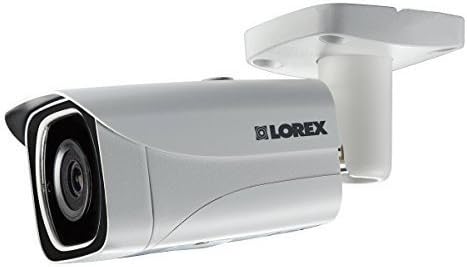
شڪل 3.4: پاسي view of the Lorex LNB8005 camera, illustrating its compact profile and the adjustable mounting arm.
4. سيٽ اپ
4.1. تنصيب جي جڳھ
The Lorex LNB8005 camera is IP66 rated, making it suitable for both indoor and outdoor use. Choose a location that provides the desired field of view and is within reach of your network cable. Consider mounting the camera high enough to prevent tampering but low enough for easy access during installation.
4.2. ڪئميرا لڳائڻ
- سطح تيار ڪريو: Ensure the mounting surface (wall or ceiling) is clean and sturdy enough to support the camera's weight.
- سوراخن کي نشان لڳايو: Use the included mounting template or the camera base to mark the positions for drilling.
- سوراخ سوراخ: Drill pilot holes at the marked positions. Insert the provided wall plugs if mounting on drywall or masonry.
- ڪئميرا کي محفوظ ڪريو: ڪئميرا جي بنياد کي سوراخ ڪيل سوراخن سان ترتيب ڏيو ۽ مهيا ڪيل اسڪرو استعمال ڪندي ان کي محفوظ ڪريو.
- زاويه ترتيب ڏيو: Loosen the adjustment screw on the camera's bracket to set the desired viewing angle. Tighten the screw once the angle is set.
4.3. ڪئميرا ڳنڍڻ
The LNB8005 camera supports Power over Ethernet (PoE), allowing both power and data to be transmitted over a single Ethernet cable. Alternatively, it can be powered via a 12V DC power barrel (adapter sold separately).
- Ethernet ڪنيڪشن: Connect one end of the included 18m (60ft) camera cable to the RJ45 Ethernet port on the camera. Connect the other end to a PoE-enabled NVR (Network Video Recorder) or a PoE switch.
- (Optional) DC Power Connection: If not using PoE, connect a compatible 12V DC power adapter (not included) to the camera's DC power barrel.
- نيٽ ورڪ ٺاھ جوڙ: Once connected to your NVR or network, the camera will typically obtain an IP address automatically. Refer to your NVR's manual for specific steps on adding and configuring IP cameras.
5. آپريٽنگ
5.1. وڊيو مانيٽرنگ
ڪئميرا جي لائيو تائين رسائي حاصل ڪريو view ۽ رڪارڊ ڪيو ويو footage through your Lorex NVR or compatible viewing software/app. The camera provides 4K (3840x2160) resolution at 15 frames per second, ensuring clear and detailed video.
5.2. نائيٽ ويزن موڊس
The LNB8005 camera features two primary night vision modes:
- Color Night Vision (CNV): In low-light conditions, the camera can maintain a full-color image, providing more detail than traditional black and white infrared. This feature requires a minimum ambient light level.
- آر جي رات جو نظارو: When light levels are too low for CNV, the camera automatically switches to infrared (IR) mode, providing clear black and white video up to 130ft (40m) using its built-in 850nm IR LEDs.
5.3. موشن جو پتو لڳائڻ
The camera supports motion-only alerts. Configure motion detection zones and sensitivity settings via your NVR or camera interface to receive notifications and trigger recordings when activity is detected in specified areas.
5.4. ترقي يافته خاصيتون
- True High Dynamic Range (HDR): This feature automatically adjusts the image to ensure optimal exposure in scenes with both very bright and very dark areas, preventing overexposure or underexposure.
- وڊيو ڪمپريشن: Supports H.265 and H.264 video compression, which efficiently reduces file sizes while maintaining video quality, saving storage space and bandwidth.
6. سار سنڀال
باقاعده سار سنڀال توهان جي سيڪيورٽي ڪئميرا جي بهترين ڪارڪردگي ۽ ڊگهي عمر کي يقيني بڻائڻ ۾ مدد ڪري ٿي.
- لينس ۽ هائوسنگ جي صفائي: وقتي طور تي ڪئميرا لينس ۽ هائوسنگ کي نرم، ڊي سان صاف ڪريوamp cloth. Avoid using harsh chemicals or abrasive materials that could scratch the lens or damage the finish.
- ڪنيڪشن چيڪ ڪرڻ: Ensure all cable connections (Ethernet, power) are secure and free from corrosion or damage.
- فرم ويئر اپڊيٽس: Check the Lorex website or your NVR's settings for available firmware updates. Keeping your camera's firmware updated can improve performance, add new features, and enhance security.
- ماحولياتي چڪاس: While the camera is designed for outdoor use, periodically inspect it for any signs of wear or damage due to extreme weather conditions. Ensure no obstructions are blocking the camera's view.
7. مسئلا حل ڪرڻ
If you encounter issues with your Lorex LNB8005 camera, refer to the following common problems and solutions:
| مسئلو | ممڪن سبب | حل |
|---|---|---|
| ڪئميرا مان ڪابه وڊيو فيڊ ناهي | No power; Loose cable connection; Network issue; Incorrect IP address. | Check PoE connection or 12V DC power supply. Ensure Ethernet cable is securely connected. Verify network connectivity to the NVR/switch. Confirm camera's IP address is correct and accessible. |
| Poor image quality / blurry video | Dirty lens; Condensation; Incorrect focus (less common for fixed lens); Low light conditions. | Clean the camera lens. Allow time for condensation to clear. Ensure adequate lighting for optimal image quality, especially for Color Night Vision. |
| رات جو خواب ڪم نٿو ڪري | IR LEDs obstructed; Insufficient power; IR cut filter stuck. | Ensure nothing is blocking the IR LEDs. Verify stable power supply. If the issue persists, a factory reset or contacting support may be necessary. |
| حرڪت جي ڳولا شروع نه ٿي رهي آهي | Incorrect sensitivity settings; Motion detection zone not configured; Obstructions in view. | Adjust motion detection sensitivity and reconfigure detection zones in your NVR settings. Clear any physical obstructions from the camera's field of view. |
For more complex issues or if the problem persists, please refer to the Lorex support webسائيٽ يا انهن جي ٽيڪنيڪل سپورٽ ٽيم سان رابطو ڪريو.
8. وضاحتون
Detailed technical specifications for the Lorex LNB8005 4K UHD IP Bullet Security Camera:
| خاصيت | تفصيل |
|---|---|
| ماڊل نمبر | LNB8005 |
| تصويري سينسر | 1/2.5" 8MP |
| وڊيو قرارداد | 8MP/4K (3840x2160) @ 15fps |
| وڊيو ڪمپريشن | H.265/H.264 |
| لينس جو قسم | 4mm F1.6 Fixed Lens |
| جو ميدان View (افقي) | 88° |
| نائيٽ ويزن جو قسم | Color Night Vision (CNV), IR Night Vision (850nm) |
| آئي آر نائيٽ ويزن جي حد | 130ft (40m) / 90ft (27 مي) |
| گھٽ ۾ گھٽ روشني | 0.5 lux (without IR), 0.3 lux (with IR) |
| بجلي جي گهرج | PoE (Power over Ethernet) Class 0 / 12V DC (optional) |
| بجلي جو استعمال | Max. 330mA / 4W |
| آپريٽنگ جي درجه حرارت | -22 ~ ~ 140 ° F / -30 ~ 60 ° س |
| آپريٽنگ نمي | <95٪ آر ايڇ |
| ماحولياتي درجه بندي | IP66 (اندروني / ٻاهرين) |
| طول و عرض (L x W x H) | 6 x 8 x 2 انچ |
| وزن | 1lb / 0.5kg (camera only); 2.89 pounds (shipping) |
| مواد | المونيم |
| ڪنيڪشن پروٽوڪول | Ethernet, Wi-Fi (for certain configurations) |
| چڙهڻ جو قسم | ڀت جبل |
| انتباہ جو قسم | صرف حرڪت |
9. وارنٽي ۽ سپورٽ
9.1. پراڊڪٽ وارنٽي
For detailed information regarding the warranty coverage for your Lorex LNB8005 camera, please refer to the official Lorex webسائيٽ يا توهان جي پراڊڪٽ سان گڏ وارنٽي ڪارڊ. وارنٽي جون شرطون ۽ ضابطا علائقي ۽ خريداري جي تاريخ جي لحاظ کان مختلف ٿي سگهن ٿا.
9.2. ٽيڪنيڪل سپورٽ
If you require technical assistance, have questions about your product, or need to troubleshoot an issue not covered in this manual, please contact Lorex customer support. You can typically find support contact information, FAQs, and additional resources on the official Lorex webسائيٽ:
- Lorex Official Webسائيٽ: www.lorex.com
- Support Section: Look for a 'Support' or 'Contact Us' link on their website for phone numbers, live chat, or email options.
Please have your product model number (LNB8005) and purchase information ready when contacting support.


