1. تعارف
This manual provides detailed instructions for the safe and efficient operation of your SANSUI SMC-300BT Vacuum Tube Hybrid Amplifier CD Stereo System. Please read this manual thoroughly before using the product and retain it for future reference.

Figure 1.1: SANSUI SMC-300BT CD Stereo System. This image displays the main unit with its central display and control knobs, flanked by two matching speakers.
2. مصنوعات جون خاصيتون
The SANSUI SMC-300BT system integrates advanced audio technologies to deliver a superior listening experience:
- هائبرڊ Ampو Designيڪ ڊيزائين: Features a vacuum tube in the pre-amplifier's first stage, generating even-order harmonic distortion for a rich, warm, and natural sound. The second stage incorporates a digital power amplifier for dynamic, delicate, and powerful audio reproduction.
- Advanced Speaker Cone Technology: Utilizes a unique "double papermaking method" inspired by traditional Japanese paper. The speaker cone surface uses "Mitsumata" Japanese paper for clear mid-high frequencies, while the reverse side employs highly elastic pulp material for rich low frequencies.
- گھڻن پلے بیک جا اختيار: Supports CD, CD-R, CD-RW, CD-DA, MP3, and WMA formats.
- وائرلیس رابطي Built-in Bluetooth for seamless streaming from compatible devices.
- ايف ايم ٽونر: Integrated FM tuner (76-108MHz) for radio reception.
- USB پلے بیک: USB port for playing audio files USB اسٽوريج ڊوائيسز مان.
- External Audio Input: Two auxiliary input systems for connecting external audio sources.
- ٻاھر نڪرڻ جي طاقت: 60 watts total audio output.
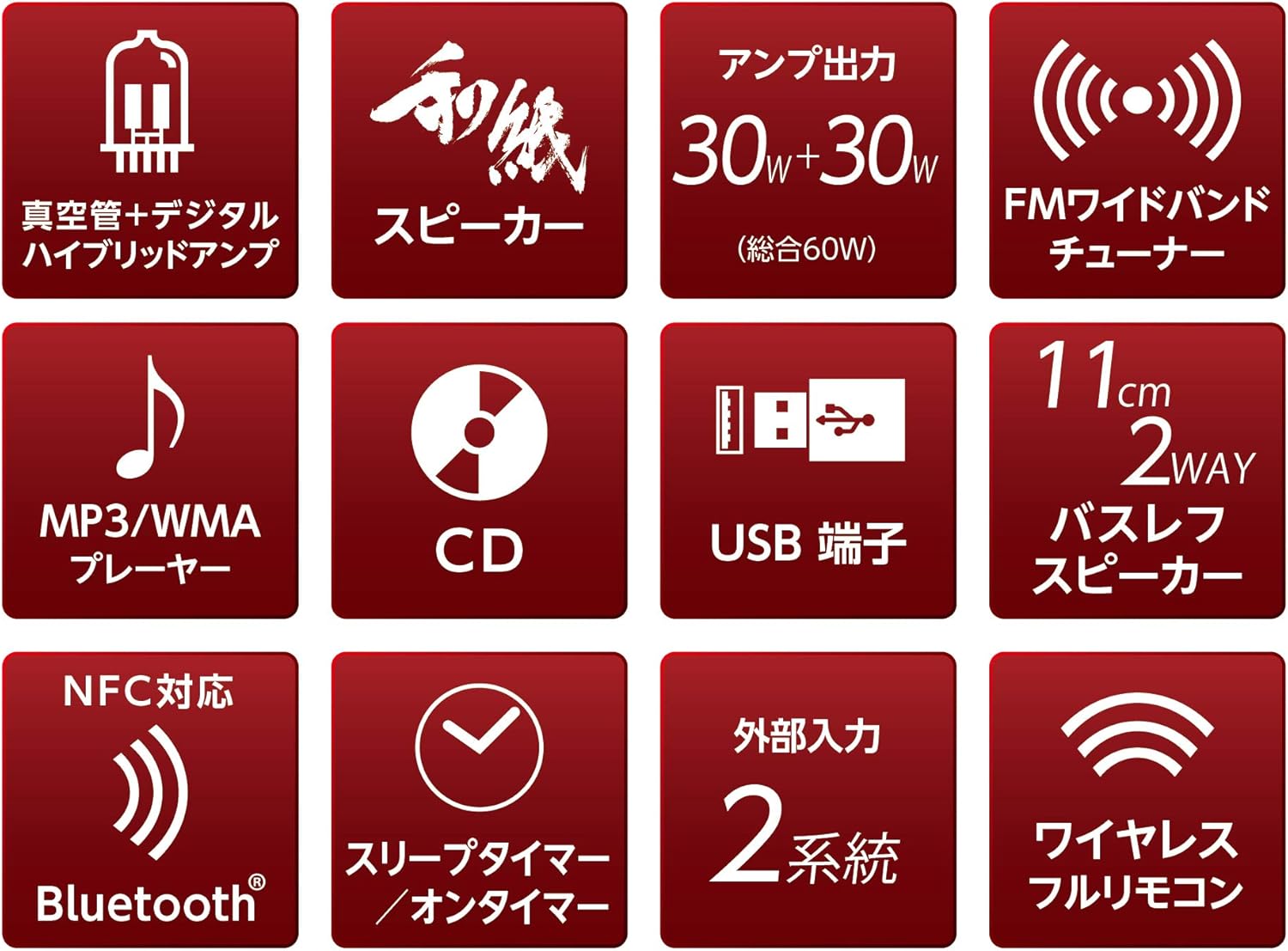
Figure 2.1: Feature icons illustrating the system's capabilities including vacuum tube hybrid amp, W-RPM speakers, 60W output, FM tuner, MP3/WMA player, CD, USB, Bluetooth, sleep/on timer, and external inputs.
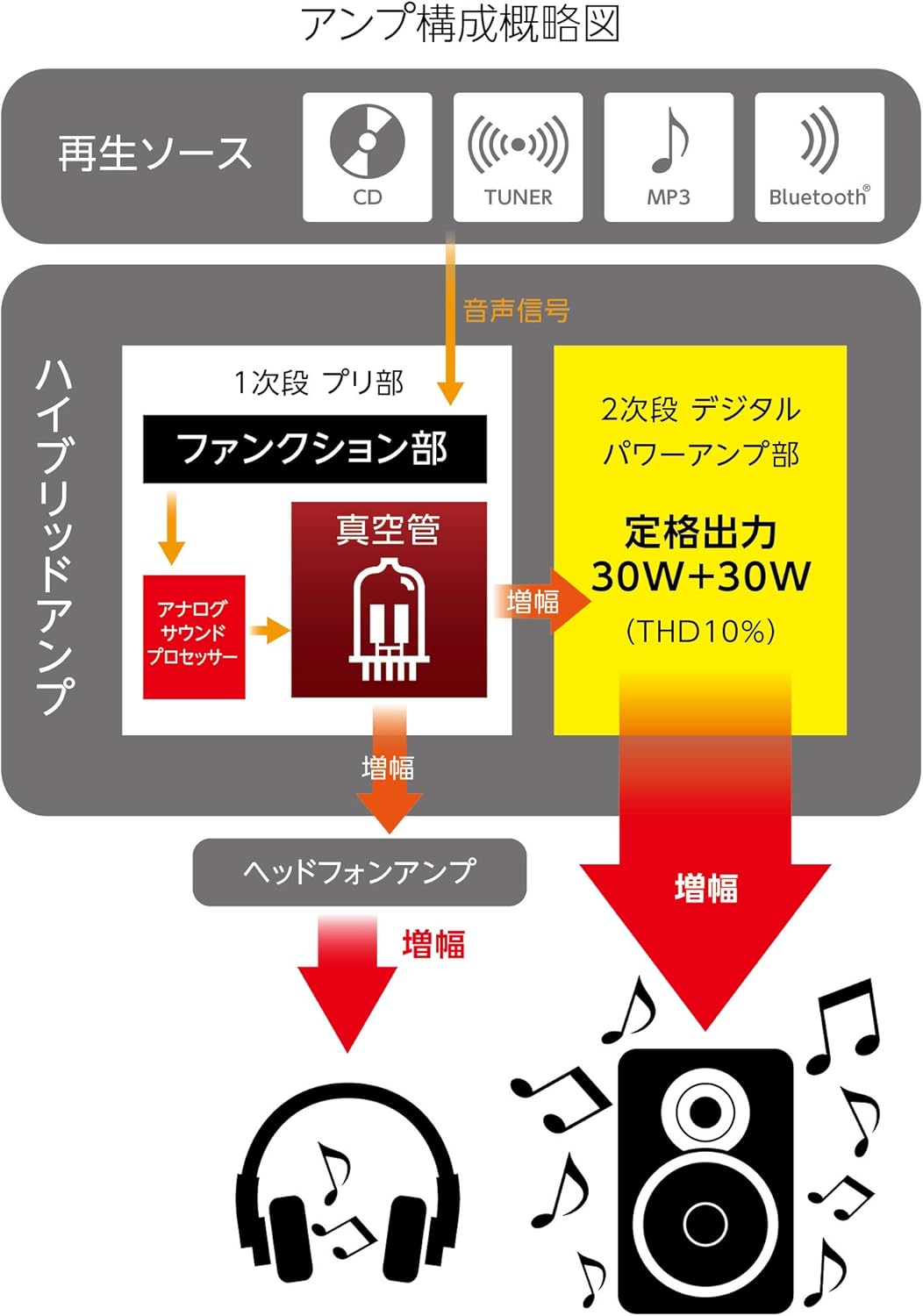
شڪل 2.2: Amplifier Block Diagram. This diagram shows the signal flow from playback sources (CD, Tuner, MP3, Bluetooth) through the 1st stagا pre-amplifier with vacuum tubes and analog sound processor, then to the 2nd stage digital power amplifier (30W+30W), and also to the headphone ampوierيڪ زنده
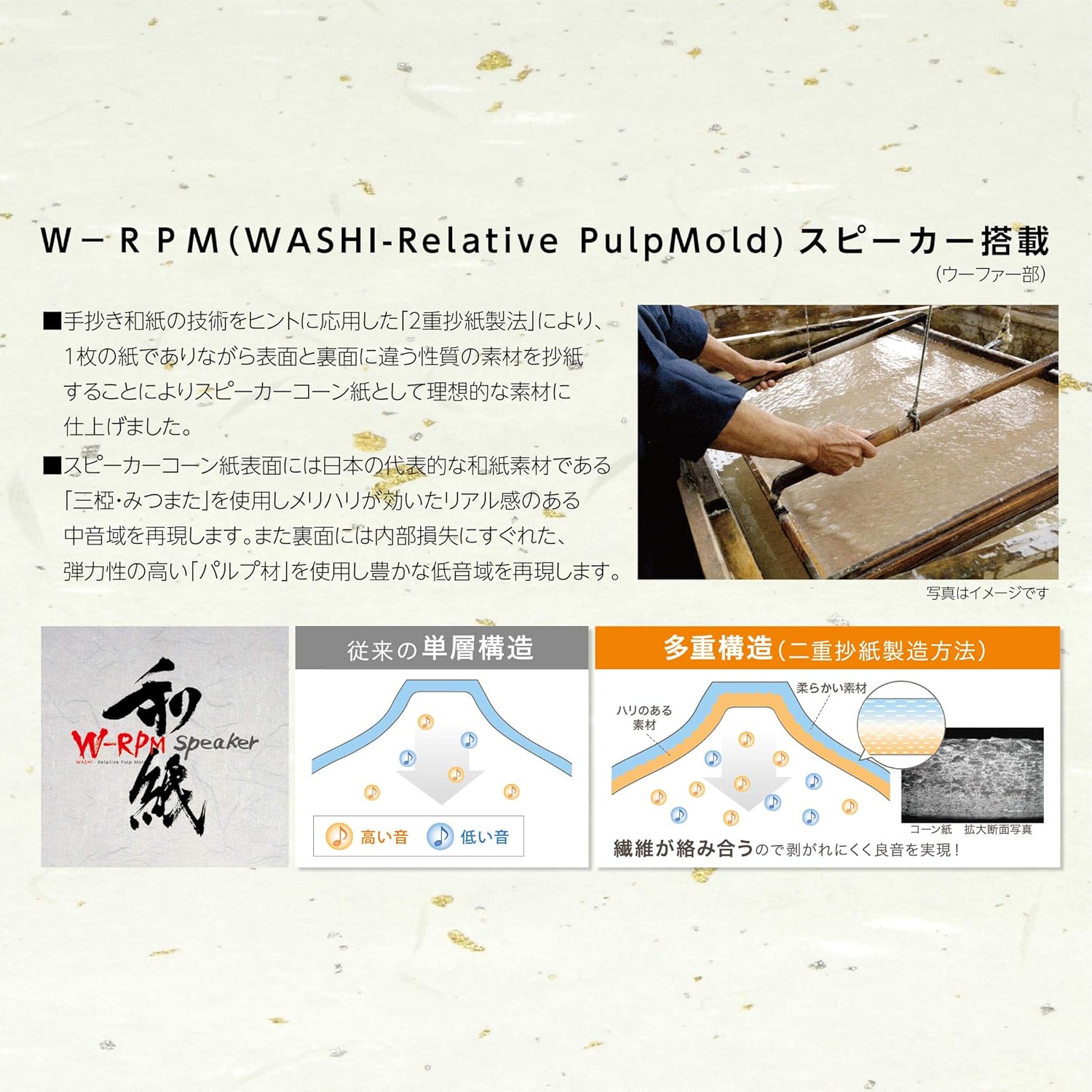
Figure 2.3: W-RPM (WASHI-Relative PulpMold) Speaker Technology. This image illustrates the double papermaking method for speaker cones, showing how different materials are used on the front (Mitsumata for mid-highs) and back (elastic pulp for lows) to achieve optimal sound reproduction, contrasting it with conventional single-layer structures.
3. جزا ۽ ڪنٽرول
3.1 پيڪيج مواد
پڪ ڪريو ته سڀئي شيون پيڪيج ۾ موجود آهن:
- Main Unit (Amplifier/CD Player)
- ڳالهائيندڙ (x2)
- ريموٽ ڪنٽرول
- پاور ڪنڊ
- ايف ايم اينٽيننا
- استعمال ڪندڙ دستي
3.2 فرنٽ پينل ڪنٽرول
The front panel provides access to essential functions:

Figure 3.1: Front Panel Controls. This close-up shows the central display indicating "NO DISC", the vacuum tubes glowing, and control buttons for Audio In, Power, Play/Pause, Skip, Bass, and Treble, along with Source and Volume knobs.
- ذريعو نوب: Selects the input source (CD, Tuner, Bluetooth, USB, Audio In).
- وولم نوب: مجموعي حجم جي سطح کي ترتيب ڏئي ٿو.
- AUDIO IN Button: Selects the external audio input.
- پاور بٽڻ: يونٽ کي آن يا بند ڪري ٿو.
- راند/روڪ بٽڻ: سي ڊي پلے بیک کي ڪنٽرول ڪري ٿو.
- SKIP Buttons (◀◀ / ▶▶): Skips tracks on CD or tunes radio stations.
- باس بٽڻ: باس جي سطح کي ترتيب ڏئي ٿو.
- TREBLE Button: Adjusts treble levels.
- ڏيکاريو: Shows current status, track information, or radio frequency.
3.3 ريئر پينل ڪنيڪشن
The rear panel houses all necessary connection ports:
- اسپيڪر ٽرمينل: Connect the left and right speakers.
- FM Antenna ان پٽ: Connect the supplied FM antenna.
- آڊيو ان پٽ (AUX IN): Connect external audio devices using RCA cables.
- پاور ان پٽ: AC پاور ڪنڊ کي ڳنڍيو.
4. سيٽ اپ
4.1 کولڻ
Carefully remove all components from the packaging. Retain the packaging materials for potential future transport or service.
4.2 اسپيڪر ڪنيڪشن
- Connect the speaker wires from the left speaker to the LEFT speaker terminals on the main unit. Ensure correct polarity (+ to + and - to -).
- Connect the speaker wires from the right speaker to the RIGHT speaker terminals on the main unit. Ensure correct polarity.
4.3 ايف ايم اينٽينا ڪنيڪشن
Connect the supplied FM antenna to the FM antenna input on the rear panel. Extend the antenna for optimal reception.
4.4 پاور ڪنيڪشن
Connect the AC power cord to the power input on the rear panel of the main unit, then plug the other end into a wall outlet.
5. آپريٽنگ هدايتون
5.1 بنيادي آپريشن
- کي دٻايو پاور button to turn on the unit. Allow approximately 10 seconds for the vacuum tubes to warm up before sound is produced.
- گھمايو ذريعو knob to select your desired input source (CD, Tuner, Bluetooth, USB, Audio In).
- حجم کي استعمال ڪندي ترتيب ڏيو حجم ڇڪ
5.2 سي ڊي پلے بیک
- استعمال ڪندي "سي ڊي" کي ذريعو طور چونڊيو ذريعو ڇڪ
- Insert a CD into the disc tray.
- کي دٻايو راند/روڪ پلے بیک شروع ڪرڻ لاءِ بٽڻ.
- استعمال ڪريو SKIP buttons (◀◀ / ▶▶) to navigate between tracks.
5.3 FM Tuner Operation
- Select "TUNER" as the source using the ذريعو ڇڪ
- استعمال ڪريو SKIP buttons (◀◀ / ▶▶) to manually tune to radio stations or perform an auto-scan (refer to remote control instructions for auto-scan).
5.4 بلوٽوٿ پيئرنگ ۽ پلے بیک
- "بلوٽوٿ" کي ذريعو طور چونڊيو استعمال ڪندي ذريعو knob. The display will indicate pairing mode.
- On your Bluetooth-enabled device, search for available devices and select "SMC-300BT".
- Once paired, you can play audio from your device through the stereo system.
5.5 USB پلے بیک
- Insert a USB storage device containing MP3/WMA files USB پورٽ ۾.
- "USB" کي ذريعو طور چونڊيو استعمال ڪندي ذريعو ڇڪ
- سسٽم خودڪار طريقي سان مطابقت رکندڙ آڊيو هلائڻ شروع ڪندو. fileس. استعمال ڪريو راند/روڪ ۽ SKIP پلے بیک کي ڪنٽرول ڪرڻ لاءِ بٽڻ.
5.6 خارجي آڊيو ان پٽ
- Connect your external audio device (e.g., smartphone, media player) to the آڊيو اندر port on the front panel or the AUX IN ports on the rear panel.
- Select "Audio In" as the source using the آڊيو اندر بٽڻ يا ذريعو ڇڪ
- پنهنجي ڳنڍيل ٻاهرين ڊوائيس تان پلے بیک کي ڪنٽرول ڪريو.
6. سار سنڀال
6.1 صفائي
- صاف ڪرڻ کان اڳ هميشه پاور ڪنڊ کي ختم ڪريو.
- Use a soft, dry cloth to wipe the exterior surfaces of the main unit and speakers.
- Do not use liquid cleaners, abrasive pads, or chemical solvents, as these may damage the finish.
6.2 اسٽوريج
If storing the unit for an extended period, disconnect it from the power supply and store it in a cool, dry place, away from direct sunlight and extreme temperatures.
7. مسئلا حل ڪرڻ
عام مسئلن ۽ انهن جي حل لاءِ هيٺ ڏنل جدول جو حوالو ڏيو:
| مسئلو | ممڪن سبب | حل |
|---|---|---|
| طاقت نه آهي | بجلي جي تار ڳنڍيل نه آهي؛ بجلي جو آئوٽليٽ خراب آهي. | پڪ ڪريو ته پاور ڪنڊ محفوظ طور تي پلگ ان ٿيل آهي؛ هڪ مختلف آئوٽليٽ آزمايو. |
| آواز ڪونهي | Volume too low; Incorrect source selected; Speaker wires loose; Vacuum tubes not warmed up | Increase volume; Select correct source; Check speaker connections; Wait 10 seconds after power on. |
| سي ڊي نه پئي هلي. | Disc inserted incorrectly; Disc scratched/dirty; Incorrect format | Insert disc correctly; Clean or replace disc; Ensure disc is CD-DA, MP3, or WMA. |
| بلوٽوٿ ڳنڍي نه ٿو | Unit not in pairing mode; Device too far; Device already paired with another unit | Select Bluetooth source to enter pairing mode; Move device closer; Disconnect from other devices. |
| ناقص ايف ايم استقبال | Antenna not extended; Interference | Extend and reposition the FM antenna; Move unit away from other electronic devices. |
جيڪڏهن انهن حلن جي ڪوشش ڪرڻ کان پوءِ به مسئلو برقرار رهي، مهرباني ڪري ڪسٽمر سپورٽ سان رابطو ڪريو.
8. وضاحتون
Technical specifications for the SANSUI SMC-300BT:
| خاصيت | تفصيل |
|---|---|
| برانڊ | SANSUI |
| ماڊل نمبر | SMC-300BT |
| رنگ | ناسي |
| آڊيو آئوٽ | 60 واٽ (ڪل) |
| ٽونر جو قسم | FM (76-108MHz) |
| سپورٽ ٿيل آڊيو فارميٽ | CD, CD-R, CD-RW, CD-DA, MP3, WMA |
| رابطي | Bluetooth, USB, 2x External Audio Input |
| اسپيڪر جو قسم | اسٽيريو |
| طاقت جو ذريعو | تار ٿيل برقي |
| پيداوار جي ماپ (W x D x H) | 57 سينٽي x 25 سينٽي x 25 سينٽي ميٽر |
| شيءِ جو وزن | 7 ڪلو |
| وال ماؤنٽ مطابقت رکندڙ | ها |
| بيٽريون شامل/گهربل | نه |
9. وارنٽي ۽ سپورٽ
9.1 وارنٽي ڄاڻ
This product is covered by a manufacturer's warranty. Please refer to the warranty card included in your package for specific terms, conditions, and duration. Keep your proof of purchase for warranty claims.
9.2 ڪسٽمر سپورٽ
For technical assistance, service, or inquiries regarding your SANSUI SMC-300BT, please contact your local SANSUI authorized dealer or customer service center. Contact details can typically be found on the SANSUI official webسائيٽ تي يا وارنٽي ڪارڊ تي.


