Propel Zipp Nano 2.0 Drone User Manual
Model: Zipp Nano 2.0
برانڊ: پروپيل
1. تعارف
This manual provides essential information for the safe and effective operation of your Propel Zipp Nano 2.0 Drone. Please read this manual thoroughly before operating the drone to ensure proper usage and to prevent damage or injury.
The Propel Zipp Nano 2.0 is a high-performance 2.4 GHz indoor/outdoor drone designed for stable flight and exciting aerial maneuvers. It features a built-in 6-axis gyroscopic chip for stability, multiple speed settings, and the ability to perform 360-degree stunt rolls.
2. حفاظتي احتياط
Always prioritize safety when operating the drone. Failure to follow these guidelines may result in injury or damage to the drone or property.
- Do not operate the drone near people, animals, or obstacles.
- Keep hands, hair, and loose clothing away from rotating propellers.
- هر اڏام کان اڳ پڪ ڪريو ته ڊرون مڪمل طور تي چارج ٿيل آهي.
- تيز هوائن يا خراب موسمي حالتن ۾ نه اڏامو.
- Supervise children during operation. This product contains small parts and is not suitable for children under 3 years due to choking hazard.
- Do not attempt to modify or repair the drone yourself. Contact customer support for assistance.

Image: Back of the product packaging, highlighting features and a warning about small parts.
3. پيڪيج مواد
پڪ ڪريو ته سڀئي شيون توهان جي پيڪيج ۾ موجود آهن:
- Propel Zipp Nano 2.0 Drone (Red)
- 2.4 GHz Digital Remote Control
- USB چارجنگ ڪيبل
- Spare Replacement Parts (Propellers)

Image: The Propel Zipp Nano 2.0 Drone and its remote control visible within the clear retail packaging.
4. سيٽ اپ
4.1 ڊرون جي بيٽري چارج ڪرڻ
The drone is powered by an internal rechargeable battery. Use the provided USB charging cable to charge the drone.
- Connect the small end of the USB charging cable to the drone's charging port.
- USB چارجنگ ڪيبل جي وڏي پڇاڙي کي USB پاور سورس سان ڳنڍيو (مثال طور، ڪمپيوٽر USB پورٽ، USB وال اڊاپٽر).
- The charging indicator light on the USB cable will illuminate during charging and turn off when fully charged.
- Charging typically takes approximately 30-45 minutes. Do not overcharge.
4.2 ريموٽ ڪنٽرول بيٽريون لڳائڻ
The remote control requires 2 "AAA" batteries (not included).
- ريموٽ ڪنٽرول جي پٺي تي بيٽري جي خاني کي ڳوليو.
- بيٽري جي ڪمري واري ڍڪ کي کوليو.
- Insert 2 "AAA" batteries, ensuring correct polarity (+/-).
- بيٽري جي ڪمري واري ڍڪ کي محفوظ طور تي بند ڪريو.

Image: The remote control for the Propel Zipp Nano 2.0 Drone, showing its various buttons and joysticks.
4.3 ڊرون ۽ ريموٽ ڪنٽرول جوڙڻ
To establish a connection between the drone and the remote control:
- ڊرون کي فليٽ، سطح جي مٿاڇري تي رکو.
- Turn on the drone by sliding the power switch. The drone's LED lights will flash.
- ريموٽ ڪنٽرول کوليو.
- Push the left joystick (throttle) all the way up, then pull it all the way down.
- The drone's LED lights will turn solid, indicating successful pairing.
5. ڊرون هلائڻ
5.1 فلائيٽ ڪنٽرول
ريموٽ ڪنٽرول جي ترتيب ۽ ڪمن سان پاڻ کي واقف ڪريو:
- کاٻي جوائس اسٽڪ (ٿروٽل/يا):
- Push up to increase altitude (throttle).
- Push down to decrease altitude.
- Push left/right to rotate the drone (yaw).
- ساڄي جوائس اسٽڪ (پچ/رول):
- Push up/down to move forward/backward (pitch).
- Push left/right to move left/right (roll).
- اسپيڊ بٽڻ: Cycles through 3 different speed settings (slow, medium, high).
- Stunt Button: Press to initiate 360-degree stunt rolls (see 5.4).
- T-Mode Button: Activates T-Mode for beginner pilots, providing more stable and controlled flight.
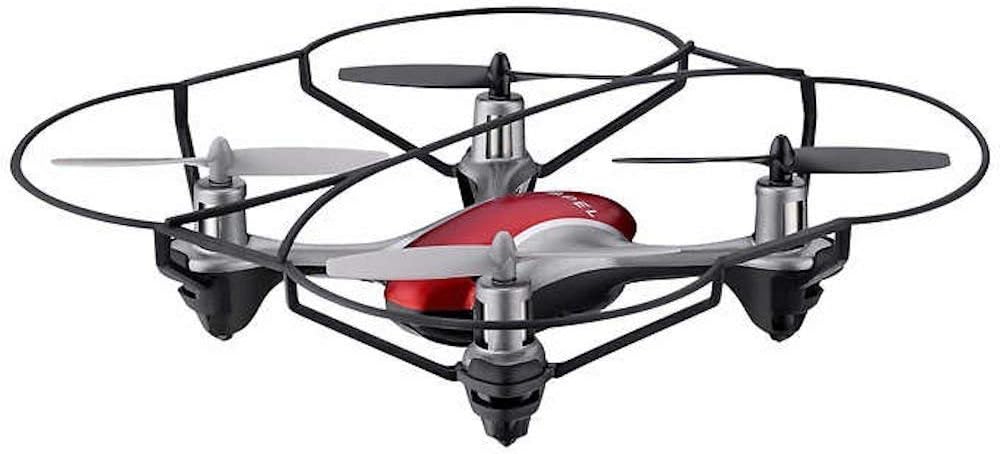
Image: The Propel Zipp Nano 2.0 Drone, showcasinان جي ڪمپيڪٽ ڊيزائن ۽ پروپيلر گارڊز جي ڪري.
5.2 اڏام ۽ لينڊنگ
- لاهڻ: After pairing, slowly push the left joystick (throttle) up to lift off.
- اترڻ: Slowly pull the left joystick (throttle) down until the drone lands gently.
5.3 اوچائي تي هولڊ
The Zipp Nano 2.0 features an air pressure sensor that helps lock altitude in mid-air, making it easier to control and hover stably.
5.4 360-Degree Stunt Rolls
To perform a stunt roll:
- Ensure the drone is flying at a sufficient height (at least 6-8 feet).
- Press the dedicated Stunt Button on the remote control.
- Immediately push the right joystick in the desired direction (forward, backward, left, or right) to execute the roll.

تصوير: هڪ زاويه view of the Propel Zipp Nano 2.0 Drone, highlighting its sleek design and protective frame.
6. سار سنڀال
- صفائي: Use a soft, dry cloth to clean the drone and remote control. Do not use harsh chemicals or water.
- پروپيلر متبادل: If propellers become damaged, replace them with the provided spare parts. Carefully remove the damaged propeller and snap the new one into place, ensuring correct orientation.
- اسٽوريج: When not in use, store the drone and remote control in a cool, dry place away from direct sunlight.
7. مسئلا حل ڪرڻ
| مسئلو | ممڪن سبب | حل |
|---|---|---|
| ڊرون ريموٽ ڪنٽرول جو جواب نٿو ڏئي. | Not paired, low drone battery, low remote control batteries. | Re-pair the drone and remote. Charge drone battery. Replace remote control batteries. |
| ڊرون بي ترتيب اڏامندو آهي يا اُڏاميندو آهي. | Not calibrated on a level surface, damaged propeller, strong wind. | Ensure drone is placed on a flat surface for pairing. Check for damaged propellers and replace if necessary. Fly in calm conditions. |
| Drone does not lift off. | Low drone battery, propellers not spinning correctly. | Charge drone battery fully. Check for obstructions around propellers. |
8. وضاحتون
| خاصيت | تفصيل |
|---|---|
| برانڊ | پروپيل |
| ماڊل نالو | Propel 2.4 ghz (Zipp Nano 2.0) |
| رابطي ٽيڪنالاجي | Radio Frequency (2.4 GHz) |
| آپريشنل رينج | 200 فوٽن تائين |
| گيروسکوپ | Built-in 6-axis gyroscopic chip |
| اسپيڊ سيٽنگون | 3 (Slow, Medium, High) |
| خاص خاصيتون | 360-degree stunt rolls, Altitude Hold, T-Mode for beginners |
| مواد جا قسم | Plastic, Carbon Fibre |
| پيداوار جي ماپ | 13.97 x 3.81 x 13.97 سينٽي |
| شيءِ جو وزن | 453.59 g (1 Pound) |
| رنگ | ڳاڙهو |
| مهارت جي سطح | شروعات ڪندڙ |
9. وارنٽي ۽ سپورٽ
Propel offers unlimited replacement parts for one year from the date of purchase. For warranty claims, technical support, or to order replacement parts, please refer to the contact information provided on the product packaging or the official Propel webسائيٽ.
وارنٽي جي مقصدن لاءِ خريداري جي ثبوت طور پنهنجي خريداري جي رسيد رکو.


