تعارف
This user manual provides essential information for the safe and efficient operation, maintenance, and troubleshooting of your BLACK+DECKER HCUA525J POWERSERIES Pro 20V Lithium 2-in-1 Cordless Vacuum. Please read this manual thoroughly before first use and retain it for future reference.
The BLACK+DECKER HCUA525J POWERSERIES PRO 20V Lithium 2-in-1 Vacuum is designed for versatile cleaning, offering strong suction and extended runtime. Its innovative design allows for easy conversion from an upright vacuum to a portable canister for comprehensive floor-to-ceiling cleaning. Key features include SMARTECH technology with AUTOSENSE for automatic suction adjustment, BATTERYSENSE for battery level indication, and FILTERSENSE for filter cleaning alerts. The vacuum also features touchpad controls, swivel steering, a low-profile design, and an LED light for enhanced visibility.
اهم حفاظتي هدايتون
باهه، بجليءَ جي جھٽڪي، ۽ ذاتي زخم جي خطري کي گهٽائڻ لاءِ بجليءَ جا آلات استعمال ڪرڻ وقت هميشه بنيادي حفاظتي احتياطن تي عمل ڪريو. ان ۾ شامل آهي، پر محدود نه آهي:
- اوزار استعمال ڪرڻ کان پهريان سڀ هدايتون پڙهو.
- ٻاهر استعمال نه ڪريو يا گندي سطحن تي.
- رانديڪن جي طور تي استعمال ڪرڻ جي اجازت نه ڏيو. جڏهن ٻارن جي ويجهو يا ويجھو استعمال ڪيو وڃي ته ڌيان ڏيڻ ضروري آهي.
- صرف هن دستور ۾ بيان ڪيل طريقي سان استعمال ڪريو. صرف ٺاهيندڙ جي تجويز ڪيل منسلڪات استعمال ڪريو.
- خراب ٿيل ڪنڊ يا پلگ سان استعمال نه ڪريو. جيڪڏهن اوزار ڪم نه ڪري رهيو آهي جيئن ان کي گهرجي، ڇڏيو ويو آهي، خراب ٿي ويو آهي، ٻاهر ڇڏي ويو آهي، يا پاڻي ۾ ڦٽو ڪيو ويو آهي، ان کي سروس سينٽر ڏانهن واپس آڻيو.
- ڊار سان نه ڇڪيو يا نه کڻو، ڊار کي هينڊل طور استعمال ڪريو، ڪنڊ تي دروازو بند ڪريو، يا تار کي تيز ڪنارن يا ڪنڊن جي چوڌاري ڇڪيو. ڪنڊ مٿان اوزار نه هلايو. تار کي گرم سطحن کان پري رکو.
- ڪنڊ تي ڇڪڻ سان ان پلگ نه ڪريو. ان پلگ ڪڍڻ لاءِ، پلگ کي پڪڙيو، نه ڪي ڪنڊ.
- گلي هٿن سان پلگ يا اوزار نه سنڀاليو.
- ڪنهن به شئي کي کولڻ ۾ نه وجهي. ڪنهن به افتتاحي بلاڪ سان استعمال نه ڪريو؛ مٽي، لن، وار، ۽ هر شيء کان پاڪ رکو جيڪو هوا جي وهڪري کي گھٽائي سگھي ٿو.
- وار، ٿلها ڪپڙا، آڱريون ۽ جسم جي سڀني حصن کي کليل ۽ هلندڙ حصن کان پري رکو.
- ٻرندڙ يا تماڪ ڇڪڻ واري شيءِ نه کڻو، جهڙوڪ سگريٽ، ماچس، يا گرم راھ.
- بغير مٽي بيگ ۽ / يا فلٽر جي جاء تي استعمال نه ڪريو.
- ان پلگ ڪرڻ کان اڳ سڀ ڪنٽرول بند ڪريو.
- ڏاڪڻ تي صفائي ڪرڻ وقت اضافي احتياط استعمال ڪريو.
- ٻرندڙ يا ٻرندڙ مائع کڻڻ لاء استعمال نه ڪريو، جهڙوڪ گيسولين، يا انهن علائقن ۾ استعمال ڪريو جتي اهي موجود هجن.
- اوزار گھر جي اندر اسٽور ڪريو.
- صرف ڪاريگر طرفان بيان ڪيل چارجر سان چارج ڪريو.
- اوزار کي نه ساڙيو جيتوڻيڪ اهو سخت خراب آهي. بيٽريون باهه ۾ ڦاٽي سگهن ٿيون.
پيداوار جا اجزاء
Familiarize yourself with the main components of your BLACK+DECKER POWERSERIES Pro 2-in-1 Cordless Vacuum.

شڪل 1: سامهون view of the BLACK+DECKER HCUA525J POWERSERIES Pro 2-in-1 Cordless Vacuum in upright mode.

شڪل 2: The vacuum with its portable canister detached, showcasing its 2-in-1 versatility.

شڪل 3: تفصيلي view of the removable canister and flexible hose for handheld cleaning.
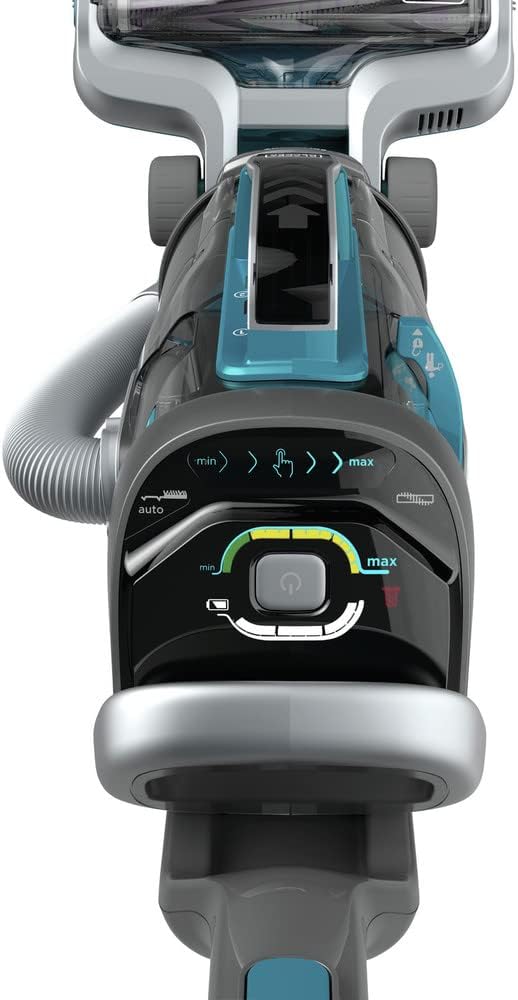
شڪل 4: The top control panel with touchpad controls for suction speed, AUTOSENSE, and LED light.

شڪل 5: The versatile 3-in-1 accessory tool, including a 6-inch nozzle, crevice tool, and upholstery brush.
شامل اجزاء:
- 1) HCUA525J 2-in-2 Cordless Vacuum
- 1) Jack Plug charger
- 1) 3-in-1 Accessory Tool (6-inch nozzle, crevice tool, and upholstery brush)
- 1) CUABF10 washable filter kit
سيٽ اپ ۽ اسيمبلي
پهرين استعمال کان اڳ پنهنجي ويڪيوم ڪلينر کي گڏ ڪرڻ لاءِ انهن قدمن تي عمل ڪريو.
- انپيڪ اجزاء: Carefully remove all components from the packaging. Ensure all listed parts are present.
- منسلڪ پهچ هينڊل کي ويڪيوم جي مکيه حصي ۾ داخل ڪريو جيستائين اهو محفوظ طور تي پنهنجي جاءِ تي نه اچي.
- بيٽري چارج: Before initial use, fully charge the vacuum's lithium-ion battery. Connect the Jack Plug charger to the charging port on the vacuum and plug it into a standard electrical outlet. The BATTERYSENSE indicator lights will show charging progress. A full charge takes approximately 6 hours.
- فلٽر انسٽال ڪريو: Ensure the CUABF10 washable filter is correctly installed in the dust canister. Refer to the "Maintenance" section for detailed filter installation and cleaning instructions.
آپريٽنگ هدايتون
Your BLACK+DECKER POWERSERIES Pro vacuum offers versatile cleaning modes and smart features.
سڌو ويڪيوم موڊ
- پاور آن: Press the power button on the touchpad control panel (Figure 4).
- Adjust Suction Speed: Use the touchpad controls to adjust suction speed between minimum (min) and maximum (max) settings.
- Activate AUTOSENSE: Enable the AUTOSENSE feature via the touchpad. This automatically adjusts suction power based on the floor type, optimizing performance and battery life.
- LED لائيٽ: Control the integrated LED light from the touchpad to illuminate cleaning surfaces, especially in dimly lit areas or under furniture.
- چالبازي: The swivel steering and low-profile design allow for easy navigation around furniture and access to hard-to-reach areas.
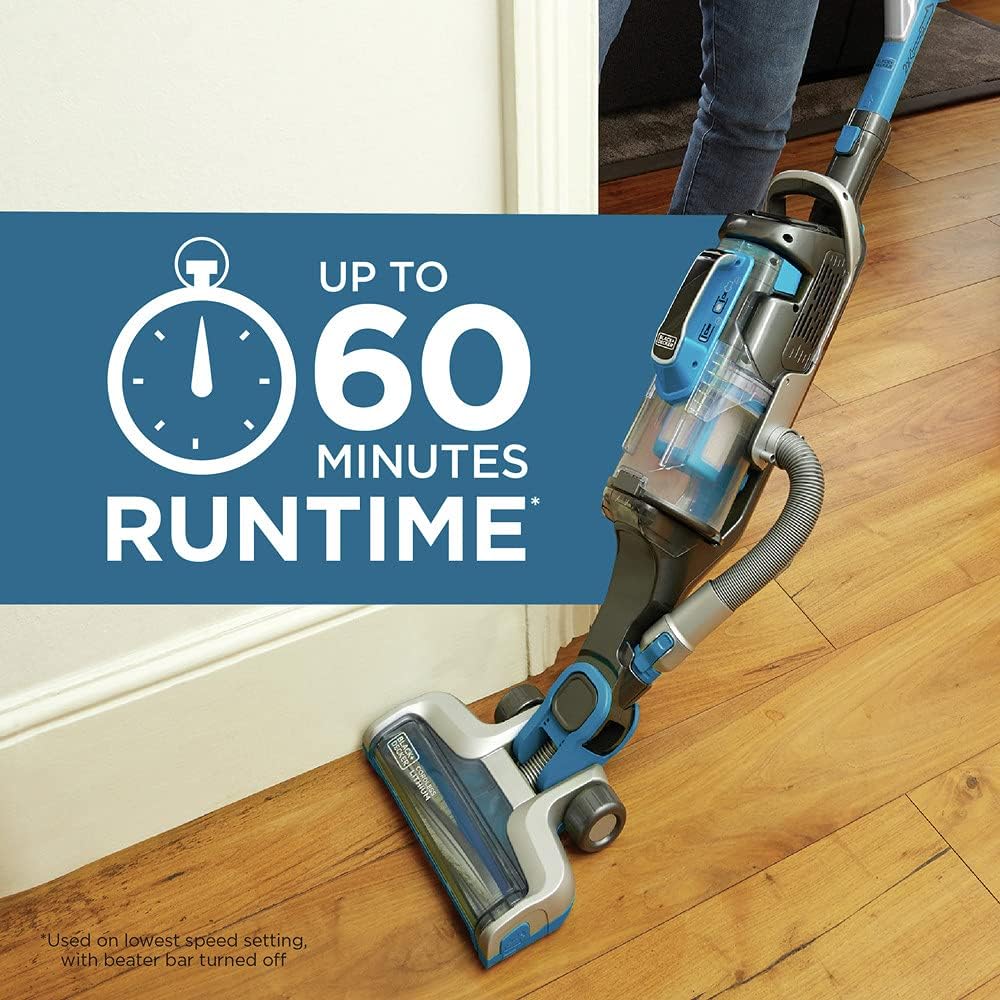
شڪل 6: The vacuum in operation on a hard floor, highlighting its impressive runtime of up to 60 minutes on the lowest speed setting with the beater bar turned off.
Portable Canister Mode (Grab+Go)
- Detach Canister: Press the release button to detach the portable canister from the main vacuum body.
- لوازمات شامل ڪريو: Connect the 3-in-1 accessory tool (6-inch nozzle, crevice tool, or upholstery brush) to the end of the flexible hose for specialized cleaning tasks.
- ورسٽائل صفائي: Use the portable canister for cleaning stairs, upholstery, car interiors, and other elevated or confined spaces.
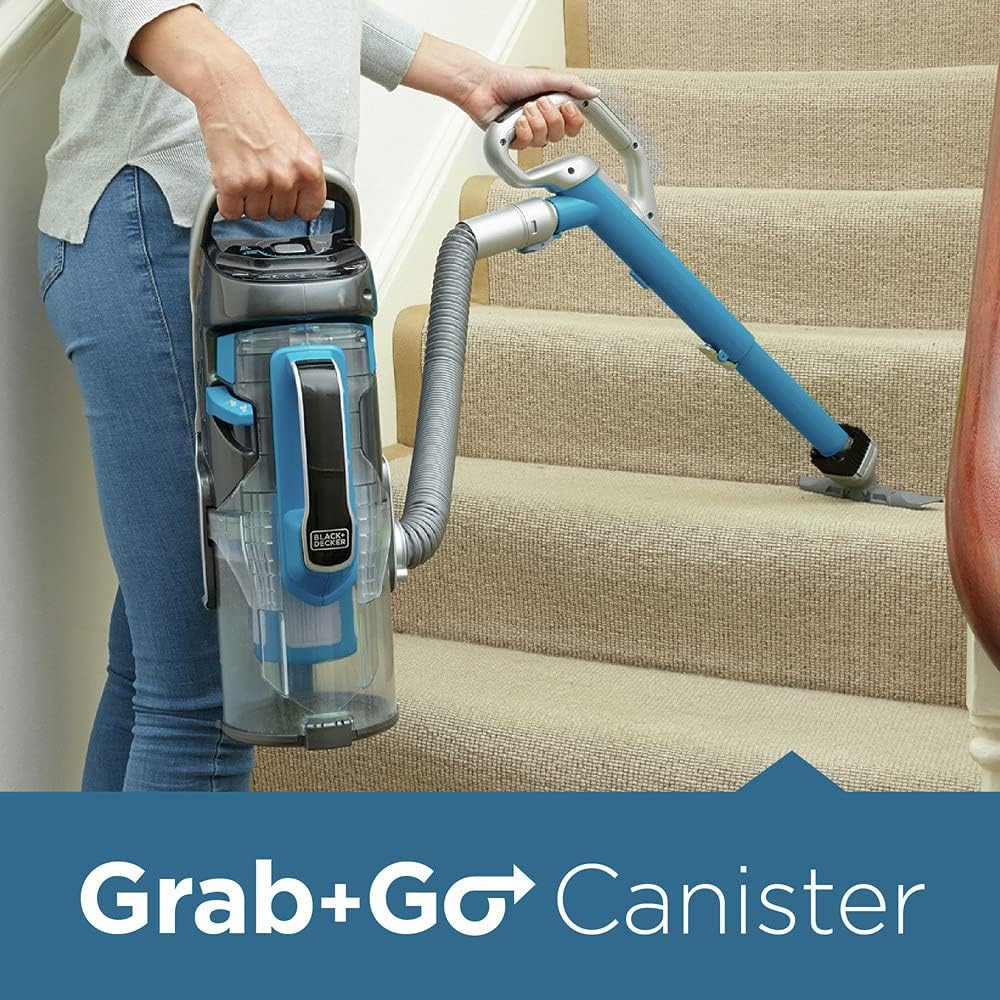
شڪل 7: A user demonstrating the "Grab+Go" feature, using the detached canister and hose to clean stairs, providing excellent versatility.
سرڪاري پراڊڪٽ وڊيو
وڊيو 1: An official product video demonstrating the features and versatility of the BLACK+DECKER POWERSERIES PRO Cordless Vacuum, 2 in 1, Blue (HCUA525J). This video showcases the vacuum's powerful suction, 2-in-1 design, SMARTECH sensors, and ease of use for various cleaning tasks.
سار سنڀال
باقاعده سار سنڀال بهترين ڪارڪردگي کي يقيني بڻائي ٿي ۽ توهان جي ويڪيوم جي زندگي کي وڌائي ٿي.
ڊسٽ ڪنسٽر کي خالي ڪرڻ
The dust canister features a unique dust compactor, allowing it to hold more dirt and reducing the frequency of emptying. Empty the canister when the dirt reaches the "Max Fill" line or when the FILTERSENSE indicator alerts you.
- بجلي بند: Ensure the vacuum is turned off before emptying.
- Detach Canister: Press the release button to detach the dust canister.
- خالي مواد: Position the canister over a trash bin and press the release button to open the bottom flap, allowing dirt and debris to fall out.
- Reattach Canister: Close the bottom flap securely and reattach the canister to the vacuum until it clicks into place.
فلٽر جي صفائي
The CUABF10 washable filter kit should be cleaned regularly to maintain suction power. The FILTERSENSE feature will alert you when cleaning is needed.
- فلٽر هٽايو: With the dust canister detached, carefully remove the filter assembly.
- ڌوئڻ فلٽر: Rinse the filter under cool, running water until the water runs clear. Do not use hot water or detergents.
- خشڪ فلٽر: Allow the filter to air dry completely for at least 24 hours before reinserting. Do not use a dryer or other heating device.
- فلٽر ٻيهر انسٽال ڪريو: Once completely dry, reinsert the filter into the dust canister and reattach the canister to the vacuum.
برش بار کي صاف ڪرڻ
Periodically check the brush bar for tangled hair or debris. The brush bar detaches easily for quick cleaning.
- بجلي بند: پڪ ڪريو ته ويڪيوم بند ٿيل آهي.
- Remove Brush Bar: Follow the instructions in the manual to release and remove the brush bar from the vacuum head.
- صاف ڪچرو: Use scissors or a brush to remove any tangled hair, strings, or debris from the brush bar.
- Reinstall Brush Bar: Reinsert the clean brush bar securely into the vacuum head.
مشڪلاتون
This section addresses common issues you might encounter with your vacuum cleaner.
| مسئلو | ممڪن سبب | حل |
|---|---|---|
| ويڪيوم آن نٿو ٿئي. | بيٽري چارج نه آهي. | Charge the battery fully (approx. 6 hours). Check BATTERYSENSE indicator. |
| پاور بٽڻ صحيح طرح نه دٻايو ويو آهي. | Ensure the power button on the touchpad is pressed firmly. | |
| گھٽجي ويو سکشن پاور. | مٽيءَ جو ٿلهو ڀريل آهي. | مٽي کي خالي ڪريو. |
| فلٽر بند ٿيل آهي. | Clean or replace the filter (CUABF10). The FILTERSENSE indicator will alert you. | |
| Brush bar is tangled or blocked. | Remove and clean the brush bar. Check for obstructions in the nozzle. | |
| نلي يا اٽيچمينٽ بند ٿيل آهن. | Check the hose and accessory tools for blockages and clear them. | |
| ويڪيوم غير متوقع طور تي بند ٿي ويندو آهي. | بيٽري ختم ٿي وئي آهي. | بيٽري کي ري چارج ڪريو. |
| اوور هيٽنگ تحفظ چالو ڪيو ويو. | Turn off the vacuum and allow it to cool down for at least 30 minutes. Clear any blockages. |
If the problem persists after attempting these solutions, please contact BLACK+DECKER customer support for assistance.
وضاحتون
| خاصيت | تفصيل |
|---|---|
| برانڊ | ڪارو + ڊيڪر |
| ماڊل نالو | BLACK+DECKER HCUA525J POWERSERIES™ PRO 20V Lithium 2-in-1 Vacuum |
| ماڊل نمبر | HCUA525J |
| طاقت جو ذريعو | بيٽري سان هلندڙ (20V ليٿيم-آئن) |
| هلندڙ وقت | Up to 60 minutes (on lowest speed setting) |
| چارج ڪرڻ وقت | لڳ ڀڳ. 6 ڪلاڪ |
| فلٽر جو قسم | Disk (CUABF10 washable filter kit) |
| فارم فيڪٽر | Upright / Handheld (2-in-1) |
| رنگ | نيرو |
| شيءِ جو وزن | 11 پائونڊ |
| پيداوار جي ماپ | 8.9 x 11.8 x 33.67 انچ |
| شور جي سطح | 78 ڊي بي |
| خاص خاصيتون | SMARTECH (AUTOSENSE, BATTERYSENSE, FILTERSENSE), Touchpad Controls, LED Light, Dust Compactor, Swivel Steering |
وارنٽي ۽ سپورٽ
Your BLACK+DECKER HCUA525J POWERSERIES Pro 20V Lithium 2-in-1 Cordless Vacuum is backed by BLACK+DECKER'S 2-year limited warranty. This warranty covers defects in material or workmanship for a period of two years from the date of purchase.
For warranty claims, technical support, or to purchase replacement parts (such as the CUABF10 washable filter kit), please contact BLACK+DECKER customer service. You may also refer to the official user manual PDF for more detailed information, available at https://manuals.plus/m/680ddf346521725983c53d4fc3d2c4b0ba3c31edbc0ebe10a410a6040819e918.
رابطي جي ڄاڻ:
- سرڪاري BLACK+DECKER جو دورو ڪريو webسپورٽ وسيلن لاء سائيٽ.
- Refer to the contact details provided in your product packaging or on the BLACK+DECKER webڪسٽمر سروس لاء سائيٽ.


