1. تعارف
This manual provides essential information for the safe and efficient operation of your InFocus IN112XV Presentation Projector. The IN112XV is designed for business presentations and educational use, offering a long lamp life, high brightness, and clear image quality.
- توسيع ٿيل ايلamp زندگي: Enjoy over 15,000 hours of viewing.
- اعلي روشني: 3800 lumens for clear images in various lighting conditions.
- مقابلي جي نسبت: 26000:1 for distinct whites and blacks.
- لچڪدار Viewing: Projects images from 28 inches to 300 inches diagonally.
- رابطي: Features HDMI input and SVGA (800 x 600) resolution.
2. پيڪيج مواد
پڪ ڪريو ته هيٺ ڏنل سڀئي شيون توهان جي پيڪيج ۾ شامل آهن:
- InFocus IN112XV Projector
- پاور ڪنڊ
- ريموٽ ڪنٽرول
- ويگا ڪيبل
- دستاويز (هي دستورالعمل ۽ ٻيون هدايتون)
3. پراڊڪٽ ختمview
Familiarize yourself with the components and controls of your InFocus IN112XV projector.
3.1 محاذ View
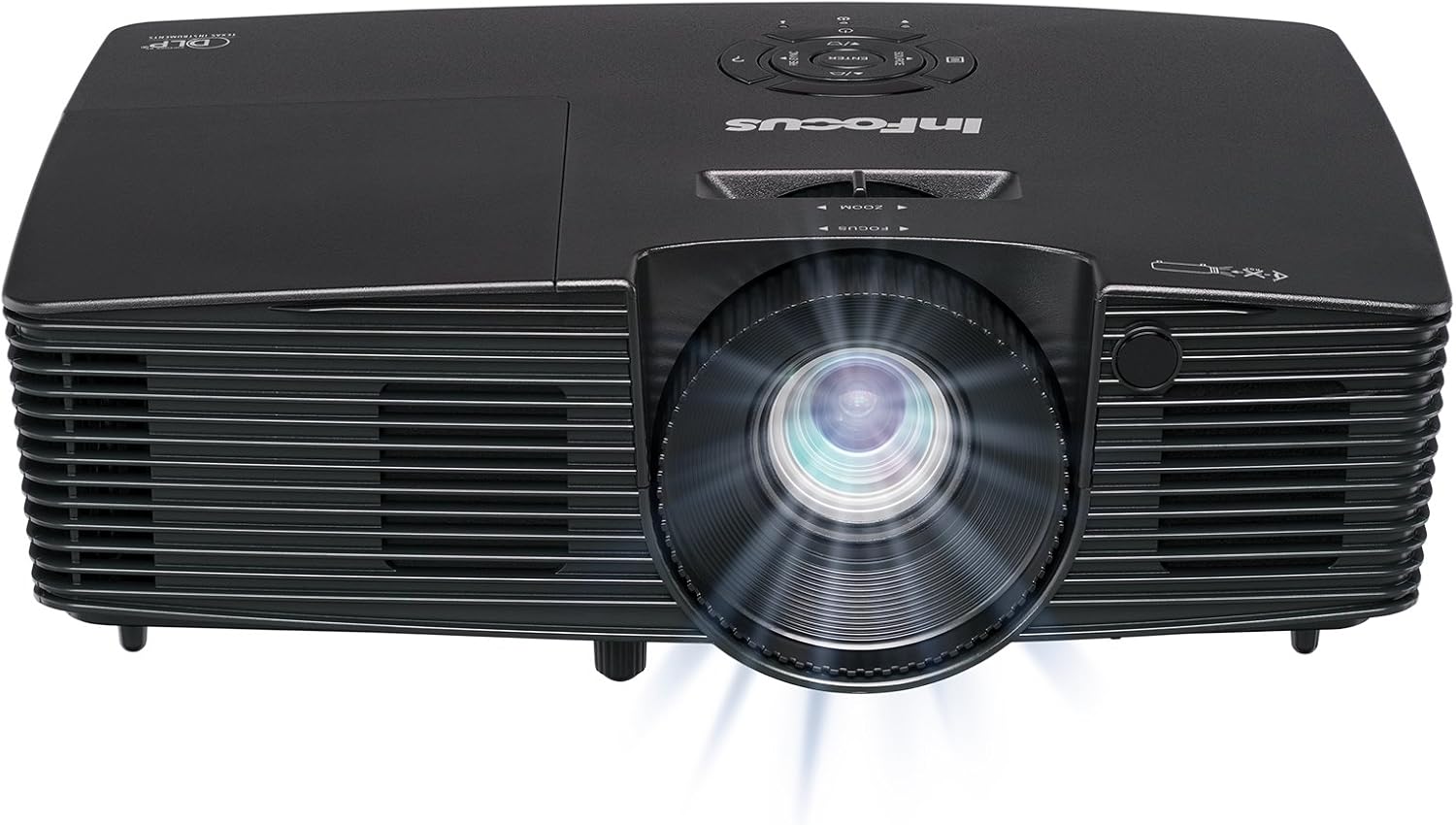
تصوير 3.1: سامهون view of the InFocus IN112XV projector. This image highlights the main projection lens and the front ventilation grilles.
3.2 مٿي View ۽ ڪنٽرول پينل

تصوير 3.2: مٿو view of the InFocus IN112XV projector. The control panel is visible on the right, featuring buttons for power, source selection, menu navigation, keystone adjustment, and volume. The focus and zoom adjustment rings are located around the lens.
The control panel on the top of the projector allows for basic operation without the remote. Key buttons include:
- طاقت: پروجيڪٽر کي آن يا آف ڪري ٿو.
- ذريعو: دستياب ان پٽ ذريعن ذريعي چڪر.
- مينيو: Accesses the on-screen display (OSD) menu.
- داخل ڪريو: او ايس ڊي مينيو ۾ چونڊن جي تصديق ڪري ٿو.
- تير جي چاٻي: مينيو آپشنز تي وڃو ۽ سيٽنگون ترتيب ڏيو.
- Re-Sync: Synchronizes the image.
3.3 پوئتي View and Connection Ports

تصوير 3.3: ريڙهه view of the InFocus IN112XV projector. This image displays the available connection ports, including Video In, S-Video In, Computer In (VGA), HDMI, and the power input.
پوئين پينل ٻاهرين ڊوائيسز کي ڳنڍڻ لاءِ مختلف بندرگاهن فراهم ڪري ٿو:
- وڊيو ۾: For composite video sources.
- S-Video In: For S-Video sources.
- Computer In (VGA): For connecting to computers via VGA cable.
- HDMI: ڊجيٽل وڊيو ۽ آڊيو ذريعن لاءِ.
- خدمت: For service and maintenance purposes.
- پاور ان پٽ: Connects the power cord to an electrical outlet.
3.4 ريموٽ ڪنٽرول

تصوير 3.4: Remote control for the InFocus IN112XV projector. The remote provides full control over the projector's functions, including power, source selection, menu navigation, keystone correction, and volume.
The remote control offers convenient access to all projector functions. Ensure batteries are correctly installed.
4. سيٽ اپ
4.1 لڳائڻ
Position the projector on a stable, flat surface or mount it securely. Ensure there is adequate space around the projector for ventilation.
4.2 پاور ڪنيڪشن
- پاور ڪنڊ کي پروجيڪٽر جي پاور ان پٽ پورٽ سان ڳنڍيو.
- پاور ڪنڊ جي ٻئي پڇاڙيءَ کي گرائونڊ ٿيل برقي آئوٽليٽ ۾ لڳايو.
4.3 ان پٽ ذريعن کي ڳنڍڻ
The projector supports various input sources. Choose the appropriate cable for your device:
- HDMI: Connect an HDMI cable from your source device (e.g., laptop, media player) to the projector's HDMI port.
- وي جي اي (ڪمپيوٽر ان): Connect a VGA cable from your computer to the projector's Computer In port. This is a plug-and-play connection.
- Video In / S-Video In: Use composite video or S-Video cables for older video sources.
- موبائل ڊوائيسز: To connect an iPad or smartphone, a LightCast Key (sold separately) is required.
5. آپريٽنگ هدايتون
5.1 پاور آن/آف
- پاور آن ڪرڻ: کي دٻايو طاقت button on the projector's control panel or the remote control. The power indicator light will change.
- پاور آف ڪرڻ: کي دٻايو طاقت button again. A confirmation message may appear. Press again to confirm shutdown. Allow the projector to cool down before unplugging.
5.2 ان پٽ سورس چونڊڻ
After connecting your source device, select the correct input:
- کي دٻايو ذريعو button on the projector's control panel or the remote control to cycle through available inputs (HDMI, VGA, Video, S-Video).
- Alternatively, use the dedicated input buttons (HDMI, VGA, Video) on the remote control.
5.3 Adjusting Focus and Zoom
For a clear and appropriately sized image, adjust the lens rings:

تصوير 5.1: Manual Focus Adjustment. This image illustrates the effect of adjusting the focus ring, transforming a blurry projection into a clear and sharp image.
- فوڪس: گھمايو فڪر ring on the projector lens until the image appears sharp and clear.
- وڏو ڪريو: گھمايو زوم ring on the projector lens to adjust the size of the projected image.
5.4 ڪيسٽون جي اصلاح
If the projected image appears trapezoidal (wider at the top or bottom), use keystone correction to square it:
- کي دٻايو Keystone + or Keystone- buttons on the remote control to adjust the image geometry.
5.5 مينيو نيويگيشن
Access the On-Screen Display (OSD) menu for advanced settings:
- کي دٻايو مينيو button on the remote or control panel.
- مينيو آپشنز ذريعي نيويگيٽ ڪرڻ لاءِ تير واري ڪيز استعمال ڪريو.
- دٻايو داخل ڪريو ڪو آپشن چونڊڻ يا سيٽنگ جي تصديق ڪرڻ لاءِ.
- دٻايو مينيو ٻيهر او ايس ڊي مان نڪرڻ لاءِ.
6. سار سنڀال
6.1 ايلamp زندگي
پروجيڪٽر ايلamp has an estimated life of over 15,000 hours. When the lamp reaches the end of its life, the projector may display a warning message or the image brightness may significantly decrease. Refer to the full service manual for lamp replacement procedures if necessary.
6.2 صفائي
- پروجيڪٽر سيasing: Use a soft, dry cloth to wipe the exterior of the projector. Do not use abrasive cleaners or solvents.
- لينس: Gently clean the lens with a lens cleaning cloth and specialized lens cleaning solution. Avoid touching the lens surface with your fingers.
- وينٽيليشن جو افتتاح: Periodically check and clean the ventilation openings to ensure proper airflow and prevent overheating. Use a soft brush or compressed air to remove dust.
7. مسئلا حل ڪرڻ
هي سيڪشن عام مسئلن کي حل ڪري ٿو جيڪي توهان کي پنهنجي پروجيڪٽر سان منهن ڏيڻا پوندا.
| مسئلو | ممڪن سبب | حل |
|---|---|---|
| ڪابه تصوير ڏيکاريل ناهي |
|
|
| تصوير urري آهي |
|
|
| تصوير ٽراپيزائيڊل آهي. |
|
|
| Projector runs hot or smells of burning plastic |
|
|
| نه آڊيو |
|
|
اهم نوٽ: This projector is not recommended for high-definition movie viewing. While it can accept a 1080p input signal, it projects at its native SVGA (800 x 600) resolution.
8. وضاحتون
| خاصيت | تفصيل |
|---|---|
| ماڊل نمبر | IN112XV |
| ڊسپلي ٽيڪنالاجي | ڊي ايل پي |
| اصلي قرارداد | SVGA (800 X 600) |
| روشني | 3800 Lumens |
| مقابلي جي نسبت | 26000:1 |
| Lamp زندگي | 15,000 ڪلاڪ تائين |
| رابطي | HDMI, VGA (Computer In), Video In, S-Video In |
| خاص خصوصيت | 3D-تيار |
| تجويز ڪيل استعمال | ڪاروبار، تعليم |
| پيداوار جي ماپ | 8.8 x 12.4 x 4 انچ |
| شيءِ جو وزن | 5.5 پائونڊ |
9. وارنٽي ۽ سپورٽ
9.1 وارنٽي ڄاڻ
The InFocus IN112XV projector is backed by a 2 سال وارنٽي. هي وارنٽي عام استعمال هيٺ مواد ۽ ڪاريگري ۾ خرابين کي ڍڪيندي آهي. وارنٽي دعوائن لاءِ مهرباني ڪري خريداري جو ثبوت رکو.
9.2 ڪسٽمر سپورٽ
For technical assistance, troubleshooting beyond this manual, or warranty service, please contact InFocus customer support. Contact information can typically be found on the official InFocus webسائيٽ يا توهان جي پراڊڪٽ سان شامل دستاويزن ۾.


