1. تعارف
This manual provides detailed instructions for the installation, operation, and maintenance of your Pyle PLRVST400 Double DIN In-Dash Car Stereo Head Unit. This versatile audio and video receiver system is designed for universal standard console or wall panel installation, making it suitable for RVs, travel trailers, motor homes, and campers. It features Bluetooth connectivity, a CD/DVD player, MP3/USB playback, AM/FM radio, and a 3-zone audio control system.
2. حفاظت جي ڄاڻ
- بجلي جي شارٽ يا نقصان کي روڪڻ لاءِ مناسب وائرنگ ڪنيڪشن کي يقيني بڻايو.
- يونٽ کي اهڙي طريقي سان نه هلايو جيڪو توهان کي ڊرائيونگ کان پريشان ڪري.
- Avoid exposing the unit to extreme temperatures, moisture, or direct sunlight.
- سڀني خدمتن کي قابل عملدارن ڏانهن رجوع ڪريو.
- Always disconnect the vehicle's battery before performing any installation or wiring.
3. پيڪيج مواد
پڪ ڪريو ته سڀئي شيون پيڪيج ۾ موجود آهن:
- Pyle PLRVST400 A/V Receiver System
- پاور ۽ وائرنگ هارنس
- ريموٽ ڪنٽرول
- ماؤنٽنگ هارڊويئر (اسڪرو)

Image 3.1: Pyle PLRVST400 unit, remote control, and wiring harness.
4. سيٽ اپ ۽ تنصيب
The PLRVST400 is designed for universal Double DIN installation in a console or wall panel. Proper installation requires careful attention to wiring connections.
4.1 وائرنگ ڪنيڪشن
Use the included power and wiring harness to connect the unit to your vehicle's electrical system and speakers. Refer to the wiring diagram provided with the harness for specific connections. Ensure all connections are secure to prevent intermittent operation or damage.
- Power (Yellow B+): مسلسل 12V پاور سان ڳنڍيو.
- Accessory (Red ACC): سوئچ ٿيل 12V پاور (اگنيشن) سان ڳنڍيو.
- گرائونڊ (ڪارو): گاڏي جي چيسس گرائونڊ سان ڳنڍيو.
- اسپيڪر جا نتيجا: پنهنجي گاڏي جي اسپيڪرن سان ڳنڍيو، پولارٽي کي ڏسو.
- RCA Audio/Video: Use for external audio/video input or output connections.

تصوير 4.1: ريئر view of the Pyle PLRVST400, illustrating the various input and output ports for wiring.
4.2 چڙهڻ
Secure the unit into the Double DIN opening using the provided mounting hardware. Ensure the unit is firmly seated and does not obstruct any vehicle controls.
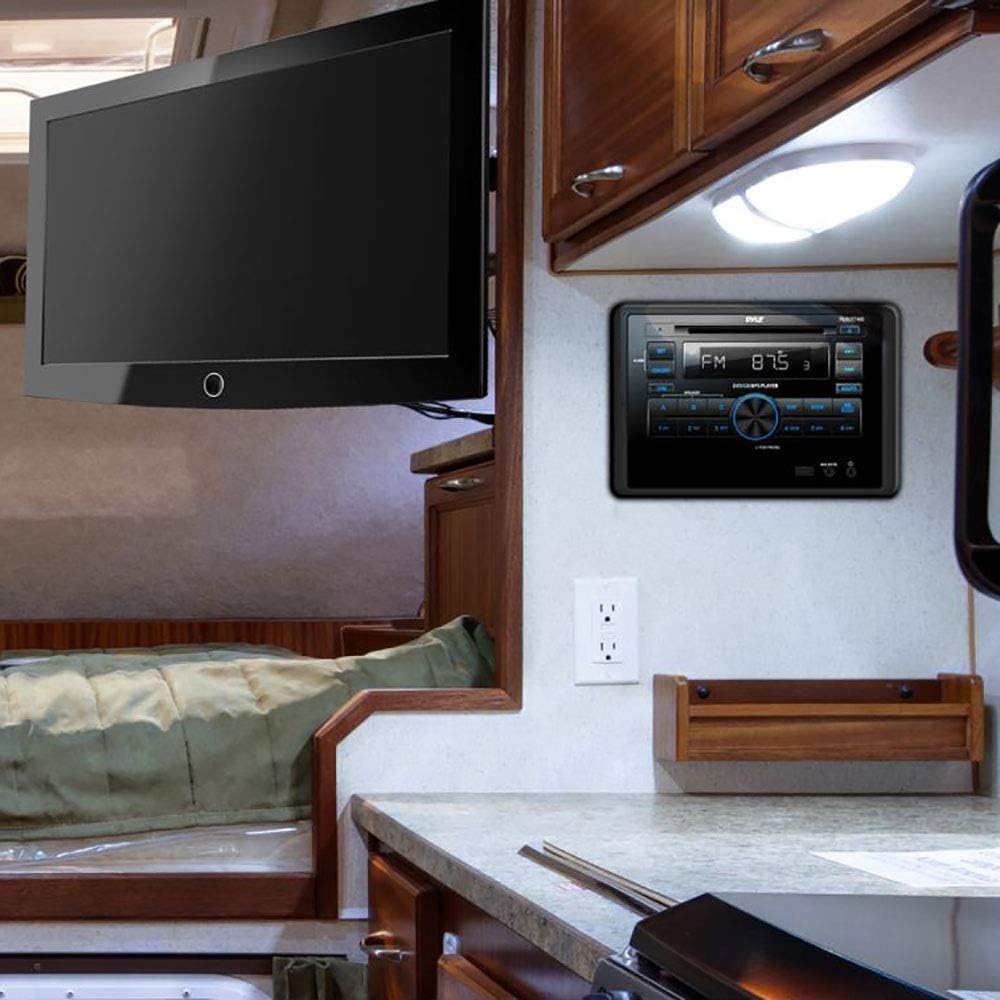
Image 4.2: The Pyle PLRVST400 unit installed in an RV wall panel, demonstrating a typical mounting scenario.
5. آپريٽنگ هدايتون
The PLRVST400 features a user-friendly interface with front panel controls and a remote control for convenient operation.

Image 5.1: Front panel of the Pyle PLRVST400 with its accompanying remote control, highlighting key buttons and the LCD display.
5.1 بنيادي ڪنٽرول
- آن/بند: يونٽ کي طاقت ڏيڻ يا بند ڪرڻ لاءِ دٻايو.
- ڊيم: LCD ڊسپلي جي چمڪ کي ترتيب ڏئي ٿو.
- PUSH PWR/SEL Knob: Press to select functions or confirm settings. Rotate to adjust volume or navigate menus.
- طرفن: Cycles through available audio sources (Radio, CD/DVD, USB, AUX, Bluetooth).
- سيٽ: سسٽم سيٽنگون ۽ ترتيب جي اختيارن تائين رسائي حاصل ڪري ٿو.
5.2 بلوٽوٿ ڪنيڪشن
The unit features built-in Bluetooth for wireless audio streaming.
- Ensure Bluetooth is enabled on your mobile device (smartphone, tablet, etc.).
- Select 'Bluetooth' as the source on the PLRVST400 using the MODE button.
- ڳولھيو available Bluetooth devices on your mobile device. The unit will appear as 'Pyle Audio' or similar.
- Select the unit to pair. The default Bluetooth network password is '0000' (four zeroes).
- Once paired, you can stream audio wirelessly from your device to the PLRVST400.
5.3 CD/DVD Player
Insert a compatible CD or DVD into the disc slot. The unit will automatically detect the disc and begin playback. Supported disc types include CD-R, CD-RW, VCD, DVD, and MP3-CD.
5.4 ريڊيو آپريشن
Press the MODE button to select 'Radio'.
- ايم/ايف ايم: Use the band button (often labeled 'WB BAND' or similar) to switch between AM, FM, and Weatherband frequencies.
- ڏسڻ: Use the seek buttons (◀◀ / ▶▶) to automatically search for stations. Manual tuning may be available through the SET menu or by holding seek buttons.
- پيشڪش: Store up to 30 radio stations using the numbered preset buttons (1-6). To save a station, tune to it, then press and hold a preset button until you hear a confirmation beep.
- Weatherband (WB): Access weather alerts and information on the Weatherband frequency.
5.5 USB پلے بیک
Insert a USB flash drive (up to 32GB) into the USB port. The unit supports MP3 and WMA audio files. Playback will begin automatically or can be selected via the MODE button.
5.6 AUX ان پٽ
Connect external audio devices using the RCA (L/R) audio input connectors or a 3.5mm jack. Select 'AUX' as the source via the MODE button.
5.7 3-Zone Audio Control
The unit features a multi-speaker '3-zone' audio source feature, allowing you to control three separate speaker zones. Use the A, B, and C buttons on the front panel to select and manage audio output for each zone independently.
5.8 آواز جي ترتيب
Access sound settings through the SET menu. Adjust Bass/Treble levels (+/-10dB) and other equalizer settings to customize your audio experience.
6. سار سنڀال
- صفائي: يونٽ جي سامهون واري پينل کي صاف ڪرڻ لاءِ نرم، سڪل ڪپڙو استعمال ڪريو. رگڙيندڙ ڪلينر يا سالوينٽس استعمال نه ڪريو.
- ڊسڪ جي سنڀال: Handle CDs and DVDs by their edges. Keep discs clean and free of scratches to ensure optimal playback.
- USB پورٽ: USB پورٽ کي مٽي ۽ ملبي کان پاڪ رکو.
7. مسئلا حل ڪرڻ
If you encounter issues with your PLRVST400, refer to the following common problems and solutions:
| مسئلو | ممڪن سبب / حل |
|---|---|
| يونٽ پاور نه آهي. | Check power connections (Yellow B+ and Red ACC). Ensure both are connected to a 12V source. Some installations may require twisting the Yellow B+ and Red ACC wires together and connecting both to constant 12V power. Check the ground connection. Verify vehicle's fuse. |
| ڳالهائيندڙن مان ڪوبه آواز ناهي. | Check speaker wiring connections and polarity. Ensure the correct audio source is selected. Verify volume level is not at minimum or muted. Check 3-zone audio settings (A, B, C buttons) to ensure desired zones are active. |
| بلوٽوٿ ڪنيڪشن جا مسئلا. | Ensure the unit is in Bluetooth mode. Verify Bluetooth is enabled on your mobile device and within range (30+ ft). Try unpairing and re-pairing the device. Confirm the correct password ('0000') is used. |
| ڊسڪ پلے بیک غلطيون. | Ensure the disc is clean and free of scratches or damage. Verify the disc type is compatible (CD-R, CD-RW, VCD, DVD, MP3-CD). |
| ريموٽ ڪنٽرول ڪم نه ڪري رهيو آهي. | Check the battery in the remote control. Ensure there are no obstructions between the remote and the unit's IR sensor. |
| Volume control issues (e.g., too loud at lowest setting). | This can sometimes occur due to specific audio source or zone settings. Adjust individual zone levels if available, then control overall volume. |
8. وضاحتون
| خاصيت | تفصيل |
|---|---|
| ماڊل نمبر | PLRVST400 |
| MAX پاور آئوٽ | 4 x 50 واٽ |
| Universal Size Standard | ڊبل DIN |
| آواز موڊ | اسٽيريو / مونو |
| تعدد جواب | 40 هز -18 ڪلوگرام (+/- 3 ڊي بي) |
| رڪاوٽ | 4 اوم |
| S/N تناسب | 60 ڊي بي |
| اسٽيريو علحدگي | >50dB، @1kHz |
| ٽون ڪنٽرول | Bass/Treble +/-10dB |
| ريڊيو | PLL Synthesizer Stereo Radio, Weatherband |
| Electronic Shockproof (ESP) | Function included |
| وڌ ۾ وڌ USB فليش سپورٽ | 32 جي بي |
| ريڊيو اسٽيشن ياداشت | Up to 30 Presets |
| ڊجيٽل آڊيو File حمايت | MP3، WMA |
| ڊجيٽل وڊيو File حمايت | MP4, AVI, MOV, MPG, FLV, XVID |
| CD/DVD Disc Compatibility | CD-R, CD-RW, VCD, DVD, MP3-CD |
| طاقت | ڊي سي 12V |
| Current Drain/Power Consumption | 10 Amp (وڌو) |
| چيسس طول و عرض | 7.0'' x 6.3'' x 3.9'' |
| پيداوار جي ماپ | 7.13 x 6.3 x 10.52 انچ |
| شيءِ جو وزن | 4 پائونڊ |
| رابطي ٽيڪنالاجي | بلوٽوٿ |
| ڪنٽرولر جو قسم | هٿ جو ڪنٽرول (ريموٽ) |
| مطابقت رکندڙ ڊوائيسز | Smartphone, Speaker, Tablet |
| ڪنيڪٽر جو قسم | 3.5mm Jack, HDMI, RCA, USB Type A |
| آڊيو آئوٽ پٽ موڊ | اسٽيريو ، مونو |
| چوڌاري آواز چينل جي جوڙجڪ | 3.0 |
9. وارنٽي ۽ سپورٽ
Warranty information for the Pyle PLRVST400 is typically provided with your purchase documentation. For specific warranty details, claims, or technical support, please refer to the official Pyle website or contact Pyle customer service directly. Keep your proof of purchase for warranty purposes.


