1. تعارف
خريد ڪرڻ لاءِ مهربانيasing the GPX PDB1077B Portable DVD Player. This device offers versatile entertainment with its 10.1-inch display, DVD/CD playback capabilities, and built-in Bluetooth wireless transmitter for audio streaming to compatible headphones. This manual provides detailed instructions for setup, operation, and maintenance to ensure optimal performance and longevity of your device.
2. اهم حفاظتي ڄاڻ
Please read all safety warnings and instructions carefully before using this product. Retain this manual for future reference.
- طاقت جو ذريعو: صرف مخصوص پاور اڊاپٽر استعمال ڪريو. غلط وولٽtagاي ڊوائيس کي نقصان پهچائي سگھي ٿو ۽ وارنٽي کي رد ڪري سگھي ٿو.
- پاڻي ۽ نمي: Do not expose the device to rain, moisture, or immerse it in water.
- گرمي: ڊوائيس کي گرمي جي ذريعن جهڙوڪ ريڊيئيٽر، گرمي رجسٽر، اسٽو، يا ٻين سامان کان پري رکو (بشمول ampلائفائرز) جيڪي گرمي پيدا ڪن ٿا.
- وينٽيليشن: مناسب وينٽيليشن کي يقيني بڻايو. ڪنهن به وينٽيليشن جي سوراخن کي بند نه ڪريو.
- صفائي: صرف سڪل ڪپڙي سان صاف ڪريو. مائع صاف ڪندڙ يا ايروسول صاف ڪندڙ استعمال نه ڪريو.
- خدمت ڪرڻ: ھن پراڊڪٽ کي پنھنجي خدمت ڪرڻ جي ڪوشش نه ڪريو. س servني خدمتن جو حوالو ڏيو قابل سروس اهلڪارن کي.
- بيٽري جي حفاظت: The device contains a rechargeable battery. Do not expose to excessive heat or direct sunlight. Dispose of batteries properly according to local regulations.
- ٻڌڻ جي حفاظت: ٻڌڻ کان پاسو ڪريو بلند آواز جي سطح تي وڌايل عرصي تائين ٻڌڻ جي نقصان کي روڪڻ لاءِ.
3. پيڪيج مواد
پڪ ڪريو ته هيٺ ڏنل سڀئي شيون توهان جي پيڪيج ۾ شامل آهن:
- GPX PDB1077B Portable DVD Player
- وائرليس بلوٽوٽ هيڊفونز
- ريموٽ ڪنٽرول
- AC/DC پاور اڊاپٽر
- ڪار پاور اڊاپٽر
- اي ڪي ڪيبل
- استعمال ڪندڙ جو دستياب (ھي دستاويز)
4. پراڊڪٽ ختمview
Familiarize yourself with the components of your GPX PDB1077B Portable DVD Player.
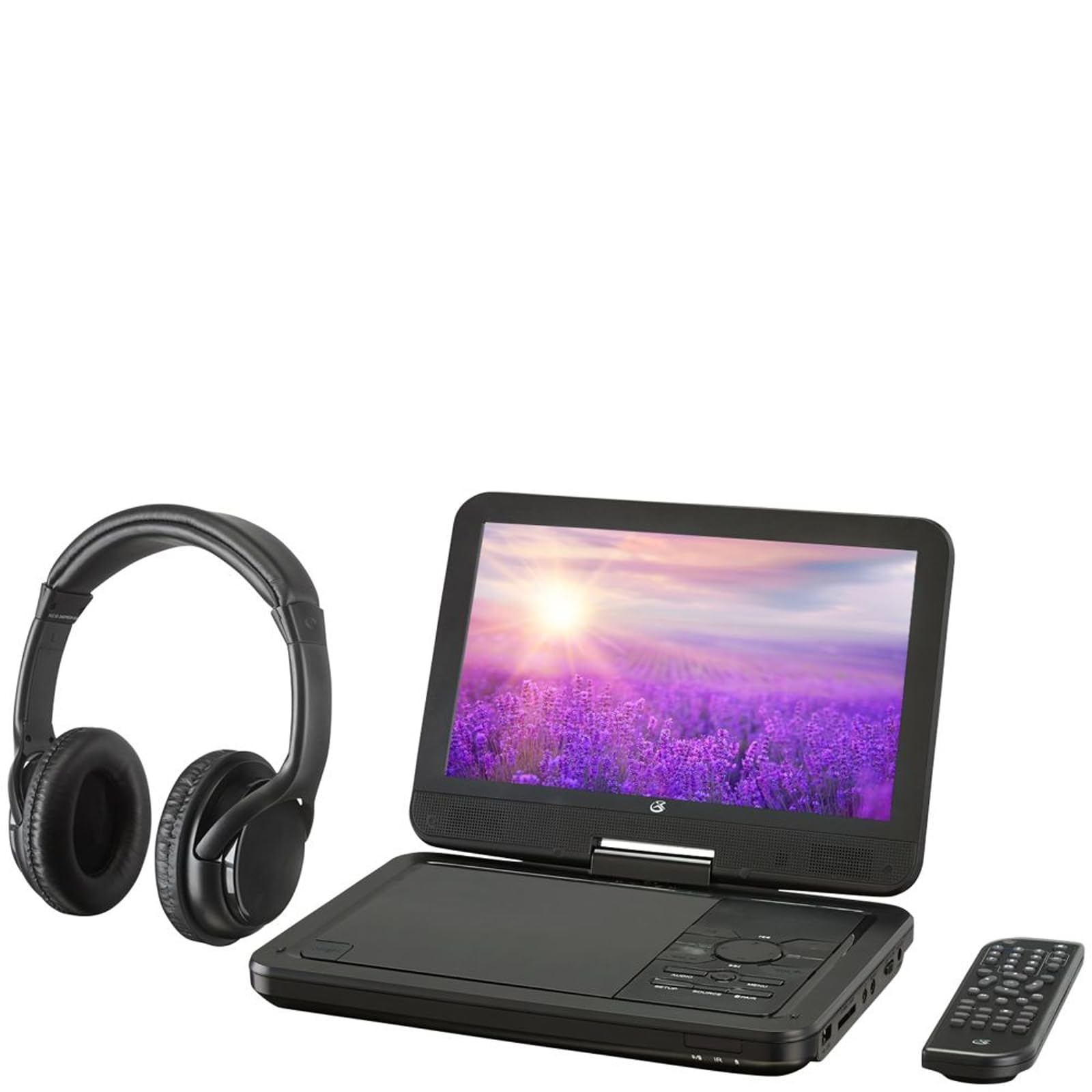
شڪل 4.1: The GPX PDB1077B Portable DVD Player, showing the 10.1-inch screen, control panel, wireless Bluetooth headphones, and remote control.
4.1 Portable DVD Player Unit
The main unit features a swivel screen, disc tray, and control buttons. Key components include:
- 10.1 انچ LCD ڊسپلي: لاءِ viewing video content.
- ڊسڪ ٽري: ڊي وي ڊي ۽ سي ڊي داخل ڪرڻ لاءِ.
- ڪنٽرول پينل: Buttons for playback, menu navigation, volume, and source selection.
- بندرگاهن: USB, SD card slot, AV out, headphone jack, DC in.
- ڳالهائيندڙ: مربوط اسٽيريو اسپيڪر.
4.2 Wireless Bluetooth Headphones
The included headphones connect wirelessly to the DVD player via Bluetooth for private listening.
شڪل 4.2: هڪ بند اپ view of the black wireless Bluetooth headphones, featuring padded earcups and an adjustable headband.
4.3 ريموٽ ڪنٽرول
ريموٽ ڪنٽرول پري کان سڀني ڪمن تائين آسان رسائي فراهم ڪري ٿو.
شڪل 4.3: هڪ بند اپ view of the compact black remote control with various buttons for playback, menu navigation, and volume adjustment.
5. سيٽ اپ گائيڊ
5.1 ڊوائيس چارج ڪرڻ
- Connect the AC/DC power adapter to the DC IN port on the DVD player.
- اڊاپٽر کي معياري وال آئوٽليٽ ۾ لڳايو.
- چارجنگ انڊيڪيٽر لائيٽ روشن ٿيندي. مڪمل چارج لاءِ لڳ ڀڳ 3-4 ڪلاڪ ڏيو.
- For in-car use, connect the car power adapter to the DC IN port and your vehicle's 12V power outlet.
5.2 پاور آن/آف
- To power on, slide the POWER switch to the ON position. The screen will light up.
- پاور آف ڪرڻ لاءِ، پاور سوئچ کي آف پوزيشن تي سلائڊ ڪريو.
5.3 Connecting Bluetooth Headphones
- Ensure the DVD player is powered on.
- Turn on the Bluetooth headphones and put them into pairing mode (refer to headphone manual if needed).
- On the DVD player, navigate to the Bluetooth settings menu.
- Select "Scan for Devices" or similar option.
- Choose your headphones from the list of available devices to pair.
- Once paired, audio will automatically transmit to the headphones.
5.4 ٻاهرين ڊسپلي سان ڳنڍڻ (اختياري)
Use the included AV cable to connect the DVD player to a TV or monitor.
- Connect one end of the AV cable to the AV OUT port on the DVD player.
- Connect the other end to the AV IN ports (Yellow for Video, White for Left Audio, Red for Right Audio) on your external display.
- Select the correct AV input on your external display.
6. آپريٽنگ هدايتون
6.1 Playing DVDs and CDs
- Open the disc tray by gently lifting the screen.
- اسپنڊل تي هڪ ڊي وي ڊي يا سي ڊي رکو ۽ ليبل جي پاسي کي مٿي ڪيو.
- Gently close the disc tray.
- پليئر خودڪار طريقي سان ڊسڪ کي ڳوليندو ۽ پلے بیک شروع ڪندو يا ڊسڪ مينيو ڏيکاريندو.
- Use the navigation buttons (Up, Down, Left, Right, Enter) on the control panel or remote to navigate menus.
- کي دٻايو راند/روڪ پلے بیک شروع ڪرڻ يا روڪڻ لاءِ بٽڻ.
- کي دٻايو اسٽاپ پلے بیک کي روڪڻ لاءِ بٽڻ
6.2 USB ۽ SD ڪارڊ ميڊيا استعمال ڪندي
- USB پورٽ ۾ USB فليش ڊرائيو يا SD ڪارڊ سلاٽ ۾ SD ڪارڊ داخل ڪريو.
- کي دٻايو ذريعو button on the control panel or remote to select "USB" or "SD".
- پنهنجي ذريعي نيويگيٽ ڪريو files using the control buttons.
- چونڊيو a file (e.g., MP3, JPEG) and press داخل ڪريو کيڏڻ يا view.
6.3 سيٽنگون ترتيب ڏيڻ
Access the system settings to customize your viewٻڌڻ ۽ ٻڌڻ جو تجربو.
- کي دٻايو سيٽ اپ ڪريو button on the remote or control panel.
- Use the navigation buttons to select options such as:
- ڊسپلي سيٽنگون: Adjust brightness, contrast, color.
- آڊيو سيٽنگون: Adjust volume, equalizer.
- ٻولي سيٽنگون: او ايس ڊي ٻولي، آڊيو ٻولي، سب ٽائيٽل ٻولي چونڊيو.
- والدين جو ڪنٽرول: Set rating levels for disc playback.
- دٻايو داخل ڪريو to confirm selections and سيٽ اپ ڪريو againيهر نڪرڻ لاءِ.
6.4 ريموٽ ڪنٽرول استعمال ڪندي
The remote control provides full functionality. Ensure batteries are correctly inserted (2 x AAA, not included).
| بٽڻ | فنڪشن |
|---|---|
| پاور | پليئر کي آن يا آف ڪري ٿو. |
| سيٽ اپ ڪريو | سسٽم سيٽ اپ مينيو تائين رسائي حاصل ڪري ٿو. |
| ذريعو | Switches between DVD, USB, SD, and AV input modes. |
| راند/روڪ | پلے بیک شروع ڪري ٿو يا کي روڪي ٿو. |
| اسٽاپ | پلے بیک کي روڪي ٿو. |
| ولول / ووول- | حجم جي سطح کي ترتيب ڏئي ٿو. |
| NAVIGATE (Up/Down/Left/Right/ENTER) | مينيو کي نيويگيٽ ڪري ٿو ۽ چونڊن جي تصديق ڪري ٿو. |
| مينيو | Accesses the disc menu during DVD playback. |
7. سار سنڀال
7.1 ڊوائيس کي صاف ڪرڻ
- پڪ ڪريو ته ڊوائيس بند ٿيل آهي ۽ صاف ڪرڻ کان اڳ ان پلگ ٿيل آهي.
- ٻاهرين سطحن کي صاف ڪرڻ لاءِ نرم، سڪل، لِنٽ کان پاڪ ڪپڙو استعمال ڪريو.
- For the screen, use a screen-specific cleaning solution and a microfiber cloth, applying gentle pressure.
- گھڙڻ وارا صاف ڪندڙ، موم، يا محلول استعمال نه ڪريو.
7.2 ڊسڪ جي سنڀال
- آڱرين جي نشانن کان بچڻ لاءِ ڊسڪ کي انهن جي ڪنارن کان هٿ ڪريو.
- Store discs in their cases when not in use to prevent scratches.
- گندي ڊسڪ کي نرم، لِنٽ فري ڪپڙي سان صاف ڪريو، وچ کان ٻاهر صاف ڪريو.
7.3 بيٽري جي سنڀال
- To prolong battery life, fully charge the device before first use.
- If storing the device for an extended period, charge it to approximately 50% every few months.
- ڊوائيس کي انتهائي گرمي پد تي ظاهر ڪرڻ کان بچاء.
8. مسئلا حل ڪرڻ
If you encounter issues with your GPX PDB1077B, refer to the following common problems and solutions.
| مسئلو | ممڪن سبب | حل |
|---|---|---|
| ڪابه طاقت | Battery drained; Power adapter not connected properly; Power switch off. | Charge the device; Ensure power adapter is securely connected; Slide power switch to ON. |
| No Disc Playback | ڊسڪ غلط طريقي سان داخل ڪئي وئي آهي؛ ڊسڪ گندي يا خراب آهي؛ ڊسڪ فارميٽ سپورٽ نه آهي. | Reinsert disc label-side up; Clean or replace disc; Check supported media types in specifications. |
| ڪو آواز | Volume too low; Mute function active; Headphones not connected/paired correctly. | Increase volume; Deactivate mute; Reconnect or re-pair headphones. |
| Bluetooth Headphones Not Pairing | Headphones not in pairing mode; Player not in Bluetooth scan mode; Interference. | Ensure headphones are in pairing mode; Activate Bluetooth scan on player; Move closer to player, away from other devices. |
| ريموٽ ڪنٽرول ڪم نه ڪري رهيو آهي | Batteries are dead or inserted incorrectly; Obstruction between remote and player; Remote sensor blocked. | Replace batteries, check polarity; Remove obstructions; Ensure remote sensor on player is clear. |
9. وضاحتون
Technical specifications for the GPX PDB1077B Portable DVD Player.
| خاصيت | تفصيل |
|---|---|
| ماڊل | PDB1077B |
| ڊسپلي سائيز | 10.1 انچ |
| ڊسپلي جو قسم | ايل سي ڊي |
| اصلي قرارداد | 1024 x 600 |
| سپورٽ ميڊيا | DVD, DVD±R/RW, CD, CD-R/RW, MP3 CD, JPEG CD |
| رابطي | Bluetooth wireless transmitter, USB port, SD card slot, AV Out, Headphone Jack, DC In |
| طاقت جو ذريعو | Built-in rechargeable battery, AC/DC adapter, Car adapter |
10. وارنٽي ۽ ڪسٽمر سپورٽ
GPX products are designed for reliability and performance. For specific warranty information, please refer to the warranty card included with your purchase or visit the official GPX website. If you require technical assistance or have questions regarding your device, please contact GPX customer support.
GPX Official Webسائيٽ: www.gpx.com
Please note that warranty terms and customer support availability may vary by region.


