تعارف
Thank you for choosing the Redragon Nothosaur M606 Gaming Mouse. This manual provides detailed instructions to help you set up, operate, and maintain your new gaming mouse. Please read this manual thoroughly before use to ensure optimal performance and longevity of your device.
The Redragon Nothosaur M606 is a wired gaming mouse designed for precision and comfort, featuring adjustable DPI, programmable buttons, and customizable LED lighting.
پيداوار ختمview
The Redragon Nothosaur M606 gaming mouse is engineered for an enhanced gaming experience. It features a comfortable ergonomic design, a high-precision optical sensor, and customizable functions.

Figure 1: Redragon Nothosaur M606 Gaming Mouse, showcasing its design and red LED illumination.
اهم خاصيتون:
- اعلي صحت واري سينسر: Equipped with a PMW3168 optical sensor for accurate tracking.
- ترتيب ڏيڻ وارو DPI: Four customizable DPI levels for varying sensitivity needs.
- پروگرام لائق بٽڻ: Side buttons can be configured for macros and in-game functions.
- LED Backlighting: Features 4 distinct lighting colors, each corresponding to a DPI setting.
- Ergonomic ڊيزائن: Crafted for comfortable use during extended gaming sessions.

Figure 2: Various angles of the Redragon Nothosaur M606 mouse, highlighting its ergonomic shape and button placement.
سيٽ اپ ڪريو
- مائوس کوليو: Carefully remove the Redragon Nothosaur M606 mouse from its packaging. Ensure all components are present (mouse, user manual).
- ڪمپيوٽر سان ڳنڍيو: مائوس جي USB ڪنيڪٽر کي پنهنجي ڪمپيوٽر تي موجود USB پورٽ ۾ لڳايو.
- ڊرائيور لڳائڻ: The mouse is typically plug-and-play, and your operating system should automatically detect and install the necessary drivers. No additional software is required for basic functionality. For advanced customization of buttons and macros, please refer to the Redragon official website for any available software or drivers, though some models may not offer dedicated software.
- ٽيسٽ ڪارڪردگي: Once connected, move the mouse to check cursor movement. Click the left and right buttons to ensure they are responsive.
آپريٽنگ هدايتون
ڊي پي آءِ ايڊجسٽمينٽ
The Redragon Nothosaur M606 features a dedicated DPI button located behind the scroll wheel, allowing you to switch between four preset DPI levels. Each DPI level is indicated by a specific LED color:
- ڳاڙهو لال 1000 ڊي پي آئي
- بليو LED: 1600 ڊي پي آئي
- گرين لائيٽ: 2400 ڊي پي آئي
- واڱڻائي LED: 3200 ڊي پي آئي
Press the DPI button repeatedly to cycle through these sensitivity settings to find the one that best suits your needs.
پروگراميبل بٽڻ
The mouse includes side buttons that can be configured for macros and in-game functions. While the mouse is plug-and-play for basic use, advanced customization for these buttons typically requires specific software. Please check the Redragon support website for any available software for the M606 model to set up macros.
LED روشني
The Nothosaur M606 features dynamic LED backlighting. The color of the LED lighting directly corresponds to the currently selected DPI setting, as detailed in the DPI Adjustment section. There is no independent control for the LED colors; they change automatically with DPI selection.
سار سنڀال
Proper maintenance ensures the longevity and optimal performance of your Redragon Nothosaur M606 mouse.
- صفائي: مائوس جي مٿاڇري کي صاف ڪرڻ لاءِ نرم، سڪل ڪپڙو استعمال ڪريو. ضدي مٽيءَ لاءِ، ٿورو ڊيampڪپڙي کي پاڻي يا نرم صفائي واري محلول سان ڌوئڻ ڏيو. سخت ڪيميڪلز يا رگڙيندڙ مواد استعمال ڪرڻ کان پاسو ڪريو.
- سينسر جي صفائي: Occasionally, dust or debris may accumulate around the optical sensor. Use a cotton swab lightly dampened with isopropyl alcohol to gently clean the sensor area. Ensure the mouse is disconnected from the computer before cleaning.
- ڪيبل جي سنڀال: نقصان کان بچڻ لاءِ USB ڪيبل تي تيز موڙ يا گهڻي ڇڪڻ کان پاسو ڪريو.
- اسٽوريج: جڏهن استعمال ۾ نه هجي، ته مائوس کي انتهائي گرمي پد کان پري صاف، سڪل ماحول ۾ رکو.
مشڪلاتون
If you encounter issues with your Redragon Nothosaur M606 mouse, refer to the following common solutions:
- مائوس جواب نه ڏئي رهيو آهي:
- پڪ ڪريو ته USB ڪيبل توهان جي ڪمپيوٽر تي ڪم ڪندڙ USB پورٽ ۾ محفوظ طور تي لڳل آهي.
- مائوس کي ڪنهن ٻئي USB پورٽ ۾ لڳائڻ جي ڪوشش ڪريو.
- پنهنجي ڪمپيوٽر کي ٻيهر شروع ڪريو.
- بي ترتيب ڪرسر حرڪت:
- Clean the optical sensor at the bottom of the mouse.
- پڪ ڪريو ته توهان مائوس کي صاف، غير عڪاسي ڪندڙ، ۽ هڪجهڙي سطح تي استعمال ڪري رهيا آهيو (مثال طور، هڪ مائوس پيڊ).
- سينسر جي چوڌاري ڪنهن به جسماني رڪاوٽ جي جانچ ڪريو.
- DPI Button Not Changing Sensitivity/Color:
- ڊي پي آءِ بٽڻ کي مضبوطيءَ سان دٻايو.
- Ensure the mouse is properly connected and recognized by your computer.
- پاسي وارا بٽڻ ڪم نه ڪري رهيا آهن:
- For basic forward/backward functionality, ensure your operating system or browser supports these actions.
- For custom macros, verify that any necessary Redragon software is installed and configured correctly (if available for this model).
وضاحتون
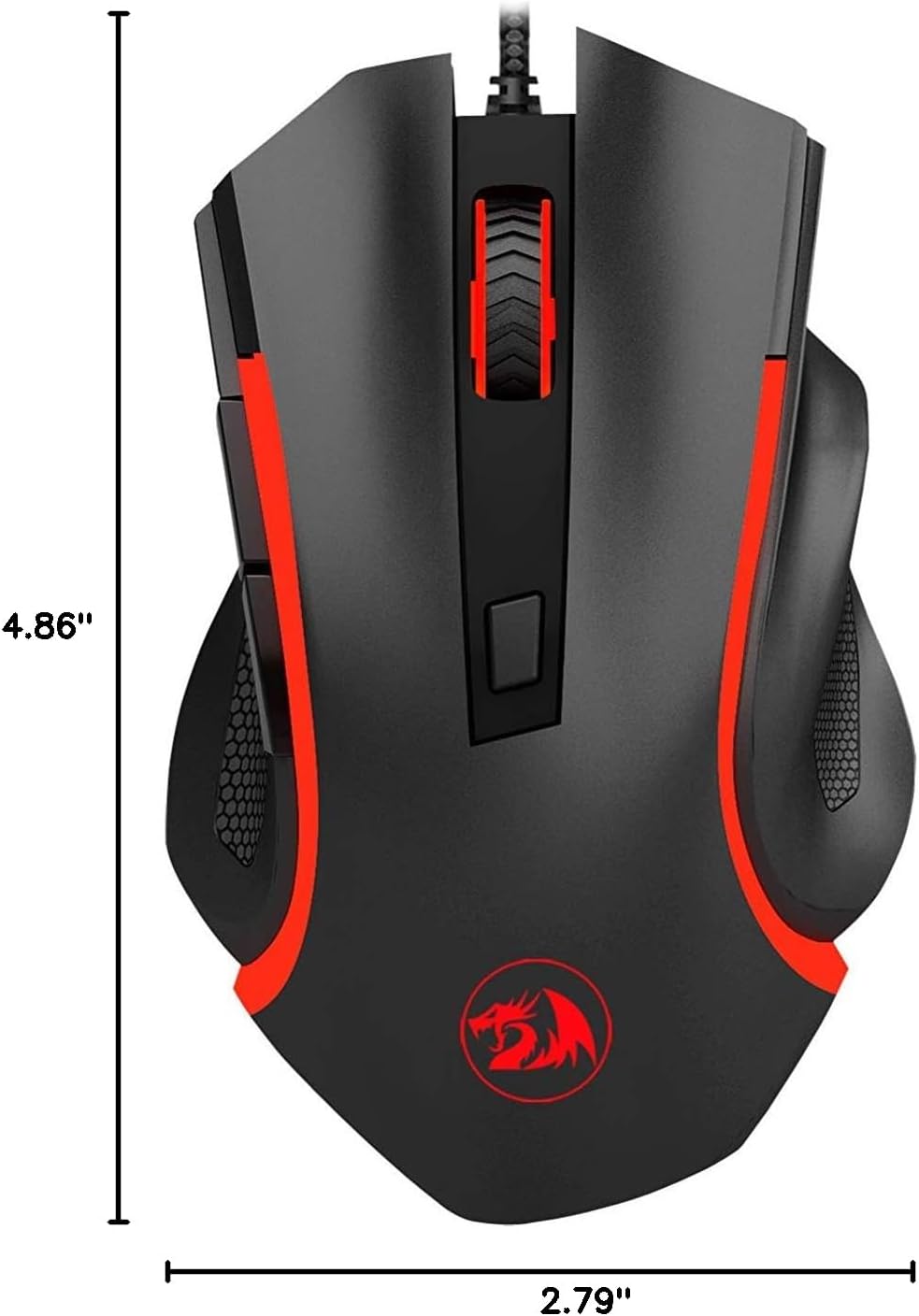
Figure 3: Physical dimensions of the Redragon Nothosaur M606 mouse.
| خاصيت | تفصيل |
|---|---|
| ماڊل نمبر | M606 |
| رابطي ٽيڪنالاجي | وائرڊ (USB) |
| تحريڪ جي سڃاڻپ ٽيڪنالاجي | آپٽيڪل (PMW3168 سينسر) |
| ڊي پي آئي سيٽنگون | 1000 / 1600 / 2400 / 3200 ڊي پي آئي |
| خاص خصوصيت | LED Backlit (4 Colors corresponding to DPI) |
| بٽڻ | 6 (Left, Right, Scroll Click, DPI, 2 Side Buttons) |
| پيداوار جي ماپ | 4.84 x 2.91 x 0.1 انچ (تقريبن 12.3 x 7.4 x 0.25 سينٽي ميٽر) |
| شيءِ جو وزن | 0.01 ounces (approx. 0.28 grams) - Note: This weight seems unusually low and may be a data entry error. Actual weight is likely higher. |
| رنگ | Black with Red accents |
| ٺاهيندڙ | ريڊريگون |
وارنٽي ڄاڻ
Redragon products typically come with a limited manufacturer's warranty. The specific terms and duration of the warranty may vary by region and retailer. Please refer to the warranty card included with your purchase or visit the official Redragon webتفصيلي وارنٽي معلومات ۽ رجسٽريشن جي طريقيڪار لاءِ سائيٽ.
پنهنجي خريداري جو ثبوت (رسيد يا انوائس) رکو ڇو ته اهو ڪنهن به وارنٽي دعوائن لاءِ گهربل هوندو.
حمايت
For further assistance, technical support, or to download the latest drivers and software (if available for your model), please visit the official Redragon support webسائيٽ:
You may also find helpful FAQs and community forums on their webسائيٽ.


