1. تعارف
خريد ڪرڻ لاءِ مهربانيasing the Lenco DIR-150 Internet Radio. This manual provides essential information for setting up, operating, and maintaining your device. Please read it thoroughly before use and retain it for future reference.
2. حفاظت جي ڄاڻ
- باهه يا بجليءَ جي جھٽڪي کان بچڻ لاءِ ڊوائيس کي مينهن يا نمي جي سامهون نه رکو.
- سي نه کوليوasing. سڀني خدمتن کي قابل اهلڪارن جي حوالي ڪريو.
- يونٽ جي چوڌاري مناسب وينٽيليشن کي يقيني بڻايو. وينٽيليشن جي سوراخن کي بند نه ڪريو.
- صرف ڊوائيس سان فراهم ڪيل پاور اڊاپٽر استعمال ڪريو.
- ڊوائيس کي سڌي سج جي روشني، گرمي جي ذريعن، ۽ مضبوط مقناطيسي شعبن کان پري رکو.
- ڊوائيس کي صرف نرم، سڪل ڪپڙي سان صاف ڪريو.
3. پيڪيج مواد
پڪ ڪريو ته سڀئي شيون پيڪيج ۾ موجود آهن:
- Lenco DIR-150 Internet Radio
- ريموٽ ڪنٽرول
- پاور اڊاپٽر
- استعمال ڪندڙ جو دستياب (ھي دستاويز)
4. پراڊڪٽ ختمview
4.1 فرنٽ پينل
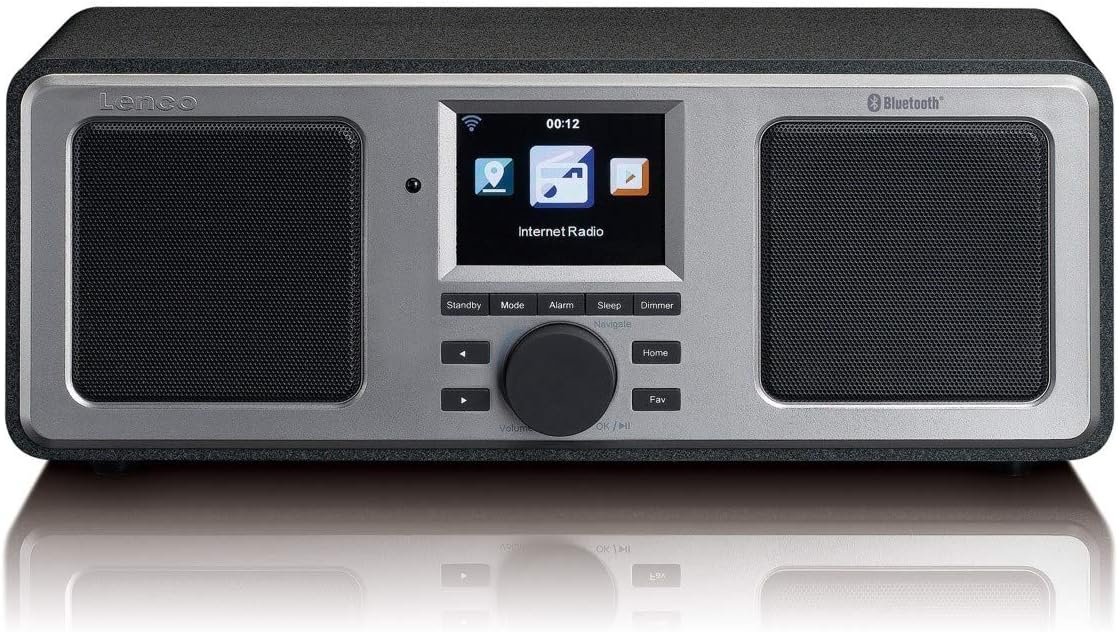
The front panel features a central color display, two integrated speakers, and control buttons. The display shows current mode, station information, time, and menu options. Control buttons include Standby, Mode, Alarm, Sleep, Dimmer, navigation arrows, a rotary knob for volume and selection, Home, and Fav (Favorites).
4.2 ريئر پينل

The rear panel includes the power switch, DC IN port, Line Out, AUX In, and a USB port. An extendable telescopic antenna for FM reception is also located on the rear.
5. سيٽ اپ
5.1 ڳنڍڻ واري طاقت
- Connect the supplied power adapter to the DC IN port on the rear of the DIR-150.
- پاور اڊاپٽر کي وال آئوٽليٽ ۾ لڳايو.
- پوئين پينل تي پاور سوئچ کي 'آن' پوزيشن ڏانهن ڦيرايو.
5.2 اينٽينا لڳائڻ
بهترين ايف ايم ريڊيو جي استقبال لاءِ، يونٽ جي پوئين پاسي واقع ٽيليسڪوپڪ اينٽينا کي مڪمل طور تي وڌايو. بهترين سگنل جي معيار لاءِ ان جي پوزيشن کي ترتيب ڏيو.
5.3 Initial Network Configuration (Wi-Fi)
Upon first power-on, the device will guide you through the initial setup wizard:
- Select your preferred language using the rotary knob and press to confirm.
- ريڊيو موجود وائي فائي نيٽ ورڪن لاءِ اسڪين ڪندو.
- فهرست مان پنھنجي گھر جو وائي فائي نيٽ ورڪ چونڊيو.
- Enter your Wi-Fi password using the rotary knob to select characters and navigation buttons to move. Press the knob to confirm each character and then the final password.
- هڪ ڀيرو ڳنڍيل، ريڊيو هڪ تصديق جو پيغام ڏيکاريندو.
6. آپريٽنگ هدايتون
6.1 بنيادي آپريشن
- پاور آن / آف: کي دٻايو تيار رهو button to switch the unit between standby and operational mode.
- حجم ڪنٽرول: حجم جي سطح کي ترتيب ڏيڻ لاءِ مرڪزي نوب کي گھمايو.
- نيويگيشن: Use the navigation arrows and the rotary knob to browse menus and select options. Press the rotary knob to confirm a selection.
- موڊ: کي دٻايو موڊ button to cycle through available modes (Internet Radio, FM, Bluetooth, USB, AUX).
- گهر: کي دٻايو گهر مين مينيو ڏانھن موٽڻ لاءِ بٽڻ دٻايو.
- Fav (Favorites): کي دٻايو پسند button to access your saved favorite stations.
6.2 انٽرنيٽ ريڊيو
دنيا جي هزارين انٽرنيٽ ريڊيو اسٽيشنن تائين رسائي حاصل ڪريو.
- Select 'Internet Radio' from the main menu.
- Browse stations by location, genre, or search by name.
- Select a station using the rotary knob and press to start playback.
- To save a station as a favorite, navigate to the station and press the پسند بٽڻ
6.3 ايف ايم ريڊيو
Listen to local FM broadcasts.
- کي دٻايو موڊ button until 'FM Radio' is selected.
- The radio will automatically scan for available FM stations.
- Use the navigation arrows to manually tune or select a scanned station.
- The display will show RDS information (station name, program type) if available.
6.4 بلوٽوٿ پلے بیک
پنهنجي بلوٽوٿ-فعال ڊوائيس تان وائرليس طور تي آڊيو اسٽريم ڪريو.
- کي دٻايو موڊ button until 'Bluetooth' is selected. The radio will enter pairing mode.
- On your mobile device, enable Bluetooth and search for 'Lenco DIR-150'.
- Select 'Lenco DIR-150' to pair. Once connected, you can play audio from your device through the radio.
6.5 USB پلے بیک
آڊيو کيڏيو files سڌو USB فليش ڊرائيو مان.
- Insert a USB flash drive into the USB port on the rear panel.
- کي دٻايو موڊ بٽڻ دٻايو جيستائين 'USB' چونڊيو وڃي.
- Browse your audio files (MP3, WAV, AAC formats supported) and select one to play.
6.6 AUX ان پٽ
3.5 ايم ايم آڊيو ڪيبل استعمال ڪندي ٻاهرين آڊيو ڊوائيسز کي ڳنڍيو.
- Connect one end of a 3.5mm audio cable to the AUX IN port on the rear of the DIR-150.
- ٻئي ڇيڙي کي پنهنجي ٻاهرين ڊوائيس جي هيڊ فون جيڪ يا آڊيو آئوٽ پٽ سان ڳنڍيو.
- کي دٻايو موڊ button until 'AUX' is selected.
- پنهنجي ٻاهرين ڊوائيس تان پلے بیک ۽ حجم کي ڪنٽرول ڪريو.
6.7 Media Streaming (UPnP)
Stream music from a PC or NAS (Network Attached Storage) device on your home network.
- Ensure your PC or NAS is configured as a UPnP media server and is on the same Wi-Fi network as the DIR-150.
- Navigate to the 'Media Player' or 'UPnP' option in the radio's menu.
- Select your media server from the list and browse your music library.
7. اضافي خاصيتون
7.1 الارم گھڙي
Set up to two independent alarms.
- کي دٻايو الارم بٽڻ
- Select 'Alarm 1' or 'Alarm 2' and configure the time, alarm source (buzzer or radio), and frequency (daily, once, weekends, weekdays).
- Press the rotary knob to confirm settings.
- To snooze an active alarm, press the سنوارڻ button (usually the rotary knob).
7.2 سمهڻ جو ٽائيم
مخصوص مدت کان پوءِ ريڊيو کي خودڪار طريقي سان بند ڪرڻ لاءِ سيٽ ڪريو.
- کي دٻايو سمهڻ بٽڻ
- Select the desired sleep duration (e.g., 15, 30, 60 minutes).
- The radio will count down and enter standby mode when the timer expires.
7.3 موسم جي اڪٿي
View local weather forecasts for the next 5 days.
- Navigate to the 'Weather' option in the main menu.
- Select your location to view اڳڪٿي.
8. سار سنڀال
- صفائي: Disconnect the power before cleaning. Use a soft, dry, lint-free cloth to wipe the exterior. Do not use abrasive cleaners or solvents.
- اسٽوريج: If not used for an extended period, unplug the device and store it in a cool, dry place.
9. مسئلا حل ڪرڻ
| مسئلو | ممڪن سبب | حل |
|---|---|---|
| طاقت نه آهي | Power adapter not connected; Power switch off | Ensure adapter is securely connected and power switch is ON. |
| انٽرنيٽ ڪنيڪشن ناهي | Incorrect Wi-Fi password; Router issue; Out of range | Re-enter Wi-Fi password; Restart router; Move radio closer to router. |
| ناقص ايف ايم استقبال | Antenna not extended or positioned correctly | ٽيليسڪوپڪ اينٽينا کي مڪمل طور تي وڌايو ۽ ترتيب ڏيو. |
| بلوٽوٿ جوڙڻ ناڪام ٿيو | Device not in pairing mode; Other device already connected | Ensure radio is in Bluetooth mode; Disconnect from other devices; Restart both devices. |
| USB پلے بیک ڪم نه ڪري رهيو آهي | اڻ سڌريل file format; USB drive not recognized | يقين ڏياريو files are MP3, WAV, or AAC; Try a different USB drive. |
10. وضاحتون
- ماڊل: ڊي- 150
- ٻاھر نڪرڻ جي طاقت: 16 ڊبليو (آر ايم ايس)
- ڏيکاريو: 2.8 انچ رنگ ڊسپلي
- رابطي: Wi-Fi, Bluetooth, USB, AUX (3.5mm), Line-Out
- ريڊيو بينڊ: Internet Radio, FM (PLL Tuner)
- سپورٽ ٿيل آڊيو فارميٽ: MP3, WAV, AAC (for USB/Streaming)
- بجلي جي فراهمي: AC اڊاپٽر (شامل)
- طول و عرض (W x D x H): 310 x 126 x 116 ملي ميٽر
- وزن: 1.52 ڪلو
- خاصيتون: Alarm Clock (2 alarms), Snooze, Sleep Timer, Weather Forecast, UPnP Streaming
11. وارنٽي ۽ سپورٽ
Lenco products are manufactured to high quality standards. In the unlikely event of a defect, Lenco provides a warranty in accordance with the laws of the country of purchase. For specific warranty terms and conditions, please refer to the warranty card included with your product or visit the official Lenco website. For technical support or service inquiries, please contact your retailer or the Lenco customer service department.


