1. تعارف
خريد ڪرڻ لاءِ مهربانيasing the Sharp HT-SB140MT 2.0 150W Soundbar. This soundbar is designed to enhance your audio experience, providing clear and powerful sound for your television, music, and other media. With its sleek design and versatile connectivity options, including Bluetooth, HDMI ARC/CEC, Optical, and Auxiliary inputs, it integrates seamlessly into any home entertainment setup. This manual provides essential information for safe and effective use, including setup, operation, maintenance, and troubleshooting.
2. حفاظت جي ڄاڻ
- طاقت جو ذريعو: بجلي جي فراهمي کي يقيني بڻائيtage matches the requirements specified on the soundbar. Use only the provided power cable.
- وينٽيليشن: ڪنهن به وينٽيليشن جي سوراخن کي نه روڪيو. مناسب هوا جي وهڪري لاءِ سائونڊ بار جي چوڌاري مناسب جاءِ برقرار رکو.
- پاڻي ۽ نمي: سائونڊ بار کي ٽِپڪندڙ يا ڇِپڪڻ واري پاڻيءَ جي سامهون نه رکو. مائع سان ڀريل شيون، جهڙوڪ گلدان، اپريٽس تي نه رکو.
- گرمي: Do not place the soundbar near heat sources such as radiators, heat registers, stoves, or other apparatus (including ampلائفائرز) جيڪي گرمي پيدا ڪن ٿا.
- صفائي: Unplug the soundbar from the power outlet before cleaning. Use a dry, soft cloth for cleaning. Do not use liquid cleaners or aerosol cleaners.
- خدمت ڪرڻ: ھن پراڊڪٽ کي پنھنجي خدمت ڪرڻ جي ڪوشش نه ڪريو. س servني خدمتن جو حوالو ڏيو قابل سروس اهلڪارن کي.
- بيٽريون: The remote control uses a CR2 battery. Ensure correct polarity when inserting batteries. Do not mix old and new batteries.
3. پيڪيج مواد
مھرباني ڪري چيڪ ڪريو ته سڀ شيون پيڪيج ۾ موجود آھن:
- Sharp HT-SB140MT Soundbar
- ريموٽ ڪنٽرول
- پاور ڪيبل
- استعمال ڪندڙ جو دستياب (ھي دستاويز)
4. پراڊڪٽ ختمview

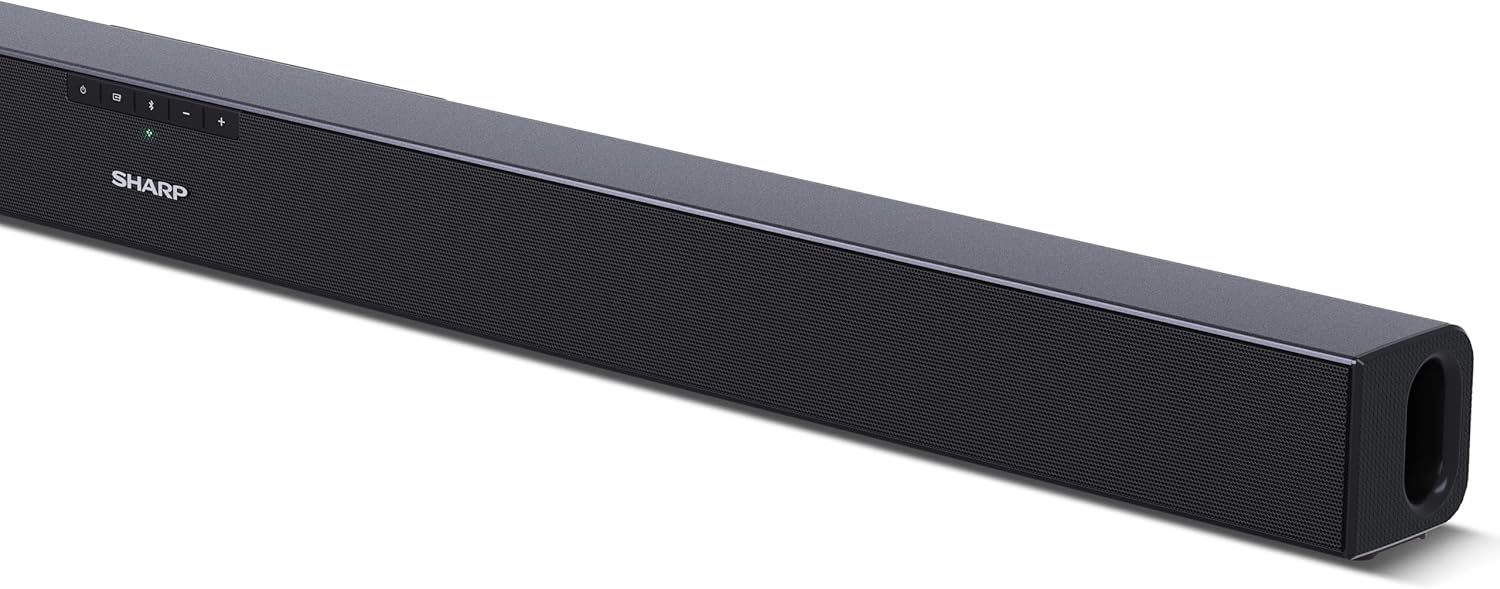
شڪل 4.1: سامهون View
The front of the soundbar features the Sharp logo and LED indicators for source selection and status. Control buttons for power, input, and volume are located on the top panel.
شڪل 4.2: پوئتي View (ڪنيڪشن)
The rear panel provides all necessary connection ports: HDMI ARC, Optical (S/PDIF), and Auxiliary (3.5mm) input, along with the power input.

شڪل 4.3: ريموٽ ڪنٽرول
The included remote control allows for convenient operation of the soundbar, including power, input selection, volume, bass, and treble adjustments.
5. سيٽ اپ
5.1 لڳائڻ
The Sharp HT-SB140MT Soundbar can be placed on a flat surface, such as a TV stand, or wall-mounted. Its slim profile of 6 cm allows it to fit easily under most TV screens without obstructing the view.

Figure 5.1: Soundbar Placement
The soundbar is ideally positioned directly in front of your television for optimal sound projection.
5.2 توهان جي ٽي وي سان ڳنڍڻ
ھيٺ ڏنل ڪنيڪشن طريقن مان ھڪڙو چونڊيو:
- HDMI ARC/CEC (Recommended): Connect an HDMI cable (not included) from the HDMI ARC port on your TV to the HDMI ARC port on the soundbar. This allows your TV remote to control the soundbar's volume and power. Ensure HDMI ARC/CEC is enabled in your TV's settings.
- Digital Optical Audio (S/PDIF): Connect an optical cable (not included) from the Optical Out port on your TV to the OPTICAL IN port on the soundbar. Select the Optical input on the soundbar.
- معاون (AUX): Connect a 3.5mm audio cable (not included) from the headphone jack or AUX Out port on your TV to the AUX IN port on the soundbar. Select the AUX input on the soundbar.
5.3 پاور ڪنيڪشن
After connecting the audio cable, plug the power cable into the soundbar's power input and then into a wall outlet (220-240V / 50Hz).
6. آپريٽنگ هدايتون
6.1 پاور آن/آف
يونٽ کي آن يا آف ڪرڻ لاءِ سائونڊ بار يا ريموٽ ڪنٽرول تي پاور بٽڻ کي دٻايو.
6.2 ماخذ جي چونڊ
Press the Input button on the soundbar or the remote control repeatedly to cycle through the available input sources: HDMI ARC, Optical, AUX, and Bluetooth. The LED indicator on the soundbar will change to reflect the selected source.
6.3 حجم جي ترتيب
Use the Volume Up (+) and Volume Down (-) buttons on the soundbar or the remote control to adjust the sound level.
6.4 بلوٽوٽ جوڙي
بلوٽوت ڊوائيس کي ڳنڍڻ لاء:
- Select Bluetooth input on the soundbar. The Bluetooth LED indicator will flash, indicating pairing mode.
- On your smart device (smartphone, tablet, etc.), enable Bluetooth and search for available devices.
- Select "SHARP HT-SB140MT" from the list of devices.
- Once connected, the Bluetooth LED indicator will stop flashing and remain solid. You can now stream audio wirelessly to the soundbar.
6.5 آواز جا طريقا (برابر ڪندڙ)
The soundbar features an equalizer with different sound modes to optimize audio for various content types. Use the EQ button on the remote control to cycle through these modes (e.g., Movie, Music, News). You can also adjust Bass and Treble levels using dedicated buttons on the remote.
7. سار سنڀال
7.1 صفائي
To clean the soundbar, unplug it from the power outlet. Use a soft, dry, lint-free cloth to wipe down the surfaces. Do not use abrasive cleaners, waxes, or solvents as they may damage the finish.
7.2 اسٽوريج
If you plan to store the soundbar for an extended period, disconnect it from the power supply and store it in a cool, dry place, away from direct sunlight and extreme temperatures.
8. مسئلا حل ڪرڻ
جيڪڏهن توهان کي پنهنجي سائونڊ بار سان مسئلا درپيش اچن ٿا، ته هيٺ ڏنل عام مسئلن ۽ حلن جو حوالو ڏيو:
| مسئلو | ممڪن سبب | حل |
|---|---|---|
| سائونڊ بار مان ڪو به آواز ناهي. | سائونڊ بار بند يا خاموش آهي. غلط ان پٽ سورس چونڊيو ويو آهي. ڪيبل صحيح طرح سان ڳنڍيل نه آهن. ٽي وي آڊيو آئوٽ پٽ سيٽنگون غلط آهن. | پڪ ڪريو ته سائونڊ بار آن آهي ۽ خاموش نه آهي. Select the correct input source (HDMI ARC, Optical, AUX). Check all cable connections (HDMI, Optical, AUX). Verify your TV's audio output settings are set to external speakers or the correct digital output. |
| بلوٽوٿ ڊوائيس ڳنڍجي نٿو سگهي. | سائونڊ بار پيئرنگ موڊ ۾ ناهي. ڊوائيس حد کان ٻاهر آهي. ٻين ڊوائيسز کان مداخلت. | Ensure the soundbar is in Bluetooth input mode and the LED is flashing. Move your Bluetooth device closer to the soundbar (within 10 meters). Turn off other Bluetooth devices nearby. Try unpairing and re-pairing. |
| ريموٽ ڪنٽرول ڪم نه ڪري رهيو آهي. | Battery is low or inserted incorrectly. ريموٽ ۽ سائونڊ بار جي وچ ۾ رڪاوٽ. Remote control is faulty. | Replace the CR2 battery and ensure correct polarity. Remove any obstructions between the remote and the soundbar's sensor. جيڪڏهن مسئلا جاري رهي، ڪسٽمر سپورٽ سان رابطو ڪريو. |
9. وضاحتون
| ماڊل نالو | HT-SB140 (MT) |
| اسپيڪر جو قسم | سائونڊ بار |
| چوڌاري آواز چينل جي جوڙجڪ | 2.0 |
| وڌ ۾ وڌ اسپيڪر آئوٽ پُٽ پاور | 150 واٽ |
| تعدد جواب | 60 هز |
| رابطي ٽيڪنالاجي | Bluetooth, HDMI ARC/CEC, Digital Optical Audio (S/PDIF), 3.5mm Auxiliary (AUX) |
| وائرليس ڪميونيڪيشن ٽيڪنالاجي | بلوٽوٿ |
| وڌ ۾ وڌ حد (بلوٽوٿ) | 10 ميٽر |
| ڪنٽرول جو طريقو | ريموٽ ڪنٽرول |
| طاقت جو ذريعو | AC (Mains) |
| انٽ واليمtage | 220-240 وولٽ |
| رنگ | ڪارو |
| مواد | پلاسٽڪ، ڌاتو |
| چڙهڻ جو قسم | ڀت جبل، ٽيبل ٽاپ |
| پيداوار جي ماپ (L x W x H) | 95 x 6 x 6 سينٽي |
| شيءِ جو وزن | 1.5 ڪلوگرام |
| شامل اجزاء | ريموٽ ڪنٽرول |
| بيٽري گھربل | 1 CR2 بيٽري |
| پنروڪ | نه |
| اسپيئر پارٽس جي دستيابي | 5 سال |
| سافٽ ويئر اپڊيٽ جي ضمانت جيستائين | معلومات دستياب ناهي |
10. وارنٽي ۽ سپورٽ
The Sharp HT-SB140MT Soundbar comes with a Limited Warranty. Please refer to the warranty card included in your package for specific terms and conditions. Spare parts are available for up to 5 years from the date of purchase.
For technical support, service, or warranty claims, please contact Sharp customer service through their official website or the contact information provided in your product documentation. When contacting support, please have your product model number (HT-SB140(MT)) and purchase details ready.


