تعارف
The Akuvox SP-R50 is a business IP phone designed to provide high-quality, cost-effective communication solutions. It features HD Voice, a 2.3-inch 132x64 graphical LCD with backlight, and supports 3-way conferencing. This manual provides essential information for setting up, operating, maintaining, and troubleshooting your SP-R50 IP phone.
پيڪيج مواد
شروع ڪرڻ کان اڳ، مھرباني ڪري تصديق ڪريو ته سڀئي شيون پيڪيج ۾ موجود آھن:
- IP Phone (Akuvox SP-R50) x 1
- اسٽينڊ x 1
- Handset with Cord x 1
- ايٿرنيٽ ڪيبل x 1
- پاور اڊاپٽر x 1
سيٽ اپ ڪريو
Follow these steps to set up your Akuvox SP-R50 IP Phone:
- اسٽينڊ کي ڳنڍيو: Securely attach the stand to the back of the IP phone.
- هينڊ سيٽ ڳنڍيو: ڪوئل ٿيل هينڊ سيٽ جي ڪنڊ جي هڪ ڇيڙي کي هينڊ سيٽ ۾ ۽ ٻئي ڇيڙي کي فون بيس تي هينڊ سيٽ پورٽ ۾ لڳايو.
- نيٽ ورڪ سان نيو:
- If using Power over Ethernet (PoE), connect one end of the Ethernet cable to the LAN port on the phone and the other end to a PoE-enabled network switch or router.
- If not using PoE, connect one end of the Ethernet cable to the LAN port on the phone and the other end to your network switch or router. Then, connect the power adapter to the phone's power port and plug it into a power outlet.
- شروعاتي بوٽ اپ: The phone will power on automatically. The LCD screen will display the boot-up sequence. Once complete, it will attempt to obtain an IP address and register with your SIP server.
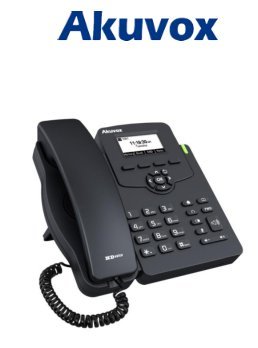
Image: Akuvox SP-R50 Business IP Phone, showing the main unit with the handset resting on its cradle and the stand attached, ready for setup.
آپريٽنگ هدايتون
This section covers the basic operation of your Akuvox SP-R50 IP Phone.
ڪالون ٺاهڻ ۽ وصول ڪرڻ
- ڪال ڪرڻ لاءِ: Pick up the handset or press the Speaker button. Dial the desired number and press the ڊائل or # چاٻي
- ڪال وصول ڪرڻ لاءِ: هٿ کي کڻي يا پريس کي اسپيڪر جڏهن فون جي گھنٽي وڄي ته بٽڻ دٻايو.
- ڪال ختم ڪرڻ لاءِ: هينڊ سيٽ کي رکو يا دٻايو اسپيڪر بٽڻ
ڪال خصوصيتون
- ڪال جو انتظار: Allows you to answer a second incoming call while on an active call.
- ڪال فارورڊ: Redirects incoming calls to another number.
- ڪال جي منتقلي: هڪ فعال ڪال کي ٻي پارٽي ڏانهن منتقل ڪري ٿو.
- ڪال آن هولڊ: هڪ فعال ڪال کي هولڊ تي رکي ٿو.
- خاموش: ڪال دوران توهان جي مائڪروفون کي ميوٽ ڪري ٿو.
- خودڪار جواب: Configures the phone to automatically answer incoming calls.
- ٻيهر ورجائڻ آخري ڪال ڪيل نمبر ڊائل ڪري ٿو.
- پريشان نه ڪريو (DND): Blocks all incoming calls.
- Local 3-Way Conference: Allows you to conduct a three-way conference call.
Phonebook and Settings
- فون بڪ: The phone supports a phonebook of up to 500 groups and 5 remote phone book URLs. Access and manage contacts through the menu.
- حجم جي ترتيب: Use the volume keys on the phone to adjust the handset, speaker, or ringer volume.
- رنگ ٽون: Select from various ring tones through the phone's settings menu.
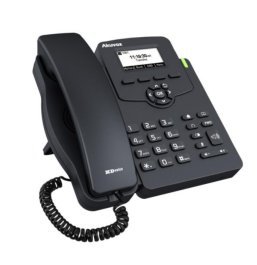
Image: Akuvox SP-R50 Business IP Phone, showcasing its ergonomic design and key layout from a slightly elevated angle, highlighting the display and navigation buttons.
سار سنڀال
مناسب سار سنڀال توهان جي IP فون جي ڊگهي عمر ۽ بهترين ڪارڪردگي کي يقيني بڻائي ٿي.
- صفائي: فون جي مٿاڇري کي صاف ڪرڻ لاءِ نرم، سڪل ڪپڙو استعمال ڪريو. ضدي نشانن لاءِ، ٿورو ڊيampen the cloth with water. Do not use harsh chemicals, abrasive cleaners, or solvents.
- ماحول: Keep the phone away from direct sunlight, excessive heat sources, and moisture. Ensure it is placed on a stable surface to prevent accidental falls.
- ڪيبل: Periodically check all connected cables (handset, Ethernet, power) for any signs of wear or damage. Replace damaged cables immediately.
مشڪلاتون
If you encounter issues with your Akuvox SP-R50, refer to the following common problems and solutions:
| مسئلو | ممڪن سبب | حل |
|---|---|---|
| فون آن نٿو ٿئي. | ڪو به پاور ڪنيڪشن يا ناقص پاور اڊاپٽر/PoE ناهي. | Check if the power adapter is securely plugged in or if the Ethernet cable is connected to a PoE-enabled port. Try a different power outlet or PoE port. |
| ڪوبه ڊائل ٽون. | نيٽ ورڪ ڪنيڪشن جو مسئلو يا SIP رجسٽريشن ناڪامي. | Verify the Ethernet cable is properly connected. Check the network status on the phone's display. Contact your network administrator or SIP service provider if the issue persists. |
| ڪالون نه ٿو ڪري سگھجي ۽ نه ئي وصول ڪري سگھجي ٿو. | SIP registration failed, DND enabled, or network problem. | Ensure the phone is registered (check display). Disable DND if active. Confirm network connectivity. |
| خراب ڪال معيار (گونج، جامد). | نيٽ ورڪ جي بندش يا مداخلت. | Ensure your network has sufficient bandwidth. Avoid placing the phone near other electronic devices that may cause interference. |
وضاحتون
Key technical specifications for the Akuvox SP-R50 Business IP Phone:
| خاصيت | وصف |
|---|---|
| برانڊ | اڪيواڪس |
| ماڊل | Akuvox SP-R50 |
| ڏيکاريو | 2.3'' 132*64 Graphical LCD with Backlight |
| SIP اڪائونٽس | 1 Line (Support 1 SIP account) |
| آواز جون خاصيتون | HD Voice, 3-Way Conference |
| فون بڪ ظرفيت | 500 groups, 5 Remote Phone Book URL حمايت ڪئي |
| ڪال لاگز | 100 داخلائون |
| طاقت | PoE Support, Power Adapter (included) |
| خاص خاصيتون | Call Waiting, Call Forward, Call Transfer, Call on Hold, Mute, Auto-answer, Redial, DND, Speed Dial, Hotline, Direct IP call, Music on hold, Intercom, Call Pickup, Group Call Pickup, Anonymous Call, Anonymous Call Rejection |
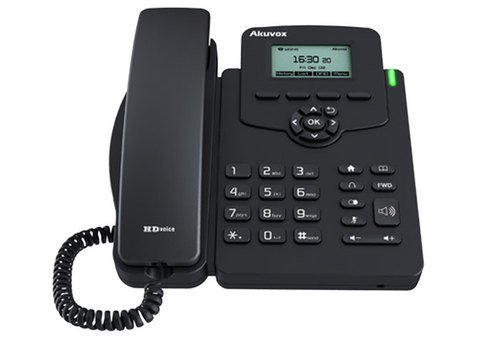
تصوير: سامهون view of the Akuvox SP-R50 Business IP Phone, clearly showing the display, navigation keys, and numeric keypad.
وارنٽي ڄاڻ
The Akuvox SP-R50 Business IP Phone comes with a 2 سال وارنٽي from the date of purchase. This warranty covers manufacturing defects and malfunctions under normal use. Please retain your proof of purchase for warranty claims. For detailed terms and conditions, refer to the warranty card included with your product or contact Akuvox customer support.
حمايت
If you require further assistance or have questions not covered in this manual, please contact your vendor or Akuvox customer support. You may also visit the official Akuvox website for additional resources and frequently asked questions.


