1. تعارف
جي ViewSonic PX706HD is a 1080p short throw projector designed for versatile entertainment and gaming. It delivers large, immersive images in various environments, including smaller rooms, thanks to its short throw lens. This manual provides essential information for setting up, operating, and maintaining your projector.
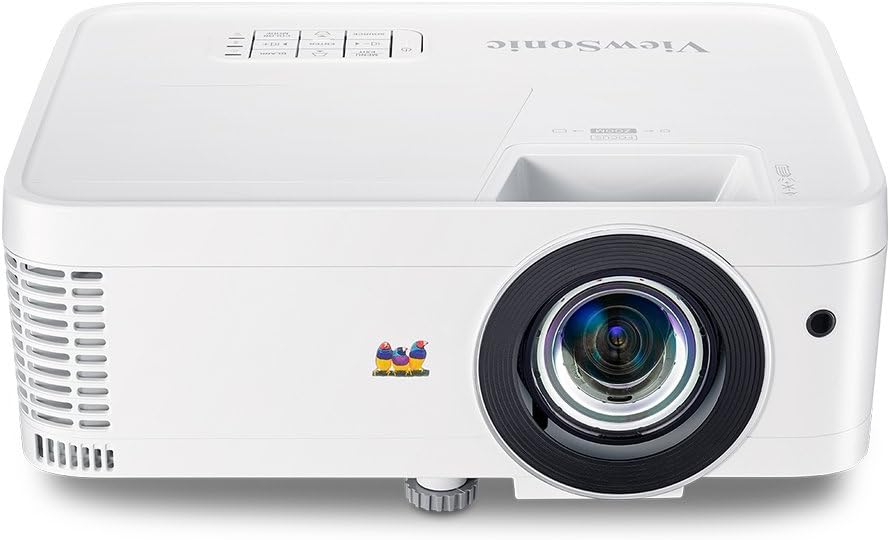
شڪل 1.1: سامهون view جو ViewSonic PX706HD Projector.
2. پيڪيج مواد
تصديق ڪريو ته هيٺ ڏنل سڀئي شيون توهان جي پراڊڪٽ پيڪيج ۾ شامل آهن:
- PX706HD پروجيڪٽر
- پاور ڪنڊ
- USB قسم سي ڪيبل
- ريموٽ ڪنٽرول
- استعمال ڪندڙ جو دستياب (ھي دستاويز)

Figure 2.1: Items included in the PX706HD package.
3. پراڊڪٽ ختمview
جي ViewSonic PX706HD projector offers a range of features for an enhanced viewراند ۽ راند جو تجربو:
- High Brightness & Resolution: 3000 Lumens and Full HD 1920x1080 resolution for vivid, ultra-sharp images.
- شارٽ اڇلائي لينس: Project large images (up to 100 inches) from a short distance, ideal for smaller rooms.
- گھٽ ان پٽ ليٽنسي: 16ms input latency ensures faster frame-by-frame action for smooth gameplay without delay.
- Cinematic Colors: Exclusive Color technology provides a wide color gamut for accurate and vibrant image production.
- لچڪدار ڪنيڪشن: Supports various devices via Dual HDMI, USB-C, and other inputs.
- Full HD 3D Compatibility: Enjoy 3D movies and games.
- اندروني اسپيڪر: Delivers room-filling sound for an immersive audiovisual experience.

Figure 3.1: High brightness and 1080p resolution for clear images.

Figure 3.2: Low input latency for responsive gaming.
4. سيٽ اپ
4.1 پروجيڪٽر جي جاءِ
The PX706HD features a short throw lens, allowing for large images from a close distance. Refer to the diagram below for typical projection distances and screen sizes.
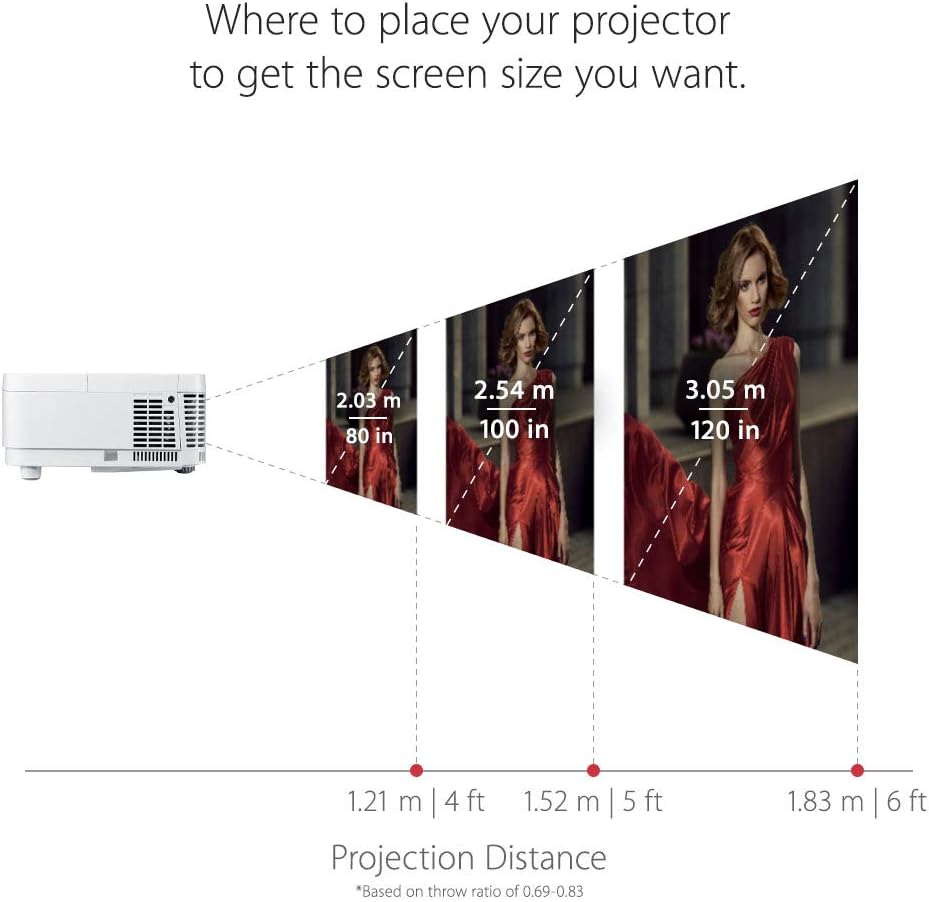
Figure 4.1: Recommended projection distances for various screen sizes.
4.2 ڳنڍڻ وارا آلات
The projector offers multiple connectivity options. Identify the appropriate port for your device:
- HDMI: Connect media players, gaming consoles, PCs, and Macs.
- USB-سي: Connect compatible mobile devices for video streaming and gaming.
- VGA: پراڻن ڪمپيوٽر ڪنيڪشن لاءِ.
- آڊيو اندر/آئوٽ: ٻاهرين آڊيو سسٽم لاءِ.

شڪل 4.2: پوئين پينل ڪنيڪٽوٽي پورٽ.
4.3 شروعاتي پاور آن
- پاور ڪنڊ کي پروجيڪٽر ۽ پاور آئوٽ سان ڳنڍيو.
- پروجيڪٽر يا ريموٽ ڪنٽرول تي پاور بٽڻ کي دٻايو ان کي آن ڪرڻ لاءِ.
- Adjust the focus and zoom using the rings on the projector lens.
- Use the menu to adjust keystone correction if the image is distorted.
5. پروجيڪٽر هلائڻ
5.1 پاور آن/آف
کي دٻايو طاقت button once to turn the projector on. Press it twice to turn it off. The projector will go through a cool-down cycle before completely shutting down.
5.2 ماخذ جي چونڊ
استعمال ڪريو ذريعو button on the remote control or the projector's control panel to cycle through available input sources (HDMI 1, HDMI 2, USB-C, VGA, etc.).
5.3 تصويري ترتيب
Access the On-Screen Display (OSD) menu by pressing the مينيو / نڪرڻ button. Navigate using the arrow keys and confirm selections with the داخل ڪريو button. Adjust settings such as:
- چمڪ/ برعڪس: تصوير جي چمڪ ۽ فرق کي بهتر بڻايو.
- رنگ موڊ: Select pre-set modes (e.g., Movie, Game, Standard) or customize.
- چاٻي Correct trapezoidal image distortion.
- تناسب تناسب: Adjust the image display ratio.
6. گيمنگ جون خاصيتون
The PX706HD is optimized for gaming with features designed to enhance your experience:
- Ultra-Low Input Latency: A 16ms input latency minimizes delay between your input and the on-screen action, crucial for fast-paced games.
- گیمنگ موڊ: Activates enhanced colors and contrast specifically tuned for gaming visuals.
- USB-C ڪنيڪشن: Directly connect compatible mobile devices for large-screen gaming.
وڊيو 6.1: ختمview جو ViewSonic PX706HD's gaming capabilities, highlighting low input lag and immersive experience.
Video 6.2: Demonstrates an ultimate gaming setup using the PX706HD projector with an Xbox 360.
7. سار سنڀال
Regular maintenance ensures optimal performance and longevity of your projector:
- Lamp زندگي: پروجيڪٽر ايلamp has a life of up to 15,000 hours in SuperEco Mode. Replace the lamp when its brightness significantly diminishes.
- صفائي: Regularly clean the projector lens with a soft, lint-free cloth. Ensure air vents are clear of dust and obstructions to prevent overheating.
- اسٽوريج: جڏهن گهڻي عرصي تائين استعمال ۾ نه هجي، ته پروجيڪٽر کي ٿڌي، سڪل جاءِ تي، مٽيءَ کان محفوظ رکو.
8. مسئلا حل ڪرڻ
If you encounter issues with your projector, try the following basic troubleshooting steps:
- طاقت ناهي: Ensure the power cord is securely connected and the power outlet is functional.
- ڪابه تصوير: Verify the input source is correctly selected and the connected device is powered on and outputting a signal. Check all cable connections.
- ڌنڌلي تصوير: Adjust the focus ring on the projector lens. Ensure the projection surface is flat.
- تصوير جي تحريف: Use the keystone correction feature in the OSD menu to correct trapezoidal images.
- گهڻو گرم ٿيڻ: Ensure the projector's air vents are not blocked and there is adequate ventilation around the unit.
For more detailed troubleshooting or persistent issues, please refer to the comprehensive user manual provided with your product or contact Viewسونڪ ڪسٽمر سپورٽ.
9. وضاحتون
| خاصيت | تفصيل |
|---|---|
| پيداوار جي ماپ | 8.66 x 4.53 x 11.53 انچ |
| شيءِ جو وزن | 5.94 پائونڊ |
| شيون ماڊل نمبر | PX706 ايڇ ڊي |
| بيٽريون | 2 AAA بيٽريون گھربل (ريموٽ لاءِ) |
| تاريخ پهرين دستياب | اپريل 9، 2018 |
| ٺاهيندڙ | Viewسونڪ |
| برانڊ | Viewسونڪ |
| مصنوعات لاءِ سفارش ڪيل استعمال | گيمنگ |
| خاص خصوصيت | بلٽ ان 3D |
| رابطي ٽيڪنالاجي | يو ايس بي، ايڇ ڊي ايم آءِ، وي جي اي |
| ڊسپلي قرارداد | 1920 x 1080 (مڪمل HD) |

شڪل 9.1: پروجيڪٽر جا طول و عرض.
10. وارنٽي ۽ سپورٽ
For warranty information and technical support, please refer to the warranty card included in your product packaging or visit the official Viewسونڪ webسائيٽ. وارنٽي جي دعوي لاء توهان جي خريداري جي رسيد رکو.


