1. تعارف
Thank you for choosing the Taylor Weather Frcster WiFi. This device provides real-time indoor and outdoor temperature and humidity readings, barometric pressure, and a weather forecast, all accessible via a clear display and a dedicated mobile application. This manual will guide you through the setup, operation, and maintenance of your new weather forecaster to ensure optimal performance.
2. پراڊڪٽ ختمview
The Taylor Weather Frcster WiFi system consists of a main display unit and a wireless remote sensor. The main unit displays all weather data and connects to your home Wi-Fi network, while the remote sensor collects outdoor temperature and humidity data.
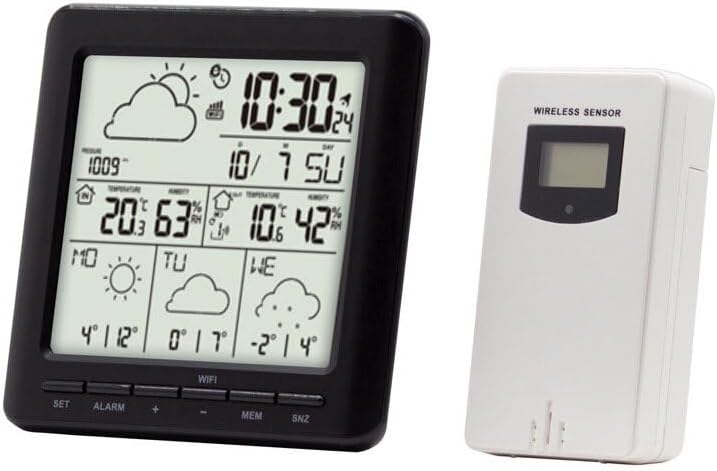
Image: The main display unit (left) shows time, date, indoor/outdoor temperature and humidity, barometric pressure, and weather forecast icons. The wireless remote sensor (right) transmits outdoor data to the main unit.
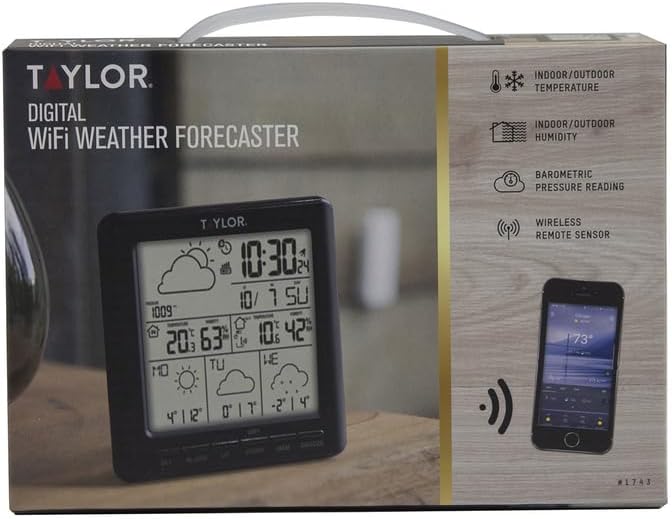
Image: The product packaging highlights key features such as indoor/outdoor temperature and humidity, barometric pressure reading, and wireless remote sensor connectivity.
3. سيٽ اپ
3.1 کولڻ
- احتياط سان پيڪنگنگ مان سڀني اجزاء کي هٽايو.
- Verify that you have the main display unit and the wireless remote sensor.
3.2 مکيه يونٽ کي طاقت ڏيڻ
- The main unit is powered by a corded electric connection.
- Plug the provided power adapter into the main unit and then into a standard electrical outlet. The display should illuminate.
3.3 Installing Batteries in the Wireless Sensor
- Locate the battery compartment on the back of the wireless sensor.
- Insert the required batteries (typically AA or AAA, not included) according to the polarity indicators (+/-).
- بيٽري جي ڪمري کي محفوظ طور تي بند ڪريو.
3.4 سينسر لڳائڻ
- Place the wireless sensor outdoors in a location protected from direct sunlight and precipitation. A shaded, well-ventilated area is ideal for accurate temperature and humidity readings.
- Ensure the sensor is within the effective transmission range of the main unit (typically up to 200 feet, line of sight). Avoid large metal objects or thick walls between the sensor and the main unit.
3.5 ايپ ڊائون لوڊ ۽ وائي فائي ڪنيڪشن
- To access full features, including detailed forecasts and historical data, download the companion mobile application (e.g., "WeatherSense" or similar, as indicated in the product packaging or quick start guide) from your device's app store (Apple App Store for iOS, Google Play Store for Android).
- Follow the in-app instructions to create an account and connect your Taylor Weather Frcster WiFi to your home Wi-Fi network. This process typically involves putting the main unit into pairing mode and entering your Wi-Fi credentials into the app.
- Ensure your Wi-Fi network is 2.4GHz, as some devices may not support 5GHz networks.
4. آپريٽنگ هدايتون
4.1 معلومات ڏيکاري
Once powered on and connected, the main unit display will show the following information:
- وقت ۽ تاريخ: وائي فائي ذريعي خودڪار طريقي سان هم وقت سازي ڪئي وئي.
- Indoor Temperature and Humidity: مکيه يونٽ ذريعي ماپيل.
- Outdoor Temperature and Humidity: Transmitted from the wireless sensor.
- بارووميٽرڪ پريشر: Indicates atmospheric pressure trends.
- موسم جي اڳڪٿي جون نشانيون: Displays predicted weather conditions (e.g., sunny, cloudy, rainy) for the next 12-24 hours based on barometric pressure changes.
4.2 بٽڻ جا ڪم
The main unit features several buttons for basic control:
- سيٽ: Used to enter settings mode for manual adjustments (e.g., time, date, units).
- الارم: الارم فنڪشن کي چالو يا غير فعال ڪري ٿو.
- ايم ايم: Displays maximum/minimum temperature and humidity records.
- SNZ: Snooze button for the alarm.
4.3 Using the Mobile Application
The mobile application provides enhanced functionality:
- View current and historical weather data remotely.
- Access more detailed weather forecasts.
- Customize settings and alerts.
- Manage multiple devices (if applicable).
5. سار سنڀال
5.1 صفائي
- مکيه يونٽ ۽ سينسر کي نرم، ڊي سان صاف ڪريوamp ڪپڙو. استعمال نه ڪريو abrasive cleaners يا solvents.
- پڪ ڪريو ته ڊوائيس جي سوراخن ۾ نمي داخل نه ٿئي.
5.2 Battery Replacement (Wireless Sensor)
- When the sensor's battery indicator appears on the main unit display, replace the batteries promptly.
- Open the battery compartment, remove old batteries, and insert new ones, observing correct polarity.
- پراڻين بيٽرين کي ذميواري سان ختم ڪريو.
5.3 بهترين جڳهه
- Periodically check the outdoor sensor's placement to ensure it remains protected from direct elements and provides accurate readings.
- Ensure the main unit is placed on a stable, flat surface indoors, away from direct heat sources or air conditioning vents that could affect indoor temperature readings.
6. مسئلا حل ڪرڻ
6.1 No Forecast Information / Blank Screen Section
- Check App Connection: Ensure the device is properly connected to your Wi-Fi network via the mobile application. The forecast data is typically retrieved online.
- ايپ ڪارڪردگي: Verify that the mobile application is up-to-date and functioning correctly. Some users have reported issues with the app's ability to retrieve forecast data.
- انٽرنيٽ ڪنيڪشن: Confirm your home Wi-Fi has an active internet connection.
- Server Issues: Occasionally, the forecast data server may experience downtime. This is usually temporary.
6.2 Wireless Sensor Not Connecting / Incorrect Outdoor Readings
- بيٽري چيڪ ڪريو: Ensure the wireless sensor has fresh batteries installed with correct polarity.
- حد: Move the sensor closer to the main unit to confirm it's within range.
- مداخلت: Avoid placing the sensor near large metal objects, thick walls, or other electronic devices that might cause interference.
- ٻيهر جوڙيو: Refer to the quick start guide or app instructions for steps to re-pair the sensor with the main unit.
6.3 App Connectivity Issues / Registration Problems
- وائي فائي بينڊ: Ensure your router is broadcasting a 2.4GHz Wi-Fi signal, as the device may not be compatible with 5GHz networks.
- Firewall/Security: If you experience issues connecting or registering, check your network's firewall or security settings. Some users have reported issues with connections to certain servers.
- ايپ ٻيهر انسٽال ڪريو: Try uninstalling and reinstalling the mobile application.
- روٽر ريبوٽ: Reboot your Wi-Fi router and the main unit.
If problems persist after attempting these troubleshooting steps, please refer to the manufacturer's website for further support or contact their customer service.
7. وضاحتون
| خاصيت | تفصيل |
|---|---|
| برانڊ | ٽيلر |
| ماڊل نالو | IP-SV679F |
| حصو نمبر | 1743 |
| طاقت جو ذريعو (مکيه يونٽ) | تار ٿيل برقي |
| رابطي ٽيڪنالاجي | وائي فائي |
| خاص خصوصيت | Weather Resistant (Sensor) |
| مواد | پلاسٽڪ |
| شيءِ جو وزن | 0.68 پائونڊ |
| شيون طول و عرض (LxWxH) | 2 x 8.1 x 6 انچ |
| ٺاهيندڙ | Taylor Precision Products |
| يو پي سي | 077784032381 |
8. وارنٽي ۽ سپورٽ
The Taylor Weather Frcster WiFi comes with a manufacturer's warranty. For specific details regarding the warranty period, coverage, and terms, please refer to the documentation included with your product or visit the official Taylor Precision Products webسائيٽ.
For technical support, troubleshooting assistance beyond what is provided in this manual, or to inquire about replacement parts, please contact Taylor Precision Products customer service directly. Contact information can typically be found on their official webسائيٽ تي يا پراڊڪٽ پيڪنگنگ تي.


