Waveshare 7inch HDMI LCD (H)

ويو شيئر 7 انچ HDMI ڪيپيسٽو ٽچ اسڪرين LCD يوزر مينوئل

Model: 7inch HDMI LCD (H)

تعارف

This manual provides detailed instructions for setting up, operating, and maintaining your Waveshare 7-inch HDMI Capacitive Touch Screen LCD. This display features a 1024x600 resolution IPS panel, capacitive touch functionality, and broad compatibility with various single-board computers and PCs.

پيڪيج مواد

پڪ ڪريو ته هيٺ ڏنل سڀئي شيون توهان جي پيڪيج ۾ شامل آهن:

Waveshare 7-inch HDMI LCD Package Contents

Image: Contents of the Waveshare 7-inch HDMI LCD package, including the display, HDMI cable, USB cable, HDMI adapter, and mounting hardware.

پيداوار جون خاصيتون

Waveshare 7-inch HDMI LCD Features Overview

تصوير: مٿانview of the 7-inch HDMI Touch Display's key specifications including size, resolution, display interface, panel type, viewing angle, touch type, touch points, touch port, OSD menu, and audio outputs.

سيٽ اپ جون هدايتون

1. Connecting to Raspberry Pi

  1. Connect the HDMI port of the Raspberry Pi to the HDMI port of the display using the provided HDMI cable.
  2. Connect the USB port of the Raspberry Pi to the Micro-B USB port labeled "Touch" on the display using the provided USB A to Micro-B cable. This provides power to the display and enables touch functionality.
  3. For Raspberry Pi Zero series, use the included HDMI to Micro HDMI adapter.
  4. Ensure the Raspberry Pi is powered by a suitable 5V/3A (or higher, depending on Pi model) power supply. The display can draw power from the USB connection, but an external power supply for the Pi is essential.

2. پي سي سان ڳنڍڻ (ونڊوز)

  1. Connect the HDMI output of your PC to the HDMI input of the display.
  2. Connect a USB port on your PC to the Micro-B USB port labeled "Touch" on the display. This provides power and enables 5-point touch functionality.
  3. The display is driver-free for Windows 11/10/8.1/8/7.

3. Connecting to Jetson Nano

  1. Connect the HDMI output of the Jetson Nano to the HDMI input of the display.
  2. Connect a USB port on the Jetson Nano to the Micro-B USB port labeled "Touch" on the display. This provides power and enables single-point touch functionality.
  3. Ensure the Jetson Nano is powered by a suitable 5V/4A power supply.
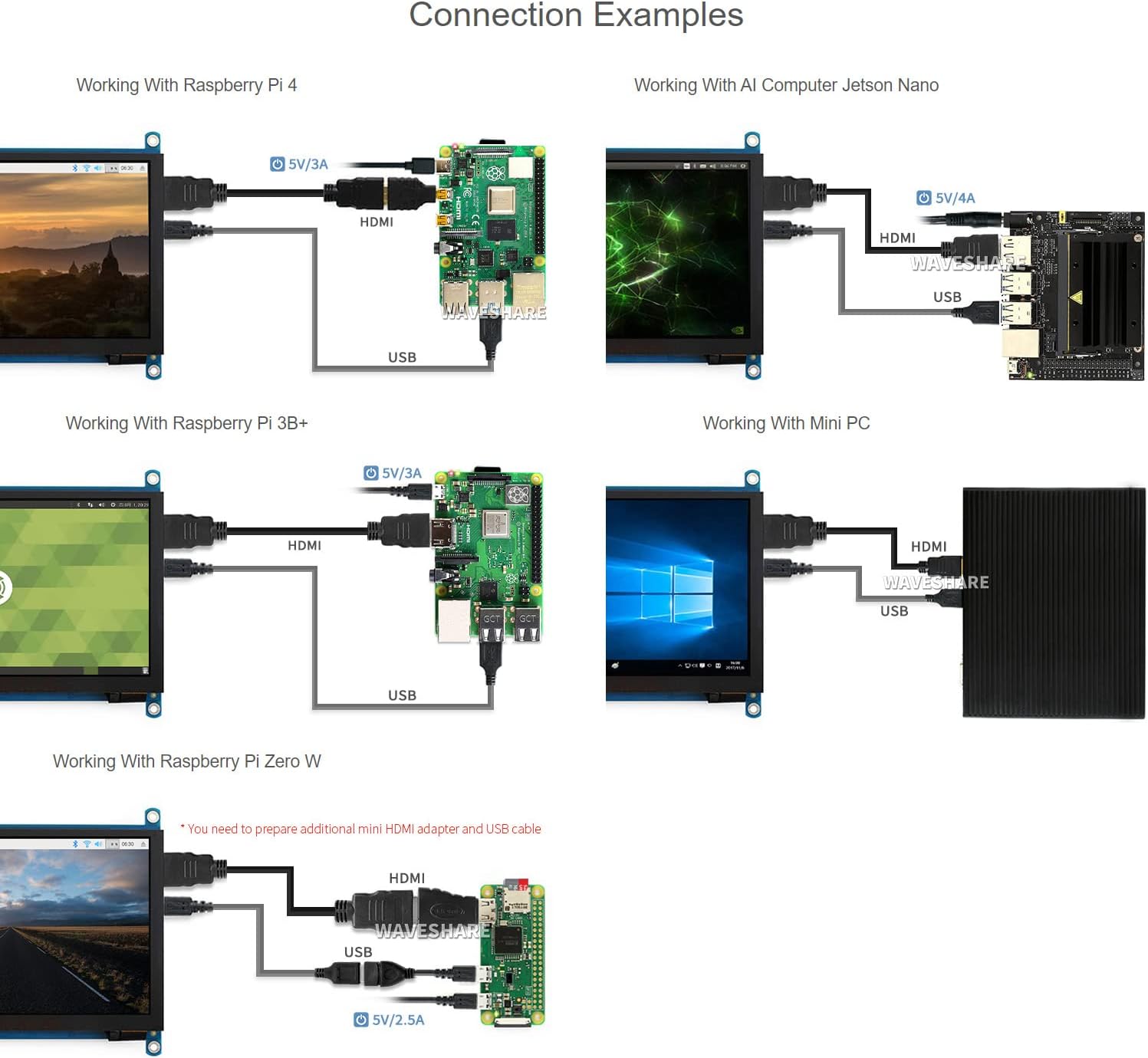
Waveshare 7-inch HDMI LCD Connection Examples

Image: Diagrams illustrating various connection examples for the 7-inch HDMI LCD with Raspberry Pi 4, Jetson Nano, Raspberry Pi 3B+, Raspberry Pi Zero W, and a Mini PC, showing HDMI and USB cable connections.

آپريٽنگ هدايتون

1. پاور آن/آف

The display powers on automatically when connected to a powered device via HDMI and USB. To power off, disconnect the power source from the connected device or the display's USB power input.

2. او ايس ڊي مينيو نيويگيشن

The display features an On-Screen Display (OSD) menu for various settings. Use the physical buttons on the side of the display to navigate and adjust settings such as brightness, contrast, and power management. Refer to the "Appearance and Dimensions" section for button identification.

3. ٽچ ڪنٽرول

The display supports capacitive touch input. When connected via USB to a compatible operating system (Raspberry Pi OS, Ubuntu, Kali, Windows), the touch functionality will be recognized automatically without additional drivers. The number of touch points supported depends on the operating system (e.g., 5-point touch on Windows, single-point on Jetson Nano Ubuntu).

Waveshare 7-inch HDMI LCD Touch Control and Gaming

Image: Demonstrates the capacitive touch control functionality on the 7-inch HDMI LCD, showing a hand interacting with a web browser interface. Also shows the display connected to a game console, indicating support for gaming display.

4. آڊيو آئوٽ

Audio can be output through the 3.5mm audio jack or the 4PIN header for external speakers. Ensure your connected device is configured to output audio via HDMI.

سار سنڀال

مشڪلاتون

وضاحتون

اسڪرين جي ماپ7 انچ
قرارداد1024 x 600 (Hardware), up to 1920x1080 (Software)
پينل جو قسمآئي پي ايس
Viewزاويه170°
ٽائيپ ٽائپگنجائش وارو
ٽچ پوائنٽس5-point (Windows), Single-point (Jetson Nano), 5-point (Raspberry Pi OS)
انٽرنيٽ جو ڏيکHDMI, VGA (requires separate cable)
آڊيو آئوٽ3.5mm Jack, 4PIN Header
پاور ان پٽ5V DC (USB ذريعي)
پيداوار جي ماپ7.09 x 5.51 x 1.97 انچ (تقريبن 180 x 140 x 50 ملي ميٽر)
شيءِ جو وزن0.352 آونس (تقريبن 10 گرام)

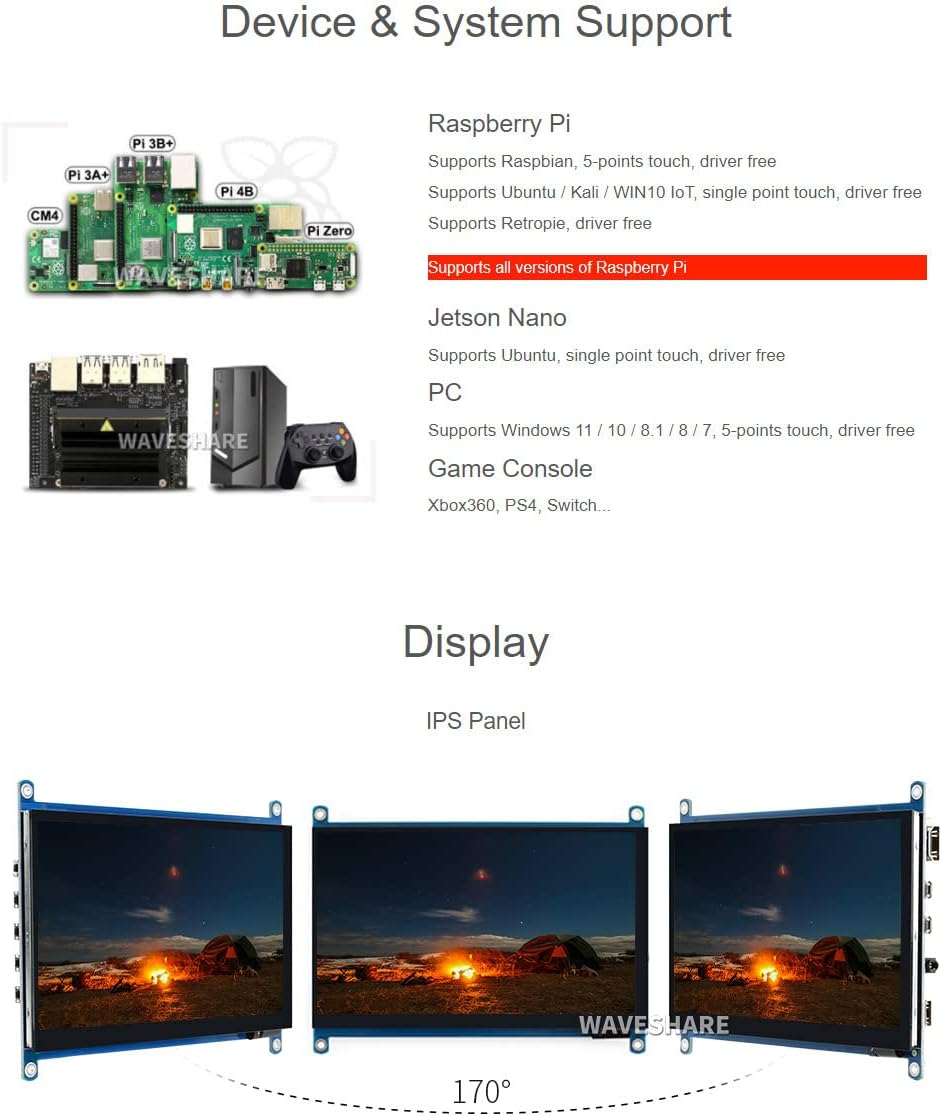
ڊوائيس ۽ سسٽم سپورٽ

Waveshare 7-inch HDMI LCD Device and System Support

Image: Illustrates various compatible devices including Raspberry Pi models (Pi 3A+, Pi 3B+, Pi 4B, CM4, Pi Zero), Jetson Nano, and a generic PC setup, along with a list of supported operating systems and touch capabilities.
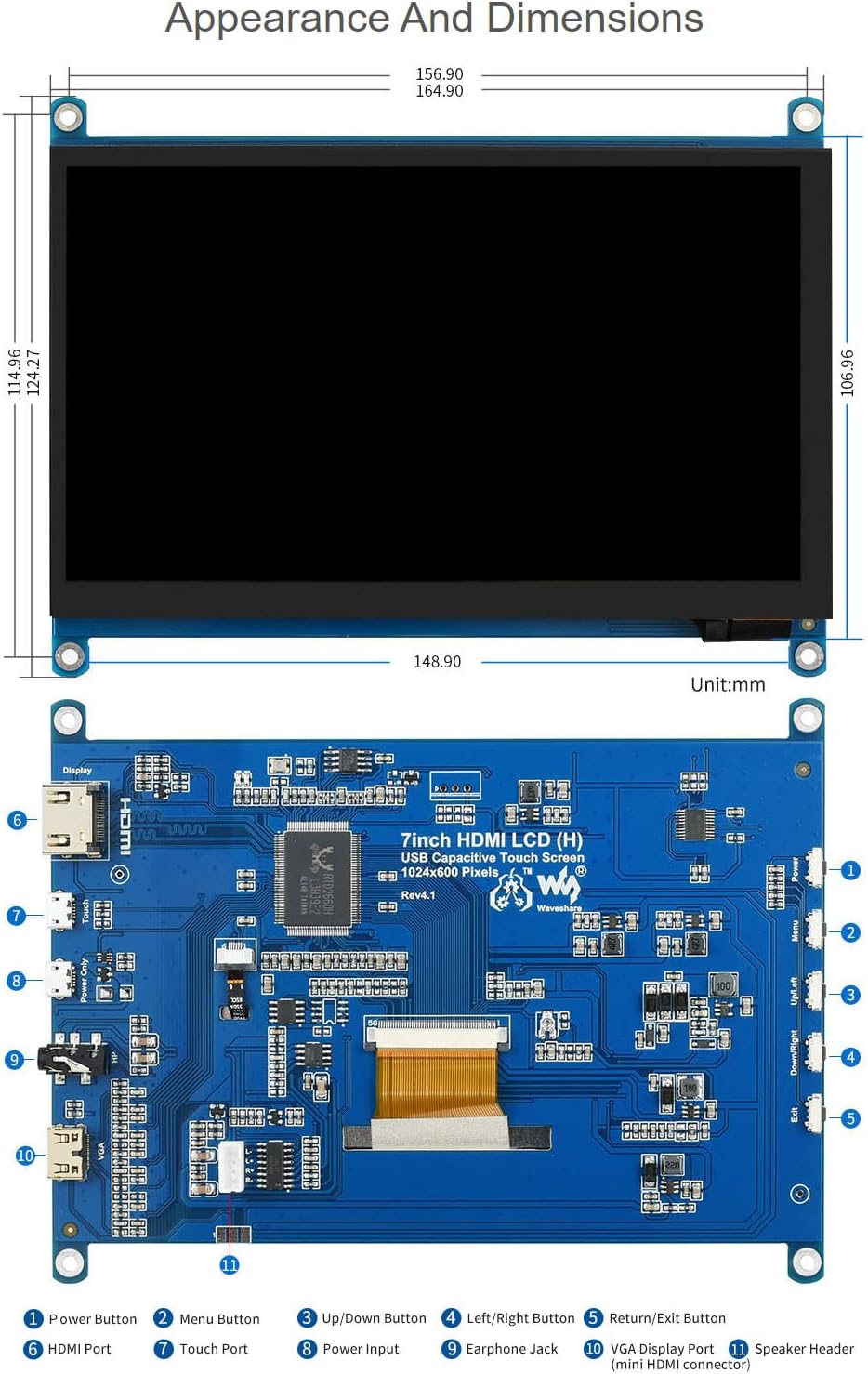
Waveshare 7-inch HDMI LCD Appearance and Dimensions

Image: Technical drawing showing the physical dimensions of the 7-inch HDMI LCD in millimeters, along with a detailed diagram identifying various ports and buttons on the display's circuit board, such as HDMI port, touch port, power input, earphone jack, VGA display port, and OSD menu buttons.

وارنٽي ۽ سپورٽ

Waveshare is committed to providing high-quality products and customer service.

For technical assistance or warranty claims, please contact Waveshare customer support through their official channels.

Waveshare Support and Service Information

Image: Details Waveshare's commitment to support and service, including rigorous testing, one-to-one technical service, 24-hour response, 30-day free replacement, 365-day free repair, and lifetime technical service.

سرٽيفڪيشن

This product holds the following certifications:

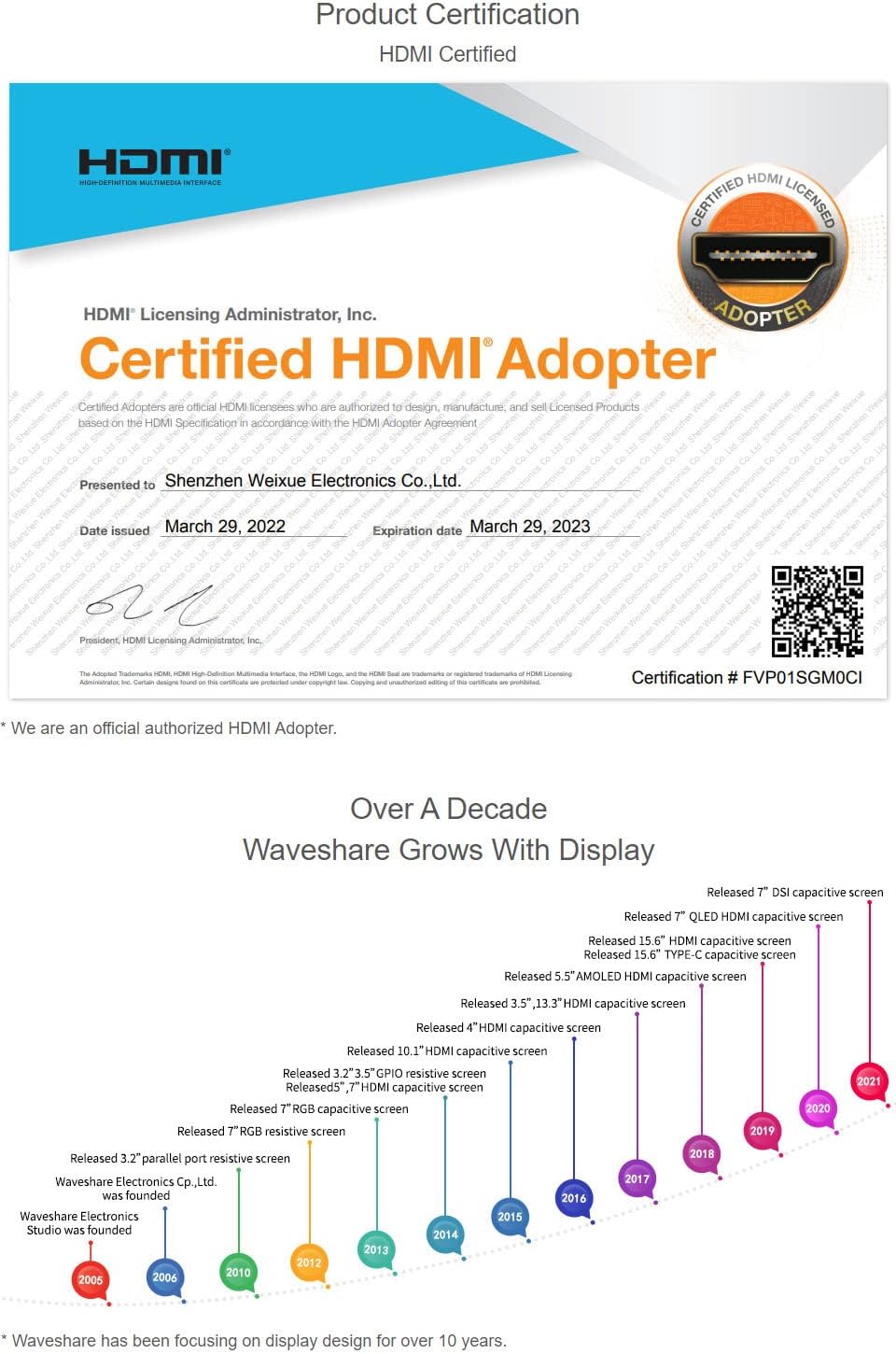
HDMI Certified Adapter Certificate

Image: A certificate indicating that Waveshare is an officially authorized HDMI adopter, ensuring compliance with HDMI standards for quality and reliability.

RoHS and CE Certifications

Image: Displays certificates for RoHS compliance and CE marking, indicating the product meets relevant environmental and safety standards.

لاڳاپيل دستاويز - 7inch HDMI LCD (H)

اڳيview ويو شيئر 7 انچ HDMI LCD (C) يوزر مينوئل: سيٽ اپ ۽ استعمال جي گائيڊ
هي يوزر مينوئل صارفين کي ويو شيئر 7 انچ HDMI LCD (C) ڊسپلي جي سيٽ اپ ۽ آپريشن جي رهنمائي ڪري ٿو، ان جي وضاحتن، راسبي پائي ۽ پي سي لاءِ ڪنيڪشن طريقن، ۽ بهترين ڪارڪردگي لاءِ ضروري استعمال جي صلاحن جي تفصيل سان.
اڳيview ويو شيئر 10.1 انچ HDMI LCD (G) يوزر مينوئل: سيٽ اپ، وضاحتون، ۽ ڪنيڪشن
ويوشيئر 10.1 انچ HDMI LCD (G) ڪيس سان گڏ ڳوليو. هي يوزر مينوئل ضروري وضاحتن، حفاظتي ڊيڄاريندڙن، راسبي پائي، جيٽسن نانو، ۽ پي سي لاءِ ڪنيڪشن گائيڊز کي ڍڪي ٿو، ۽ عام سوالن جا جواب ڏئي ٿو.
اڳيview Waveshare 4inch DSI LCD Display for Raspberry Pi: Setup and Guide
Detailed guide for the Waveshare 4inch DSI LCD display, covering features, hardware connection, software installation, screen rotation, backlight control, and troubleshooting for Raspberry Pi.
اڳيview ويو شيئر 7 انچ HDMI LCD: راسبي پائي ٽچ اسڪرين ڊسپلي گائيڊ
ويوشيئر 7 انچ HDMI LCD لاءِ جامع صارف گائيڊ، سيٽ اپ، ڊرائيور جي انسٽاليشن، ٽچ ڪيليبريشن، ۽ راسبي پائي سان استعمال کي ڍڪيندي.
اڳيview ويو شيئر 5 انچ 1080x1080 گول IPS LCD ڊسپلي - استعمال ڪندڙ گائيڊ
ويو شيئر 5 انچ 1080x1080 گول IPS LCD ڊسپلي کي ڳولهيو. هي گائيڊ ان جي خاصيتن، وضاحتن، ۽ راسبي پائي ۽ ونڊوز پي سي لاءِ سيٽ اپ جي تفصيل ڏئي ٿو، جنهن ۾ ٽچ ڪيليبريشن ۽ ڪنيڪٽوٽي شامل آهن.
اڳيview ويو شيئر 4.3 انچ ڊي ايس آءِ ايل سي ڊي: راسبي پائي لاءِ ڪيپيسٽو ٽچ ڊسپلي
ويوشيئر 4.3 انچ ڊي ايس آءِ ايل سي ڊي کي ڳولهيو، هڪ 800x480 آئي پي ايس ڪيپيسٽو ٽچ ڊسپلي جيڪو راسبي پائي لاءِ ٺهيل آهي. خاصيتون MIPI ڊي ايس آءِ انٽرفيس، ڊرائيور فري سيٽ اپ، ۽ سافٽ ويئر ڪنٽرول ٿيل بيڪ لائيٽ.