تعارف
This manual provides essential information for the safe and efficient use of your AOC 22P1D 21.5-inch Full HD LED Monitor. Please read these instructions carefully before operating the device and retain them for future reference.
حفاظت جي ڄاڻ
Always observe the following safety precautions to prevent damage to the monitor and ensure personal safety:
- باهه يا جھٽڪي جي خطرن کان بچڻ لاءِ مانيٽر کي مينهن يا نمي جي سامهون نه رکو.
- مانيٽر نه کوليو casing. اندر ڪو به استعمال ڪندڙ جي خدمت لائق پرزا نه آهن. سڀني سروسنگ کي قابل سروس اهلڪارن جي حوالي ڪريو.
- مانيٽر کي هڪ مستحڪم، فليٽ مٿاڇري تي رکو ته جيئن ان کي ڪري نه پوي.
- مانيٽر جي چوڌاري مناسب وينٽيليشن کي يقيني بڻايو. وينٽيليشن جي سوراخن کي بند نه ڪريو.
- صرف مانيٽر سان فراهم ڪيل پاور ڪنڊ ۽ اڊاپٽر استعمال ڪريو.
- بجلي جي طوفان دوران يا ڊگهي عرصي تائين استعمال نه ٿيڻ تي مانيٽر کي پاور آئوٽليٽ مان ڪڍو.
پيڪيج مواد
پڪ ڪريو ته سڀئي شيون پيڪيج ۾ موجود آهن:
- AOC 22P1D Monitor
- مانيٽر اسٽينڊ (بنياد ۽ گردن)
- پاور ڪيبل
- HDMI ڪيبل
- ويگا ڪيبل
- آڊيو ڪيبل (3.5mm)
- User Manual (on CD, if applicable)
سيٽ اپ جون هدايتون
1. اسٽينڊ گڏ ڪرڻ
Carefully remove the monitor and stand components from the packaging. Attach the stand neck to the monitor panel, then secure the base to the neck. Ensure all connections are firm.

تصوير: پوئين پاسي view of the AOC 22P1D monitor, showing the stand assembly point.
2. مانيٽر کي ڳنڍڻ
Connect the necessary cables to the monitor and your computer. The AOC 22P1D supports HDMI and VGA inputs.
- پاور ڪنيڪشن: پاور ڪيبل کي مانيٽر جي پاور ان پٽ سان ۽ پوءِ وال آئوٽليٽ سان ڳنڍيو.
- وڊيو ڪنيڪشن (HDMI): HDMI ڪيبل جي هڪ ڇيڙي کي مانيٽر تي HDMI پورٽ سان ۽ ٻئي ڇيڙي کي پنهنجي ڪمپيوٽر تي HDMI پورٽ سان ڳنڍيو.
- وڊيو ڪنيڪشن (VGA): Alternatively, connect one end of the VGA cable to the VGA port on the monitor and the other end to the VGA port on your computer.
- آڊيو ڪنيڪشن: If using VGA or a source without audio over HDMI, connect the 3.5mm audio cable from your computer's audio output to the monitor's audio input for sound through the monitor's built-in speakers.
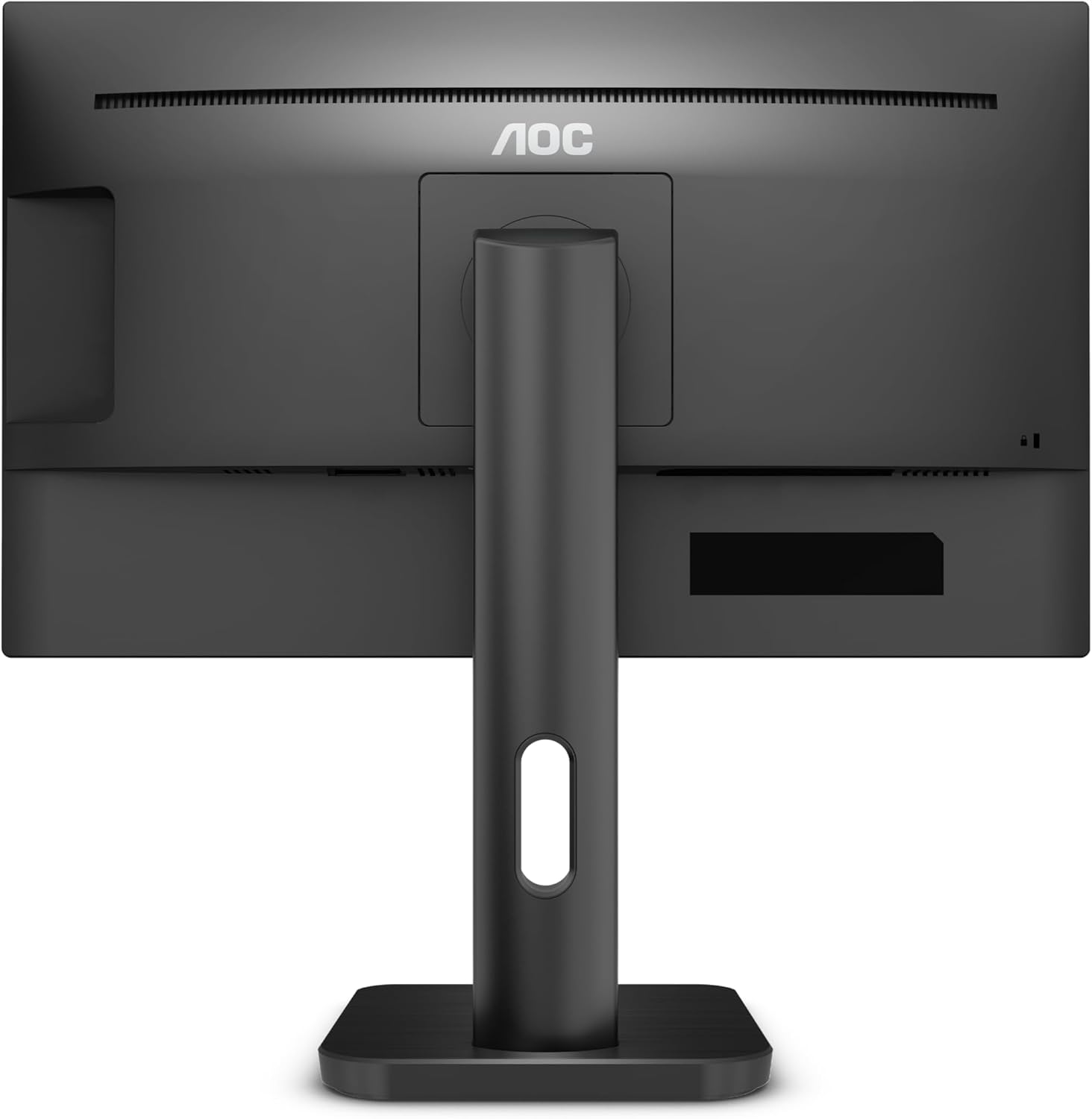
تصوير: پوئين پاسي view of the AOC 22P1D monitor, highlighting the various input ports for connectivity.
3. شروعاتي پاور آن
After connecting all cables, press the power button on the monitor to turn it on. The monitor will automatically detect the active input signal. If no signal is detected, ensure your computer is powered on and the correct input source is selected on the monitor.
آپريٽنگ هدايتون
1. پاور آن/آف
مانيٽر جي هيٺئين ساڄي بيزل تي موجود پاور بٽڻ کي دٻايو ان کي آن يا آف ڪرڻ لاءِ.

تصوير: سامهون view of the AOC 22P1D monitor, showing the power button location and key features.
2. آن-اسڪرين ڊسپلي (OSD) مينيو نيويگيشن
او ايس ڊي مينيو توهان کي مختلف مانيٽر سيٽنگون ترتيب ڏيڻ جي اجازت ڏئي ٿو. مينيو کي نيويگيٽ ڪرڻ لاءِ هيٺئين ساڄي پاسي تي ڪنٽرول بٽڻ استعمال ڪريو.
- کي دٻايو مينيو او ايس ڊي کولڻ لاءِ بٽڻ دٻايو.
- استعمال ڪريو مٿي / هيٺ مينيو آپشنز ذريعي نيويگيٽ ڪرڻ لاءِ بٽڻ.
- کي دٻايو چونڊيو ذيلي مينيو ۾ داخل ٿيڻ يا سيٽنگ جي تصديق ڪرڻ لاءِ بٽڻ دٻايو.
- کي دٻايو نڪرڻ button to go back or close the OSD.
3. تصويري سيٽنگون
Adjust the display quality to your preference:
- روشني: اسڪرين جي مجموعي روشني کي ڪنٽرول ڪري ٿو.
- تضاد: روشني ۽ اونداهي علائقن جي وچ ۾ فرق کي ترتيب ڏئي ٿو.
- رنگ جي درجه حرارت: Selects preset color modes (e.g., Warm, Cool, Normal) or custom RGB settings.
- Low Blue Mode: Reduces blue light emission for eye comfort.
- چمڪندڙ مفت: Technology to reduce screen flickering.
4. انٽ چونڊ
If you have multiple devices connected, use the OSD menu or a dedicated input button to switch between HDMI and VGA inputs.
5. آڊيو سيٽنگون
If using the monitor's built-in speakers, adjust the volume through the OSD menu. Ensure your computer's audio output is directed to the monitor.
سار سنڀال
مانيٽر جي صفائي
To maintain optimal performance and appearance, follow these cleaning guidelines:
- صفائي ڪرڻ کان اڳ هميشه مانيٽر کي پاور آئوٽليٽ مان ڪڍي ڇڏيو.
- نرم، لِنٽ کان خالي ڪپڙو استعمال ڪريو ٿورڙو ڊيampپاڻي يا نرم، غير رگڙيندڙ اسڪرين ڪلينر سان صاف ڪيو وڃي.
- صاف ڪندڙ کي سڌو سنئون اسڪرين تي نه اسپري ڪريو. پهرين ان کي ڪپڙي تي لڳايو.
- بينزين، ٿنڀا، امونيا تي ٻڌل ڪلينر، يا رگڙيندڙ صفائي ايجنٽ استعمال ڪرڻ کان پاسو ڪريو، ڇاڪاڻ ته اهي اسڪرين کي نقصان پهچائي سگهن ٿا ياasing.
- مٽي ۽ داغ هٽائڻ لاءِ اسڪرين کي نرميءَ سان صاف ڪريو.
مشڪلاتون
جيڪڏهن توهان کي پنهنجي مانيٽر سان مسئلا درپيش اچن ٿا، ته هيٺ ڏنل عام مسئلن ۽ حلن جو حوالو ڏيو:
| مسئلو | ممڪن سبب | حل |
|---|---|---|
| ڪابه طاقت | پاور ڪيبل ڳنڍيل نه آهي؛ پاور آئوٽليٽ فعال نه آهي. | Ensure power cable is securely connected to both monitor and outlet. Test outlet with another device. |
| ڪوبه سگنل | وڊيو ڪيبل ڳنڍيل نه آهي؛ غلط ان پٽ سورس چونڊيو ويو آهي؛ ڪمپيوٽر آن نه آهي. | Check video cable connections (HDMI/VGA). Select the correct input source via the OSD menu. Ensure computer is on and outputting video. |
| خراب تصويري معيار | Incorrect resolution; Brightness/Contrast settings incorrect; Dirty screen. | Set display resolution to 1920x1080. Adjust brightness and contrast via OSD. Clean the screen as per maintenance instructions. |
| ڪو آواز | Audio cable not connected (for VGA); Monitor volume too low; Computer audio output incorrect. | If using VGA, connect the 3.5mm audio cable. Increase monitor volume via OSD. Check computer's audio settings to ensure output is to the monitor. |
وضاحتون
Technical specifications for the AOC 22P1D monitor:
| خاصيت | تفصيل |
|---|---|
| ماڊل نمبر | 22P1D |
| اسڪرين جي ماپ | 21.5 انچ |
| ڊسپلي ٽيڪنالاجي | ايل اي ڊي |
| قرارداد | 1920 x 1080 (مڪمل HD) |
| اسپيڪٽ ريشو | 16:9 |
| ريفريش جي شرح | 60 هز |
| جوابي وقت | 2 ملي سيڪنڊ |
| مقابلي جي نسبت | 1000:1 |
| ان پٽ پورٽس | 1x HDMI، 1x VGA |
| بلٽ ان اسپيڪرز | ها |
| رنگ | ڪارو |
| پيداوار جي ماپ | 50.6 x 19.8 x 50.4 سينٽي |
| شيءِ جو وزن | 4.2 ڪلوگرام |
| بجلي جو استعمال | 22 واٽ (عام) |

تصوير: سامهون view of the AOC 22P1D monitor with approximate dimensions shown.
وارنٽي ڄاڻ
Your AOC 22P1D monitor comes with a standard manufacturer's warranty. Please refer to the warranty card included in your product packaging or visit the official AOC webوارنٽي ڪوريج، مدت، ۽ سروس جي طريقيڪار بابت تفصيلي شرطن ۽ ضابطن لاءِ سائيٽ.
ڪسٽمر سپورٽ
For further assistance, technical support, or service inquiries, please contact AOC customer support. You can find contact information and additional resources on the official AOC webسائيٽ:
Please have your monitor's model number (22P1D) and serial number ready when contacting support.