1. تعارف ۽ اوورview
The Dio DiOCAMRI01 is an advanced 360° HD WiFi camera designed for indoor surveillance, offering comprehensive monitoring while prioritizing user privacy. This camera features a motorized lens, 1080p resolution, and infrared night vision, ensuring clear visuals day and night. Its unique geo-fencing capability automatically activates a privacy mode when you are home, retracting the lens to ensure your personal space remains private. The camera also includes motion and noise detection, two-way audio communication, and local recording options via a Micro SD card.
This manual provides essential information for the proper installation, operation, and maintenance of your DiOCAMRI01 camera.
2. حفاظت جي ڄاڻ
- استعمال ڪرڻ کان پهريان سڀ هدايتون احتياط سان پڙهو.
- صرف ڊوائيس سان فراهم ڪيل پاور اڊاپٽر استعمال ڪريو.
- ڪئميرا کي پاڻي، نمي، يا انتهائي گرمي پد جي سامهون نه آڻيو.
- ڪئميرا کي گرمي جي ذريعن جي ويجهو يا سڌي سج جي روشني ۾ رکڻ کان پاسو ڪريو.
- ڪئميرا کي پاڻ ڌار ڪرڻ يا مرمت ڪرڻ جي ڪوشش نه ڪريو. سڀني سروسنگ کي قابل اهلڪارن جي حوالي ڪريو.
- Ensure the camera is securely mounted if using wall or ceiling installation.
3. پيڪيج مواد
پڪ ڪريو ته سڀئي جزا توهان جي پيڪيج ۾ موجود آهن:
- DiOCAMRI01 HD WiFi Camera
- پاور اڊاپٽر
- Mounting Kit (screws, wall plugs, mounting bracket)
- استعمال ڪندڙ جو دستياب (ھي دستاويز)
4. مصنوعات جون خاصيتون
- ريموٽ مانيٽرنگ: Day and night vision (infrared night vision up to 10m).
- Wide-Angle Motorized Lens: جامع ڪوريج لاءِ 360° افقي ۽ 150° عمودي گردش پيش ڪري ٿو.
- رازداري جو تحفظ: Geo-fencing feature automatically puts the camera in standby mode and closes the lens when the owner is present. Manual standby mode is also available via the app.
- Motion and Noise Detection: Adjustable sensitivity with 3 levels. Sends direct notifications to your smartphone.
- ٻه طرفي آڊيو: Built-in microphone and intercom function allow you to hear and speak through the camera.
- مقامي رڪارڊنگ: Supports Micro SD card (up to 128GB, not included) for manual or automatic recording upon detection. Remote viewing of recordings is available via the smartphone app.
- آسان سيٽ اپ: Quick and intuitive installation via the DiO Cam+ mobile application.
- لچڪدار چڙهڻ: Designed for discreet integration, can be mounted on a wall, ceiling, or placed on a shelf.
5. سيٽ اپ
5.1 شروعاتي سيٽ اپ
- پاور ڪنيڪشن: Connect the camera to a power outlet using the provided power adapter. The camera will power on.
- Download DiO Cam+ App: ڳولھيو "DiO Cam+" in your smartphone's app store (iOS or Android) and download the application.
- رجسٽر/لاگ ان: Open the app and follow the on-screen instructions to create an account or log in if you already have one.
- ڪئميرا شامل ڪريو: Within the DiO Cam+ app, select the option to add a new device. Follow the in-app wizard to connect your camera to your Wi-Fi network. This typically involves scanning a QR code on the camera or entering Wi-Fi credentials.
- لڳائڻ: Position the camera in your desired location. It can be placed on a flat surface, or mounted on a wall or ceiling using the included mounting kit. Ensure the camera has a clear line of sight to the area you wish to monitor.
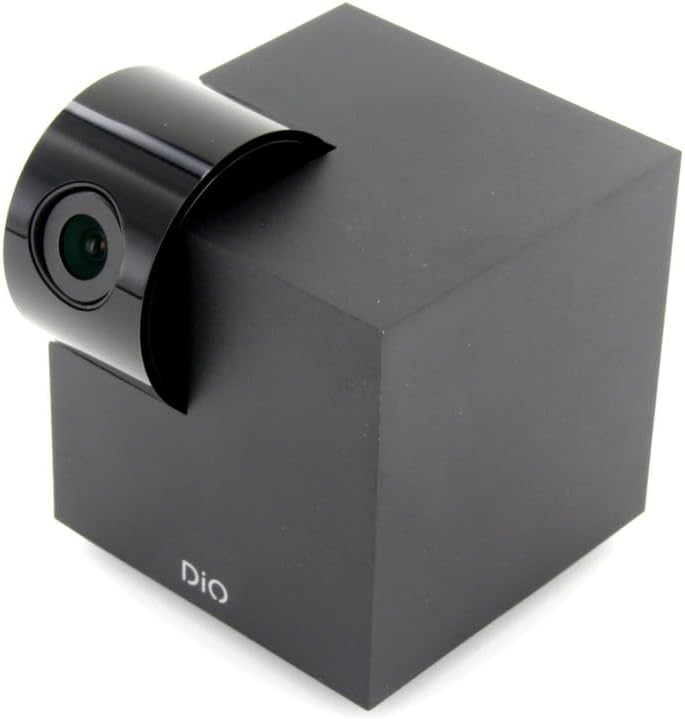
Figure 5.1: The DiOCAMRI01 camera in its standard upright position.

Figure 5.2: Camera placed on a shelf, demonstrating discreet integration.

Figure 5.3: Camera mounted on a ceiling for overhead surveillance.
5.2 Micro SD Card Installation (Optional)
To enable local video recording, insert a Micro SD card (up to 128GB, not included) into the designated slot on the camera. Ensure the camera is powered off before inserting or removing the card.
5.3 شيئرنگ ڪئميرا رسائي
The DiO Cam+ app allows you to easily share access to your camera with family members or trusted friends. Navigate to the camera settings within the app and select the sharing option to invite others to view the live feed and recordings.
6. آپريٽنگ هدايتون
6.1 زنده View ۽ ريموٽ ڪنٽرول
Once connected, open the DiO Cam+ app to access the live video feed from your camera. From the live view screen, you can:
- ترتيب ڏيڻ View زاويه: Use the on-screen controls to remotely rotate the camera lens up to 350° horizontally and 150° vertically to cover all corners of your room.
- ٻه طرفي آڊيو: ڪئميرا جي اسپيڪر ذريعي ڳالهائڻ لاءِ مائڪروفون آئڪن تي ٽيپ ڪريو، ۽ ڪئميرا جي مائڪروفون مان آڊيو ٻڌو.
- Take Snapshots/Record Video: Capture still images or start manual video recordings directly from the live view.

Figure 6.1: Camera interacting with the DiO Cam+ smartphone application.

شڪل 6.2: پاسي view of the camera, highlighting the rotating lens mechanism.
6.2 Privacy Features (Geo-Fencing and Manual Standby)
The DiOCAMRI01 camera offers advanced privacy protection:
- جيو-فينسنگ: Configure geo-fencing in the app to automatically switch the camera to privacy mode when your smartphone enters a predefined home zone. In privacy mode, the camera lens will retract, ensuring no recording or live viewing ٿئي ٿي.
- Manual Standby: You can manually activate or deactivate the camera's standby mode (privacy mode) at any time through the DiO Cam+ app.
- Scheduled Standby: Set a schedule within the app for the camera to automatically enter or exit standby mode at specific times.

Figure 6.3: Camera with lens retracted, indicating privacy mode.
6.3 Motion and Noise Detection
The camera can detect motion and noise within its field of view. When triggered, it will send a notification to your smartphone and can automatically begin recording to the Micro SD card.
- حساسيت جي ترتيب: Adjust the detection sensitivity (3 levels) in the app settings to minimize false alarms.
- رڪارڊنگ جا آپشن: Configure recording duration (1, 3, or 5 minutes per clip) or continuous recording if a Micro SD card is installed.
7. سار سنڀال
- صفائي: Use a soft, dry cloth to clean the camera body and lens. Do not use liquid cleaners or abrasive materials.
- سافٽ ويئر اپڊيٽ: Regularly check the DiO Cam+ app for firmware updates to ensure optimal performance and security. Follow the in-app instructions for any available updates.
- مائڪرو ايس ڊي ڪارڊ جو انتظام: وقتي طور تي ٻيهرview and manage recordings on your Micro SD card. Format the card through the app if necessary to maintain performance.
8. مسئلا حل ڪرڻ
- ڪئميرا آف لائن: Ensure the camera is powered on and connected to your Wi-Fi network. Check your Wi-Fi router and internet connection. Try restarting the camera and your router.
- ايپ سان ڳنڍي نه ٿو سگهجي: Verify your Wi-Fi password. Ensure your smartphone is connected to a 2.4GHz Wi-Fi network during initial setup, as the camera may not support 5GHz networks.
- خراب وڊيو معيار: پنهنجي انٽرنيٽ ڪنيڪشن جي رفتار چيڪ ڪريو. پڪ ڪريو ته ڪئميرا لينس صاف ۽ رڪاوٽن کان پاڪ آهي. بهترين روشني لاءِ ڪئميرا جي جڳهه کي ترتيب ڏيو.
- Motion/Noise Detection Not Working: Check the sensitivity settings in the app. Ensure the detection zones are correctly configured.
- No Recording to SD Card: Ensure the Micro SD card is correctly inserted and formatted. Check if the card is full. The camera supports up to 128GB.
- Privacy Mode Not Activating: Verify that geo-fencing is enabled and configured correctly in the app, and that your smartphone's location services are active.
9. وضاحتون
| خاصيت | تفصيل |
|---|---|
| ماڊل نمبر | DIOCAM-RI01 |
| چڙهڻ جو قسم | ڀت جبل |
| وڊيو ڪيپچر ريزوليوشن | 1080 ص |
| رنگ | اڇو |
| شين جو تعداد | 1 |
| شامل اجزاء | DiOCAMRI01 WiFi HD 360° Rotating 1080P 2MP Camera with Geo-Fencing |
| وائرليس ڪميونيڪيشن ٽيڪنالاجي | وائي فائي |
| فارم فيڪٽر | Dome (Cube with rotating lens) |
| مؤثر وڊيو حل | 1080 |
| Viewزاويه | 360 درجا (افقي) |
| نائيٽ ويزن رينج | 10 ميٽر |
| مواد | ڌاتو |
| جلدtage | 5 وولٽ |
| واتtage | 5 واٽ |
| شيون طول و عرض (L x W x H) | 9.4 x 4.9 x 31.9 سينٽي ميٽر |
| ٺاهيندڙ | چيڪون |
| خاص خاصيتون | Local Recording, Night Vision |
| بيٽريون شامل آهن | نه |
| بيٽرين جي ضرورت آهي | نه |
| تجويز ڪيل استعمال | Motion Detection, Night Vision |
| رابطي ٽيڪنالاجي | وائرليس |
| اندروني / ٻاهرين استعمال | اندريون |
| مطابقت رکندڙ ڊوائيسز | اسمارٽ فون |
| طاقت جو ذريعو | Battery Powered (Note: Product specs indicate 'No batteries required', implying external power) |
| ڪنيڪشن پروٽوڪول | وائي فائي |
| ڪنٽرولر جو قسم | Android |
10. وارنٽي ۽ سپورٽ
For information regarding warranty coverage, technical support, or service, please refer to the official Dio webسائيٽ تي وڃو يا پنهنجي خريداري واري هنڌ سان رابطو ڪريو. وارنٽي دعوائن لاءِ خريداري جو ثبوت رکو.
ٺاهيندڙ: چيڪون


