تعارف
This manual provides essential instructions for the safe and efficient operation of your Fujitsu FS-6160ZLA Document Scanner. Please read this manual thoroughly before using the scanner and retain it for future reference. Following these guidelines will ensure optimal performance and longevity of your device.
پيداوار ختمview
The Fujitsu FS-6160ZLA is a high-performance document scanner designed for efficient paper handling and digital conversion. It features an Automatic Document Feeder (ADF) for batch scanning and a user-friendly control panel.
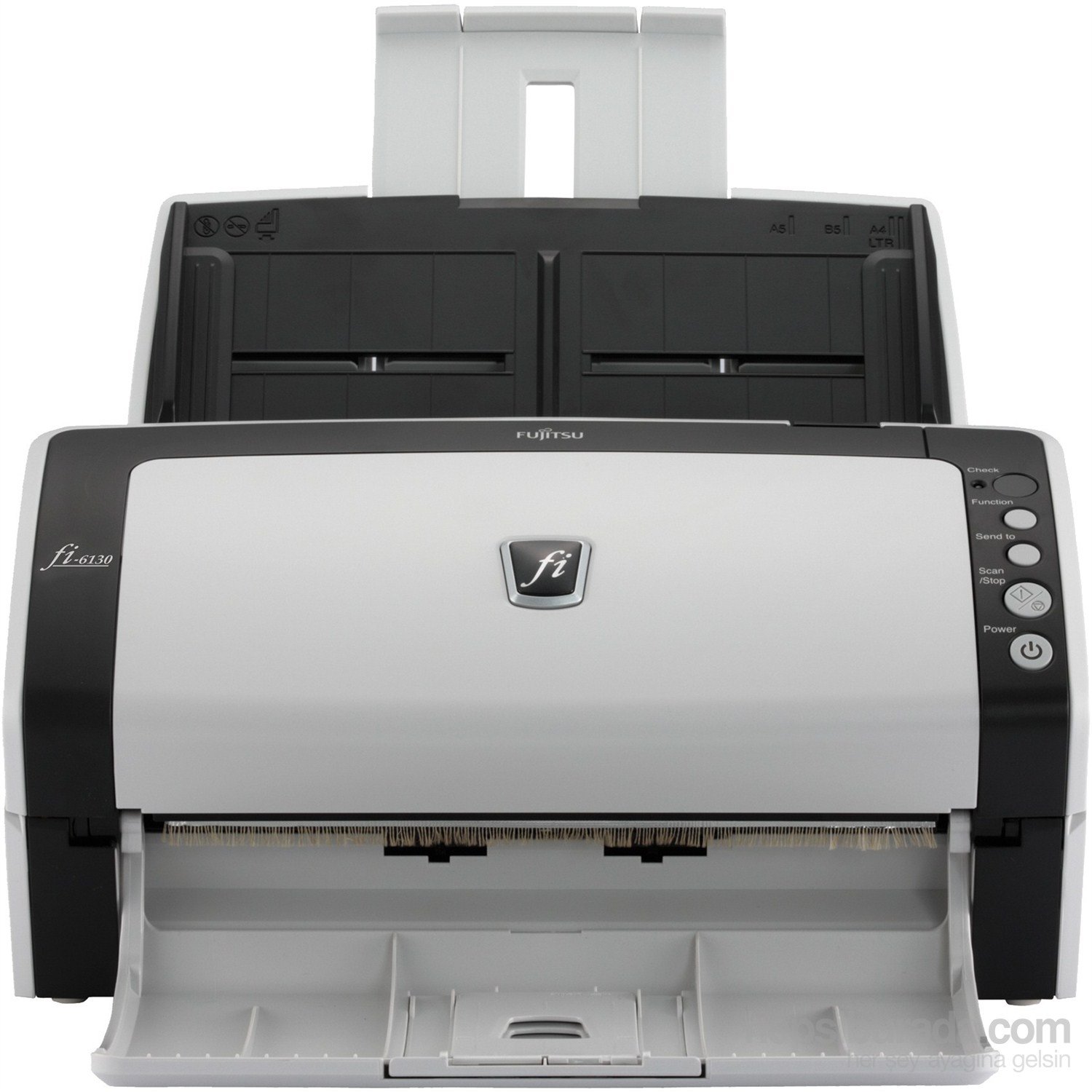
شڪل 1: سامهون view of the Fujitsu fi-6130 document scanner, showing the automatic document feeder (ADF) input tray at the top, the control panel on the right, and the output tray at the bottom. The scanner is white and black.
اهم اجزاء:
- خودڪار دستاويز فيڊر (ADF): مسلسل اسڪيننگ لاءِ ڪيترائي دستاويز لوڊ ڪرڻ لاءِ.
- ڪنٽرول پينل: Buttons for various functions including power, scan, and job selection.
- آئوٽ پٽ ٽري: اسڪين ٿيل دستاويز گڏ ڪري ٿو.
- USB/Power Ports: Located at the rear for connectivity and power supply.
سيٽ اپ ڪريو
- پيڪنگ کولڻ: Carefully remove the scanner and all accessories from the packaging. Ensure all components are present: scanner unit, AC adapter, USB cable, and software CD/DVD (if included).
- لڳائڻ: Place the scanner on a stable, flat surface with adequate space for document feeding and output. Ensure proper ventilation.
- پاور Connectنيو: Connect the AC adapter to the scanner's power input and then plug it into a wall outlet.
- ڪمپيوٽر سان ڳنڍيو:
- USB ڪنيڪشن: USB ڪيبل جي هڪ ڇيڙي کي اسڪينر جي USB پورٽ سان ۽ ٻئي ڇيڙي کي پنهنجي ڪمپيوٽر تي موجود USB پورٽ سان ڳنڍيو.
- وائي فائي ڪنيڪشن: Refer to the separate network setup guide or the scanner's display (if applicable) for instructions on connecting to your wireless network.
- سافٽ ويئر انسٽاليشن: Insert the provided software CD/DVD into your computer's drive, or download the latest drivers and scanning software from the official Fujitsu support webسائيٽ. انسٽاليشن مڪمل ڪرڻ لاءِ اسڪرين تي ڏنل هدايتن تي عمل ڪريو.
آپريٽنگ هدايتون
- پاور آن: کي دٻايو طاقت button on the control panel to turn on the scanner. Wait for the scanner to initialize.
- دستاويز لوڊ ڪريو:
- Fan the stack of documents to separate pages and align edges.
- Place documents face-down in the Automatic Document Feeder (ADF) input tray. Adjust the side guides to fit the width of your documents.
- Ensure documents are within supported sizes (e.g., A4, A5, B5, Letter, Legal).
- Select Scan Settings: Open your scanning software on the computer. Select the desired scan profile, resolution, color mode (e.g., color, grayscale, black & white), and destination folder.
- اسڪيننگ شروع ڪريو:
- کي دٻايو اسڪين/روڪ button on the scanner's control panel, or initiate the scan from your computer software.
- The scanner will feed and scan the documents.
- Review ۽ محفوظ ڪريو: اسڪين ڪرڻ کان پوءِ، ٻيهرview the digitized images on your computer. Save them to your preferred location and format.
- ڪنٽرول پينل افعال:
- چيڪ ڪريو: Verifies scanner status or settings.
- فنڪشن: Cycles through predefined scan jobs or settings.
- ڏانهن موڪليو: Directs scanned documents to a specific application or destination.
- Scan/Stop: Starts or stops the scanning process.
- طاقت: اسڪينر کي آن يا آف ڪري ٿو.
سار سنڀال
باقاعده سار سنڀال مسلسل اسڪين معيار کي يقيني بڻائي ٿي ۽ توهان جي اسڪينر جي زندگي کي وڌائي ٿي.
- رولرز جي صفائي:
- بند ڪريو ۽ اسڪينر کي انپلگ ڪريو.
- Open the scanner cover to access the feed rollers.
- Gently wipe the rollers with a lint-free cloth dampened with isopropyl alcohol or a specialized roller cleaner. Allow to dry completely before closing the cover.
- شيشي جي صفائي:
- Locate the glass scanning surface inside the scanner.
- نرم، لِنٽ کان خالي ڪپڙو استعمال ڪريو ڊيampened with glass cleaner (non-abrasive) to clean the glass. Avoid spraying cleaner directly onto the glass.
- ٻاهرين صفائي: Wipe the exterior of the scanner with a soft, dry cloth. Do not use abrasive cleaners or solvents.
- استعمال جون شيون: Periodically check the condition of feed rollers and separation pads. Replace them as recommended by Fujitsu to maintain optimal performance. Refer to the Fujitsu support website for replacement part information.
مشڪلاتون
This section addresses common issues you might encounter with your Fujitsu FS-6160ZLA scanner.
- اسڪينر تي طاقت نه آهي:
- Ensure the power cable is securely connected to both the scanner and a working power outlet.
- پڪ ڪريو ته پاور اڊاپٽر صحيح ڪم ڪري رهيو آهي.
- Documents Jamming:
- Remove all jammed documents carefully, following the scanner's internal guides.
- Ensure documents are properly fanned and aligned in the ADF.
- Check for worn-out feed rollers or separation pads and replace if necessary.
- Avoid loading creased, stapled, or damaged documents.
- Poor Scan Quality (Streaks, Blurs, Dots):
- Clean the glass scanning surface and feed rollers as described in the Maintenance section.
- Adjust scan settings (e.g., resolution, brightness) in your scanning software.
- پڪ ڪريو ته دستاويز صاف ۽ ملبے کان پاڪ آهن.
- ڪمپيوٽر پاران اسڪينر نه مليو:
- Verify the USB or Wi-Fi connection is secure and active.
- اسڪينر ۽ ڪمپيوٽر ٻئي ٻيهر شروع ڪريو.
- Reinstall the scanner drivers and software.
- ڪو ٻيو USB پورٽ يا ڪيبل آزمايو.
وضاحتون
| خاصيت | تفصيل |
|---|---|
| برانڊ | فوجيتسو |
| ماڊل | FS-6160ZLA |
| اسڪينر جو قسم | دستاويز |
| رابطي ٽيڪنالاجي | وائي فائي |
| آپٽيڪل سينسر ٽيڪنالاجي | CIS |
| قرارداد | 200 ڊي پي آئي |
| سَري کوٽائي | 24-bit |
| وزن | 4.2 ڪلو |
| طول و عرض (W x D x H) | 301mm x 160mm x 158mm |
| وڌ کان وڌ دستاويز سائيز | A4 Vertical: 210 mm x 297 mm, Legal: 216 mm x 355.6 mm (8.5 in x 14 in) |
وارنٽي ۽ سپورٽ
For detailed warranty information, technical support, or to purchase replacement parts and consumables, please visit the official Fujitsu website or contact your local Fujitsu service provider. Keep your purchase receipt as proof of purchase for warranty claims.
آن لائين وسيلا:


