تعارف
The Mitel 6920W is a powerful, feature-rich IP phone designed for business communication. Equipped with Wi-Fi connectivity, it offers flexibility in deployment and ensures reliable voice communication. This manual provides comprehensive instructions for setting up, operating, maintaining, and troubleshooting your Mitel 6920W IP Phone.
پيڪيج مواد
شروع ڪرڻ کان اڳ، مھرباني ڪري تصديق ڪريو ته توھان جي پيڪيج ۾ ھيٺيون شيون شامل آھن:
- Mitel 6920W IP Phone Unit
- هينڊ سيٽ
- هينڊسيڊ ڪنڊ
- فون اسٽينڊ
- Ethernet ڪيبل
- پاور اڊاپٽر (جيڪڏهن پاور اوور ايٿرنيٽ - PoE استعمال نه ڪري رهيا آهيو)
- جلدي شروع ڪرڻ جي ھدايت (جيڪڏهن شامل هجي)
سيٽ اپ ڪريو
1. Attaching the Phone Stand
The phone stand allows you to position your phone at an optimal viewing angle. Align the tabs on the stand with the slots on the back of the phone and push firmly until it clicks into place.
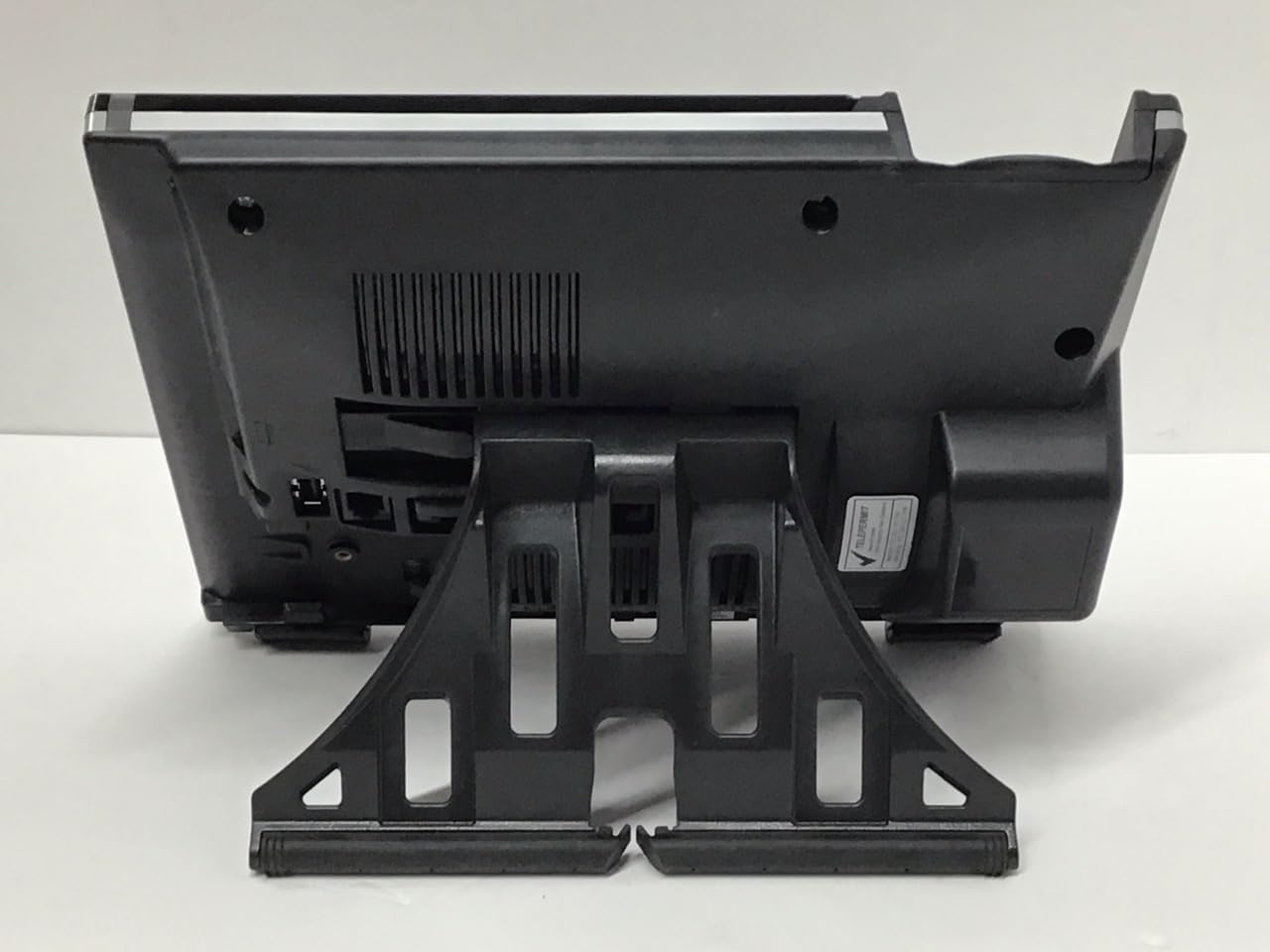
تصوير: پوئتي view of the Mitel 6920W IP Phone with its stand attached, showing the connection points and the angled support.
2. Connecting the Handset and Headset
- Connect one end of the coiled handset cord to the handset and the other end to the handset port on the back of the phone (usually marked with a handset icon).
- If using a headset, connect it to the dedicated headset port (usually marked with a headset icon).
3. نيٽ ورڪ ۽ پاور سان ڳنڍڻ
- Ethernet ڪنيڪشن: Connect one end of the Ethernet cable to the LAN port on the back of the phone and the other end to your network switch or router. If your network provides Power over Ethernet (PoE), the phone will power on automatically.
- پاور اڊاپٽر (جيڪڏهن PoE نه هجي): If PoE is not available, connect the power adapter to the power port on the back of the phone and then plug it into a wall outlet.

تصوير: سامهون view of the Mitel 6920W IP Phone, displaying its screen, physical keypad, and programmable soft keys.
4. شروعاتي پاور آن ۽ ترتيب
Once powered on, the phone will boot up and attempt to connect to your network. It may automatically download configuration settings from your VoIP system. Follow any on-screen prompts for initial setup, such as language selection or time zone.
5. وائي فائي ڪنيڪشن سيٽ اپ
To connect your 6920W to a Wi-Fi network:
- کي دٻايو سيٽنگون button (gear icon) on the phone.
- ڏانهن وڃو نيٽ ورڪ سيٽنگون or وائي فائي سيٽنگون.
- Enable Wi-Fi and select your desired network from the list of available networks.
- Enter the Wi-Fi password (if required) using the keypad and on-screen prompts.
- Confirm the connection. The phone should display a Wi-Fi icon indicating a successful connection.
Operating Your Mitel 6920W IP Phone
بنيادي ڪال فنڪشن
- ڪال ڪرڻ: هٿ کي کڻي يا پريس کي اسپيڪر فون بٽڻ. نمبر ڊائل ڪريو ۽ دٻايو ڊائل or موڪليو نرم چاٻي
- ڪال جو جواب ڏيڻ هينڊ سيٽ کڻڻ، دٻايو اسپيڪر فون بٽڻ، يا دٻايو جواب نرم چاٻي
- ڪال ختم ڪرڻ: هينڊ سيٽ کي رکو يا دٻايو ڪال ختم ڪريو نرم چاٻي
Keypad and Navigation
The phone features a standard 12-button dial pad. Use the navigation cluster (up, down, left, right arrows, and select button) to move through menus and options on the display.
ڊسپلي ۽ نرم چاٻيون
The phone's display shows call information, menus, and status indicators. The soft keys located directly below the display change their function based on the current context (e.g., during a call, in a menu). Their current function is indicated on the display above each key.
وائس ميل رسائي
To access your voicemail, press the وائيس ميل button (envelope icon) and follow the audio prompts.
ترقي يافته ڪال خاصيتون
- رکو: فعال ڪال دوران، دٻايو رکو نرم چاٻي. ڪال ٻيهر شروع ڪرڻ لاءِ ان کي ٻيهر دٻايو.
- منتقلي فعال ڪال دوران، دٻايو منتقلي soft key. Dial the number to transfer to, and once connected, press منتقلي again (consultative transfer) or hang up (blind transfer).
- ڪانفرنس: فعال ڪال دوران، دٻايو ڪانفرنس soft key. Dial the number of the third party, and once connected, press ڪانفرنس ٻيهر سڀني پارٽين ۾ شامل ٿيڻ لاءِ.
- اسپيڪر فون: کي دٻايو اسپيڪر فون اسپيڪر فون موڊ کي آن يا آف ڪرڻ لاءِ بٽڻ.
- خاموش: کي دٻايو گونگا ڪال دوران پنهنجي مائڪروفون کي خاموش ڪرڻ لاءِ بٽڻ. ان ميوٽ ڪرڻ لاءِ ان کي ٻيهر دٻايو.
سار سنڀال
فون جي صفائي
To keep your phone clean, gently wipe the surfaces with a soft, damp, lint-free cloth. Avoid using abrasive cleaners, solvents, or aerosol sprays, as these can damage the phone's finish and internal components.
سافٽ ويئر اپڊيٽس
Your Mitel 6920W IP Phone may receive software updates periodically to improve performance and add new features. These updates are typically managed by your system administrator. Do not attempt to manually update the firmware unless instructed by your IT department or Mitel support.
مشڪلاتون
عام مسئلا ۽ حل
| مسئلو | ممڪن حل |
|---|---|
| ڪابه ڊائل ٽون | Check all cable connections (Ethernet, power, handset). Ensure the phone is powered on. Contact your system administrator if the issue persists. |
| وائي فائي سان ڳنڍجي نٿو سگهي | Verify Wi-Fi password. Ensure the phone is within range of the Wi-Fi access point. Restart the phone and try again. Check network settings. |
| ظاهر نه ڪرڻ | Check power connection. Restart the phone. If the display remains blank or faulty, contact support. |
| خراب ڪال ڪوالٽي | Check network connection stability (wired or Wi-Fi signal strength). Ensure no other devices are heavily using network bandwidth. |
فيڪٽري ري سيٽ
A factory reset will erase all custom settings and return the phone to its default state. This should only be performed as a last resort and typically under the guidance of your system administrator or Mitel support. Consult your system administrator for the specific procedure for your deployment.
وضاحتون
| خاصيت | تفصيل |
|---|---|
| برانڊ | مٽيل |
| ماڊل | 6920W |
| ASIN | B07DD9BW2Z |
| رنگ | ڪارو |
| ٽيليفون جو قسم | ڏڪار |
| مواد | پلاسٽڪ |
| طاقت جو ذريعو | تار ٿيل برقي |
| ڊائلر جو قسم | سنگل ڪي پيڊ |
| جوابي نظام جو قسم | ڊجيٽل |
| مطابقت رکندڙ ڊوائيسز | Computer Systems, VoIP Services, Telephone Networks |
| ملٽي لائن آپريشن | ملٽي لائين آپريشن |
| سڏيندڙ جي سڃاڻپ | ها |
| پيڪيج جي ماپ | 10.71 x 7.91 x 3.66 انچ |
| شيءِ جو وزن | 2.38 پائونڊ |
| ٺاهيندڙ | مٽيل |
| تاريخ پهرين دستياب | ڊسمبر 20، 2022 |
وارنٽي ۽ سپورٽ
The Mitel 6920W IP Phone comes with a standard manufacturer's warranty. For specific warranty terms and conditions, please refer to the documentation provided with your purchase or visit the official Mitel webسائيٽ.
For technical support, troubleshooting assistance, or warranty claims, please contact your system administrator or authorized Mitel reseller. You can also find additional resources and contact information on the official Mitel support webسائيٽ: www.mitel.com/support