تعارف
This document provides essential information for the setup, operation, and maintenance of your Easytry123 replacement infrared (IR) remote control, designed for various Daikin Room AC Air Conditioner models. This remote serves as a direct replacement for your original unit, offering core functionalities for comfortable climate control.
Important Compatibility Notes
- Visual Match: It is crucial to ensure your current remote control visually matches the replacement remote shown in the product images. Discrepancies in appearance may indicate incompatibility.
- ماڊل جي تصديق: This remote is compatible with Daikin models BRC4C64, BRC7E830, BRC4C152, BRC4C153, BRC7E818, BRC7F812, BRC4C, BRC7E83, BRC7E63W, and BRC7E66. If your specific model number is not listed, please verify compatibility before use.
- ڪارڪردگي: While designed as a replacement, this remote may not offer all functions identical to your original remote. Core functions are typically supported.
- No Printed Manual: A physical instruction manual is not included with the product. Please refer to this digital guide for all operational details.
پيداوار ختمview

شڪل 1: زاويه view of the remote control, highlighting the LCD display and primary control buttons such as ON/OFF, UP, DOWN, and FAN.

شڪل 2: سامهون view of the remote control, providing a clear look at the button arrangement and the display screen.
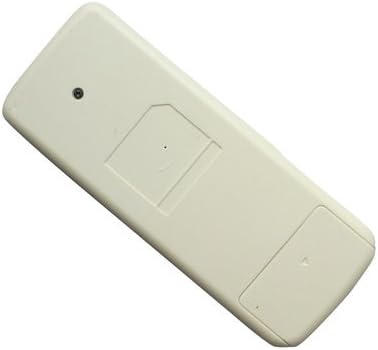
شڪل 3: پوئتي view of the remote control, illustrating the battery compartment cover.
سيٽ اپ ڪريو
بيٽري لڳائڻ
ريموٽ ڪنٽرول جي ضرورت آهي ٻہ (2) AAA بيٽريون آپريشن لاءِ. انهن کي انسٽال ڪرڻ لاءِ انهن قدمن تي عمل ڪريو:
- ريموٽ ڪنٽرول جي پوئين پاسي بيٽري جي ڪمري کي ڳوليو (شڪل 3 ڏسو).
- بيٽري جي ڪمپارٽمينٽ جي ڍڪ کي هيٺئين طرف يا تير سان ڏيکاريل طرف سلائڊ ڪريو ته جيئن ان کي کوليو وڃي.
- ٻہ AAA بيٽريون داخل ڪريو، پڪ ڪريو ته مثبت (+) ۽ منفي (-) ٽرمينل ڪمري اندر نشانن سان صحيح طرح سان ترتيب ڏين.
- بيٽري جي ڪمپارٽمينٽ جي ڍڪ کي واپس جاءِ تي سلائڊ ڪندي تبديل ڪريو جيستائين اهو محفوظ طور تي ڪلڪ نه ڪري.
نوٽ: هميشه ساڳئي قسم جون نيون بيٽريون استعمال ڪريو. پراڻيون ۽ نيون بيٽريون، يا مختلف قسمن جون بيٽريون نه ملايو.
آپريٽنگ هدايتون
Once batteries are installed, point the remote control directly at the infrared receiver on your Daikin AC unit. Ensure there are no obstructions between the remote and the AC unit.
- آن / آف بٽڻ: Press the circular button labeled "ON/OFF" to power the air conditioner on or off.
- مٿي بٽڻ (▲): Press the "UP" arrow button to increase the temperature setting or adjust other parameters upwards.
- هيٺ بٽڻ (▼): Press the "DOWN" arrow button to decrease the temperature setting or adjust other parameters downwards.
- فين بٽڻ: Press the button labeled "FAN" to cycle through fan speed settings or fan modes.
سار سنڀال
- صفائي: ريموٽ ڪنٽرول کي نرم، سڪل ڪپڙي سان صاف ڪريو. مائع صاف ڪندڙ يا رگڙيندڙ مواد استعمال نه ڪريو.
- بيٽري مٽائڻ: جڏهن ريموٽ جي حد گهٽجي وڃي يا اهو جواب ڏيڻ بند ڪري ڇڏي ته بيٽريون تبديل ڪريو. جيڪڏهن ريموٽ ڊگهي عرصي تائين استعمال نه ٿيندو ته جيئن ليڪيج کي روڪي سگهجي ته بيٽريون هٽايو.
- اسٽوريج: ريموٽ کي سڌي سج جي روشني ۽ انتهائي گرمي پد کان پري ٿڌي، سڪل جاءِ تي رکو.
مشڪلاتون
- ريموٽ جواب نه ڏيڻ:
- چيڪ ڪريو ته ڇا بيٽريون صحيح طرح سان نصب ٿيل آهن ۽ صحيح پولارٽي آهي.
- نئين سان پراڻي بيٽرين کي تبديل ڪريو.
- Ensure there are no obstructions between the remote and the AC unit's IR receiver.
- Confirm the remote is pointed directly at the AC unit.
- محدود ڪارڪردگي:
- As a replacement remote, some advanced or specific functions of your original unit may not be supported. Focus on core operations like power, temperature, and fan control.
- Refer to the "Important Compatibility Notes" section to re-verify if this remote is suitable for your specific AC model.
وضاحتون
| خاصيت | تفصيل |
|---|---|
| ٺاهيندڙ | ايزيٽري 123 |
| ماڊل نمبر | ايزيٽري 1114 |
| ASIN | B07F41DLCB |
| بيٽرين جي ضرورت آهي | 2 x AAA بيٽريون |
| رابطي ٽيڪنالاجي | انفراريڊ (IR) |
| خاص خصوصيت | Replacement remote, ergonomic design |
| رنگ | اڇو |
| ڪنٽرولر جو قسم | بٽڻ ڪنٽرول |
حمايت
For any questions, concerns, or further assistance regarding your Easytry123 replacement remote control, please contact the seller directly through the platform where you made your purchase. They will be able to provide specific support related to your order and product.