تعارف
This manual provides essential instructions for the setup, operation, and maintenance of your Easytry123 replacement remote control. This remote is designed to be compatible with various AOC LED HDTV television models, including LE50D7840, LE42H234D, LE42H164, LE17W034, LE22A1321, LE22H138, LE22H168, and LE32A0321. Please note that while this remote offers primary functions, some advanced or specific features of your original TV remote may not be supported.
سيٽ اپ ڪريو
1. بيٽري لڳائڻ
ريموٽ ڪنٽرول کي ٻه (2) AAA بيٽريون گهرجن (شامل نه آهن). انهن کي انسٽال ڪرڻ لاءِ انهن قدمن تي عمل ڪريو:
- ريموٽ ڪنٽرول جي پٺيءَ تي بيٽري جي دٻي جي احاطي کي ڳولھيو.
- Gently slide the cover downwards or press the latch and lift to open the compartment.
- ٻہ AAA بيٽريون داخل ڪريو، پڪ ڪريو ته مثبت (+) ۽ منفي (-) ٽرمينل ڪمري اندر نشانن سان صحيح طرح سان ترتيب ڏين.
- بيٽري جي ڪمپارٽمينٽ جي ڍڪ کي واپس جاءِ تي سلائڊ ڪندي تبديل ڪريو جيستائين اهو محفوظ طور تي ڪلڪ نه ڪري.
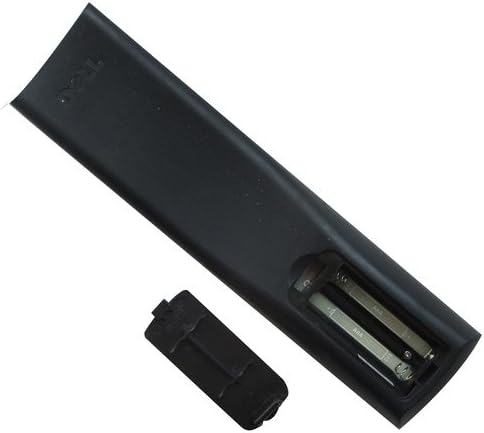
تصوير: ريڙهه view of the remote control with the battery cover removed, revealing the two AAA battery slots. This illustrates the correct orientation for battery insertion.
2. شروعاتي استعمال
This replacement remote control is designed for immediate use with compatible AOC LED HDTV models. No programming or pairing is typically required. Simply point the remote at your television and press the desired function button.
آپريٽنگ هدايتون
Familiarize yourself with the buttons on your remote control. The layout is designed for intuitive operation of your AOC television.

تصوير: سامهون view of the Easytry123 remote control, displaying its full button layout. Key buttons include Power, Input, Number Pad, Volume, Channel, Menu, and Navigation controls.
اهم ڪم:
- طاقت (●): ٽيليويزن کي آن يا بند ڪري ٿو.
- ان پٽ: دستياب ان پٽ ذريعن (HDMI، AV، جزو، وغيره) ذريعي چڪر.
- نمبر پيڊ (0-9): سڌو سنئون چينل چونڊيندو آهي.
- VOL (+/-): حجم جي سطح کي ترتيب ڏئي ٿو.
- CH (+/-): ٽيليويزن چينل تبديل ڪري ٿو.
- خاموش: Silences or restores the television audio.
- مينيو: Accesses the television's main menu for settings and options.
- نيويگيشن بٽڻ (مٿي، هيٺ، کاٻي، ساڄي، ٺيڪ): مينيو ذريعي نيويگيٽ ڪرڻ ۽ چونڊن جي تصديق ڪرڻ لاءِ استعمال ڪيو ويندو آهي.
- نڪرڻ / واپسي: مينيو مان نڪرندو آهي يا پوئين اسڪرين ڏانهن موٽندو آهي.
- ڄاڻ: موجوده پروگرام يا ان پٽ بابت معلومات ڏيکاري ٿو.
- رنگ جا بٽڻ (لال، سائو، پيلو، نيرو): These buttons may have specific functions depending on the TV model or current menu/application. Refer to your TV's manual for details.
سار سنڀال
بيٽري مٽائڻ
جڏهن ريموٽ جو ردعمل سست ٿي وڃي يا ڪم ڪرڻ بند ڪري ڇڏي ته بيٽريون تبديل ڪريو. هميشه ٻنهي بيٽرين کي هڪ ئي وقت نئين AAA بيٽرين سان تبديل ڪريو. پراڻيون ۽ نئين بيٽريون، يا مختلف قسمن جون بيٽريون نه ملايو.
صفائي
ريموٽ ڪنٽرول کي صاف ڪرڻ لاءِ، نرم، سڪل ڪپڙو استعمال ڪريو. ضدي مٽيءَ لاءِ، ٿورو ڊيampen the cloth with water or a mild cleaning solution, then wipe dry immediately. Avoid using harsh chemicals or abrasive cleaners.
ذخيرو
When not in use for extended periods, it is recommended to remove the batteries to prevent leakage, which can damage the remote control.
مشڪلاتون
| مسئلو | ممڪن سبب | حل |
|---|---|---|
| ريموٽ جواب نه ڏئي رهيو آهي. | Dead or incorrectly inserted batteries. Obstruction between remote and TV. Remote out of range. | Replace batteries, ensuring correct polarity. Remove any obstructions. Ensure you are within a reasonable distance and pointing directly at the TV's IR receiver. |
| ڪجھ فنڪشن ڪم نه ڪندا آھن. | The replacement remote may not support all advanced functions of the original TV remote. | This is expected for some replacement remotes. Verify if the function is a basic TV control. If it's a specific smart TV or advanced feature, it might not be compatible. |
| بٽڻ چپچپا يا غير جوابده آهن. | بٽڻ جي هيٺان مٽي يا ملبو. | ريموٽ ڪنٽرول کي صاف ڪريو جيئن سار سنڀال واري حصي ۾ بيان ڪيو ويو آهي. |
وضاحتون
- برانڊ: ايزيٽري 123
- ماڊل نمبر: ايزيٽري 1152
- مطابقت رکندڙ ڊوائيسز: AOC LED HDTV Televisions
- رابطي ٽيڪنالاجي: انفراريڊ (IR)
- ڪنٽرولر جو قسم: بٽڻ ڪنٽرول
- طاقت جو ذريعو: 2 x AAA بيٽريون (شامل نه آهن)
- خاص خصوصيت: Ergonomic ڊيزائن
وارنٽي ۽ سپورٽ
For any issues or questions regarding your Easytry123 remote control, please refer to the retailer or manufacturer's support channels. Specific warranty information may vary by purchase location.