1. تعارف ۽ اوورview
The Zoom LiveTrak L-20 is a 20-channel digital mixer designed for live sound, studio recording, and podcasting. It integrates a 24-bit/96kHz 22-track recorder, a 22-in/4-out USB audio interface, 6 independent monitor outputs, 3-band EQ, and 20 built-in effects. This manual provides essential information for setting up, operating, maintaining, and troubleshooting your L-20 unit.
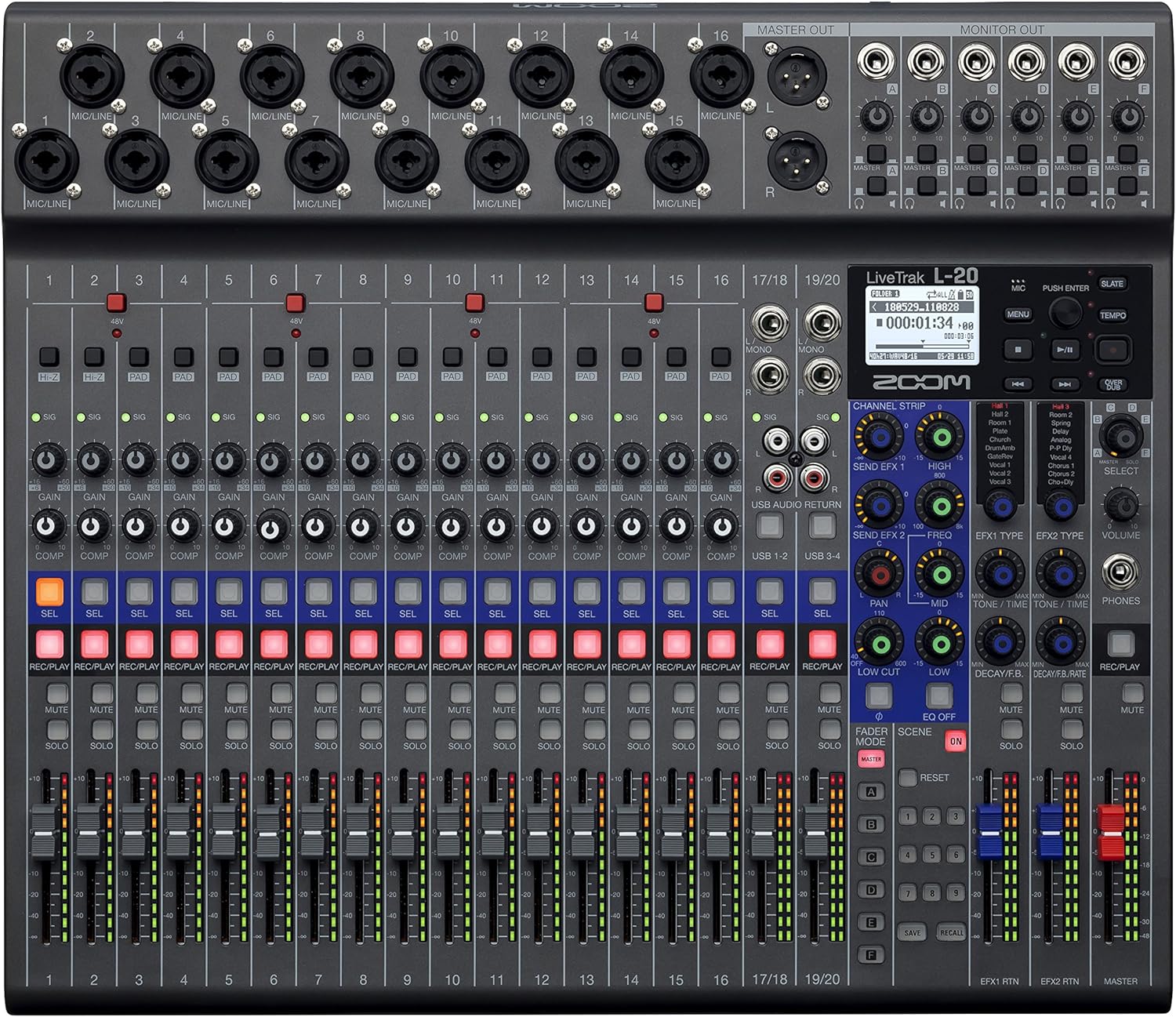
شڪل 1: سامهون view of the Zoom LiveTrak L-20 Digital Mixer, showcasing its comprehensive control surface.
اهم خاصيتون:
- اعليٰ آواز جو معيار: Experience pristine audio with 44.1/48/96 kHz sampling, ensuring every recording captures the nuances of your performance with exceptional clarity and depth.
- ورسٽائل ڪنيڪشن: Seamlessly integrate with various devices using USB 2.0 for audio interface capabilities, offering 22-channel recording and 4-channel playback for flexible workflow.
- وجداني ڪنٽرول: Navigate effortlessly with the LCD backlight display (128 x 64 resolution), providing clear visual feedback for settings and levels, enhancing your mixing experience.
- Expanded Input Options: Accommodate diverse audio sources with 16 mono (MIC/LINE) inputs and 2 stereo (LINE) inputs, offering XLR/TRS combo jacks and selectable Hi-Z input for instruments.
- Robust Recording Capabilities: Capture every moment with up to 22 simultaneous recording tracks at high resolution (96 kHz), ensuring no detail is missed during live performances or studio sessions.
2. سيٽ اپ
2.1 انباڪسنگ ۽ شروعاتي معائنو
Upon receiving your Zoom LiveTrak L-20, carefully unpack all components. The package typically includes the L-20 unit and an AC Adapter. Inspect the unit for any signs of damage during transit. Ensure all listed accessories are present.
2.2 ڳنڍڻ واري طاقت
Connect the supplied AC adapter to the DC IN 12V port on the rear panel of the L-20 and plug it into a suitable power outlet. Use the POWER switch to turn the unit on or off.
2.3 ان پٽ ۽ آئوٽ پٽ ڪنيڪشن
The L-20 offers extensive connectivity options:
- مائڪروفون/لائن ان پٽ (چينل 1-16): These channels feature XLR/TRS combo jacks, accommodating both microphones and line-level instruments. Channels 1-2 also offer selectable Hi-Z input for direct connection of guitars or basses.
- Stereo Line Inputs (Channels 17/18, 19/20): These inputs are suitable for stereo line-level sources such as keyboards or media players.
- ماسٽر آئوٽ: XLR outputs for connecting to main PA systems or studio monitors.
- Monitor Outputs (A-F): Six independent TRS outputs for connecting to personal monitor systems or headphones, allowing for customized mixes for each performer.
- USB بندرگاهن: USB Host port for connecting flash drives and a USB 2.0 port for computer connectivity (audio interface mode).
- SD ڪارڊ سلاٽ: For multitrack recording directly to an SD card.
- فوٽ سوئچ ان پٽ: Allows connection of an optional foot switch for remote control of certain functions, such as punch-in/out for recording.

Figure 2: Rear panel connections of the Zoom LiveTrak L-20, detailing various input and output options.
2.4 ايس ڊي ڪارڊ داخل ڪرڻ
Insert a compatible SD card (up to 512GB) into the SD card slot on the front panel. The L-20 supports SD, SDHC, and SDXC cards. Ensure the card is formatted correctly by the L-20 before recording.
2.5 بلوٽوت ريموٽ ڪنٽرول
The L-20 includes a Bluetooth remote adapter. Insert this adapter into the 'REMOTE' port on the front panel. This enables wireless control of the L-20 via a dedicated application on a compatible device (e.g., iPad).
3. آپريٽنگ هدايتون
3.1 چينل ڪنٽرول
Each channel on the L-20 features dedicated controls for optimal sound shaping:
- نوبت حاصل ڪرڻ: هر چينل لاءِ ان پٽ ليول کي ترتيب ڏئي ٿو.
- پي اي ڊي بٽڻ: Attenuates the input signal by 26dB for high-level sources.
- COMP (ڪمپريسر) نوب: Applies compression to the input signal, helping to control dynamics.
- 3-بينڊ EQ: High, Mid, and Low frequency controls to shape the tone of each channel.
- SEND EFX: Controls the amount of signal sent to the built-in effects processor.
- پان: چينل جي اسٽيريو پوزيشن کي ترتيب ڏئي ٿو.
- REC/PLAY Button: Engages recording or playback for the individual track.
- MUTE بٽڻ: چينل کي خاموش ڪري ٿو.
- سولو بٽڻ: نگراني لاءِ چينل کي الڳ ڪري ٿو.
- فادر: Controls the output level of the channel.
3.2 Multitrack Recording
The L-20 can record up to 22 tracks simultaneously to an SD card. To begin recording:
- Ensure an SD card is inserted and formatted.
- کي دٻايو REC/PLAY هر چينل تي بٽڻ جيڪو توهان رڪارڊ ڪرڻ چاهيو ٿا. بٽڻ ڳاڙهي رنگ سان روشن ٿيندو.
- مکيه کي دٻايو آر اي سي button (red circle) in the master section to start recording.
- کي دٻايو راند ڪريو رڪارڊنگ کي روڪڻ لاءِ بٽڻ.
3.3 Monitor Mixes
The L-20 provides 6 independent monitor mixes (A-F). Each mix can be customized for individual performers:
- Select the desired monitor mix (A-F) using the dedicated buttons.
- Adjust the level of each channel within that specific monitor mix using the channel's موڪليو ڇڪ
- Connect headphones or in-ear monitors to the corresponding monitor output.
3.4 بلٽ ان اثرات
The L-20 features 20 built-in effects. To apply effects:
- استعمال ڪريو EFX ٽائپ knob to select the desired effect.
- ترتيب ڏيو EFX واپسي level to control the overall effect amount.
- استعمال ڪريو SEND EFX knob on individual channels to send signal to the effects processor.
3.5 USB آڊيو انٽرفيس موڊ
The L-20 can function as a 22-in/4-out USB audio interface for your computer (Mac/PC/iOS). Use the ڊيوائس موڊ switch to select between HOST (for flash drives) and DEVICE (for computer connection). The CLASS COMPLIANT MODE switch allows for driverless operation with iOS devices.
وڊيو 1: پراڊڪٽ ختمview of the Zoom LiveTrak L-20. This video demonstrates the key features and operational aspects of the mixer, including inputs, outputs, and controls.
وڊيو 2: تفصيلي جائزوview of the Zoom LiveTrak L-20 Digital Mixer and Multitrack Recorder. This video focuses on the recording features, input channels, and overall design.
4. سار سنڀال
4.1 صفائي
Regularly clean the surface of the L-20 with a soft, dry cloth. For stubborn dirt, use a slightly damp cloth with a mild, non-abrasive cleaner. Avoid using harsh chemicals or solvents, as these can damage the finish and electronic components. Ensure no liquids enter the unit.
4.2 اسٽوريج
When not in use, store the L-20 in a cool, dry place away from direct sunlight, extreme temperatures, and high humidity. Protect the unit from dust by covering it with a dust cover or storing it in its original packaging or a suitable carrying case.
4.3 فرم ویئر تازه ڪاريون
وقت بوقت سرڪاري زوم چيڪ ڪريو website for firmware updates. Keeping your L-20's firmware up-to-date ensures optimal performance, new features, and bug fixes. Follow the instructions provided by Zoom carefully when performing updates.
5. مسئلا حل ڪرڻ
This section addresses common issues you might encounter with your Zoom LiveTrak L-20.
5.1 پاور ناهي
- Ensure the AC adapter is securely connected to both the L-20 and a working power outlet.
- پڪ ڪريو ته پاور سوئچ 'آن' پوزيشن ۾ آهي.
- پاور آئوٽليٽ کي ٻئي ڊوائيس سان جانچيو ته اهو ڪم ڪري رهيو آهي.
5.2 ڪو به آواز آئوٽ پُٽ ناهي
- Check all cable connections from inputs to outputs.
- Ensure channel faders and the master fader are raised.
- Verify that channels are not muted or soloed incorrectly.
- Check the gain settings for each channel to ensure adequate input level.
- Confirm that monitor mixes are correctly configured and their output levels are sufficient.
5.3 رڪارڊنگ جا مسئلا
- Ensure a compatible SD card is inserted and properly formatted.
- Check the available space on the SD card.
- تصديق ڪريو ته REC/PLAY button is illuminated red for the desired tracks before pressing the main آر اي سي بٽڻ
- If using as a USB audio interface, ensure the correct drivers are installed (if required by your OS) and the L-20 is selected as the audio input/output device in your DAW.
5.4 Bluetooth Connectivity Problems
- Ensure the Bluetooth remote adapter is securely inserted into the 'REMOTE' port.
- Verify Bluetooth is enabled on your controlling device (e.g., iPad).
- Restart both the L-20 and your controlling device.
- Ensure the controlling app is up-to-date.
6. وضاحتون
| خاصيت | تفصيل |
|---|---|
| شيءِ جو وزن | 9.8 آونس (0.28 ڪلوگرام) |
| پيداوار جي ماپ | 17.5 x 15.3 x 3.25 انچ (44.45 x 38.86 x 8.26 سينٽي) |
| شيون ماڊل نمبر | ايل-20 |
| چينلن جو تعداد | 20 |
| طاقت جو ذريعو | تار ٿيل برقي |
| رابطي ٽيڪنالاجي | USB |
| Sampling فريڪوئنسي | 44.1 / 48 / 96 ڪلوگرام |
| رڪارڊنگ ٽريڪ | Up to 22 simultaneous tracks |
| مانيٽر آئوٽ پُٽ | 6 آزاد پيداوار |
| تعمير ٿيل اثر | 20 قسم |
7. وارنٽي ڄاڻ
The Zoom LiveTrak L-20 typically comes with a manufacturer's warranty. For detailed information regarding warranty coverage, duration, and terms, please refer to the warranty card included with your product or visit the official Zoom webسائيٽ. وارنٽي دعوائن لاءِ خريداري جو ثبوت رکو.
8. سپورٽ ۽ رابطو
For further assistance, technical support, or to download the latest drivers and firmware, please visit the official Zoom support webسائيٽ. توهان اضافي مدد لاءِ FAQs ۽ ڪميونٽي فورم پڻ ڳولي سگهو ٿا.
Official Zoom Webسائيٽ: www.zoom.co.jp


