1. تعارف
This manual provides instructions for the installation, operation, and maintenance of your GAMEMAX G561 FRGB Black ATX Mid Tower Gaming Case. The G561 is designed to accommodate ATX, Micro ATX, and Mini-ITX motherboards, featuring an acrylic front panel, an acrylic side window, and integrated FRGB fans for system cooling.
Please read this manual thoroughly before beginning installation to ensure proper setup and to prevent damage to the product or other components.
2. حفاظت جي ڄاڻ
- ڪنهن به جزو کي انسٽال ڪرڻ يا هٽائڻ کان اڳ هميشه وال آئوٽليٽ مان بجلي جي فراهمي کي ڊسڪنيڪٽ ڪريو.
- حساس حصن کي اليڪٽرو اسٽيٽڪ ڊسچارج (ESD) نقصان کان بچائڻ لاءِ اينٽي اسٽيٽڪ کلائي پٽي پائڻ.
- Handle all components with care. Avoid touching circuit boards or connector pins directly.
- The case features rolled edges to minimize the risk of injury during installation. Exercise caution when working inside the case.
- Keep the case and components away from moisture, dust, and extreme temperatures.
3. پراڊڪٽ ختمview
The GAMEMAX G561 case features a transparent acrylic front panel and a clear acrylic side window, allowing visibility of internal components and the integrated FRGB fans. The I/O ports are located on the top panel for convenient access.

شڪل 3.1: سامهون واري پاسي view of the GAMEMAX G561 case with illuminated FRGB fans.
3.1 Front Panel and I/O Ports
The front panel includes three fixed-color FRGB fans. The top panel provides essential connectivity and control options.

Figure 3.2: Top I/O Panel layout.
- ري سيٽ بٽڻ: سسٽم ري سيٽ لاءِ.
- USB 3.0 پورٽ: تيز رفتار ڊيٽا جي منتقلي.
- USB 2.0 بندرگاهن (x2): Standard data transfer.
- مائڪروفون جڪ آڊيو ان پٽ.
- هيڊ فون جڪ آڊيو آئوٽ.
- Fan Control Key: Toggles fan speed and FRGB lighting (Off, Low speed/no LEDs, High speed/LEDs on).
3.2 Internal Layout and Component Support
The G561 case offers ample space for various components, including support for CPU coolers up to 160mm and VGA cards up to 360mm.

Figure 3.3: Internal dimensions for CPU cooler (160mm) and VGA card (360mm).
Drive bays are located behind the motherboard tray and at the bottom of the case for efficient cable management and airflow.

Figure 3.4: Drive bay locations for 2x 2.5" SSDs and 2x 3.5" HDDs.
4. سيٽ اپ ۽ تنصيب
4.1 ڪيس جي تياري
- ڪيس کي هڪ مستحڪم، فليٽ مٿاڇري تي رکو.
- Remove the side panel by unscrewing the thumbscrews at the rear and sliding the panel backward.
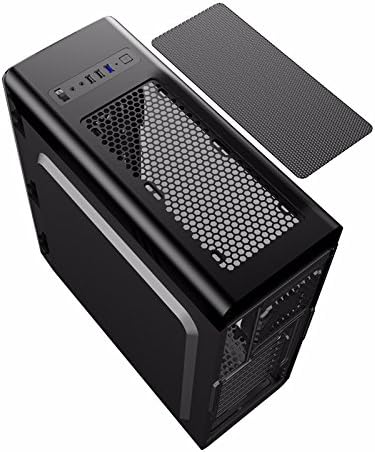
Figure 4.1: Side panel removal.
4.2 Motherboard جي انسٽاليشن
- Install the I/O shield provided with your motherboard into the opening at the rear of the case.
- Align the motherboard with the standoffs inside the case. Ensure the standoffs match your motherboard's form factor (ATX, Micro ATX, or Mini-ITX).
- مدر بورڊ کي مناسب اسڪرو سان محفوظ ڪريو.
4.3 Drive Installation (SSD/HDD)
- For 2.5" SSDs: Mount SSDs to the designated trays behind the motherboard tray using screws. Note that some mounts may use a combination of screws and retention clips.
- For 3.5" HDDs: Slide HDDs into the drive cages located at the bottom of the case. Secure them with screws or tool-less clips if available.
4.4 پاور سپلاءِ جي تنصيب
- پاور سپلائي يونٽ (PSU) کي ڪيس جي پوئين پاسي وقف ٿيل ڪمري ۾ رکو.
- Secure the PSU to the case using screws from the rear.
4.5 گرافڪس ڪارڊ ۽ ايڪسپينشن ڪارڊ جي انسٽاليشن
- ڪيس جي پوئين پاسي کان ضروري PCI-E سلاٽ ڪَوَر هٽايو.
- Insert the graphics card or other expansion cards into the appropriate PCI-E slots on the motherboard.
- ڪارڊن کي اسڪرو سان محفوظ ڪريو.
4.6 ڪيبل مينيجمينٽ
Utilize the cutouts and tie-down points behind the motherboard tray to route and secure cables. This improves airflow and maintains a clean internal appearance.
4.7 فين ۽ ريڊيٽر جي انسٽاليشن
The case comes with four pre-installed FRGB fans (three front, one rear). The front panel supports a 240mm radiator for liquid cooling solutions.
- If installing an additional radiator, ensure it is compatible with the designated mounting points.
- Secure the radiator and any additional fans using the provided screws.
5. آپريٽنگ هدايتون
5.1 پاور آن/آف
Press the power button on the top I/O panel to turn your system on or off. A short press typically powers on, while a longer press (usually 4-5 seconds) forces a shutdown.
5.2 Fan and Lighting Control
Use the 'Fan Control Key' on the top I/O panel to adjust the speed of the pre-installed FRGB fans and their lighting:
- بند: Fans and FRGB lighting are turned off.
- گھٽ: Fans operate at a lower speed; FRGB lighting is off.
- اعلي: Fans operate at a higher speed; FRGB lighting is active.
6. سار سنڀال
6.1 ڪيس صاف ڪرڻ
Regular cleaning helps maintain optimal airflow and component longevity.
- ٻاهران: نرم استعمال ڪريو، ڊيamp cloth to wipe down the exterior surfaces. Avoid abrasive cleaners.
- مٽي فلٽر: The top panel features a magnetic dust filter. Periodically remove and clean it with water or a soft brush. Ensure it is completely dry before reattaching.
- اندروني: Use compressed air to remove dust from internal components and fans. Hold fan blades gently to prevent over-spinning during cleaning.

Figure 6.1: Top magnetic dust filter.
7. مسئلا حل ڪرڻ
- سسٽم آن نه ٿي رهيو آهي: Check all power connections, including the 24-pin ATX power, 8-pin CPU power, and front panel power switch headers. Ensure the power supply is switched on.
- پنکھا نه ڦرڻ / ايل اي ڊي نه روشن ٿيڻ: Verify that the fan control key is set to 'High'. Check fan power connections to the motherboard or fan controller.
- USB پورٽ ڪم نه ڪري رهيا آهن: Ensure the USB headers from the case are correctly connected to the motherboard.
- Audio jacks not working: Confirm the front panel audio header is securely connected to the motherboard's audio pins.
8. وضاحتون
| خاصيت | تفصيل |
|---|---|
| برانڊ | گيمڪس |
| ماڊل نمبر | casegamemax (G561) |
| ڪيس جو قسم | مائي ٽاور |
| Motherboard مطابقت | ATX, Micro ATX, Mini-ITX |
| پيداوار جي ماپ | 44 x 20.5 x 47 سينٽي |
| شيءِ جو وزن | 5.3 ڪلوگرام |
| رنگ | ڪارو |
| مواد | اکري |
| کولڻ جو طريقو | هوا |
| شامل ٿيل پرستار | 4x Fixed Color FRGB Fans (3 front, 1 rear) |
| فرنٽ ريڊيٽر سپورٽ | 240mm تائين |
| وڌ ۾ وڌ CPU کولر جي اوچائي | 160mm |
| وڌ ۾ وڌ VGA ڪارڊ ڊگھائي | 360mm |
| ڊرائيو بيز | 2x 2.5" SSD, 2x 3.5" HDD |
| ڪل USB بندرگاهن | 3 (1x USB 3.0, 2x USB 2.0) |
| تجويز ڪيل استعمال | گيمنگ |
9. وارنٽي ۽ سپورٽ
وارنٽي جي معلومات ۽ ٽيڪنيڪل سپورٽ لاءِ، مھرباني ڪري سرڪاري GAMEMAX جو حوالو ڏيو. webسائيٽ تي وڃو يا پنهنجي مقامي پرچون ڪندڙ سان رابطو ڪريو. وارنٽي دعوائن لاءِ خريداري جو ثبوت رکو.


