1. تعارف
The Snakebyte GAME:PAD 4S Wireless controller is designed to provide a seamless and immersive gaming experience on your PlayStation 4 console. This manual provides essential information on setting up, operating, maintaining, and troubleshooting your new gamepad.

شڪل 1: سامهون view of the Snakebyte GAME:PAD 4S Wireless Controller in blue camo.
2. اهم خاصيتون
- Lag-Free Wireless Connectivity: Utilizes Bluetooth technology for a responsive and uninterrupted gaming experience on Sony PlayStation 4.
- Immersive Dual Vibration: Equipped with dual vibration motors that provide haptic feedback, making in-game actions feel more realistic.
- درست ڪنٽرول: Features twin analog joysticks and responsive trigger buttons for accurate and precise gameplay.
- Integrated Audio Jack: Includes a 3.5mm headphone jack for connecting headsets, allowing for in-game audio and communication.
- LED Status Home Button: A central LED-illuminated home button indicates controller status.
- Ergonomic ڊيزائن: Crafted for comfort during extended gaming sessions, reducing hand fatigue.
- موشن سينسر: Built-in accelerometer and gyroscope enable motion-sensing gameplay for enhanced immersion.
3. سيٽ اپ ۽ ڪنيڪشن
3.1 پلے اسٽيشن 4 سان شروعاتي جوڙو
- پڪ ڪريو ته توهان جو PlayStation 4 ڪنسول آن آهي.
- Connect the Snakebyte GAME:PAD 4S Wireless controller to the PS4 using the supplied micro-USB cable.
- Press the PS button (Home button) on the controller. The controller will automatically pair with the console.
- Once paired, you can disconnect the USB cable, and the controller will maintain its wireless connection.

Figure 2: Controller connected via micro-USB for initial pairing and charging.
3.2 ڪنٽرولر کي چارج ڪرڻ
To charge the controller, connect it to your PlayStation 4 console or a USB power adapter using the provided micro-USB cable. The LED on the home button will indicate charging status. A full charge typically takes approximately 2 hours and provides about 7-8 hours of playtime.
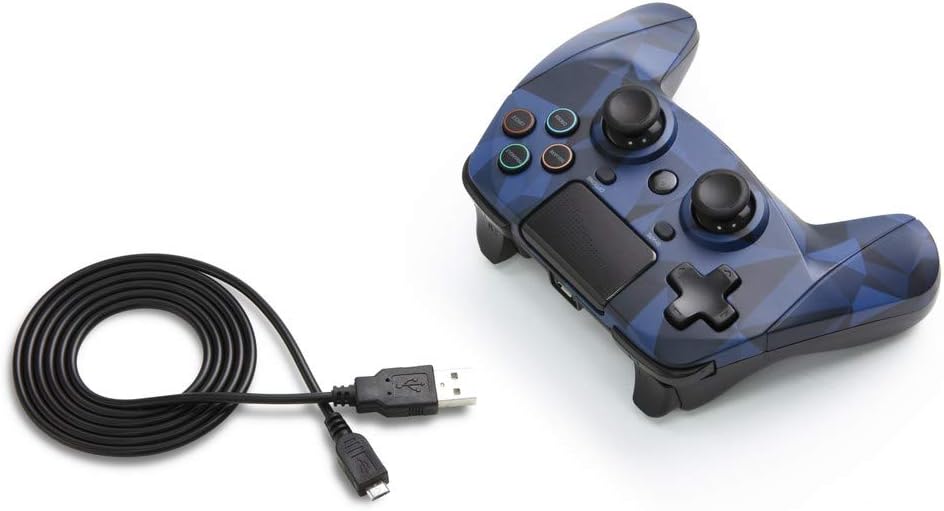
Figure 3: The Snakebyte GAME:PAD 4S Wireless Controller shown with its included micro-USB charging cable.
4. آپريٽنگ هدايتون
4.1 بٽڻ جي ترتيب ۽ ڪم
The controller features a familiar layout with dual analog sticks, a D-pad, action buttons (Triangle, Square, Circle, Cross), Share, Options, and a Home button. The action buttons are labeled with their names rather than symbols, but are color-coded similarly to standard PlayStation controllers.

شڪل 4: زاويه view highlighting the button layout and ergonomic design.
4.2 Touchpad and Motion Sensors
The integrated touchpad is fully functional and can be used for navigation and specific in-game interactions. The highly sensitive built-in accelerometer and gyroscope detect motion, tilt, and rotation, providing an immersive gaming experience for titles that utilize motion controls.
4.3 آڊيو جيڪ
Connect any standard 3.5mm headset to the controller's audio jack for private listening of game audio and voice chat. Ensure your headset is properly inserted for optimal sound quality.
5. سنڀال ۽ سار سنڀال
- ڪنٽرولر کي نرم، سڪل ڪپڙي سان صاف ڪري صاف رکو. سخت ڪيميڪلز يا رگڙيندڙ مواد استعمال ڪرڻ کان پاسو ڪريو.
- ڪنٽرولر کي سڌي سج جي روشني ۽ انتهائي گرمي پد کان پري ٿڌي، سڪل جاءِ تي ذخيرو ڪريو.
- ڪنٽرولر کي ڇڏڻ يا ان کي مضبوط اثرن جي تابع ڪرڻ کان پاسو ڪريو، ڇاڪاڻ ته اهو اندروني حصن کي نقصان پهچائي سگهي ٿو.
- Do not attempt to disassemble the controller, as this will void the warranty.
6. مسئلا حل ڪرڻ
6.1 ڪنيڪشن جا مسئلا
- If the controller does not connect, ensure it is fully charged.
- Try re-pairing the controller by connecting it via USB cable and pressing the PS button.
- Ensure there are no strong interferences (e.g., other Bluetooth devices, Wi-Fi routers) nearby.
6.2 Button Unresponsiveness
- If buttons are unresponsive, try resetting the controller. Locate the small reset button on the back of the controller (often near the L2 shoulder button) and press it with a thin object like a paperclip.
- Ensure the controller's firmware is up to date (check the Snakebyte support webاپڊيٽس لاءِ سائيٽ).
7. ٽيڪنيڪل وضاحتون
| خاصيت | تفصيل |
|---|---|
| برانڊ | Snakebyte |
| ماڊل نالو | GAME:PAD 4 S WIRELESS |
| شيون ماڊل نمبر | ايس بي 912726 |
| مطابقت رکندڙ ڊوائيسز | پلے اسٽيشن 4 |
| رابطي ٽيڪنالاجي | وائرليس (بلوٽوت) |
| ڪنٽرولر جو قسم | گيم پيڊ |
| طاقت جو ذريعو | بيٽري سان هلندڙ (1 ليتيم پوليمر بيٽري شامل آهي) |
| جلدtage | 3.7 وولٽ |
| شيءِ جو وزن | 11.2 اونس |
| پيداوار جي ماپ (LxWxH) | 4.53 x 2.95 x 6.1 انچ |
| رنگ | Blue Camo |
8. وارنٽي ۽ سپورٽ
The Snakebyte GAME:PAD 4S Wireless controller is covered by a 5-سال محدود ڪاريگر وارنٽي. For warranty claims or technical support, please refer to the contact information provided on the product packaging or visit the official Snakebyte webسائيٽ.


