1. تعارف
This manual provides essential instructions for the setup, operation, and maintenance of your Easytry123 replacement remote control. This remote is designed to function with specific Sony KDL series LCD HDTV models, including KDL-50R450A, KDL-40R475B, KDL-40R477B, and KDL-40R471A. Please read this manual thoroughly to ensure proper use and to understand the capabilities and limitations of this replacement device.
اهم نوٽ: As a replacement unit, this remote control may not support all advanced or unique functions present on your original television remote. Its primary purpose is to provide core television control functionalities.
2. پراڊڪٽ ختمview
The Easytry123 replacement remote control is an ergonomic, button-controlled device utilizing infrared (IR) technology for communication with your television. It is designed for ease of use and provides access to common television functions.
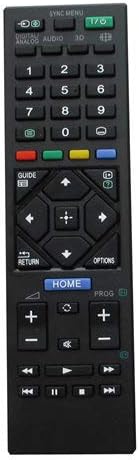
شڪل 1: سامهون view of the remote control, displaying its button layout for various functions.

شڪل 2: پوئتي view ريموٽ ڪنٽرول جو، ان جي ergonomic ڊيزائن کي اجاگر ڪندي.
3. سيٽ اپ
3.1 بيٽري لڳائڻ
ريموٽ ڪنٽرول کي ٻه AAA بيٽريون گهرجن (شامل نه آهن). انهن کي انسٽال ڪرڻ لاءِ انهن قدمن تي عمل ڪريو:
- ريموٽ ڪنٽرول جي پٺيءَ تي بيٽري جي دٻي جي احاطي کي ڳولھيو.
- ڍڪ کي هيٺئين طرف سلائڊ ڪريو يا ڪمپارٽمينٽ کولڻ لاءِ لچ (جيڪڏهن موجود هجي) کي دٻايو.
- ٻہ AAA بيٽريون داخل ڪريو، پڪ ڪريو ته مثبت (+) ۽ منفي (-) ٽرمينل ڪمري اندر نشانن سان صحيح طرح سان ترتيب ڏين.
- بيٽري جي ڪمپارٽمينٽ جي ڍڪ کي واپس جاءِ تي سلائڊ ڪريو جيستائين اهو محفوظ طور تي ڪلڪ نه ڪري.
نوٽ: هميشه نئين بيٽري استعمال ڪريو ۽ ساڳئي وقت ٻئي بيٽريون تبديل ڪريو. پراڻيون ۽ نئين بيٽريون يا مختلف قسمن جون بيٽريون نه ملايو.
4. آپريٽنگ هدايتون
Once batteries are installed, the remote control is ready for use. Point the remote directly at your Sony LCD HDTV and press the desired function button.
4.1 بنيادي ڪم
- پاور (آءِ/آءِ): ٽي وي کي آن يا بند ڪري ٿو.
- نمبر بٽڻ (0-9): Directly select TV channels.
- Channel Up/Down (PROG +/-): چينلن کي ترتيب وار تبديل ڪري ٿو.
- حجم مٿي/گهٽ (+/-): آواز جي مقدار کي ترتيب ڏئي ٿو.
- خاموش: ٽي وي آڊيو کي خاموش ڪري ٿو.
- ان پٽ/ذريعو: دستياب ان پٽ ذريعن (HDMI، AV، وغيره) ذريعي چڪر لڳائي ٿو.
- Navigation Buttons (Arrows, Enter): مينيو کي نيويگيٽ ڪرڻ ۽ چونڊن جي تصديق ڪرڻ لاءِ استعمال ڪيو ويندو آهي.
- گهر: Accesses the TV's main menu or smart features.
- واپسي/واپس: پوئين اسڪرين يا مينيو ڏانھن واپسي.
For specific button functions, refer to your television's original user manual, as button labels and their corresponding actions can vary slightly between TV models.
5. سار سنڀال
5.1 صفائي
ريموٽ ڪنٽرول کي صاف ڪرڻ لاءِ، نرم، سڪل ڪپڙي سان ان جي مٿاڇري کي نرميءَ سان صاف ڪريو. ضدي مٽيءَ لاءِ، ٿورو ڊيampڪپڙي کي پاڻي سان ڍڪيو. سخت ڪيميڪل، رگڙيندڙ صاف ڪندڙ، يا گهڻي نمي استعمال ڪرڻ کان پاسو ڪريو، ڇاڪاڻ ته اهي ريموٽ جي اليڪٽرانڪس يا ختم کي نقصان پهچائي سگهن ٿا.
5.2 اسٽوريج
When not in use for extended periods, remove the batteries from the remote control to prevent leakage and potential damage. Store the remote in a cool, dry place away from direct sunlight and extreme temperatures.
6. مسئلا حل ڪرڻ
If you encounter issues with your remote control, please refer to the following troubleshooting steps:
- ريموٽ جواب نه ڏيڻ:
- پڪ ڪريو ته بيٽريون صحيح پولارٽي سان صحيح طور تي نصب ٿيل آهن.
- نئين سان پراڻي بيٽرين کي تبديل ڪريو.
- ريموٽ ڪنٽرول ۽ ٽي وي جي IR رسيور جي وچ ۾ ڪنهن به رڪاوٽ جي جانچ ڪريو.
- Ensure you are within a reasonable range and pointing the remote directly at the TV.
- Certain Functions Not Working:
- Verify that your TV model is listed as compatible with this replacement remote.
- Remember that replacement remotes may not support all original TV functions. If a specific advanced function is not working, it may not be supported by this replacement unit.
- Consult your TV's original manual to confirm if the function requires a specific button sequence or is unique to the original remote.
7. وضاحتون
| خاصيت | تفصيل |
|---|---|
| برانڊ | ايزيٽري 123 |
| مطابقت رکندڙ ڊوائيسز | Sony KDL-50R450A, KDL-40R475B, KDL-40R477B, KDL-40R471A LCD HDTVs |
| رابطي ٽيڪنالاجي | انفراريڊ (IR) |
| ڪنٽرولر جو قسم | بٽڻ ڪنٽرول |
| خاص خصوصيت | Ergonomic ڊيزائن |
| طاقت جو ذريعو | 2 x AAA بيٽريون (شامل نه آهن) |
8. وارنٽي ۽ سپورٽ
Specific warranty information for this Easytry123 replacement remote control is not provided within the product details. For any support inquiries or issues not covered in this manual, please refer to the retailer or point of purchase for assistance.


