1. تعارف
The Denver MRD-51 is a versatile multi-function music system designed to play various audio formats. It integrates a record player, DAB+ and FM/AM radio tuner, CD player, and cassette deck into a single unit. Additionally, it features a USB port for digitizing audio from CDs, records, or cassettes, and an AUX input for connecting external devices. The system includes two integrated stereo speakers for a complete audio experience.
2. حفاظتي هدايتون
- ڊوائيس هلائڻ کان اڳ سڀ هدايتون احتياط سان پڙهو.
- مستقبل جي حوالي لاءِ هي دستياب رکو.
- باهه يا بجليءَ جي جھٽڪي کان بچڻ لاءِ يونٽ کي مينهن يا نمي جي سامهون نه رکو.
- مناسب وينٽيليشن کي يقيني بڻايو؛ ڪنهن به وينٽيليشن جي سوراخن کي نه روڪيو.
- يونٽ کي هڪ مستحڪم، لوڻ واري مٿاڇري تي رکو.
- Disconnect the power plug from the wall outlet if the unit is not in use for a long period.
- يونٽ جي پاڻ خدمت ڪرڻ جي ڪوشش نه ڪريو. سڀني خدمتن کي قابل خدمت اهلڪارن جي حوالي ڪريو.
3. پيڪيج مواد
پيڪنگ ڪرڻ وقت پڪ ڪريو ته سڀئي شيون موجود آهن:
- Denver MRD-51 Multi-Function Music System
- پاور ڪيبل
- ريموٽ ڪنٽرول
- استعمال ڪندڙ دستي
4. پراڊڪٽ ختمview

شڪل 4.1: Denver MRD-51 Multi-Function Music System with turntable open. This image displays the Denver MRD-51 music system from a front-top perspective, with the turntable lid open and a vinyl record placed on the platter. The control panel, including the LCD display, knobs, and buttons, is visible below the turntable.

شڪل 4.2: Denver MRD-51 Multi-Function Music System, front view. A front view of the Denver MRD-51 music system with the turntable lid closed. This image highlights the integrated stereo speakers on the sides and the central control panel, emphasizing its classic design.
4.1 فرنٽ پينل ڪنٽرول
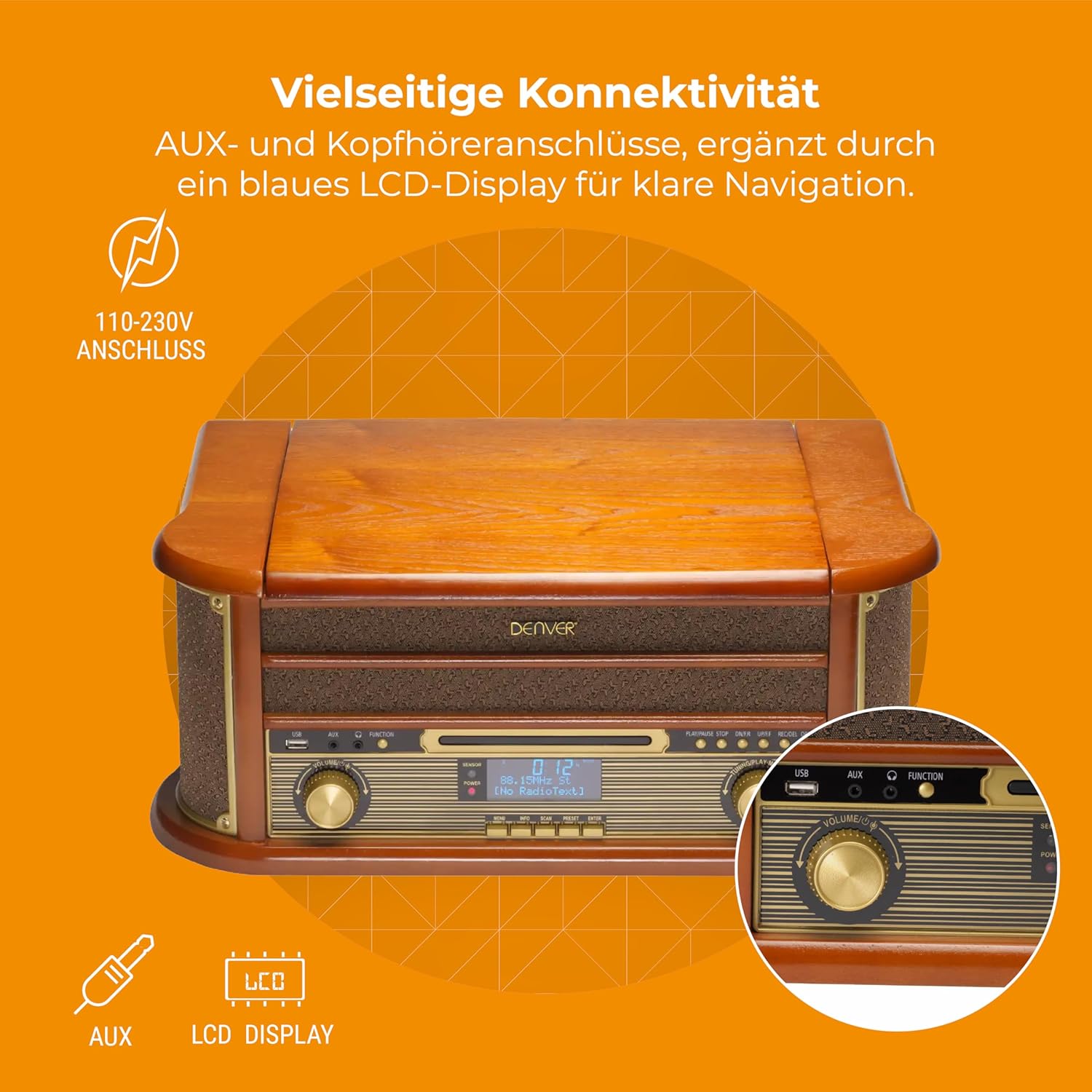
شڪل 4.3: Denver MRD-51 front panel with USB, AUX, and LCD display. A close-up of the Denver MRD-51's front control panel, showcasing the USB port, AUX input, and the blue LCD display for clear navigation. This view details the various connectivity options available.
- پاور بٽڻ: يونٽ کي آن يا بند ڪري ٿو.
- فنڪشن بٽڻ: Selects between Turntable, CD, Cassette, DAB+, FM, AM, AUX, and USB modes.
- USB پورٽ: For connecting USB storage devices for playback or recording.
- AUX ان پٽ: ٻاهرين آڊيو ذريعن کي ڳنڍڻ لاءِ 3.5 ايم ايم جيڪ.
- LCD ڊسپلي: Shows current mode, track information, radio frequency, and other system status.
- راند/روڪ بٽڻ: Starts or pauses playback for CD, Cassette, or USB.
- اسٽاپ بٽڻ: پلے بیک کي روڪي ٿو.
- SKIP Buttons (◀◀ / ▶▶): ٽريڪ ڇڏي ٿو يا تيز اڳتي/ پوئتي ڪري ٿو.
- رڪارڊ بٽڻ: Initiates recording to USB.
- وولم نوب: مجموعي آئوٽ پُٽ حجم کي ترتيب ڏئي ٿو.
- ٽيوننگ نوب: Adjusts radio frequency in FM/AM mode or navigates menus in DAB+ mode.
4.2 Turntable and Cassette Deck

شڪل 4.4: Denver MRD-51 showing open turntable and cassette deck. This image illustrates the versatility of the Denver MRD-51, featuring the open turntable with a record and an arrow pointing to the cassette deck slot on the side, indicating its multi-format playback capabilities.
- ٽرنبل ٽيبل: وينائل رڪارڊ کيڏڻ لاءِ.
- Tone Arm with Stylus: Reads the grooves of vinyl records.
- رفتار چونڊيندڙ: 33، 45، يا 78 RPM جي چونڊ جي اجازت ڏئي ٿو.
- Cassette Deck Slot: For inserting audio cassettes.
4.3 سي ڊي پليئر

شڪل 4.5: Denver MRD-51 with CD tray open and remote control. This image shows the Denver MRD-51 with its CD tray open, ready for disc insertion. A remote control is also pictured, indicating convenient operation of the system's functions.
- سي ڊي ٽري: For inserting compact discs.
- کولڻ/بند ڪرڻ جو بٽڻ: Opens and closes the CD tray.
5. سيٽ اپ
5.1 Unpacking ۽ لڳائڻ
- احتياط سان ان جي پيڪنگنگ مان يونٽ کي هٽايو.
- Place the unit on a flat, stable surface away from direct sunlight, heat sources, and excessive dust or moisture.
- پڪ ڪريو ته يونٽ جي چوڌاري وينٽيليشن لاءِ مناسب جاءِ آهي.
5.2 پاور ڪنيڪشن
- پاور ڪيبل کي يونٽ جي پوئين پاسي AC IN ساڪٽ سان ڳنڍيو.
- Plug the other end of the power cable into a standard wall outlet (110-230V).
5.3 اينٽينا ڪنيڪشن
For optimal radio reception, extend the telescopic antenna fully for FM/DAB+ or adjust its position for AM.
6. آپريٽنگ هدايتون
6.1 جنرل آپريشن
- کي دٻايو پاور يونٽ کي چالو ڪرڻ لاءِ بٽڻ.
- کي دٻايو فنڪشن button repeatedly to cycle through available modes: Turntable, CD, Cassette, DAB+, FM, AM, AUX, USB.
- ترتيب ڏيو حجم توهان جي گهربل ٻڌڻ جي سطح تي نوب.
6.2 Turntable Operation
- Select the 'Turntable' function.
- ٽرن ٽيبل جو ڍڪ کوليو.
- پليٽ تي ونائل رڪارڊ رکو.
- Set the speed selector to match the record's speed (33, 45, or 78 RPM). For 45 RPM records, use the included adapter if necessary.
- Gently lift the tone arm and position the stylus over the desired track on the record.
- Lower the tone arm slowly onto the record. Playback will begin.
- At the end of the record, the tone arm may automatically return to its rest, or you may need to manually lift and return it.
6.3 سي ڊي پليئر آپريشن
- 'سي ڊي' فنڪشن چونڊيو.
- کي دٻايو کوليو/ بند ڪريو سي ڊي ٽري کولڻ لاءِ بٽڻ دٻايو.
- Place a CD (CD/CD-R/CD-RW compatible) with the label side facing up into the tray.
- کي دٻايو کوليو/ بند ڪريو ٽري کي بند ڪرڻ لاءِ ٻيهر بٽڻ دٻايو. يونٽ ڊسڪ کي پڙهندو.
- دٻايو راند/روڪ پلے بیک شروع ڪرڻ لاء.
- استعمال ڪريو SKIP buttons (◀◀ / ▶▶) to navigate between tracks.
- دٻايو اسٽاپ پلے بیک ختم ڪرڻ لاء.
6.4 ڪيسٽ پليئر آپريشن
- Select the 'Cassette' function.
- Insert an audio cassette into the cassette deck slot until it clicks into place.
- کي دٻايو راند ڪريو button (often integrated with the cassette mechanism) to start playback.
- استعمال ڪريو اسٽاپ button to end playback. Fast forward and rewind functions are typically available via dedicated buttons on the cassette deck.
6.5 Radio Operation (DAB+/FM/AM)
- Select the desired radio function (DAB+, FM, or AM).
- For DAB+ Radio: The unit will typically perform an automatic scan for available stations upon first use. Use the ٽيوننگ ڇڪ يا SKIP buttons to navigate through the list of stations.
- For FM/AM Radio: استعمال ڪريو ٽيوننگ knob to manually tune to a station. The frequency will be displayed on the LCD.
6.6 USB رڪارڊنگ
The MRD-51 allows you to digitize audio from your records, CDs, or cassettes directly to a USB storage device.
- هڪ USB فليش ڊرائيو داخل ڪريو USB پورٽ.
- Select the source function you wish to record from (Turntable, CD, or Cassette).
- Start playback of the audio source (e.g., play a record, CD, or cassette).
- کي دٻايو رڪارڊ button. The recording indicator on the display will illuminate, and recording will begin.
- کي دٻايو رڪارڊ بٽڻ againيهر يا اسٽاپ button to end the recording. The recorded file USB ڊرائيو تي محفوظ ڪيو ويندو.
6.7 AUX ان پٽ
- هڪ ٻاهرين آڊيو ڊيوائس (مثال طور، اسمارٽ فون، MP3 پليئر) کي ان سان ڳنڍيو AUX ان پٽ 3.5 ايم ايم آڊيو ڪيبل استعمال ڪندي.
- Select the 'AUX' function.
- Start playback on your external device. The audio will be played through the MRD-51's speakers.
7. سار سنڀال
7.1 يونٽ جي صفائي
- هميشه صاف ڪرڻ کان پهريان يونٽ کي پاور آئوٽ مان انپلگ ڪريو.
- ٻاهرين سطحن کي صاف ڪرڻ لاءِ نرم، سڪل ڪپڙو استعمال ڪريو.
- گھڙڻ وارا صاف ڪندڙ، موم، يا محلول استعمال نه ڪريو.
7.2 Turntable Stylus Care
- Gently clean the stylus regularly with a soft brush, brushing from back to front.
- پنھنجن آڱرين سان اسٽائلس کي ڇھڻ کان پاسو ڪريو.
- Replace the stylus when sound quality deteriorates or if it is visibly damaged.
7.3 CD/Cassette Player Care
- Handle CDs and cassettes by their edges to avoid fingerprints and scratches.
- Keep the CD tray and cassette deck free of dust and debris.
8. مسئلا حل ڪرڻ
| مسئلو | ممڪن سبب | حل |
|---|---|---|
| طاقت نه آهي | پاور ڪيبل ڳنڍيل نه آهي؛ وال آئوٽليٽ فعال نه آهي | Ensure power cable is securely connected; Try a different outlet |
| آواز ڪونهي | Volume too low; Incorrect function selected; External device not playing | Increase volume; Select correct function; Ensure external device is playing and connected properly |
| Turntable not spinning or poor sound | Speed setting incorrect; Stylus dirty or damaged; Record dirty | Adjust speed selector; Clean or replace stylus; Clean record |
| سي ڊي نه پئي هلي. | CD inserted incorrectly; CD scratched or dirty; CD format not supported | Reinsert CD correctly; Clean or replace CD; Ensure CD is CD/CD-R/CD-RW format |
| ناقص ريڊيو استقبال | اينٽينا صحيح طرح سان نه وڌايو ويو آهي / پوزيشن ۾ آهي؛ ڪمزور سگنل | Extend and adjust antenna; Try repositioning the unit |
| USB رڪارڊنگ ڪم نه ڪري رهي آهي | USB drive full or incompatible; Source not playing | Use a different USB drive or clear space; Ensure audio source is playing during recording |
9. وضاحتون
| خاصيت | تفصيل |
|---|---|
| پيداوار جي ماپ | 20.08 x 13.39 x 8.46 انچ |
| شيءِ جو وزن | 15.18 پائونڊ (6.9 ڪلوگرام) |
| ماڊل نمبر | MRD-51 (Internal: 111201210000) |
| برانڊ | ڊنور |
| وڌ ۾ وڌ گھمڻ واري رفتار | 78 RPM (33، 45، 78 RPM کي سپورٽ ڪري ٿو) |
| شامل اجزاء | MRD-51 unit |
| خاص خاصيتون | Adjustable Speed, Digital Recorder, Integrated Speakers |
| مواد | Aluminum (internal components), Wood (housing) |
| رنگ | ڪاٺ |
| مطابقت رکندڙ ڊوائيسز | Personal Computer (for USB transfer) |
| ريڊيو Tuner | DAB+, FM, AM |
| سي ڊي پليئر | Supports CD/CD-R/CD-RW |
| آڊيو آئوٽ | 2 x 2.5W اسٽيريو اسپيڪر |
10. وارنٽي ۽ سپورٽ
For warranty information and technical support, please refer to the documentation provided with your purchase or contact Denver customer service through their official webسائيٽ. ڪنهن به وارنٽي دعوائن لاءِ خريداري جو ثبوت رکو.


