The MOZA Air 2 is a professional 3-axis handheld gimbal stabilizer designed for DSLRs, mirrorless cameras, and pocket cinema cameras. It offers advanced stabilization, extended battery life, and intelligent features to enhance your videography experience. This manual provides essential information for setup, operation, and maintenance of your MOZA Air 2.
پيڪيج مواد
پڪ ڪريو ته هيٺ ڏنل سڀئي شيون توهان جي پيڪيج ۾ شامل آهن:
Air2 Gimbal x 1
Lens support x 1
Lens support screw x 1
Follow focus install pipe x 2
Riser Plate x 2
ٽراپڊ x 1
18650 battery x 4
Intelligent charger x 1
MOZA control cable - Micro USB x 1
MOZA control cable - Mini USB x 1
MOZA control cable - Panasonic x 1
MOZA control cable - Sony x 1
USB قسم-سي ڪيبل x 1
يوزر مينوئل x 1
Warning card x 1
Tool bag x 1
H2 Hexagon wrench x 1
3/8 turn 1/4 nut x 1
M3 x 10 hexagon socket countersunk flat cap head screw x 10
Follow focus support x 1
پيداوار ختمview
The MOZA Air 2 gimbal stabilizer is designed for professional filmmaking, offering robust support and precise control for various camera setups.
Figure 1: MOZA Air 2 Gimbal with a camera mounted, showcasinان جي ڪمپيڪٽ ۽ ايرگونومڪ ڊيزائن جي ڪري.
Key features include a maximum payload capacity of 9 lbs (4.2 kg), supporting a wide range of cameras. It features an OLED display for easy parameter customization and offers 4-axis control with 8 follow modes for versatile shooting scenarios.
شڪل 2: تفصيلي view of the MOZA Air 2's control panel, including the OLED display, multi-function dial, and various control buttons.
The gimbal also integrates with a newly developed ecosystem of accessories, such as the MOZA thumb controller, iFocus, camera cage, and camera backpack (sold separately), to provide comprehensive control over gimbal movement and camera functions.
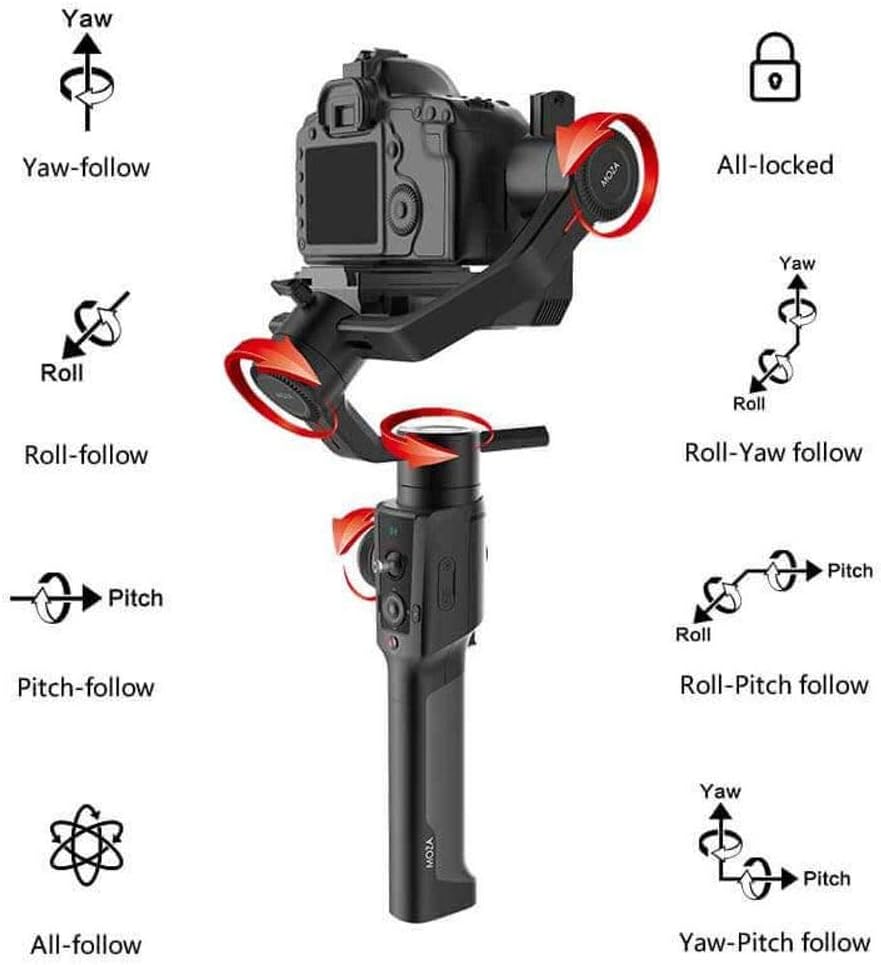
Figure 3: Visual representation of the MOZA Air 2's various operational modes, including Yaw, Roll, Pitch, and their respective follow modes, as well as All-locked and All-follow modes.
سيٽ اپ ڪريو
1. بيٽري لڳائڻ ۽ چارج ڪرڻ
The MOZA Air 2 is powered by four 18650 Li-on batteries. Ensure batteries are fully charged before first use.
Insert the four 18650 batteries into the battery compartment located in the handle. Ensure correct polarity.
Connect the intelligent charger to a power source and insert the batteries for charging. The charger's indicator lights will show charging status.
The MOZA Spark power supply system includes input and output ports for versatile power management. The input port allows for alternative power sources, while output ports can power the camera and other accessories.
2. Camera Mounting and Balancing
Proper balancing is crucial for optimal gimbal performance and battery efficiency. The MOZA Air 2 features quick-release plates and mechanical locks for easy setup.
Figure 4: The MOZA Air 2 gimbal highlighting the adjustable axes (tilt, roll, pan) for precise camera balancing.
Attach your camera to the MOZA quick release plate.
Mount the quick release plate with the camera onto the gimbal. Ensure it is securely locked.
Unlock each axis (tilt, roll, pan) one by one and adjust the camera position until it remains stable in any orientation without motor power. Use the lens support and screw if necessary for heavier lenses.
هڪ ڀيرو متوازن ٿي وڃي، سڀني محورن کي بند ڪريو.
Figure 5: MOZA Air 2 Gimbal with a camera connected, demonstrating the cable connection for camera control and power.
3. ڪئميرا ڪنيڪشن
Connect your camera to the gimbal using the appropriate camera control cable (Micro USB, Mini USB, Panasonic, or Sony) to enable camera control features via the gimbal.
Video 1: An official MOZA video demonstrating the features and capabilities of the MOZA Air 2 gimbal stabilizer, including its design and operational aspects.
آپريٽنگ موڊس
The MOZA Air 2 offers various operating modes to suit different shooting requirements:
Yaw-follow: The camera follows the pan movement of the gimbal while tilt and roll axes are locked.
Roll-follow: The camera follows the roll movement of the gimbal while pan and tilt axes are locked.
Pitch-follow: The camera follows the pitch movement of the gimbal while pan and roll axes are locked.
All-follow: The camera follows all pan, tilt, and roll movements of the gimbal.
All-locked: All three axes (pan, tilt, roll) are locked, keeping the camera pointed in a fixed direction.
Roll-Yaw follow: The camera follows roll and yaw movements.
Yaw-Pitch follow: The camera follows yaw and pitch movements.
Sport Gear Mode: Provides rapid response for fast-moving scenes.
Switch between modes using the gimbal's control buttons or the MOZA Assistant App.
ترقي يافته خاصيتون
Smart Time-Lapse
The MOZA Air 2 features comprehensively upgraded time-lapse functions, offering up to 20 optimizations. This allows users to easily create various personalized and professional time-lapse videos, including motion-lapse, tracking time-lapse, and zoom time-lapse.
MOZA Spark Power Supply System
Equipped with four power ports, the MOZA Spark power supply system ensures extended working time. One input port allows for alternative power sources, while three output ports provide power to the camera and other accessories like follow focus systems, LED lights, and monitors. The integrated Battery Management System (BMS) enhances the gimbal's operational duration.
سپورٽ ٿيل ڪئميرا
The MOZA Air 2 is compatible with a wide range of cameras, including but not limited to:
ڪنن: 1D, 1DX, 1DX2, 5D Mark IV, 5D Mark III, 5D Mark II, 6D, 60D, 7D, 70D, 750D
For specific compatibility questions, please contact MOZA support.
وضاحتون
خاصيت
تفصيل
پيداوار جي ماپ
13.39 x 5.51 x 18.11 انچ
شيءِ جو وزن
3.64 پائونڊ (1650 گرام)
ماڊل نمبر
ايم جي جي 01
بيٽريون
4 بيٽري گهربل (شامل)
وڌ ۾ وڌ وزن جي سفارش
9 پائونڊ (4.2 ڪلوگرام)
رنگ
ڪارو
مطابقت رکندڙ ڊوائيسز
مانيٽر، ڪئميرا
ٺاهيندڙ
گڊسن
تاريخ پهرين دستياب
سيپٽمبر 19، 2018
يو پي سي
712424355122
سار سنڀال
To ensure the longevity and optimal performance of your MOZA Air 2 gimbal, follow these maintenance guidelines:
گِمبل کي صاف ۽ مٽي ۽ ملبي کان پاڪ رکو. صفائي لاءِ نرم، سڪل ڪپڙو استعمال ڪريو.
گيمبل کي انتهائي گرمي پد يا نمي جي سامهون آڻڻ کان پاسو ڪريو.
Store the gimbal in its carrying case when not in use to protect it from impacts.
باقاعدي طور تي سڀني اسڪرو ۽ ڪنيڪشن کي چيڪ ڪريو ته جيئن اهي محفوظ هجن.
Ensure batteries are charged periodically even when not in use to maintain battery health.
مشڪلاتون
This section addresses common issues you might encounter with your MOZA Air 2 gimbal.
Gimbal Not Powering On or Malfunctioning
بيٽري چيڪ ڪريو: Ensure all four 18650 batteries are fully charged and correctly inserted with proper polarity.
بيٽري صحت: If batteries are old or frequently used, their capacity might degrade. Consider replacing them with new MOZA-approved 18650 batteries.
ھلندڙ خبر جي تازه ڪاري: Ensure the gimbal's firmware is up to date. Outdated firmware can sometimes cause operational issues.
ٻيهر ماپڻ: If the gimbal behaves erratically or drifts, perform a re-calibration through the MOZA Assistant App.
Difficulty Balancing Camera
لوڊ جي حد: Verify that your camera and lens setup does not exceed the 9 lbs (4.2 kg) payload capacity.
Axis Locks: Ensure all axis locks are disengaged when attempting to balance.
سٺيون ترتيبون: Use the fine-tuning knobs and sliding plates for precise balance adjustments on each axis.
Lens Support: For longer or heavier lenses, utilize the included lens support to prevent front-heavy imbalance.
Camera Control Issues
صحيح ڪيبل: Ensure you are using the correct camera control cable for your specific camera model.
محفوظ ڪنيڪشن: Check that the control cable is securely connected to both the gimbal and the camera.
ڪئميرا سيٽنگون: Some cameras require specific settings (e.g., USB mode) to enable external control. Refer to your camera's manual.
For persistent issues not covered here, please refer to the official MOZA support resources or contact customer service.
وارنٽي ۽ سپورٽ
MOZA products are covered by a limited warranty. For detailed warranty information, product registration, and technical support, please visit the official MOZA webسائيٽ تي وڃو يا انهن جي ڪسٽمر سروس ڊپارٽمينٽ سان رابطو ڪريو. وارنٽي دعوائن لاءِ خريداري جي ثبوت طور پنهنجي خريداري جي رسيد رکو.
For any questions regarding the use of your MOZA Air 2 Gimbal with your camera, please contact MOZA directly.
لاڳاپيل دستاويز - ايم جي جي 01
موزا ايئر پروفيشنل هينڊ هيلڊ گيمبل يوزر مينوئل | گڊسن ٽيڪنالاجي گڊسن ٽيڪنالاجي پاران پيشيور هٿ ۾ هٿ ۾ رکڻ واري گيمبل لاءِ MOZA ايئر يوزر مينوئل جي ڳولا ڪريو. 5.5 پائونڊ تائين آئيني کان سواءِ ڪيمرائن ۽ DSLR سان سينيما ڪئميرا جي حرڪت لاءِ ان جي جديد خاصيتن، سيٽ اپ، ڪنٽرول ۽ سار سنڀال بابت سکو.
MOZA AirCross Gimbal User Manual and Operation Guide Comprehensive guide to the MOZA AirCross camera stabilizer, covering setup, operation, app control, troubleshooting, and specifications for professional videography and photography.