1. تعارف
This manual provides instructions for the Easytry123 replacement infrared remote control, model Easytry3192. This remote is designed to function with specific JVC car stereo CD receiver models. Please review this document carefully to ensure proper setup and operation.
2. مطابقت
This replacement remote control is intended for use with the following JVC car stereo CD receiver models:
- JVC KD-G430
- JVC KD-AR560
- JVC KD-G510
- JVC KD-AR760
- JVC KD-G710
- JVC KD-AR390
Important: Before use, compare your original remote control with the image below to confirm visual similarity. Functionality may vary slightly from the original remote. If your specific model is not listed above, this remote may not be compatible.

تصوير 2.1: سامهون view of the Easytry123 replacement remote control. This image displays the power, sound, source, navigation, and volume buttons.
3. سيٽ اپ
3.1 بيٽري لڳائڻ
ريموٽ ڪنٽرول کي هلائڻ لاءِ ٻه (2) AAA بيٽريون گهربل آهن. بيٽريون انسٽال ڪرڻ لاءِ انهن قدمن تي عمل ڪريو:
- ريموٽ ڪنٽرول جي پٺيءَ تي بيٽري جي دٻي جي احاطي کي ڳولھيو.
- ڍڪ کي هيٺئين طرف سلائڊ ڪريو يا ڪمپارٽمينٽ کولڻ لاءِ لچ (جيڪڏهن موجود هجي) کي دٻايو.
- ٻہ AAA بيٽريون داخل ڪريو، پڪ ڪريو ته مثبت (+) ۽ منفي (-) ٽرمينل ڪمري اندر نشانن سان صحيح طرح سان ترتيب ڏين.
- بيٽري جي ڪمپارٽمينٽ جي ڍڪ کي واپس جاءِ تي سلائڊ ڪريو جيستائين اهو محفوظ طور تي ڪلڪ نه ڪري.
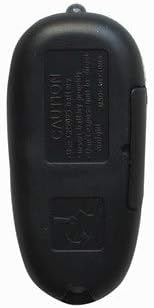
تصوير 3.1: پوئتي view of the Easytry123 replacement remote control. The battery compartment is visible on the lower half of the remote's back.
4. آپريٽنگ هدايتون
Point the remote control directly at the infrared receiver on your JVC car stereo system. Ensure there are no obstructions between the remote and the stereo.
4.1 بنيادي ڪم
- POWER (⑁/ATT): Turns the stereo system on or off, or activates/deactivates the attenuation function.
- آواز: Accesses sound settings or audio adjustments.
- ذريعو: Cycles through available audio sources (e.g., CD, Radio, AUX).
- جلد + / جلد -: Increases or decreases the audio volume.
- Navigation Buttons (▲ U, ◄ R, ► F, ▼ D): Used for menu navigation, track skipping, or tuning depending on the current mode of the stereo.
5. سار سنڀال
5.1 صفائي
To clean the remote control, use a soft, dry cloth. Do not use liquid cleaners, abrasive pads, or chemical solvents, as these may damage the remote's surface or internal components.
5.2 بيٽري جي سنڀال
- جڏهن ريموٽ جي ڪارڪردگي خراب ٿئي يا اهو جواب ڏيڻ بند ڪري ته بيٽريون تبديل ڪريو.
- جيڪڏهن ريموٽ ڊگهي عرصي تائين استعمال نه ٿيندو ته جيئن رسي کي روڪي سگهجي ته بيٽريون هٽايو.
- مقامي ضابطن جي مطابق استعمال ٿيل بيٽرين کي ختم ڪريو.
6. مسئلا حل ڪرڻ
6.1 ريموٽ جواب نه ڏئي رهيو آهي
- بيٽري چيڪ ڪريو: Ensure batteries are installed correctly with the correct polarity (+/-) and are not depleted. Replace with fresh AAA batteries if necessary.
- نظارو لائن: Verify there are no obstructions between the remote control and the car stereo's infrared sensor.
- فاصلو: Ensure you are within the effective operating range of the remote control (typically within 15-20 feet).
- مطابقت: Reconfirm that your JVC stereo model is listed as compatible with this remote.
6.2 Limited Functionality
As a replacement remote, some advanced or specific functions of your original JVC remote may not be fully replicated. This is normal for universal or replacement remotes. Focus on the primary functions listed in Section 4.1.
7. وضاحتون
| خاصيت | تفصيل |
|---|---|
| ماڊل نمبر | ايزيٽري 3192 |
| رابطي ٽيڪنالاجي | انفراريڊ (IR) |
| طاقت جو ذريعو | 2 x AAA بيٽريون (شامل نه آهن) |
| مطابقت رکندڙ ڊوائيسز | JVC Car Stereo Systems (specific models listed in Section 2) |
| سپورٽ ٿيل ڊوائيسز جو وڌ ۾ وڌ تعداد | 1 |
| خاص خصوصيت | Ergonomic, Replacement Remote |
8. وارنٽي ۽ سپورٽ
For any questions, concerns, or support regarding your Easytry123 replacement remote control, please contact the seller directly through your purchase platform. Please refer to your purchase documentation for specific warranty information.