1. تعارف
The Optex ORT 8930-HD is a digital terrestrial receiver designed to receive free-to-air digital programs broadcast in MPEG2/MPEG4 format, compatible with DVB-T2 and HEVC/H.265 standards. This device connects to your television via HDMI or SCART. It features a USB input for future software updates, multimedia file playback (photos, music, videos), and direct recording to an external USB storage device (not included).
This manual provides detailed instructions for the proper installation, operation, and maintenance of your Optex ORT 8930-HD receiver. Please read it thoroughly before use to ensure optimal performance and to prevent damage.
2. حفاظت جي ڄاڻ
- وڌيڪ گرم ٿيڻ کان بچڻ لاءِ ڊوائيس جي چوڌاري مناسب وائيٽليشن کي يقيني بڻايو وڃي.
- Do not expose the receiver to rain, moisture, or extreme temperatures.
- ڊوائيس کي گرمي جي ذريعن جي ويجهو رکڻ کان پاسو ڪريو جهڙوڪ ريڊيٽرز يا اسٽو.
- يونٽ سان فراهم ڪيل صرف پاور اڊاپٽر استعمال ڪريو.
- سي نه کوليوasing؛ سڀني خدمتن کي قابل اهلڪارن جي حوالي ڪريو.
- بجلي جي طوفان دوران يا ڊگهي عرصي تائين استعمال نه ٿيڻ تي وال آئوٽليٽ کان پاور پلگ ڪٽي ڇڏيو.
3. پيڪيج مواد
پڪ ڪريو ته سڀئي شيون پيڪيج ۾ موجود آهن:
- 1 x Optex ORT 8930-HD Digital Receiver
- 1 x ريموٽ ڪنٽرول
- 1 x استعمال ڪندڙ دستياب
4. پراڊڪٽ ختمview
4.1 فرنٽ پينل

تصوير 1: سامهون view of the Optex ORT 8930-HD receiver, showing the display, USB port, and control buttons.
The front panel includes a digital display for channel numbers, a USB 2.0 port for external storage, and basic control buttons (CH+, CH-, Power).
4.2 ريئر پينل
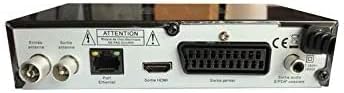
تصوير 2: ريڙهه view of the Optex ORT 8930-HD receiver, displaying various connectivity ports.
پوئين پينل هيٺ ڏنل ڪنيڪشن فراهم ڪري ٿو:
- اينٽينا اندر/ٻاهر: IEC 9.52 mm connectors for terrestrial antenna.
- HDMI ٻاھر For connecting to an HD television.
- SCART Connector: For connecting to older televisions.
- S/PDIF Coaxial Audio: ڊجيٽل آڊيو آئوٽ.
- پاور ان پٽ: For the external power adapter.
4.3 ريموٽ ڪنٽرول

تصوير 3: The remote control unit for the Optex ORT 8930-HD receiver.
The remote control allows full operation of the receiver, including power, channel selection, volume, menu navigation, recording functions, and multimedia playback controls.
5. سيٽ اپ
5.1 اينٽيننا کي ڳنڍڻ
- Connect your terrestrial antenna cable to the "Antenna In" port on the rear panel of the receiver.
- If you wish to loop the antenna signal to another device, connect a coaxial cable from the "Antenna Out" port to the input of the next device.
5.2 توهان جي ٽيليويزن سان ڳنڍڻ
ھيٺ ڏنل ڪنيڪشن طريقن مان ھڪڙو چونڊيو:
- HDMI (Recommended for HD): Connect an HDMI cable from the "HDMI Output" port on the receiver to an available HDMI input on your television.
- اسڪارٽ: Connect a SCART cable from the "SCART Connector" on the receiver to the SCART input on your television.
5.3 پاور ڪنيڪشن
- Connect the power adapter to the power input port on the receiver.
- پاور اڊاپٽر کي مناسب وال آئوٽليٽ ۾ لڳايو.
5.4 Initial Channel Scan
- پنھنجو ٽيليويزن آن ڪريو ۽ پنھنجي ڪنيڪشن سان لاڳاپيل صحيح ان پٽ سورس (HDMI يا SCART) چونڊيو.
- Power on the Optex ORT 8930-HD receiver.
- The first-time setup wizard should appear. Follow the on-screen instructions to perform an automatic channel search. This will scan for all available digital terrestrial channels in your area.
- If the wizard does not appear, navigate to the "Menu" > "Installation" > "Automatic Search" using the remote control.
6. آپريٽنگ هدايتون
6.1 بنيادي آپريشن
- پاور آن / آف: کي دٻايو پاور ريموٽ ڪنٽرول يا فرنٽ پينل تي بٽڻ.
- چينل چونڊ: استعمال ڪريو CH+ / CH- buttons or enter the channel number directly using the numeric keypad.
- حجم ڪنٽرول: استعمال ڪريو VOL+ / Vol- بٽڻ
- خاموش: کي دٻايو خاموش آڊيو کي عارضي طور تي خاموش ڪرڻ لاءِ بٽڻ.
6.2 چينل مينيجمينٽ
- خودڪار/دستي ڳولا: ذريعي رسائي مينيو > تنصيب to rescan for channels.
- LCN فنڪشن: The Logical Channel Numbering (LCN) function automatically sorts channels into a logical order. This can usually be enabled/disabled in the installation menu.
- Favorite List: Create personalized lists of your preferred channels for quick access. Refer to the on-screen menu for instructions on adding and managing favorite channels.
6.3 رڪارڊنگ ۽ پلے بیک
To use recording and multimedia playback features, connect a USB storage device (e.g., USB flash drive or external hard drive) to the USB port on the front panel.
- USB رڪارڊنگ: کي دٻايو آر اي سي button on the remote control to start recording the current program. Press اسٽاپ رڪارڊنگ ختم ڪرڻ.
- Timeshift Function: This allows you to pause live TV and resume watching later. Activate Timeshift via the remote control (usually a dedicated button or through the menu).
- ملٽي ميڊيا پلے بیک: Access the multimedia player via the مينيو. You can browse and play music, photo, and video files stored on your connected USB device.
6.4 اليڪٽرانڪ پروگرام گائيڊ (EPG)
کي دٻايو اي پي جي ريموٽ ڪنٽرول تي بٽڻ کي view the Electronic Program Guide, which displays program schedules for upcoming broadcasts.
6.5 والدين جو تالا
Set up a parental lock to restrict access to certain channels or programs. This feature is typically found in the مينيو > سسٽم سيٽنگون > والدين جو ڪنٽرول سيڪشن.
6.6 ٽائمر فنڪشن
The timer function allows you to schedule the receiver to turn on/off or record a specific program at a set time. Access this feature through the مينيو.
6.7 Software Update via USB
وقتي طور تي ٺاهيندڙ جي چيڪ ڪريو website for available software updates. Download the update file to a USB drive and follow the instructions in the مينيو > سسٽم سيٽنگون > سافٽ ويئر اپڊيٽ section to install it.
7. سار سنڀال
- صفائي: Use a soft, dry cloth to clean the exterior of the receiver. Do not use liquid or aerosol cleaners.
- وينٽيليشن: Ensure that the ventilation slots on the device are not blocked to prevent overheating.
- سافٽ ويئر: Keep the receiver's software updated to ensure optimal performance and access to the latest features.
8. مسئلا حل ڪرڻ
| مسئلو | ممڪن سبب | حل |
|---|---|---|
| طاقت نه آهي | بجلي ڪيبل ڪٽيل آهي؛ بجلي جو آئوٽليٽ خراب آهي. | پاور ڪيبل ڪنيڪشن چيڪ ڪريو؛ ٻيو آئوٽ ليٽ آزمايو. |
| No signal / No channels | Antenna not connected; incorrect input source on TV; no channel scan performed. | Check antenna connection; select correct TV input; perform an automatic channel scan. |
| ريموٽ ڪنٽرول ڪم نه ڪري رهيو آهي | Batteries depleted; obstruction between remote and receiver. | Replace batteries; ensure clear line of sight to the receiver's IR sensor. |
| USB رڪارڊنگ ڪم نه ڪري رهي آهي | USB device not connected or formatted incorrectly; insufficient storage space. | Ensure USB device is properly connected; format USB device (FAT32/NTFS); check available space. |
| Device freezes or becomes unresponsive | عارضي سافٽ ويئر جي خرابي. | Disconnect power for a few seconds, then reconnect. If problem persists, check for software updates. |
9. وضاحتون
| خاصيت | تفصيل |
|---|---|
| ماڊل | ORT 8930-HD |
| برانڊ | Optex |
| ٽونر جو قسم | زميني (DVB-T2) |
| وڊيو ڊيڪوڊنگ | HEVC/H.265, MPEG-2.5 |
| رابطي | 1x HDMI, 1x SCART, 1x USB 2.0, 1x S/PDIF Coaxial Audio, Antenna In/Out |
| چينل جي گنجائش | Over 1000 channels |
| رڪارڊنگ | External USB media (PVR function) |
| ملٽي ميڊيا پلے بیک | Music, Photos, Videos |
| خاص خاصيتون | Timeshift, EPG, Parental Lock, Favorite List, Multi-language Menu, LCN, 5V Antenna Power, Timer Function, Dolby Digital+ compatible |
| آڊيو آئوٽ پٽ موڊ | [SOM] |
| اسپيڪر سرائونڊ سائونڊ ڪنفيگريشن | 5.1 |
| پاور آئوٽ | 5 واٽ |
| پيداوار جو وزن | 600 جي |
10. وارنٽي ۽ سپورٽ
Specific warranty information is not provided within this manual. Please refer to the warranty card included with your purchase, contact your retailer, or visit the official Optex webتفصيلي وارنٽي شرطن ۽ ضابطن لاءِ سائيٽ.
For technical support or service inquiries, please contact your local Optex distributor or the customer service department as indicated on the product packaging or manufacturer's webسائيٽ.


