1. تعارف
This manual provides essential information for the safe and effective operation, setup, and maintenance of your Sharp UA-HD50E-L Air Purifier with Humidification Function. Please read it thoroughly before using the appliance and keep it for future reference.
The Sharp UA-HD50E-L is designed to improve indoor air quality by combining a patented Plasmacluster ion generator with a 3-stage filtration system. It effectively removes airborne particles, allergens, viruses, pollen, dust mites, and odors. Additionally, it features an automatic humidification function to maintain a comfortable and healthy indoor climate. This unit is suitable for rooms up to 38 m² for air purification and 27 m² when using the humidification function.
2. حفاظت جي ڄاڻ
محفوظ آپريشن کي يقيني بڻائڻ لاءِ، هميشه انهن بنيادي احتياطن تي عمل ڪريو:
- يونٽ کي خراب ٿيل پاور ڪنڊ يا پلگ سان هلائڻ نه ڏيو.
- ايئر انليٽ يا آئوٽليٽ کي بلاڪ نه ڪريو.
- يونٽ کي پاڻي ۽ نمي کان پري رکو. پاڻي ۾ نه ٻوڙيو.
- ڪنهن به سوراخ ۾ شيون داخل نه ڪريو.
- صفائي ڪرڻ يا ڪنهن به سار سنڀال ڪرڻ کان اڳ يونٽ کي ان پلگ ڪريو.
- هي اوزار استعمال ڪرڻ جو ارادو نه ڪيو ويو آهي ماڻهن (بشمول ٻارن سميت) گھٽ جسماني، حسي يا ذهني صلاحيتن سان، يا تجربو ۽ ڄاڻ جي کوٽ، جيستائين انهن جي حفاظت لاء ذميوار شخص طرفان اوزار جي استعمال بابت نگراني يا هدايت نه ڏني وئي آهي.
- Use only genuine Sharp replacement filters.
3. پراڊڪٽ ختمview
Familiarize yourself with the main components of your Sharp UA-HD50E-L air purifier.
3.1 محاذ View

Figure 3.1: The front of the Sharp UA-HD50E-L air purifier, showcasing its sleek, light grey design and the Sharp logo.
3.2 پوئتي View and Air Intake

Figure 3.2: The rear of the air purifier, showing the large air intake grille and the power cord connection point. This is where air is drawn into the unit for filtration.
3.3 Water Tank Access
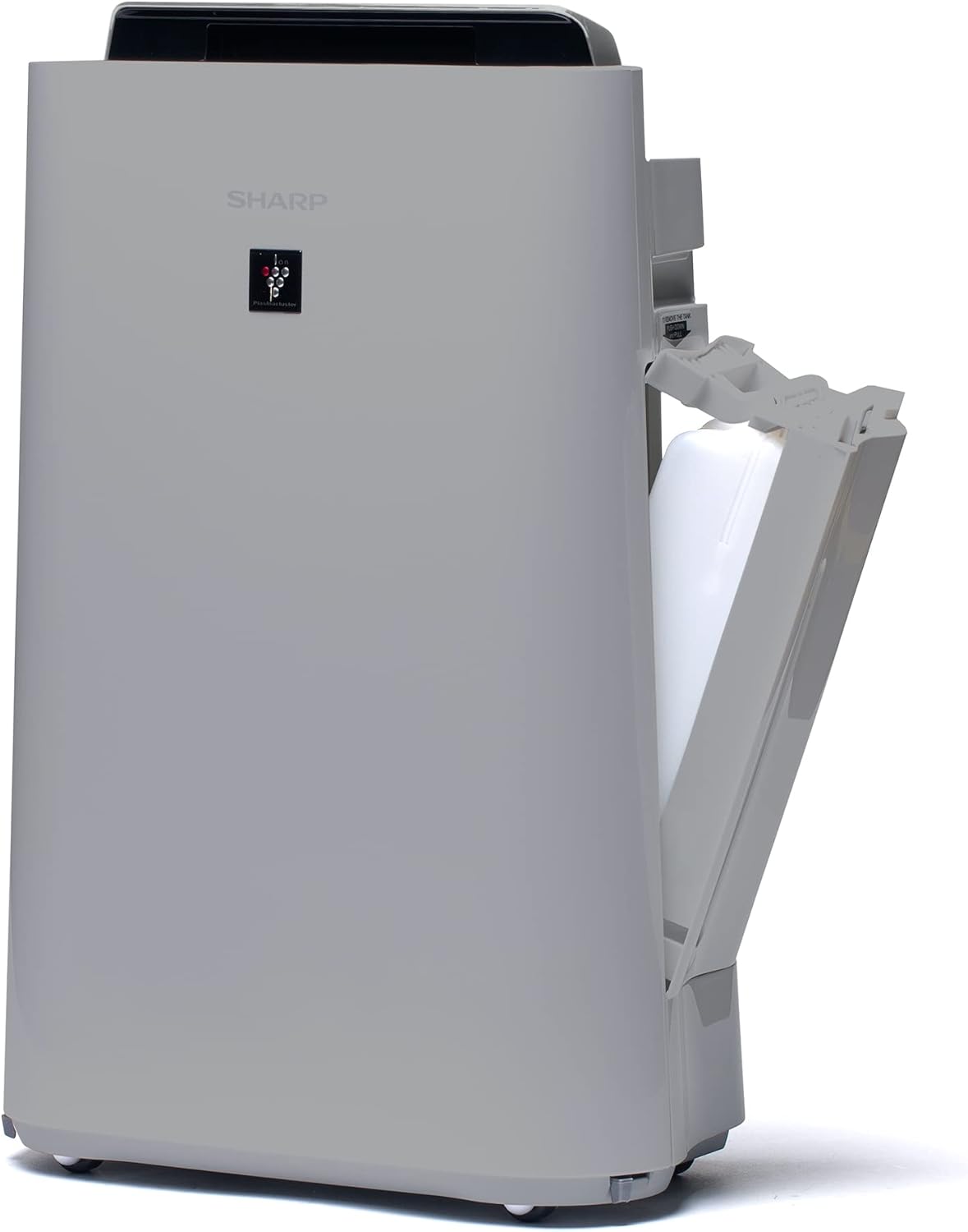
شڪل 3.3: هڪ پاسو view of the unit with the water tank compartment door open, revealing the removable water tank for humidification.
3.4 Control Panel and Air Outlet

شڪل 3.4: مٿي کان هيٺ تائين view highlighting the intuitive control panel with various function buttons and the primary air outlet where purified and humidified air is released.
3.5 فلٽر سسٽم
The Sharp UA-HD50E-L utilizes a multi-stage filtration system for comprehensive air purification:
- پري فلٽر: مٽي ۽ پالتو جانورن جي وارن جهڙن وڏن ذرڙن کي پڪڙي ٿو.
- Deodorization Filter (UZ-HD4DF): Absorbs various odors, including cigarette smoke and household smells.
- HEPA Filter (UZ-HD4HF): Traps microscopic particles such as pollen, mold spores, and fine dust.
- Humidification Filter (UZ-HD6MF): Used for the humidification function.

شڪل 3.5: هڪ ڌماڪو ٿيو view illustrating the sequence of the pre-filter, deodorization filter, and HEPA filter within the unit's rear compartment.
4. سيٽ اپ
پهريون ڀيرو پنهنجي هوائي صاف ڪندڙ کي سيٽ اپ ڪرڻ لاءِ انهن قدمن تي عمل ڪريو.
- يونٽ کوليو: Carefully remove the air purifier and all its components from the packaging. Retain packaging for future transport or storage.
- فلٽر پيڪنگنگ هٽايو: Open the rear panel of the unit. Remove all plastic packaging from the HEPA filter, deodorization filter, and humidification filter.
- فلٽر انسٽال ڪريو: Insert the filters back into the unit in the correct order: deodorization filter, then HEPA filter, followed by the pre-filter. Ensure they are securely seated. Close the rear panel.

Figure 4.1: Illustration of a filter being inserted into the side compartment of the air purifier.
- Fill Water Tank (for Humidification): Open the water tank compartment on the side of the unit. Remove the water tank, fill it with clean tap water, and securely close the cap. Reinsert the water tank into the unit.
Figure 4.2: The water tank being removed from its compartment for refilling.
- لڳائڻ: Place the air purifier on a flat, stable surface, ensuring adequate clearance (at least 20 cm) from walls and furniture for optimal air circulation.
- پاور Connectنيو: بجلي جي تار کي هڪ مناسب بجلي جي آئوٽليٽ (220V) ۾ لڳايو.
5. آپريٽنگ هدايتون
The control panel on the top of the unit allows you to manage all functions.

Figure 5.1: Close-up of the control panel with various buttons and indicators, including sensors for dust, odor, temperature, humidity, light, movement, and PM2.5.
5.1 پاور آن / آف
- کي دٻايو پاور يونٽ کي آن يا آف ڪرڻ لاءِ بٽڻ دٻايو.
5.2 آپريٽنگ موڊس
- خودڪار موڊ: The unit automatically adjusts fan speed and humidification based on sensor readings (dust, odor, temperature, humidity, light, movement, PM2.5). This mode ensures optimal air quality and comfort.
- دستي فين جي رفتار: Select desired fan speed (Low, Medium, High) for continuous operation.
- نمي ڪرڻ جو طريقو: Activates the humidification function. The unit will maintain a comfortable humidity level. Ensure the water tank is filled.
- Air Purification Only: Disables the humidification function, focusing solely on air purification.
5.3 Plasmacluster Ion Function
- کي دٻايو پلازما ڪلسٽر button to activate or deactivate the Plasmacluster ion generator.
- Ion Spot Mode: This mode provides a 10-fold more intensive airflow of Plasmacluster ions to target specific areas or strong odors. Activate it by pressing the dedicated button on the control panel.
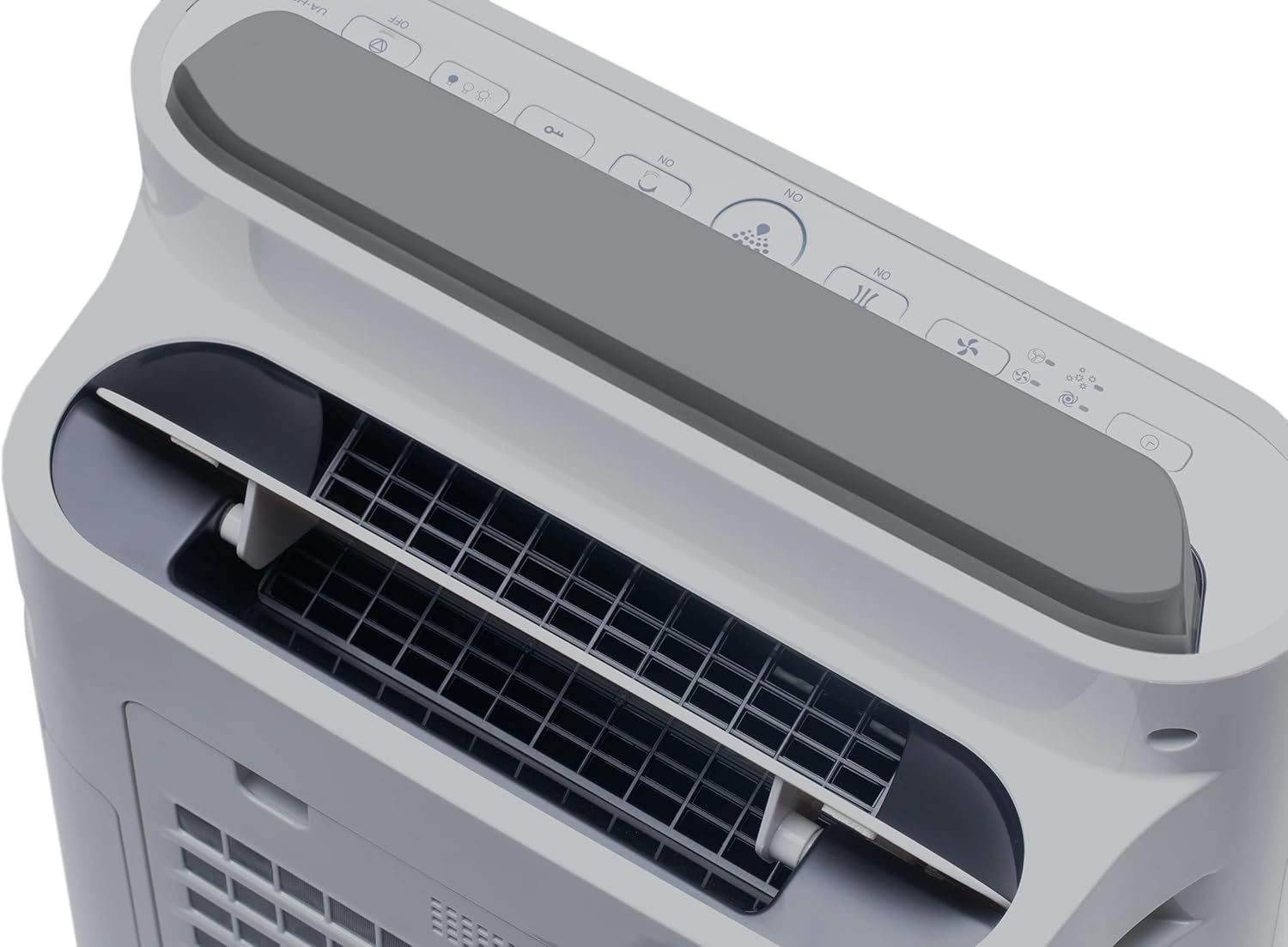
Figure 5.2: Visual representation of Plasmacluster ions being dispersed into the room, indicating the Ion Spot Mode's enhanced air circulation.
5.4 Air Circulation
The unit features 20° back air outlets to ensure perfect air circulation throughout the room, effectively distributing purified and humidified air.
Figure 5.3: A diagram showing the optimal air circulation pattern created by the unit's design, ensuring even distribution of clean air.
6. سار سنڀال
باقاعده سار سنڀال بهترين ڪارڪردگي کي يقيني بڻائي ٿي ۽ توهان جي هوائي صاف ڪندڙ جي عمر وڌائي ٿي.
6.1 پري فلٽر کي صاف ڪرڻ
- The pre-filter should be cleaned approximately once a month, or more frequently if used in dusty environments.
- Remove the rear panel and carefully detach the pre-filter.
- Use a vacuum cleaner to remove dust and debris. For stubborn dirt, wash with mild soap and water, then air dry completely before reinstallation.

Figure 6.1: The pre-filter being removed from the unit, with icons indicating its function against dust and pet hair.
6.2 Deodorization and HEPA Filters (UZ-HD4DF, UZ-HD4HF)
- These filters are not washable and should not be cleaned with water.
- Periodically check for excessive dust accumulation. A vacuum cleaner can be used gently on the surface of the HEPA filter to remove loose dust.
- Replace these filters approximately every 2-5 years, depending on usage and air quality. Refer to the indicator light on the control panel for replacement reminders.

Figure 6.2: The deodorization filter, designed to combat odors such as cigarette smoke and general household smells.
6.3 Humidification Filter (UZ-HD6MF) and Water Tank
- Clean the water tank daily or every few days to prevent mold and bacterial growth. Wash with mild detergent and rinse thoroughly.
- The humidification filter should be cleaned regularly (e.g., weekly) by rinsing under running water. If mineral deposits accumulate, soak the filter in a descaling solution (e.g., citric acid solution) as per product instructions.
- Replace the humidification filter approximately once a year, or when it becomes stiff or discolored.
6.4 ٻاهرئين صفائي
- يونٽ جي ٻاهرئين حصي کي نرم سان صاف ڪريو، ڊيamp ڪپڙو. استعمال نه ڪريو abrasive cleaners يا solvents.
7. مسئلا حل ڪرڻ
جيڪڏهن توهان کي ڪو مسئلو درپيش اچي ته هيٺ ڏنل عام مسئلن ۽ حلن جو حوالو ڏيو.
| مسئلو | ممڪن سبب | حل |
|---|---|---|
| يونٽ چالو نه آهي. | Power cord not properly connected; Power outage. | Ensure power cord is securely plugged in; Check household circuit breaker. |
| ڪمزور هوا جو وهڪرو. | Clogged pre-filter; Blocked air inlets/outlets. | Clean the pre-filter; Ensure nothing is obstructing air passages. |
| ڪابه نمي نه. | Water tank empty; Humidification filter clogged or improperly installed. | Refill water tank; Clean or correctly install humidification filter. |
| Unusual odor from unit. | Dirty filters; Stagٽانڪي ۾ پاڻي. | Clean/replace filters; Clean water tank and humidification filter. |
| آپريشن دوران وڏي آواز. | Foreign object in fan; Unit not on a stable surface. | Turn off and unplug, check for obstructions; Place on a flat, stable surface. |
جيڪڏهن انهن حلن جي ڪوشش ڪرڻ کان پوءِ به مسئلو برقرار رهي، مهرباني ڪري ڪسٽمر سپورٽ سان رابطو ڪريو.
8. وضاحتون
| برانڊ | تيز |
| ماڊل نمبر | UA-HD50E-L |
| رنگ | هلڪو گرين |
| طول و عرض (L x W x H) | 39.9 x 23 x 61.5 سينٽي |
| وزن | 7.9 ڪلوگرام |
| پاڻي جي ٽانڪي گنجائش | 1 ليٽر |
| طاقت | 3600 (Please refer to product label for actual wattage) |
| جلدtage | 220 وولٽ |
| مواد | پلاسٽڪ |
| خودڪار بند فنڪشن | ها |
| شور جي سطح | 23 ڊيسيبل |
| فلٽر جو قسم | هيپا |
| ڪنٽرول جو طريقو | Touch, Button Control |
| Room Coverage (Purification) | 38 m² تائين |
| Room Coverage (with Humidification) | 27 m² تائين |
9. وارنٽي ۽ سپورٽ
Sharp provides a warranty for this product in accordance with local regulations. Please retain your proof of purchase for warranty claims.
- اسپيئر پارٽس جي دستيابي: هن ماڊل جا اسپيئر پارٽس خريداري جي تاريخ کان 2 سالن جي عرصي تائين موجود آهن.
- For technical support, service, or to purchase replacement filters, please contact your local Sharp authorized dealer or visit the official Sharp webسائيٽ.


