1. تعارف
Welcome to the user manual for your Easytry123 Replacement Remote Control. This manual provides essential information for the proper setup, operation, and maintenance of your new remote. This remote is designed as a replacement for specific Sunstech LCD HDTV TV models. Please note that as a replacement unit, some advanced or unique functions of your original TV remote may not be fully supported. Ensure your TV model is listed in the title for compatibility.
2. پراڊڪٽ ختمview
The Easytry123 Replacement Remote Control is an ergonomic, button-controlled device utilizing infrared technology for seamless interaction with compatible Sunstech televisions. Its design focuses on ease of use for common television functions.
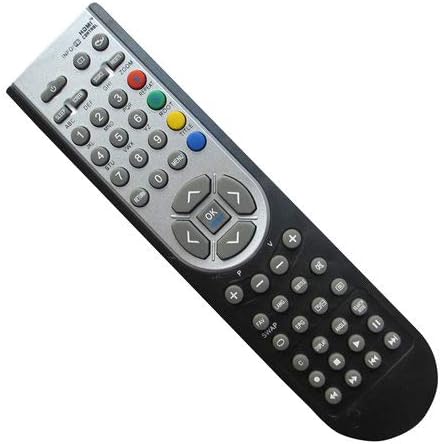
شڪل 2.1: سامهون view of the Easytry123 Replacement Remote Control, showing various function buttons including power, number keys, volume, channel, navigation, and menu controls.
3. سيٽ اپ
Your Easytry123 Replacement Remote Control requires two AAA batteries (not included) for operation. Follow these steps to install the batteries:
- ريموٽ ڪنٽرول جي پٺي تي بيٽري جي خاني کي ڳوليو.
- ليچ کي دٻايو ۽ بيٽري جو ڍڪ بند ڪريو.
- ٻہ AAA بيٽريون داخل ڪريو، پڪ ڪريو ته مثبت (+) ۽ منفي (-) ٽرمينل ڪمري اندر نشانن سان صحيح طرح سان ترتيب ڏين.
- بيٽري جي ڍڪ کي واپس جاء تي سلائيڊ ڪريو جيستائين اهو محفوظ طور تي ڪلڪ ڪري.
The remote is now ready for use. No additional programming is typically required for compatible Sunstech TV models.
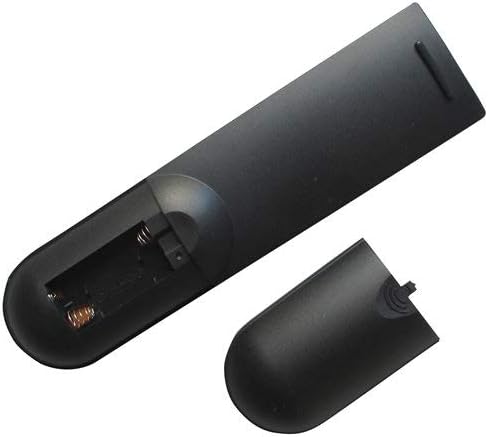
شڪل 3.1: پوئتي view ريموٽ ڪنٽرول جو بيٽري ڪمپارٽمينٽ کليل آهي، جيڪو ڏيکاري ٿو ته ٻه AAA بيٽريون ڪٿي داخل ڪرڻيون آهن.
4. آپريٽنگ هدايتون
This remote control operates using infrared signals. Ensure there is a clear line of sight between the remote and your television's IR receiver. Point the remote directly at the TV for optimal performance.
بنيادي ڪم:
- پاور بٽڻ: ٽي وي کي آن يا بند ڪري ٿو.
- نمبر بٽڻ (0-9): سڌو سنئون چينل چونڊيو.
- حجم مٿي / ھيٺ: آواز جي سطح کي ترتيب ڏئي ٿو.
- چينل مٿي / هيٺ: چينل کي ترتيب وار تبديل ڪري ٿو.
- نيويگيشن بٽڻ (مٿي، هيٺ، کاٻي، ساڄي): Used to navigate menus and on-screen options.
- ٺيڪ/داخل ڪريو بٽڻ: مينيو ۾ چونڊ جي تصديق ڪري ٿو.
- مينيو بٽڻ: ٽي وي جي مکيه مينيو تائين رسائي حاصل ڪري ٿو.
- ان پٽ/ذريعو بٽڻ: مختلف وڊيو ان پٽ ذريعن جي وچ ۾ سوئچ ڪري ٿو (مثال طور، HDMI، AV).
For specific functions not listed, refer to your Sunstech TV's original user manual, as replacement remotes may have varying levels of compatibility for advanced features.
5. سار سنڀال
توهان جي ريموٽ ڪنٽرول جي ڊگهي عمر ۽ صحيح ڪم کي يقيني بڻائڻ لاءِ، انهن سار سنڀال جي هدايتن تي عمل ڪريو:
- صفائي: ريموٽ کي نرم، سڪل ڪپڙي سان صاف ڪريو. مائع صاف ڪندڙ يا رگڙيندڙ مواد استعمال ڪرڻ کان پاسو ڪريو، ڇاڪاڻ ته اهي مٿاڇري يا اندروني حصن کي نقصان پهچائي سگهن ٿا.
- بيٽري مٽائڻ: Replace batteries promptly when the remote's responsiveness decreases. Always replace both batteries at the same time with new ones of the same type (AAA). Remove batteries if the remote will not be used for an extended period to prevent leakage.
- اسٽوريج: ريموٽ کي سڌي سج جي روشني، انتهائي گرمي پد ۽ تيز نمي کان پري ٿڌي، سڪل جاءِ تي رکو.
- سنڀالڻ: Avoid dropping the remote or exposing it to strong impacts, which can damage internal circuitry.
6. مسئلا حل ڪرڻ
- ريموٽ جواب نه ڏئي رهيو آهي:
- چيڪ ڪريو ته بيٽريون صحيح پولارٽي سان صحيح طرح سان داخل ڪيون ويون آهن.
- پراڻين بيٽرين کي نئين AAA بيٽرين سان تبديل ڪريو.
- پڪ ڪريو ته ريموٽ ۽ ٽي وي جي انفراريڊ سينسر جي وچ ۾ ڪا به رڪاوٽ نه آهي.
- پڪ ڪريو ته ريموٽ سڌو سنئون ٽي وي ڏانهن اشارو ڪيو ويو آهي.
- ڪجھ ڪم ڪم نه ٿا ڪن:
- As a replacement remote, certain advanced or unique functions specific to your original TV remote may not be supported. This is normal for universal or replacement remotes.
- Verify that your TV model is explicitly listed as compatible with this remote.
7. وضاحتون
| ماڊل نمبر | ايزيٽري 4915 |
| برانڊ | ايزيٽري 123 |
| مطابقت رکندڙ ڊوائيسز | Television (Sunstech LCD HDTV TV models: 24LEDTIRSABK, TL-EI19HDMKII, TL-I 32 HD-MKWBK, TLEI19HD-MKIIWBK, TLEI22HDMKII) |
| رابطي ٽيڪنالاجي | انفراريڊ |
| ڪنٽرولر جو قسم | بٽڻ ڪنٽرول |
| بيٽرين جي ضرورت آهي | 2 x AAA (شامل نه آهي) |
| خاص خصوصيت | Ergonomic ڊيزائن |
8. وارنٽي ۽ سپورٽ
Specific warranty details and direct customer support information for the Easytry123 Replacement Remote Control are not provided within the product's general specifications. For any issues or inquiries regarding your remote, please contact the seller or retailer from whom you purchased the product. They will be able to provide assistance or guide you to the appropriate support channels.