1. پراڊڪٽ ختمview
The LAUNCH X431 PRO5 is a high-end professional diagnostic tool designed for comprehensive vehicle diagnostics and reprogramming. It features a SmartLink C V2.0 VCI (Vehicle Communication Interface) that supports J2534, CANFD, and DOIP protocols, enabling advanced functions like ECU programming, online coding, topology mapping, and over 60 service functions. This tool is engineered for efficiency and convenience, providing intelligent diagnostics and bi-directional control for a wide range of vehicle models.
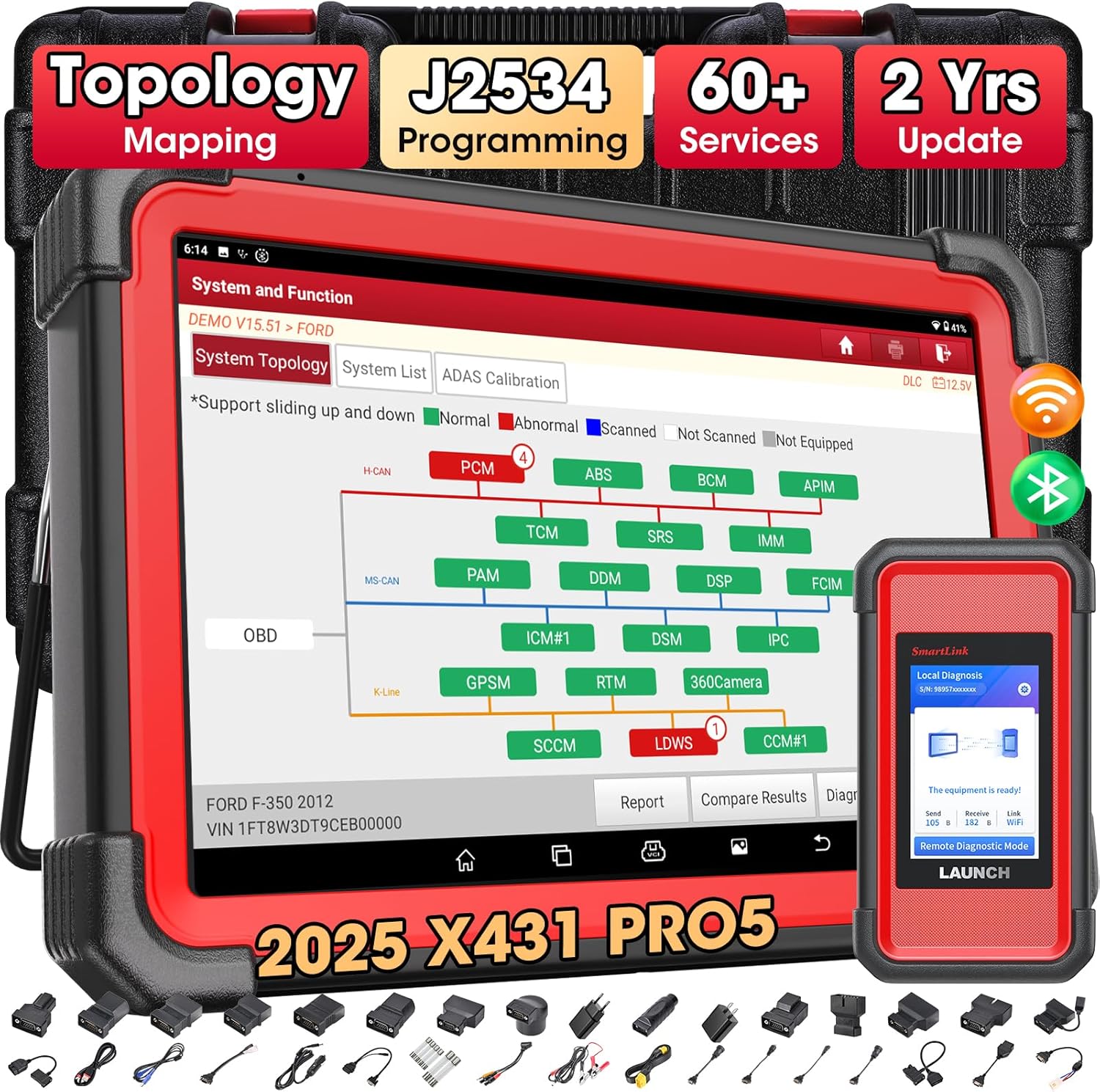
Figure 1: LAUNCH X431 PRO5 Diagnostic Tool with SmartLink C V2.0 and various adapters.
2. سيٽ اپ ۽ شروعاتي استعمال
2.1. دٻي ۾ ڇا آهي
- ٽيبل ڏيکاري
- VCI connector (SmartLink C V2.0)
- OBD II extension cable
- Password envelope
- Power adaptors (x2)
- Charging (Type A to Micro) cable
- ٽائپ A کان ٽائپ B USB ڪيبل
- OBD I adaptor box (Optional)
- بيٽري clamps cable (Optional)
- Cigarette lighter cable (Optional)
- Non-16pin adaptor cable kit (Optional)
Video 1: LAUNCH X431 PRO5 Unboxing and contents overview.
2.2. پاورنگ آن ۽ شروعاتي ترتيب
Upon receiving your LAUNCH X431 PRO5, ensure all components are present. Connect the power adapter to the tablet and a power source. Press and hold the power button to turn on the device. Follow the on-screen prompts for initial setup, including language selection and Wi-Fi connection. It is recommended to perform a software update immediately after connecting to Wi-Fi to ensure you have the latest features and vehicle data.
3. آپريٽنگ هدايتون
3.1. J2534 ECU Programming
The X431 PRO5, paired with the SmartLink C V2.0 device, functions as a J2534-compliant pass-thru tool. This allows you to perform ECU reprogramming by downloading OEM software from vehicle manufacturers. This is crucial for replacing new blank modules, repairing ECUs with data loss, upgrading ECU software versions, and restoring original software data if programming fails.
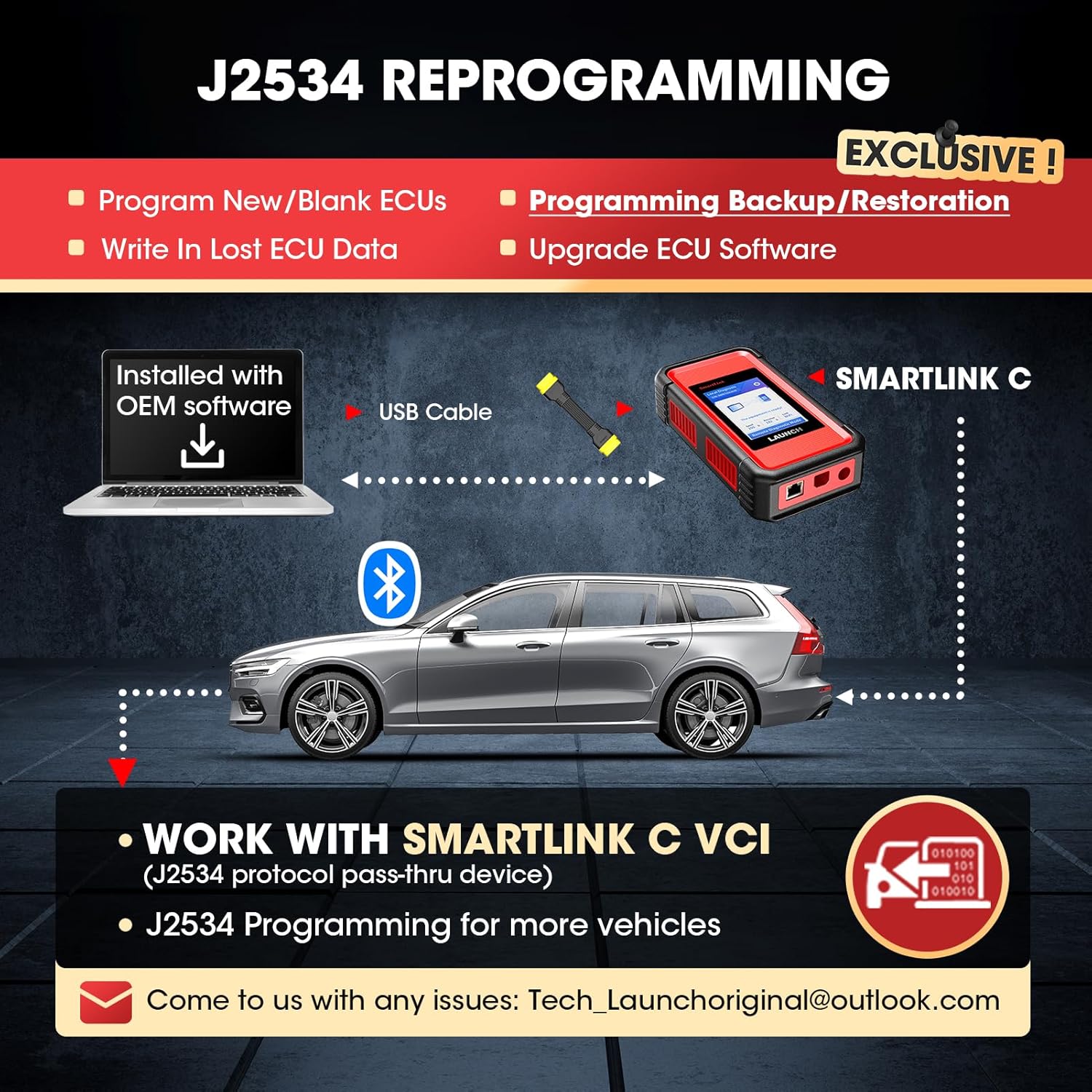
Figure 2: Diagram illustrating the J2534 reprogramming process with SmartLink C V2.0.
وڊيو 2: ختمview of the LAUNCH X431 PRO5 J2534 Reprogramming Tool capabilities.
3.2. ECU Coding and Personalization
The ECU Coding function allows for advanced vehicle customization and adaptation. This includes:
- Online Coding: Accessing abundant online vehicle databases for high-end vehicles (e.g., Benz SCN coding, BMW, VW, Skoda, Seat).
- Component Matching: Writing adaptive code values to replaced modules/components for proper communication.
- ذاتي ڪرڻ: Modifying pre-programmed options such as deactivating auto start-stop, changing interior lights, disabling seat belt warnings, or customizing daytime running lights.
- ريٽروفٽنگ: Installing or changing modules to upgrade vehicle performance (e.g., fog lights, headlamps).
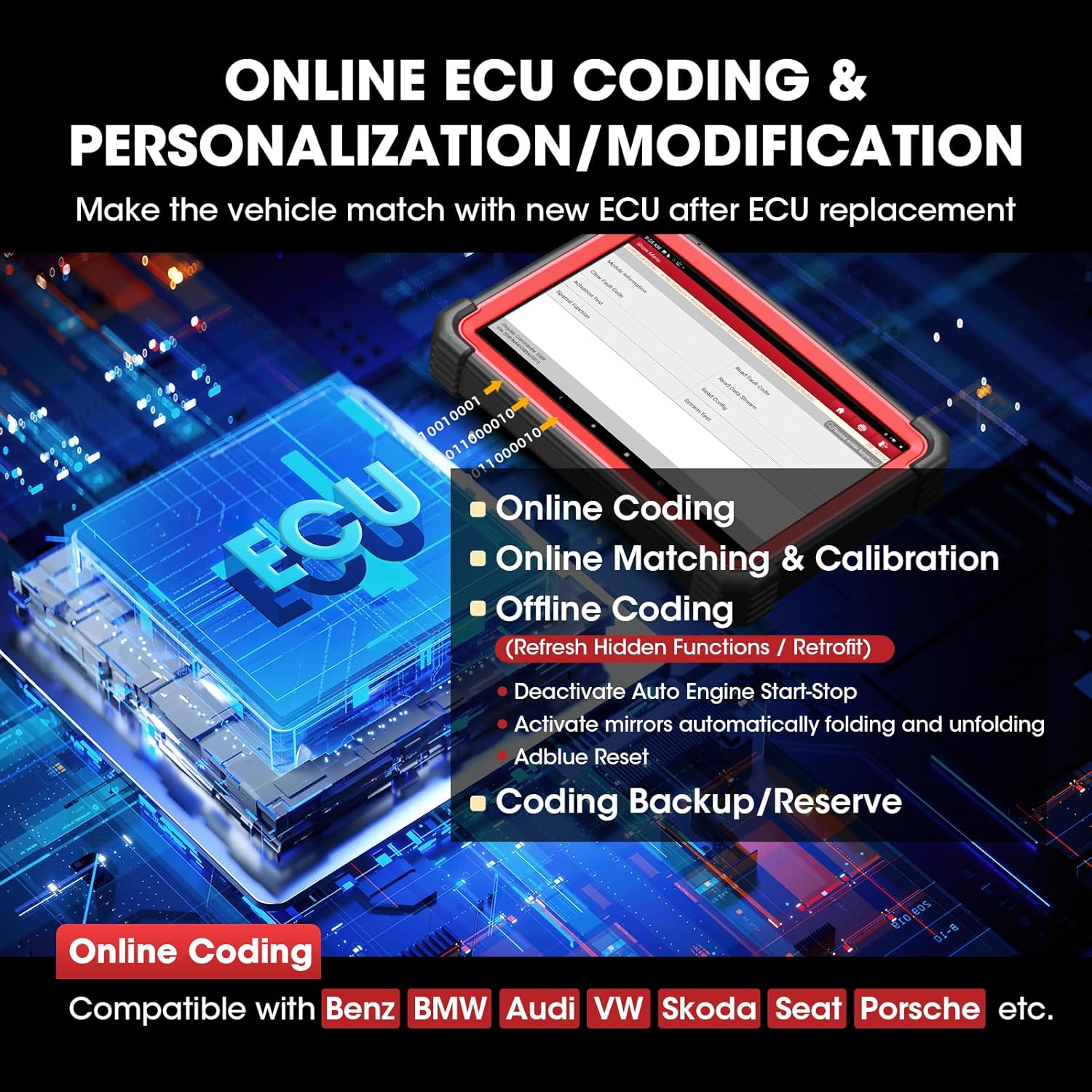
Figure 3: Online ECU Coding and Personalization features of the X431 PRO5.
3.3. Topology Mapping
Topology Mapping provides a visual representation of the vehicle's electronic control units (ECUs) and their interconnections. This feature offers a comprehensive overview of the system architecture, enhancing troubleshooting by quickly identifying components involved in specific issues and streamlining the diagnostic process.
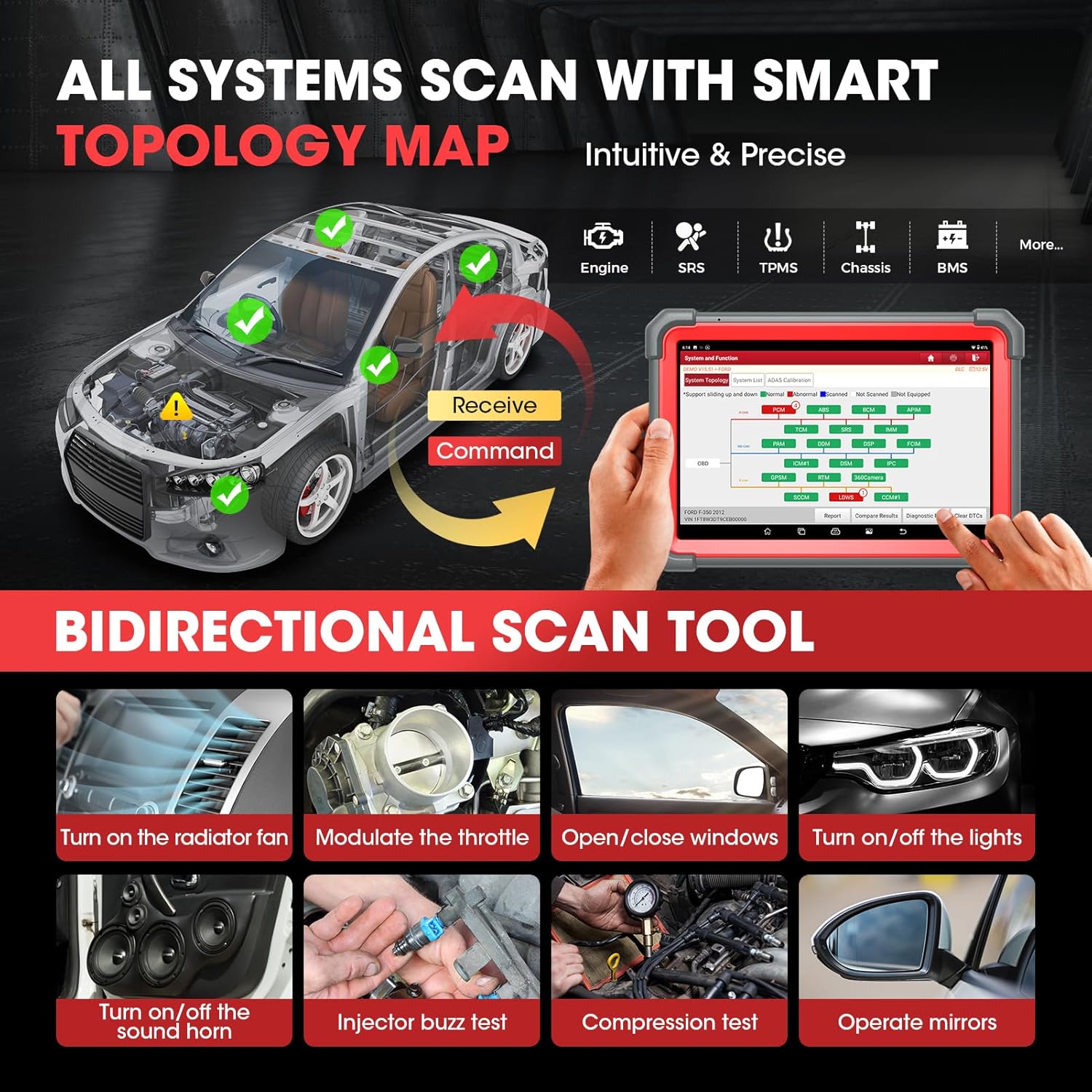
Figure 4: All Systems Scan with Smart Topology Map for intuitive and precise diagnostics.
3.4. All System Scan with Bidirectional Control
The X431 PRO5 can scan all possible vehicle system modules to quickly identify and clear Diagnostic Trouble Codes (DTCs). Its bi-directional control feature allows sending commands to ECUs and performing active tests on components (e.g., turning on the fuel pump, modulating the throttle, operating windows/headlamps) to pinpoint problems efficiently.
3.5. 60+ Service Functions
The tool includes a wide array of maintenance and reset functions, such as:
- Oil Maintenance Light Reset
- اسٽيئرنگ اينگل ري سيٽ
- انجيڪٽر ڪوڊنگ
- اليڪٽرڪ پارڪنگ بريڪ ري سيٽ
- ٿروٽل ميچنگ
- بيٽري ملائڻ
- Tire Pressure Reset
- Headlight Matching
- ABS خونريزي
- Adblue Reset
- ۽ ٻيا ڪيترائي.

شڪل 5: ختمview of FCA Vehicle Access, Guided Functions, and 60+ Service Functions.
3.6. Intelligent Diagnostics and AutoAuth Access
The intelligent diagnostic feature automatically identifies vehicle make, model, and year (AutoVIN & AutoScan), streamlining the diagnostic process. It also supports AutoAuth access for FCA vehicles (2017 and later), allowing direct login to perform secure diagnostics.
Video 3: Instructions on how to set up an AutoAuth account for FCA vehicles.
3.7. Expandable Modules and Live Data Stream
The X431 PRO5 can be expanded with compatible modules (sold separately) for specialized tasks, including ADAS Calibration, VSP-600 VideoScope, X431 TPMS TSGUN, and BTS360 Bluetooth Battery Tester. The graphic live data stream feature allows real-time monitoring of vehicle performance and sensor data in various modes: numbers, wave patterns (up to 12 channels), and merged graphs (up to 4 data streams).
4. سار سنڀال
4.1. سافٽ ويئر اپڊيٽ
Your LAUNCH X431 PRO5 includes 2 years of free software updates. Regular updates are crucial for fixing bugs, optimizing performance, adding new functions, and expanding vehicle coverage. To update, navigate to the 'Upgrade' section on the device and download the latest software packages. After the initial 2 years, updates may require a subscription.
4.2. ڊوائيس جي سنڀال
- ڊوائيس کي صاف ۽ مٽي ۽ نمي کان پاڪ رکو.
- Store the device and its accessories in the provided case when not in use.
- انتهائي گرمي پد ۽ سڌي سورج جي روشني کان بچاء.
- Handle the touchscreen with care to prevent scratches.
5. مسئلا حل ڪرڻ
5.1. عام مسئلا ۽ حل
- ڊوائيس تي طاقت نه آهي: پڪ ڪريو ته پاور اڊاپٽر محفوظ طور تي ڳنڍيل آهي ۽ بيٽري چارج ٿيل آهي.
- Connectivity issues (VCI): Verify the VCI is properly connected to the vehicle's OBD-II port and the tablet. Check Wi-Fi connection for wireless VCI use.
- J2534 driver installation problems: If you encounter issues downloading or installing drivers for SmartBox 3.0 on the Launch site, contact customer support. Note that the J2534 tool is currently compatible only with Windows-based computers.
- Functionality varies by vehicle: Diagnostic functions depend on the vehicle's make, model, and year. Contact customer support for compatibility checks if a specific function is not working as expected.
- Received broken or used product: If you receive a damaged or previously used item, contact customer support for a replacement.
- Topology map functionality after free update period: The topology map feature will continue to work even after the 2-year free update period. Updates primarily focus on bug fixes, optimizations, new functions, and new model support.
5.2. تشخيصي راءِ
The X431 PRO5 offers a 'Diagnostic Feedback' function, allowing you to send diagnostic reports to LAUNCH's certified professionals for customized repair suggestions. This is particularly useful for new car models or complex issues.
6. وضاحتون
| خاصيت | وصف |
|---|---|
| برانڊ | لانچ |
| ماڊل | LAUNCH X431 PRO 5 |
| پيداوار جي ماپ | 10.5"ليٽر x 7.5"ڊبليو x 1.3"ايڇ |
| شيءِ جو وزن | 17.64 پائونڊ |
| آپريٽنگ سسٽم | Android 9.0 |
| خاص خاصيتون | ECU Coding, J2534 Programming, AutoAuth Access, 50+ Services, All System Scan with Bidirectional Control, Topology Mapping |
| بيٽريون | 1 ليتيم پوليمر بيٽري گھربل (شامل) |
| يو پي سي | 680666203597، 680666203580 |
7. وارنٽي ۽ سپورٽ
7.1. وارنٽي ڄاڻ
The LAUNCH X431 PRO5 comes with 2 years of free software updates and 5 years of quality backup. For detailed warranty terms and conditions, please refer to the documentation included with your product or contact customer support.
7.2. ڪسٽمر سپورٽ
For any questions, technical assistance, or support needs, please contact LAUNCH customer service:
- اي ميل: aftersale-launchdirect@outlook.com
- فون: 1-888-756-2936 (Mon-Fri 9:00 AM–6:00 PM EST)
When contacting support, please provide your product model and any relevant diagnostic reports or error messages to facilitate a quicker resolution.


