ڀلي ڪري آيا
Thank you for choosing the iTek GGC 30-inch Curved Monitor. This manual provides essential information for setting up, operating, and maintaining your new monitor. Please read it thoroughly before use to ensure optimal performance and safety.
اهم حفاظتي هدايتون
To prevent damage and ensure safe operation, please observe the following precautions:
- مانيٽر کي مينهن، نمي، يا انتهائي گرمي پد جي سامهون نه رکو.
- مانيٽر جي چوڌاري مناسب وينٽيليشن کي يقيني بڻايو. وينٽيليشن جي سوراخن کي بند نه ڪريو.
- صرف مانيٽر سان فراهم ڪيل پاور اڊاپٽر استعمال ڪريو.
- بجلي جي تار تي ڳري شيون رکڻ کان پاسو ڪريو.
- Disconnect the power plug from the outlet if the monitor will not be used for a long period.
- پاڻ مانيٽر جي سروس ڪرڻ جي ڪوشش نه ڪريو. سڀني سروسنگ کي قابل اهلڪارن جي حوالي ڪريو.
- Clean the monitor screen and casing نرم، سڪل ڪپڙي سان. رگڙيندڙ صاف ڪندڙ يا محلول استعمال ڪرڻ کان پاسو ڪريو.
پيڪيج مواد
مھرباني ڪري ھيٺ ڏنل شين لاءِ پيڪيج چيڪ ڪريو:
- iTek GGC 30-inch Curved Monitor
- مانيٽر اسٽينڊ (بنياد ۽ گردن)
- پاور اڊاپٽر ۽ ڪيبل
- ڊسپلي پورٽ ڪيبل
- HDMI ڪيبل
- استعمال ڪندڙ دستي
- اسٽينڊ اسيمبلي لاءِ اسڪرو
پيداوار ختمview
The iTek GGC 30-inch Curved Monitor is designed for an immersive viewing experience, ideal for gaming and professional use. It features a WFHD (2560x1080) resolution, a high 200Hz refresh rate, and a rapid 1ms MPRT response time.

Key Performance Highlights
- 200Hz Refresh Rate & AMD FreeSync Technology: Experience ultra-smooth visuals and tear-free gaming with a high refresh rate and adaptive sync technology.

Figure 2: 200Hz Refresh Rate and AMD FreeSync Technology in action. - Flicker-Free & Low Blue Light: Designed to reduce eye strain during prolonged use, providing a more comfortable viewتجربو.

Figure 3: Flicker-Free and Low Blue Light features for eye comfort. - 1ms MPRT جوابي وقت: Minimizes motion blur and ghosting, crucial for fast-paced games and action sequences.

Figure 4: Rapid Refresh Rate and Response Time for smooth visuals. - 1800R وکر ڊسپلي: The immersive curvature brings the edges of the screen closer to your field of view, enhancing depth perception and reducing distortion.

Figure 5: 1800R Curved Display for an immersive experience.
سيٽ اپ ڪريو
اسٽينڊ گڏ ڪرڻ
- پيڪنگ مان مانيٽر ۽ اسٽينڊ جي حصن کي احتياط سان هٽايو.
- Attach the stand neck to the monitor panel using the provided screws. Ensure it clicks securely into place or is fastened tightly.
- اسٽينڊ بيس کي اسٽينڊ جي گردن سان ڳنڍيو، ان کي انگوٺي جي اسڪرو يا هيٺان کان اسڪرو سان محفوظ ڪريو.
- گڏ ٿيل مانيٽر کي هڪ مستحڪم، هموار مٿاڇري تي رکو.
پنھنجي مانيٽر کي نڻ
The iTek GGC monitor offers multiple connectivity options for various devices:
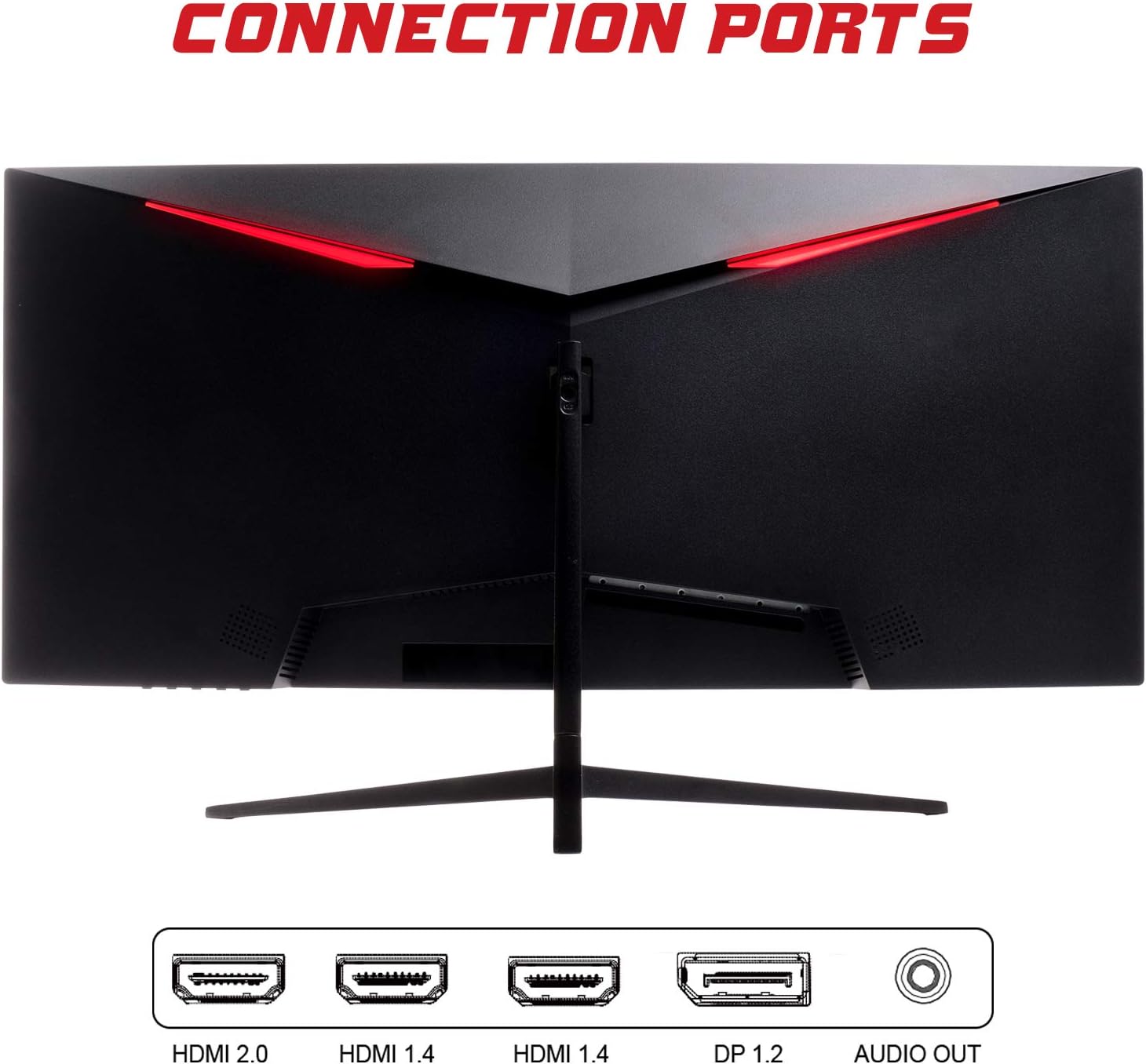
- ڊسپلي پورٽ (ڊي پي 1.2): For high-resolution and high-refresh-rate connections to your PC.
- HDMI (HDMI 2.0, HDMI 1.4 x2): Connect to PCs, gaming consoles, and other multimedia devices. HDMI 2.0 supports higher refresh rates at certain resolutions.
- آڊيو آئوٽ: ٻاهرين اسپيڪر يا هيڊفون ڳنڍيو.
After connecting the video cable, connect the power adapter to the monitor and then to a power outlet.
مانيٽر هلائڻ
پاور آن / آف
Press the power button, usually located on the bottom or back of the monitor, to turn it on or off. The power indicator light will illuminate when the monitor is on.
آن-اسڪرين ڊسپلي (OSD) مينيو
The OSD menu allows you to adjust various monitor settings. Use the buttons on the monitor (typically on the back or bottom right) to navigate the menu.
- تصويري سيٽنگون: چمڪ، برعڪس، تيز رفتاري، ۽ گاما کي ترتيب ڏيو.
- رنگ سيٽنگون: رنگ جي گرمي پد، رنگت، ۽ سنترپتي کي تبديل ڪريو.
- ان پٽ چونڊيو: دستي طور تي DisplayPort ۽ HDMI ان پٽ جي وچ ۾ سوئچ ڪريو.
- آڊيو: Adjust volume for the audio output.
- سسٽم سيٽنگون: Access language, OSD timeout, and reset options.
- گیمنگ خاصيتون: Enable/disable FreeSync, adjust response time overdrive, and activate crosshair overlays if available.
سار سنڀال
مناسب سنڀال توهان جي مانيٽر جي ڊگهي عمر کي يقيني بڻائي ٿي:
- صاف ڪرڻ کان اڳ هميشه مانيٽر کي بند ڪريو ۽ پاور ڪنڊ کي ان پلگ ڪريو.
- اسڪرين کي نرميءَ سان صاف ڪرڻ لاءِ نرم، لِنٽ فري ڪپڙو استعمال ڪريو. ضدي نشانن لاءِ، ٿورو ڊيampڪپڙي کي پاڻي يا نرم، غير رگڙيندڙ اسڪرين ڪلينر سان ڌوئڻ ڏيو.
- مانيٽر صاف ڪريو جasing نرم، سڪل ڪپڙي سان.
- Avoid spraying liquids directly onto the screen or casing.
- Do not use benzene, thinner, ammonia-based cleaners, or abrasive materials.
مشڪلاتون
If you encounter issues with your monitor, please refer to the following table for common problems and solutions:
| مسئلو | ممڪن حل |
|---|---|
| طاقت نه آهي | Ensure the power cable is securely connected to the monitor and the power outlet. Check if the power outlet is working. |
| ڪوبه سگنل ناهي / خالي اسڪرين | Verify the video cable (DisplayPort or HDMI) is firmly connected to both the monitor and your computer. Select the correct input source via the OSD menu. Ensure your computer is powered on and not in sleep mode. |
| تصوير ٽمٽار يا غير مستحڪم | Check the video cable connection. Try a different cable or port. Ensure your graphics card drivers are up to date. Adjust the refresh rate in your computer's display settings. |
| Poor image quality (blurry, distorted colors) | Adjust brightness, contrast, and color settings in the OSD menu. Ensure the display resolution on your computer matches the monitor's native resolution (2560x1080). |
| No sound from audio out | Check the audio cable connection to your speakers/headphones. Verify the volume setting in the OSD menu and on your computer. Ensure the correct audio output device is selected in your computer's sound settings. |
ٽيڪنيڪل وضاحتون
| خاصيت | تفصيل |
|---|---|
| برانڊ | آئيڪ |
| ماڊل | ITMC30V201FHD |
| اسڪرين جي ماپ | 30 انچ |
| پينل جو قسم | VA |
| گھمڻ | R1800 |
| قرارداد | 2560 x 1080 (WFHD) |
| اسپيڪٽ ريشو | 21:9 |
| ريفريش جي شرح | 200 هز |
| جوابي وقت | 1ms MPRT |
| روشني | 350 cd/m² |
| مقابلي جي نسبت | 3000:1 |
| Viewزاويه | 178° (افقي/عمودي) |
| رابطي | 1x DisplayPort 1.2, 1x HDMI 2.0, 2x HDMI 1.4, Audio Out |
| خاص خاصيتون | HDR Ready, FreeSync, Low Blue Light, Flicker Free, VESA Mountable |
| پيداوار جا طول و عرض (اسٽينڊ سان) | 70.68 x 40.89 x 18.48 سينٽي |
| وزن | 6.9 ڪلو |
توانائي جي ڪارڪردگي

For detailed energy consumption information and product registration, please refer to the official EPREL database:
وارنٽي ۽ سپورٽ
Your iTek GGC monitor is backed by a manufacturer's warranty. Please retain your proof of purchase for warranty claims.
- Guaranteed Product Support: This product is guaranteed to have support available until at least January 1, 2031.
- For technical support, warranty inquiries, or service requests, please contact iTek customer service through their official webسائيٽ يا توهان جي خريداري سان مهيا ڪيل رابطي جي معلومات.


