1. تعارف
Thank you for choosing the Antec P101S Silent Performance Mid-Tower PC Case. This manual provides essential information for the proper installation, operation, and maintenance of your new computer case. Please read this manual thoroughly before beginning assembly to ensure optimal performance and longevity of your system.
The Antec P101S is engineered for quiet computing, featuring sound-dampening panels and efficient cooling solutions, making it ideal for users who prioritize a silent and high-performance computing environment.
2. اهم خاصيتون
- خاموش آپريشن: Equipped with sound-dampening top, front, and side panels for quiet computing.
- Extensive Drive Bays: Supports 11 drive bays, including 1 x 5.25" ODD bay, 8 x 3.5" HDD/2.5" SSD removable bays, and 2 x dedicated 2.5" SSD bays.
- اعليٰ کولنگ: Includes 4 pre-installed 120/140mm cooling fans (3 front, 1 rear). Supports up to 4 fan mounts with a maximum of 360mm radiator support for enhanced cooling.
- آسان I/O پينل: Features power/reset buttons, a fan speed controller (High/Stop/Low), Audio/Mic ports, 2 x USB 2.0, and 2 x USB 3.0 ports with white LED lighting.
- وسيع مدر بورڊ مطابقت: Supports E-ATX, ATX, Micro-ATX, and ITX motherboards.
- Generous Component Clearance: Accommodates CPU coolers up to 180mm, graphics cards up to 450mm, and PSUs up to 290mm in length.
3. پيڪيج مواد
مھرباني ڪري تصديق ڪريو ته سڀ شيون توھان جي پيڪيج ۾ موجود آھن:
- Antec P101S Mid-Tower PC Case
- 3 x 120mm Front Fans (Pre-installed)
- 1 x 140mm Rear Fan (Pre-installed)
- Accessory Box (screws, cable ties, user manual)
4. اجزاء اوورview
Familiarize yourself with the various parts of your Antec P101S case.

Figure 1: Front, Back, Left, and Right views of the Antec P101S case, illustrating its external design and panel layout.

شڪل 2: اندروني view of the Antec P101S, showing the spacious layout, drive bays, and fan mounts.

Figure 3: Close-up of the top I/O panel, highlighting the power, reset, fan speed controller, audio, USB 2.0, and USB 3.0 ports.
5. سيٽ اپ ۽ تنصيب
Follow these steps to install your components into the Antec P101S case.
5.1 ڪيس جي تياري
- پاسي واري پينل کي هٽايو: Unscrew the thumbscrews on the rear of the side panels and slide them backward to remove.
- Access Interior: The interior is now accessible for component installation.
5.2 Motherboard جي انسٽاليشن
- اسٽينڊ آف انسٽال ڪريو: Ensure the correct motherboard standoffs are installed for your motherboard form factor (ATX, Micro-ATX, ITX, E-ATX).
- مدر بورڊ جي جاءِ: احتياط سان پنهنجي مدر بورڊ کي اسٽينڊ آف ۽ I/O شيلڊ اوپننگ سان ترتيب ڏيو.
- محفوظ مدر بورڊ: Fasten the motherboard with the provided screws.
5.3 ڊرائيو جي انسٽاليشن
The P101S offers versatile drive mounting options.
5.3.1 3.5" HDD / 2.5" SSD Removable Bays

Figure 4: Illustration of the various drive bay locations within the Antec P101S case.
- ڊرائيو ٽري هٽايو: Pull out an empty 3.5" drive tray from the drive cage.
- ڊرائيو انسٽال ڪريو: For a 3.5" HDD, flex the tray and insert the drive. For a 2.5" SSD, secure it to the bottom of the tray with screws.
- ٽري ٻيهر داخل ڪريو: Slide the loaded tray back into the drive cage until it clicks into place.
5.3.2 Dedicated 2.5" SSD Bays
Two dedicated 2.5" SSD mounts are located behind the motherboard tray.
- محفوظ ايس ايس ڊي: Attach your 2.5" SSD to the dedicated mounting bracket using screws.
- ماؤنٽ بریکٹ: Secure the bracket with the SSD to the chassis behind the motherboard tray.
5.3.3 5.25" ODD Bay
- Remove Front Bezel: Gently remove the 5.25" bay cover from the front bezel.
- Insert ODD: Slide your optical disc drive into the bay from the front until it aligns with the screw holes.
- Secure ODD: Fasten the ODD with screws.
5.4 گرافڪس ڪارڊ ۽ ايڪسپينشن ڪارڊ جي انسٽاليشن
- PCIe سلاٽ ڪَوَر هٽايو: Unscrew and remove the necessary PCIe slot covers from the rear of the case.
- داخل ڪريو ڪارڊ: Carefully insert your graphics card or other expansion card into the appropriate PCIe slot on the motherboard.
- محفوظ ڪارڊ: Fasten the card with screws.
5.5 پاور سپلائي يونٽ (PSU) لائڻ
- پوزيشن PSU: Slide the PSU into its designated compartment at the bottom rear of the case.
- محفوظ PSU: Fasten the PSU to the rear of the chassis with screws.
5.6 ڪيبل مينيجمينٽ
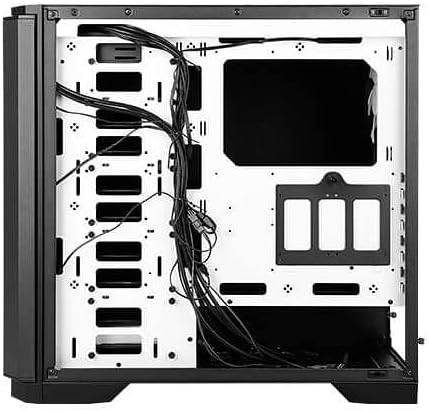
شڪل 5: پوئتي view of the motherboard tray, showing cable routing channels and tie-down points for organized cable management.
Utilize the cable routing holes and tie-down points behind the motherboard tray to organize cables for improved airflow and aesthetics.
6. توهان جي پي سي ڪيس کي هلائڻ
6.1 پاور آن/آف
Press the large power button on the top I/O panel to turn your system on or off.
6.2 فين اسپيڊ ڪنٽرول
Use the fan speed controller switch on the top I/O panel to adjust the speed of the pre-installed fans:
- اعلي: Maximum fan speed for optimal cooling.
- گھٽ: Reduced fan speed for quieter operation.
- روڪيو: Fans are turned off.
7. سار سنڀال
7.1 Cleaning Dust Filters
Regularly clean the dust filters located at the front, top, and bottom of the case to maintain optimal airflow and prevent dust buildup. The front filter is easily removable for cleaning.
7.2 عام صفائي
Use a soft, dry cloth to clean the exterior of the case. For stubborn marks, a slightly damp ڪپڙو استعمال ڪري سگھجي ٿو، ۽ پوءِ سڪائي سگھجي ٿو. رگڙيندڙ صاف ڪندڙ يا محلولن کان پاسو ڪريو.
8. مسئلا حل ڪرڻ
- سسٽم آن نه ٿي رهيو آهي: Double-check all power connections, including the 24-pin ATX, 8-pin CPU, and GPU power cables. Ensure the PSU switch is in the 'On' position.
- پنکھا نه ڦرڻ: Verify that the fan speed controller on the I/O panel is not set to 'Stop'. Check fan connections to the motherboard or fan hub.
- گهڻو گرم ٿيڻ: Ensure all fans are spinning correctly and dust filters are clean. Verify proper component installation and thermal paste application.
- USB بندرگاهن ڪم نه ڪري رهيا آهن: Check the internal USB header connections from the I/O panel to the motherboard.
9. وضاحتون
| خاصيت | تفصيل |
|---|---|
| ماڊل نالو | P101S Silent |
| ڪيس جو قسم | وچ ٽاور |
| Motherboard مطابقت | E-ATX، ATX، مائڪرو-ATX، ITX |
| طول و عرض (LxWxH) | 20.74 x 9.13 x 19.92 انچ |
| شيءِ جو وزن | 26.1 پائونڊ |
| مواد | مصر جو اسٽيل |
| ڊرائيو بيز | 1 x 5.25" ODD, 8 x 3.5" HDD/2.5" SSD, 2 x 2.5" SSD |
| اڳ ۾ نصب ٿيل پرستار | 3 x 120mm Front, 1 x 140mm Rear |
| ريڊيٽر سپورٽ | Front: Up to 360mm, Rear: Up to 140mm |
| وڌ ۾ وڌ CPU کولر جي اوچائي | 180mm |
| وڌ ۾ وڌ GPU ڊگھائي | 450mm |
| وڌ ۾ وڌ PSU ڊگھائي | 290mm |
| اڳيان I / O بندرگاھ | 2 x USB 2.0, 2 x USB 3.0, Audio/Mic, Power, Reset, Fan Speed Controller |
10. وارنٽي ۽ سپورٽ
وارنٽي جي معلومات ۽ ٽيڪنيڪل سپورٽ لاءِ، مھرباني ڪري سرڪاري اينٽيڪ جو حوالو ڏيو website or contact your local Antec distributor. Keep your proof of purchase for warranty claims.
اينٽيڪ آفيشل Webسائيٽ: www.antec.com


