تعارف
This manual provides comprehensive instructions for the Mitel Wireless DECT Headset, designed for use with Mitel MiVoice 6930 and 6940 phones. It covers product components, setup procedures, operational guidelines, maintenance tips, and technical specifications to ensure optimal performance and user experience. This headset offers wireless connectivity, allowing users freedom of movement during calls.
دٻي ۾ ڇا آهي
Carefully unpack your Mitel Wireless DECT Headset and verify that all components are present. The package typically includes the following items:
- Mitel Wireless DECT Headset
- Integrated Headset Charging Cradle
- مٿو پٽي
- انسٽاليشن ھدايت
- Necessary connection cables/adapters
- Small tools (e.g., screwdriver) for installation
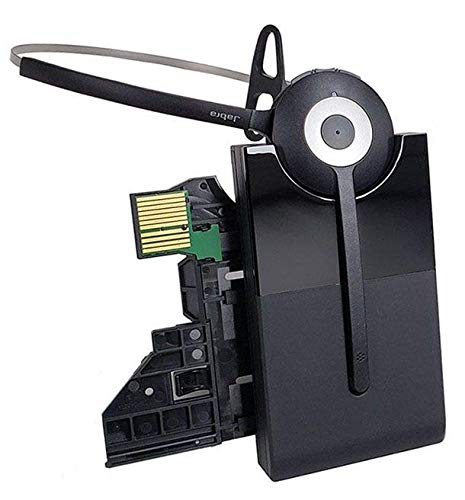
Image: All components included in the Mitel Wireless DECT Headset package. This includes the headset, charging cradle, headband, installation guide, and various small accessories for setup.
سيٽ اپ جون هدايتون
Follow these steps to set up your Mitel Wireless DECT Headset with your compatible Mitel MiVoice phone.
- مطابقت جي چڪاس: Ensure your Mitel MiVoice phone is a 6930 or 6940 model. The system requires MiVoice Business Release 8.0 SP1 or higher.
- Connect Charging Cradle: The integrated headset charging cradle connects directly to your MiVoice 6930 or 6940 phone via its expansion port or a PKM expansion port. Refer to the included installation guide for specific connection diagrams.
- چارج هيڊ سيٽ: Place the wireless DECT headset into the charging cradle. The headset battery requires initial charging. A full charge provides up to 8 hours of talk time.
- جوڙڻ: The headset is designed for simplified deployment. Once connected and charged, the headset should automatically pair with the compatible Mitel phone. Consult the phone's user manual or the headset's installation guide for specific pairing instructions if automatic pairing does not occur.

Image: Detail from the installation guide, illustrating the connection process for the Mitel Integrated DECT charging base to the MiVoice 6930/6940 phone.
آپريٽنگ هدايتون
Once your headset is set up, you can begin using it for calls. The headset offers crystal clear HD audio and a noise-cancelling microphone for effective communication.
- ڪالون ڪرڻ/وصول ڪرڻ: Use the call control features on the headset to answer, end, or reject calls. Refer to the headset's specific buttons and their functions in the installation guide.
- حجم جي ترتيب: Adjust the call volume using the dedicated controls on the headset.
- خاموش فنڪشن: Activate the mute function on the headset's microphone when you need privacy during a call.
- رومنگ: Enjoy a roaming range of up to 300 feet (100 meters) from your desk phone, allowing you to move freely while on a call.
سار سنڀال
مناسب سار سنڀال توهان جي هيڊ سيٽ جي ڊگهي عمر ۽ بهترين ڪارڪردگي کي يقيني بڻائي ٿي.
- چارج ڪرڻ: Always return the headset to its charging cradle when not in use to ensure it is fully charged for your next call. The headset provides up to 8 hours of talk time on a full charge.
- صفائي: Use a soft, dry cloth to clean the headset and charging cradle. Avoid using harsh chemicals or abrasive materials.
- اسٽوريج: هيڊ سيٽ کي سڌي سج جي روشني ۽ انتهائي گرمي پد کان پري ٿڌي، سڪل جاءِ تي رکو.
- بيٽري: The headset contains a Lithium Polymer battery. Do not attempt to replace the battery yourself. Contact qualified service personnel if battery issues arise.
مشڪلاتون
If you encounter issues with your Mitel Wireless DECT Headset, refer to the following common troubleshooting steps:
- ڪابه آڊيو ناهي/خراب آڊيو معيار:
- پڪ ڪريو ته هيڊ سيٽ مڪمل طور تي چارج ٿيل آهي.
- Verify the headset is properly paired with the phone.
- Check the volume settings on both the headset and the phone.
- Confirm the charging cradle is securely connected to the phone's expansion port.
- هيڊ سيٽ چارج نه ٿي رهيو آهي:
- Ensure the headset is correctly seated in the charging cradle.
- Check the connection of the charging cradle to the phone.
- Verify the phone itself is powered on.
- Limited Roaming Range:
- Ensure there are no major obstructions (e.g., thick walls, large metal objects) between the headset and the phone.
- مضبوط برقي مقناطيسي مداخلت جي ذريعن کان پاسو ڪريو.
- Headset Not Responding:
- هيڊ سيٽ کي بند ڪري ۽ پوءِ ٻيهر آن ڪري نرم ري سيٽ ڪريو.
- If issues persist, consult the detailed troubleshooting section in the full installation guide or contact Mitel support.
وضاحتون
| خاصيت | تفصيل |
|---|---|
| ماڊل نالو | Mitel Wireless DECT Headset |
| شيون ماڊل نمبر | 930-65-509-105-MIT |
| مطابقت رکندڙ ڊوائيسز | Mitel MiVoice 6930, 6940 Phones |
| رابطي ٽيڪنالاجي | وائرليس (DECT) |
| وائرليس ڪميونيڪيشن ٽيڪنالاجي | DECT (also lists Bluetooth 4.0 with 100m range in source data) |
| شور ڪنٽرول | Active Noise Cancellation, Noise Cancelling Microphone |
| آڊيو ڊرائيور جو قسم | متحرڪ ڊرائيور |
| بيٽري جي زندگي | 8 ڪلاڪن تائين (ڳالهائڻ جو وقت) |
| چارج ڪرڻ وقت | 8 ڪلاڪ |
| رومنگ رينج | 300 فوٽ (100 ميٽر) تائين |
| ڪنٽرول قسم | Call Control (Remote) |
| شيءِ جو وزن | 11.2 اونس |
| طاقت جو ذريعو | 1 ليتيم پوليمر بيٽري (شامل) |
| ٺاهيندڙ | جبرا |
سرڪاري پراڊڪٽ وڊيوز
Watch these official videos for additional guidance on your Mitel Wireless DECT Headset.
Video: Detailed overview of the Mitel Wireless DECT Headset features and functionality. (Duration: 12:45)
Video: Quick guide to setting up and using the Mitel Wireless DECT Headset. (Duration: 1:24)
وارنٽي ۽ سپورٽ
For warranty information, technical support, or service inquiries, please refer to the documentation included with your product or visit the official Mitel webسائيٽ. وارنٽي جي دعوي لاء توهان جي خريداري جي رسيد رکو.


