1. تعارف
This user manual provides comprehensive instructions for the setup, operation, and maintenance of your Reloop RP-1000 MK2 Professional Belt Drive Turntable System. Please read this manual thoroughly before using the product to ensure proper function and to prevent damage.
The Reloop RP-1000 MK2 is designed for both aspiring DJs and HiFi enthusiasts, offering high-quality audio reproduction through its belt-driven mechanism. This design effectively isolates the platter from motor vibrations, ensuring clear, distortion-free sound. The MK2 version features an enhanced top panel construction, improved metallic buttons, and a pre-fitted Ortofon OM Black pick-up system for immediate playback.
2. حفاظتي هدايتون
To ensure safe operation and prolong the life of your turntable, please observe the following safety guidelines:
- بجلي جي فراهمي: Connect the unit only to an AC outlet with the correct voltage as indicated on the product. Ensure the power cord is not pinched or walked on.
- نمي: يونٽ کي مينهن، نمي، يا گهڻي نمي جي سامهون نه رکو. يونٽ تي مائع سان ڀريل شيون، جهڙوڪ گلدان، نه رکو.
- وينٽيليشن: يونٽ جي چوڌاري مناسب وينٽيليشن کي يقيني بڻايو. وينٽيليشن جي سوراخن کي بند نه ڪريو.
- گرمي جا ذريعا: يونٽ کي گرمي جي ذريعن جهڙوڪ ريڊيئيٽر، گرمي رجسٽر، اسٽو، يا ٻين سامان کان پري رکو (بشمول ampلائفائرز) جيڪي گرمي پيدا ڪن ٿا.
- صفائي: صرف سڪل ڪپڙي سان صاف ڪريو. مائع صاف ڪندڙ يا ايروسول استعمال ڪرڻ کان پاسو ڪريو.
- خدمت ڪرڻ: Do not attempt to service the unit yourself. Refer all servicing to qualified service personnel. Servicing is required when the apparatus has been damaged in any way, such as power-supply cord or plug is damaged, liquid has been spilled or objects have fallen into the apparatus, the apparatus has been exposed to rain or moisture, does not operate normally, or has been dropped.
- لڳائڻ: Place the turntable on a stable, level surface to prevent vibrations and ensure proper tracking.
3. پيڪيج مواد
مھرباني ڪري پڪ ڪريو ته ھيٺ ڏنل سڀ شيون توھان جي پيڪيج ۾ شامل آھن:
- ٽرنبل ٽيبل تي
- OM Black pick-up system (by Ortofon)
- هيڊيل
- سِپچي
- ضد وزن
- پاور ڪنڊ
- آپريٽنگ هدايت نامو (هي دستاويز)
If any items are missing or damaged, please contact your retailer or Reloop customer support immediately.
4. پراڊڪٽ ختمview
Familiarize yourself with the main components of your Reloop RP-1000 MK2 turntable.

شڪل 4.1: زاويه view of the Reloop RP-1000 MK2 turntable, showcasing the platter, tonearm, and control panel.
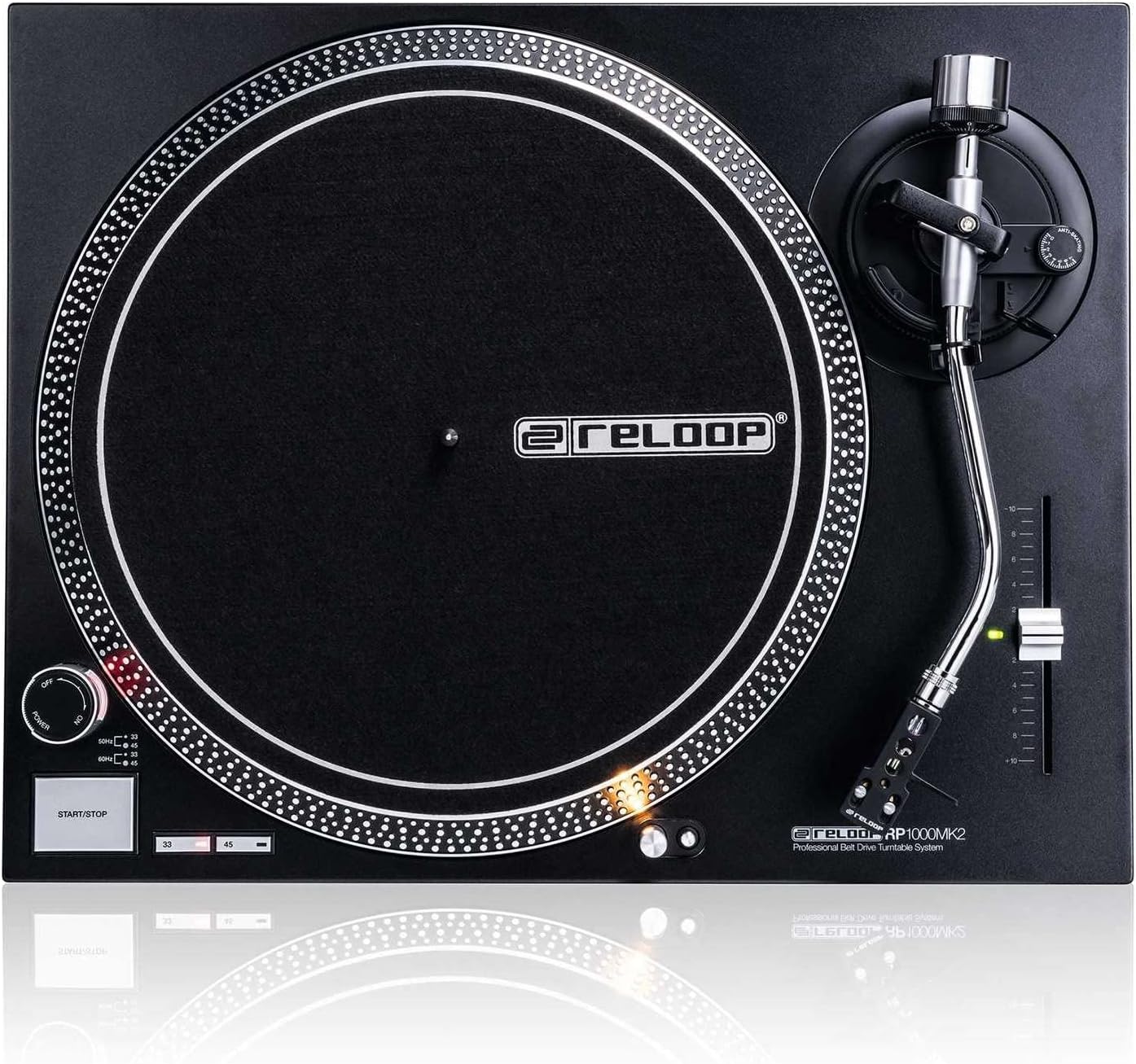
شڪل 4.2: مٿي کان هيٺ view highlighting the platter, slipmat with Reloop logo, S-shaped tonearm, and pitch control slider.

شڪل 4.3: تفصيلي view of the S-shaped tonearm, headshell, and the pre-fitted Ortofon OM Black pick-up system.
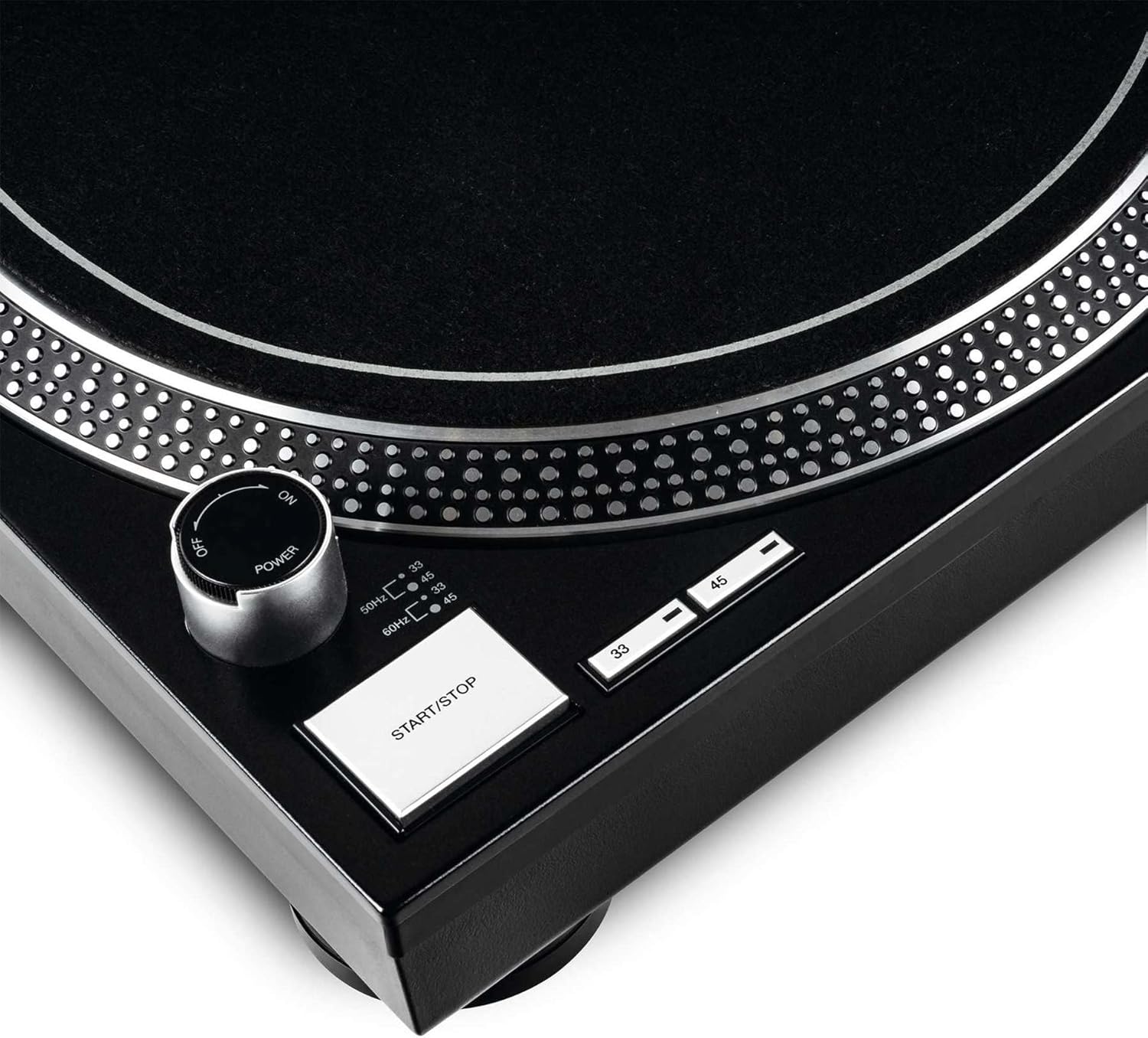
Figure 4.4: Close-up of the power knob, start/stop button, and speed selection buttons (33/45 RPM).
اهم اجزاء:
- پليٽ: Precision-engineered, die-cast aluminum platter for stable rotation.
- ٽونيرم: Statically balanced S-shaped tonearm with hydraulic lift and anti-skating mechanism.
- ڪارٽريج: High-quality OM Black pick-up system by Ortofon, pre-fitted to a headshell.
- پچ ڪنٽرول: Adjustable slider with a range of +/-10% for fine speed adjustments.
- Speed Select Buttons: Buttons for selecting 33 1/3 RPM and 45 RPM playback speeds.
- شروع ڪريو/بند ڪريو بٽڻ: Controls the rotation of the platter.
- Target Light: Extendable aluminum target light to illuminate the needle position in dark environments.
- Shock-absorbing Feet: Improve isolation from unwanted vibrations.
5. سيٽ اپ
5.1 Unpacking ۽ لڳائڻ
- Carefully remove all components from the packaging. Retain the packaging for future transport or storage.
- Place the turntable on a flat, stable, and level surface, away from direct sunlight, heat sources, and strong magnetic fields.
- Ensure there is sufficient space around the unit for ventilation.
5.2 Platter and Belt Installation
- پليٽ کي وچ واري اسپنڊل تي رکو. پڪ ڪريو ته اهو محفوظ طور تي ويٺو آهي.
- Locate the drive belt. Carefully stretch the belt around the inner rim of the platter and hook it onto the motor pulley, which is visible through one of the platter's openings.
- Place the felt slipmat on top of the platter.
5.3 Tonearm Setup
The OM Black pick-up system is pre-fitted to the headshell. Follow these steps to balance the tonearm:
- Attach the headshell with the pre-fitted cartridge to the front end of the tonearm. Secure it by turning the locking ring clockwise.
- Place the counterweight onto the rear of the tonearm and rotate it until it is approximately centered.
- tonearm cl کي ڏايوamp and lower the tonearm lift.
- Carefully adjust the counterweight by rotating it forwards or backwards until the tonearm is perfectly balanced and floats horizontally.
- Once balanced, hold the counterweight steady and rotate only the numbered ring on the front of the counterweight to '0' (zero).
- Rotate the entire counterweight (including the numbered ring) counter-clockwise to set the recommended tracking force for the Ortofon OM Black cartridge, typically between 1.5 to 2.0 grams. Refer to the cartridge manufacturer's specifications for the precise recommended tracking force.
- Set the anti-skating dial to the same value as your tracking force.
- Return the tonearm to its rest and secure it with the clamp.
5.4 آڊيو ۽ پاور ڪنيڪشن
- Connect the RCA audio cables from the turntable's output to the PHONO input of your amplifier or mixer. Ensure correct left (white) and right (red) channel connections.
- ٽرن ٽيبل کان گرائونڊ تار کي پنهنجي گرائونڊ ٽرمينل سان ڳنڍيو amplifier or mixer to minimize hum.
- Plug the power cord into the turntable's power input and then into a suitable AC power outlet.
6. آپريٽنگ هدايتون
6.1 بنيادي آپريشن
- پاور آن: Turn the power knob clockwise to the "ON" position. The platter will not start spinning until the START/STOP button is pressed.
- رفتار چونڊيو: Press the "33" or "45" button to select the desired playback speed according to the record you are playing. The corresponding LED will illuminate.
- جڳھ جو رڪارڊ: Carefully place a vinyl record onto the platter.
- Start Platter: Press the START/STOP button. The platter will begin to rotate.
- ٽوني بازو جي پوزيشن: tonearm cl کي ڏايوamp. Use the tonearm lift lever to raise the tonearm. Carefully move the tonearm over the desired track on the record.
- هيٺيون ٽوني بازو: Gently lower the tonearm lift lever to allow the stylus to descend onto the record groove.
- کيڏڻ: The audio will now play through your connected audio system.
- هلڻ کي روڪڻ At the end of the record, or when you wish to stop, use the tonearm lift lever to raise the tonearm, return it to its rest, and secure it with the clamp. Press the START/STOP button to stop the platter rotation.
- بجلي بند: Turn the power knob counter-clockwise to the "OFF" position when not in use.
6.2 Using Pitch Control
The pitch control slider allows you to finely adjust the playback speed by +/-10%. Move the slider up or down to increase or decrease the speed. The center detent indicates 0% pitch adjustment (nominal speed).
6.3 Target Light
Press the aluminum target light button to extend the light, illuminating the needle position. This is particularly useful in low-light environments. Press it again to retract the light.
7. سار سنڀال
7.1 يونٽ جي صفائي
- صاف ڪرڻ کان اڳ هميشه پاور ڪنڊ کي ختم ڪريو.
- Use a soft, dry, lint-free cloth to wipe the surface of the turntable.
- ضدي نشانن لاءِ، ٿورو ڊيamp ڪپڙو استعمال ڪري سگھجي ٿو، ۽ ان کان پوءِ فوري طور تي سڪل ڪپڙو استعمال ڪري سگھجي ٿو. رگڙيندڙ صاف ڪندڙن يا محلولن کان پاسو ڪريو.
7.2 اسٽائلس ڪيئر
- The stylus (needle) is a delicate component. Handle it with extreme care.
- Clean the stylus regularly using a soft brush designed for stylus cleaning, brushing gently from back to front.
- A worn or dirty stylus can damage your records and degrade sound quality. Replace the stylus when signs of wear are apparent (e.g., distorted sound, skipping).
7.3 بيلٽ جي تبديلي
The belt is a wear-and-tear part. If you notice inconsistent speed or the platter not spinning, the belt may need replacement. Contact Reloop support or an authorized service center for replacement belts and instructions.
7.4 Dust Cover Care (if applicable)
If your turntable includes a dust cover, clean it with a soft, damp cloth. Avoid using dry cloths as they can scratch the acrylic surface. Do not use harsh chemicals.
8. مسئلا حل ڪرڻ
Before contacting support, please refer to the following common issues and their solutions:
| مسئلو | ممڪن سبب | حل |
|---|---|---|
| بجلي ناهي / پليٽر نه ڦري رهيو آهي | Power cord not connected; Power switch off; Belt not installed or broken. | Ensure power cord is securely plugged in. Turn power switch ON. Check if the drive belt is correctly installed around the platter and motor pulley. Replace belt if broken. |
| ڪو به آواز نه يا تمام گهٽ آواز | RCA cables not connected correctly; Amplifier/mixer input incorrect; Stylus damaged or dirty; Cartridge not properly seated. | Check RCA connections to amplifier/mixer (PHONO input). Ensure ground wire is connected. Clean stylus. Re-seat cartridge in headshell. |
| بگڙيل آواز / ڇڏڻ | Stylus dirty or worn; Tracking force incorrect; Anti-skating incorrect; Turntable not level; Record dirty or damaged. | Clean or replace stylus. Re-adjust tracking force and anti-skating. Ensure turntable is on a level surface. Clean record. |
| غير مطابقت واري رفتار | Worn or stretched belt; Motor issue. | Inspect the drive belt for wear and replace if necessary. If the issue persists, contact service. |
9. وضاحتون
| خاصيت | وصف |
|---|---|
| ماڊل نالو | RP-1000 MK2 Professional Belt Drive Turntable System |
| ڊرائيو جو قسم | بيلٽ ڊرائيو |
| موٽر سسٽم | Powerful belt-drive motor system absorbs unwanted vibration and noise |
| پليٽر | Precision-engineered, die-cast aluminum platter with stable rotation |
| رفتار | 2 selectable speeds (33 1/3 & 45 RPM) |
| پچ ڪنٽرول | Adjustable range of +/-10% |
| ٽونيرم | Statically balanced S-shaped tonearm with hydraulic lift and anti-skate |
| اڏاوت | Redesigned metal top panel, tactile buttons, reinforced housing construction, optimized damping features, shock-absorbing feet |
| طول و عرض (W x D x H) | 17.72 x 13.86 x 5.67 انچ (تقريبن 45 x 35.2 x 14.4 سينٽي ميٽر) |
| وزن | 16.06 پائونڊ (تقريبن 7.3 ڪلوگرام) |
| رابطي | Analog RCA output, Ground terminal |
| طاقت جو ذريعو | Corded Electric, 220 Volts (check local voltage گهرجون) |
10. وارنٽي ۽ سپورٽ
10.1 وارنٽي ڄاڻ
Reloop products are manufactured to the highest quality standards. This product comes with a manufacturer's warranty. Please refer to the warranty card included in your package or visit the official Reloop webتوهان جي علائقي تي لاڳو ٿيندڙ تفصيلي وارنٽي شرطن ۽ ضابطن لاءِ سائيٽ.
پنهنجي خريداري جو ثبوت (رسيد يا انوائس) رکو ڇو ته اهو ڪنهن به وارنٽي دعوائن لاءِ گهربل هوندو.
10.2 ڪسٽمر سپورٽ
Should you encounter any issues not covered in the troubleshooting section, or require further assistance, please contact Reloop customer support or your authorized dealer. Contact information can typically be found on the official Reloop webسائيٽ تي يا توهان جي پراڊڪٽ پيڪنگنگ تي.
For the latest information, FAQs, and support resources, please visit the official Reloop webسائيٽ: www.reloop.com


