تعارف
This manual provides detailed instructions for the setup, operation, and maintenance of your PROMETHEAN PRM-35 Short-Throw DLP Home Theater Projector. Please read this manual thoroughly before using the projector to ensure proper operation and to extend the life of your device. Keep this manual for future reference.
حفاظت جي ڄاڻ
باهه، بجليءَ جي جھٽڪي، يا زخم کان بچڻ لاءِ ھيٺ ڏنل حفاظتي احتياطن تي عمل ڪريو:
- وينٽيليشن جي سوراخن کي نه روڪيو. پروجيڪٽر جي چوڌاري مناسب هوا جي وهڪري لاءِ مناسب جاءِ کي يقيني بڻايو.
- پروجيڪٽر کي مينهن يا نمي جي سامهون نه رکو.
- پروجيڪٽر نه کوليو casing. سڀني خدمتن کي قابل سروس اهلڪارن جي حوالي ڪريو.
- پروجيڪٽر لينس ۾ سڌو سنئون ڏسڻ کان پاسو ڪريو جڏهن ايلamp روشن روشني توهان جي اکين کي نقصان پهچائي سگهي ٿي، ڇاڪاڻ ته اها آن آهي.
- صرف پروجيڪٽر سان فراهم ڪيل پاور ڪنڊ يا مناسب متبادل استعمال ڪريو.
- Unplug the projector from the power outlet before cleaning or when not in use for extended periods.
پيڪيج مواد
پڪ ڪريو ته سڀئي شيون توهان جي پيڪيج ۾ موجود آهن:
- PROMETHEAN PRM-35 Projector
- پاور ڪنڊ
- ريموٽ ڪنٽرول
- HDMI Cable (may vary by region/bundle)
- استعمال ڪندڙ جو دستياب (ھي دستاويز)

Image: The PROMETHEAN PRM-35 projector shown alongside its remote control, power cord, and an HDMI cable, illustrating the typical package contents.
پيداوار ختمview
سامهون View

تصوير: سامهون view of the PROMETHEAN PRM-35 projector, highlighting the lens, brand logo, and various certifications.
The front of the projector features the main projection lens, which includes manual focus and digital zoom capabilities. The PROMETHEAN logo and other product identifiers are also visible.
ريڙهه View (Connectivity Ports)
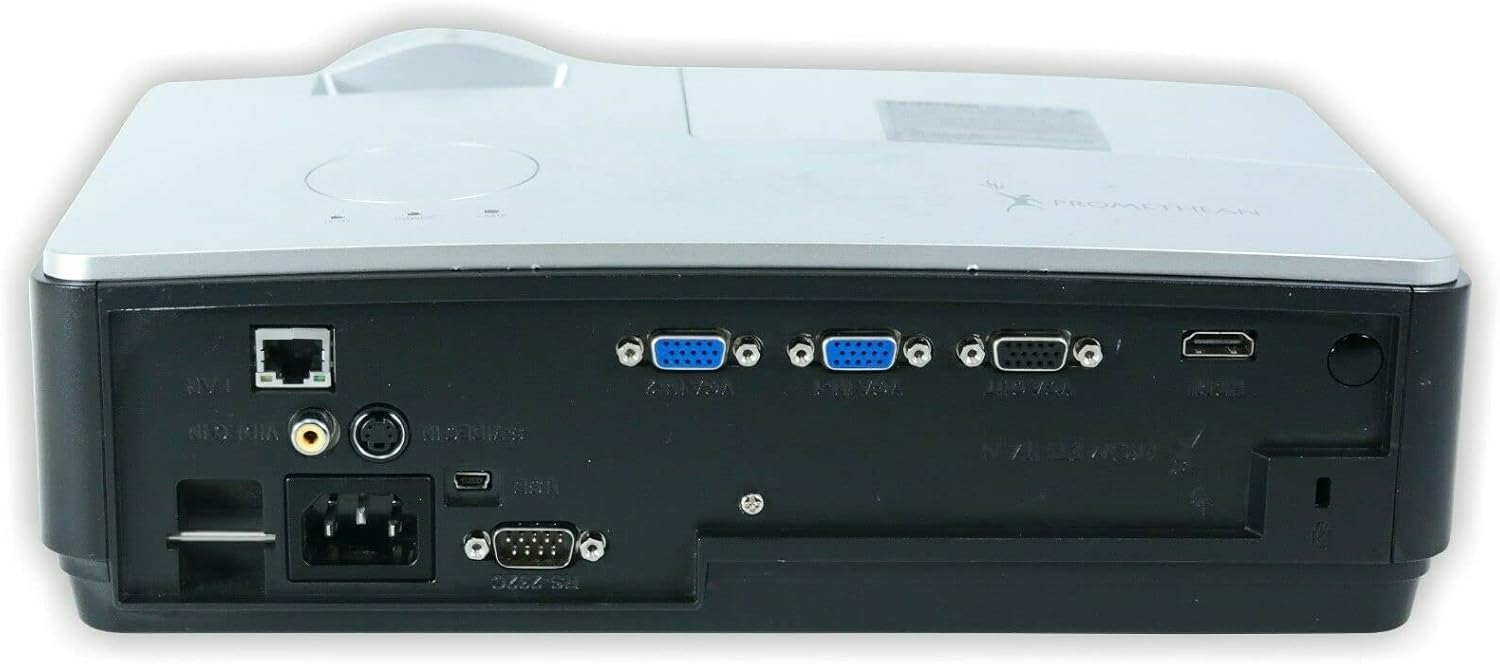
تصوير: پوئين پاسي view of the PROMETHEAN PRM-35 projector, displaying a variety of input and output ports including HDMI, VGA, USB, S-Video, and network connections.
The rear panel provides all the necessary input and output ports for connecting to various devices. These include HDMI, VGA, S-Video, USB Mini Type-A, RS232, RJ-45 (LAN), and audio jacks.
پاسي Views (Ventilation)

تصوير: پاسي view of the PROMETHEAN PRM-35 projector, showing the ventilation grilles for heat dissipation.

تصوير: ٻيو پاسو view of the PROMETHEAN PRM-35 projector, also featuring ventilation grilles.
Both sides of the projector feature ventilation grilles to ensure proper airflow and prevent overheating. It is crucial to keep these vents unobstructed during operation.
مٿو View
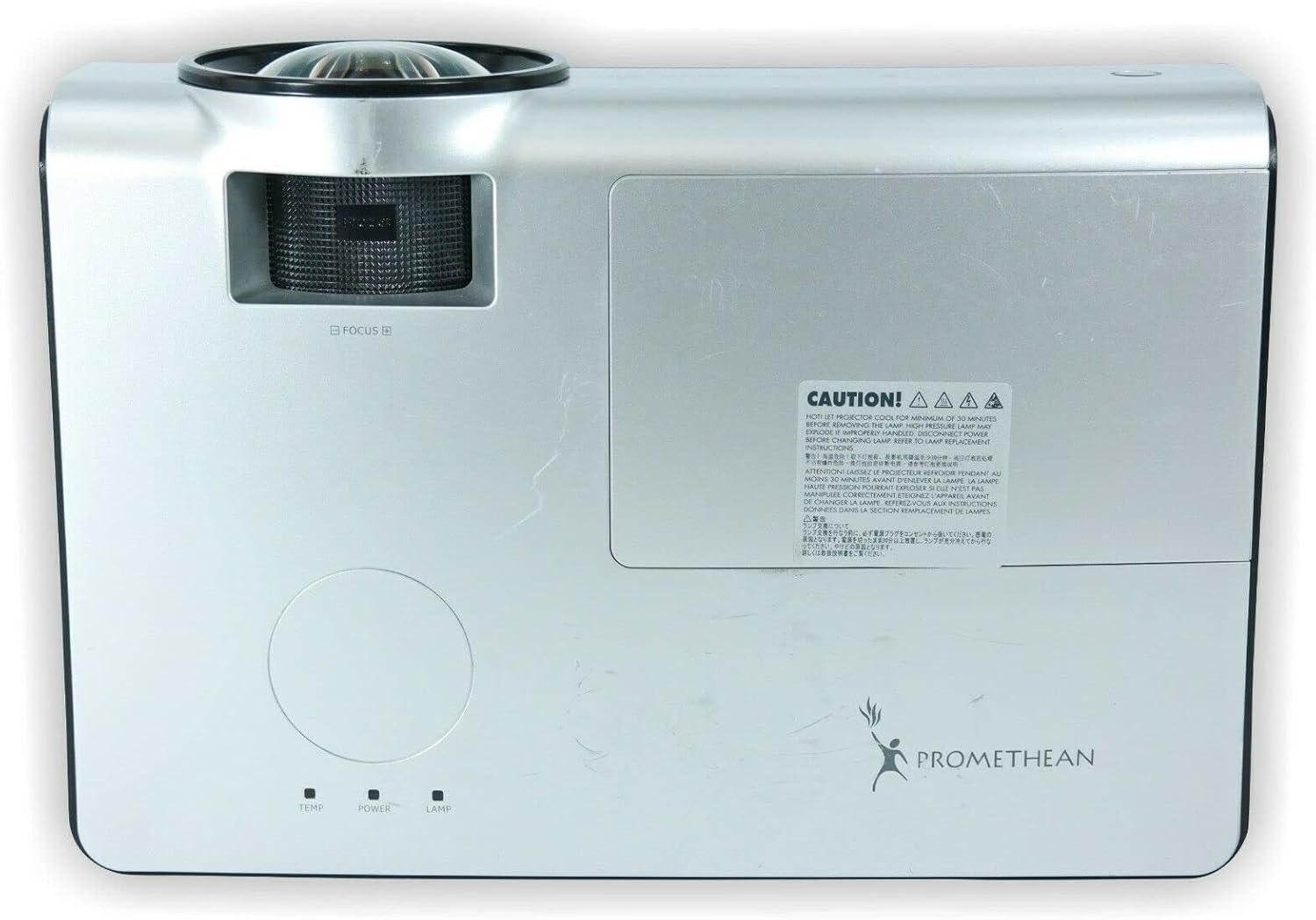
تصوير: مٿي view of the PROMETHEAN PRM-35 projector, showing the control panel area and lamp رسائي ڍڪ.
The top panel includes indicator lights for temperature, power, and lamp status, along with a caution label regarding lamp گرمي.
هيٺيون View

تصوير: هيٺيون view of the PROMETHEAN PRM-35 projector, showing mounting points and regulatory labels.
The bottom of the projector features mounting points for ceiling or table top projection, along with product information and regulatory compliance labels.
سيٽ اپ ڪريو
1. رکڻ
Position the projector on a stable, flat surface or mount it securely. For short-throw projection, place the projector close to the screen. Ensure there is adequate space around the projector for ventilation.
- Table Top Projection: پروجيڪٽر کي اسڪرين جي سامهون ٽيبل تي رکو.
- ڇت جو اندازو: Use a compatible ceiling mount (sold separately) and ensure the projector is securely fastened.
- پوئين پروجيڪشن: If your screen supports it, the projector can be placed behind the screen. Adjust settings in the projector menu for rear projection.
2. پاور سان ڳنڍڻ
- Connect the power cord to the projector's power input port on the rear panel.
- پاور ڪنڊ جي ٻئي پڇاڙيءَ کي گرائونڊ ٿيل برقي آئوٽليٽ ۾ لڳايو.
- پروجيڪٽر تي پاور انڊيڪيٽر لائيٽ روشن ٿيڻ گهرجي.
3. ان پٽ ذريعن کي ڳنڍڻ
The PRM-35 offers multiple connectivity options:
- HDMI: For high-definition digital video and audio. Connect an HDMI cable from your source device (e.g., Blu-ray player, game console, PC) to the HDMI port on the projector.
- VGA: For analog video connection from computers. Connect a VGA cable from your PC to one of the VGA/SVGA D-Sub ports.
- ايس وڊيو معياري تعريف واري وڊيو لاءِ.
- USB Mini Type-A: ڪجهه ڊيٽا يا ڪنٽرول ڪمن لاءِ.
- RS232 (DB-9pin): پروجيڪٽر جي سيريل ڪنٽرول لاءِ.
- RJ-45 (LAN): For network connectivity and control (e.g., Crestron RoomView).
- آڊيو: Use the headphone jack for audio output or connect external speakers if desired.
4. Focus and Digital Zoom Adjustment
Once the projector is powered on and displaying an image:
- فوڪس: Rotate the focus ring around the projector lens until the image appears sharp and clear on the screen.
- ڊجيٽل زوم: Use the remote control or projector's on-screen display (OSD) menu to adjust the digital zoom. This feature allows you to enlarge or reduce the image size without moving the projector.
پروجيڪٽر کي هلائڻ
پاور آن / آف
- پاور آن: کي دٻايو طاقت button on the projector's control panel or the remote control. The power indicator light will change to solid green.
- بجلي بند: کي دٻايو طاقت ٻيهر بٽڻ دٻايو. هڪ تصديقي پيغام ظاهر ٿي سگهي ٿو. دٻايو طاقت a second time to confirm shutdown. The projector will enter a cooling cycle before fully powering off. Do not unplug the projector during the cooling cycle.
Menu Navigation (OSD)
Use the buttons on the projector's control panel or the remote control to navigate the On-Screen Display (OSD) menu:
- استعمال ڪريو مينيو button to open or close the OSD.
- استعمال ڪريو تير بٽڻَمٿي، هيٺ، کاٻي، ساڄي) مينيو آپشنز ذريعي نيويگيٽ ڪرڻ لاءِ.
- کي دٻايو داخل ڪريو or OK آپشن چونڊڻ يا سيٽنگ جي تصديق ڪرڻ لاءِ بٽڻ دٻايو.
- استعمال ڪريو نڪرڻ or پوئتي button to return to the previous menu or exit the OSD.
ان پٽ ماخذ جي چونڊ
ڳنڍيل ڊوائيسز جي وچ ۾ مٽائڻ لاء:
- کي دٻايو ذريعو or ان پٽ ريموٽ ڪنٽرول يا پروجيڪٽر تي بٽڻ.
- A list of available input sources will appear on the screen.
- استعمال ڪريو تير buttons to highlight the desired source and press داخل ڪريو or OK.
تصويري ترتيب
Access the Picture menu in the OSD to fine-tune image quality:
- روشني: تصوير جي مجموعي روشني يا اونداهي کي ترتيب ڏئي ٿو.
- تضاد: Controls the difference between the lightest and darkest areas.
- رنگ: رنگن جي شدت کي ترتيب ڏئي ٿو.
- رنگ: Fine-tunes the color balance (primarily for NTSC video sources).
- تيز رفتاري: Enhances or softens the edges of objects in the image.
- تناسب تناسب: Selects the display format (e.g., 16:10, 16:9, 4:3). The native aspect ratio is 16:10.
آڊيو سيٽنگون
The PRM-35 has built-in speakers. Adjust audio settings via the OSD:
- حجم: Controls the output level of the built-in speakers.
- خاموش: عارضي طور تي آڊيو کي خاموش ڪري ٿو.
3D Modes (PC 3D Ready)
The projector supports PC 3D Ready functionality. To experience 3D content:
- Ensure your PC's graphics card and software support 3D output.
- Use compatible 3D glasses (sold separately).
- Refer to your PC's 3D software instructions for specific setup.
سار سنڀال
باقاعده سار سنڀال توهان جي پروجيڪٽر جي بهترين ڪارڪردگي ۽ ڊگهي عمر کي يقيني بڻائي ٿي.
پروجيڪٽر جي صفائي
- ٻاهران: نرم، لِنٽ کان خالي ڪپڙو استعمال ڪريو ڊيampened with a mild, non-abrasive cleaner. Do not spray cleaner directly onto the projector.
- لينس: Use a professional lens cleaning kit or a soft, dry microfiber cloth specifically designed for optical lenses. Avoid touching the lens with your fingers.
- وينٽيليشن جو افتتاح: Periodically check and gently clean the ventilation grilles to prevent dust buildup, which can impede airflow. Use a soft brush or compressed air (held upright to prevent propellant discharge).
Lamp زندگي ۽ متبادل
The PRM-35 projector lamp has a long lifespan, up to 6000 hours. When the lamp پنهنجي زندگيءَ جي پڄاڻيءَ تي پهچندي، ايلamp indicator light on the projector will illuminate or flash, and a message may appear on the screen.
Note: This projector features a filter-free design, eliminating the need for filter replacement or cleaning, which reduces maintenance time and cost.
لاء ايلamp replacement, it is recommended to contact qualified service personnel or refer to the detailed lamp replacement guide available from Promethean support.
ذخيرو
If storing the projector for an extended period:
- Power off the projector correctly and allow it to cool down completely.
- س all ڪيبل ڊسڪنيٽ ڪريو.
- Store the projector in a cool, dry place, away from direct sunlight and extreme temperatures.
- Use the original packaging or a protective case to prevent dust and damage.
مشڪلاتون
This section addresses common issues you might encounter with your PRM-35 projector.
| مسئلو | ممڪن سبب | حل |
|---|---|---|
| اسڪرين تي ڪوبه تصوير نه آهي |
|
|
| تصوير urري آهي |
|
|
| پروجيڪٽر گهڻو گرم ٿئي ٿو يا بند ٿئي ٿو |
|
|
| ريموٽ ڪنٽرول ڪم نه ڪري رهيو آهي |
|
|
وضاحتون
| خاصيت | تفصيل |
|---|---|
| برانڊ | پروميٿين |
| ماڊل | PRM-35 |
| ڊسپلي جو قسم | ڊي ايل پي |
| اصلي قرارداد | 1280x800 |
| تصوير جي روشني | 2500 ANSI ليمن |
| مقابلي جي نسبت | 2000:1 |
| اسپيڪٽ ريشو | 16:10 (آبائي) |
| Video Modes Supported | 720p، 1080i، 1080p |
| 3D موڊس | PC 3D Ready |
| فاصلو اڇلائڻ | ننڍو اڇو |
| رابطي | HDMI, VGA, USB Mini Type-A, RS232, S-Video, RJ-45 (LAN), Headphone Jack |
| خاص خاصيتون | Portable, Short Throw, 3D-Ready, Closed Captioning, Crestron RoomView, Built-in Speakers, Filter-free design |
| شيءِ جو وزن | 6 پائونڊ (تقريبن) |
| پيداوار جي ماپ | 11 x 12 x 4 انچ (تقريبن) |
| Lamp زندگي | 6000 ڪلاڪ تائين |
| مطابقت | PC and MAC computers |
وارنٽي ۽ سپورٽ
For information regarding the warranty coverage for your PROMETHEAN PRM-35 projector, please refer to the warranty card included with your purchase or visit the official PROMETHEAN webسائيٽ. وارنٽي جون شرطون علائقي ۽ پرچون ڪندڙ جي لحاظ کان مختلف ٿي سگهن ٿيون.
For technical support, service, or to purchase replacement parts, please contact PROMETHEAN customer support through their official channels. You may need your product model number (PRM-35) and serial number when contacting support.
Official PROMETHEAN Webسائيٽ: www.prometheanworld.com (This is a placeholder link, please refer to actual manufacturer webمدد لاءِ سائيٽ.)


