1. پراڊڪٽ ختمview
The NUBWO U3 Wired Gaming Headset is designed for an immersive audio experience across multiple gaming platforms. It features high-quality stereo sound, a noise-canceling microphone, and a comfortable, lightweight design for extended use.

Image: The NUBWO U3 headset, showcasing its over-ear design, adjustable microphone, and in-line volume/mute controls with a 3.5mm audio jack.
اهم خاصيتون:
- يونيورسل مطابقت: Supports PS5, PS4, New Xbox One, PC, Nintendo Switch, Laptop, PSP, Tablet, iPad, Computer, and Mobile Phone.
- اعليٰ آواز جو معيار: High-quality stereo with enhanced bass for clear audio.
- شور منسوخ ڪرڻ وارو مائڪروفون: Flexible microphone for clear communication, reducing background noise.
- انساني ڊيزائن: Soft, skin-friendly leather ear pads and an adjustable headband ensure comfort during long gaming sessions.
- Adjustable Volume & Mute Control: Convenient in-line controls for volume adjustment and microphone muting.
2. سيٽ اپ جون هدايتون
Follow these steps to connect your NUBWO U3 Gaming Headset to your device.
2.1 Connecting to PC, PS4, PS5, Nintendo Switch, Laptop, Tablet, Mobile Phone:
- Locate the 3.5mm audio jack on your device.
- Plug the 3.5mm connector from the NUBWO U3 headset into the audio jack.
- Ensure the headset is recognized by your device's audio settings. You may need to select the headset as the default input/output device in your system settings.
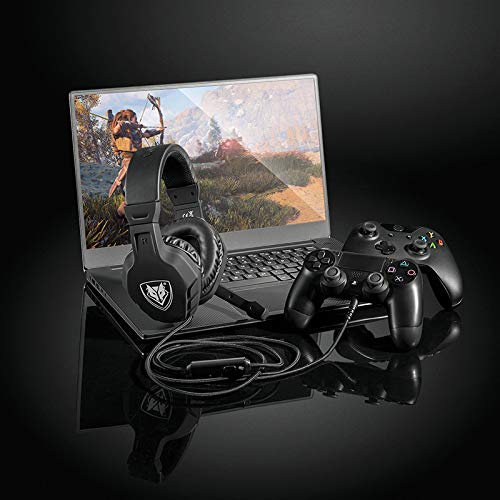
Image: The NUBWO U3 headset connected to a laptop and a game controller, illustrating multi-device compatibility.
2.2 Connecting to Xbox One (Older Versions):
For older versions of the Xbox One controller that do not have a 3.5mm audio jack, an additional Microsoft Adapter (not included) is required. Connect the headset to the adapter, then connect the adapter to the Xbox One controller.
3. آپريٽنگ هدايتون
Utilize the in-line controls and adjustable microphone for optimal performance.
3.1 حجم ڪنٽرول:
The headset features an in-line volume control wheel. Rotate the wheel up to increase volume and down to decrease volume.
3.2 مائڪروفون خاموش:
A mute switch is located on the in-line control unit. Slide the switch to mute or unmute the microphone as needed during gameplay or communication.
3.3 Microphone Positioning:
The microphone boom is flexible. Adjust its position to ensure it is close to your mouth for clear voice pickup, while avoiding direct airflow to minimize breath sounds.

Image: A young person wearing the NUBWO U3 headset, highlighting its lightweight and comfortable design during use.
4. سار سنڀال
Proper care will extend the lifespan and maintain the performance of your headset.
- صفائي: ڪنن جي ڪپن ۽ هيڊ بينڊ کي صاف ڪرڻ لاءِ نرم، سڪل ڪپڙو استعمال ڪريو. ضدي مٽيءَ لاءِ، ٿورو ڊيamp ڪپڙو استعمال ڪري سگهجي ٿو، پر پڪ ڪريو ته ڪو به نمي اسپيڪر گرلز يا مائڪروفون ۾ داخل نه ٿئي.
- اسٽوريج: Store the headset in a clean, dry place away from extreme temperatures and direct sunlight. Avoid wrapping the cable tightly around the headset to prevent damage.
- ڪيبل جي سنڀال: Handle the cable gently. Avoid pulling on the cable to disconnect it from devices; always grasp the plug.
5. مسئلا حل ڪرڻ
If you encounter issues with your NUBWO U3 headset, refer to the following common solutions.
| مسئلو | ممڪن سبب | حل |
|---|---|---|
| هيڊ سيٽ مان ڪو به آواز نه آيو |
|
|
| مائڪرو فون ڪم نه ڪري رهيو آهي |
|
|
| آواز جو معيار خراب يا خراب آهي |
|
|
6. وضاحتون
Technical details for the NUBWO U3 Gaming Headset.
- ماڊل نالو: U3
- رابطي ٽيڪنالاجي: وائرڊ (3.5 ايم ايم جڪ)
- آڊيو ڊرائيور سائيز: 50mm
- تعدد جي حد: 20 هرٽز - 20 ڪلو هرٽز
- حساسيت: 95 ڊي بي
- مائڪروفون: Noise-canceling, flexible boom
- ڪنٽرول قسم: In-line Volume Control, Mute Button
- مواد: Plastic, Skin-friendly leather ear pads
- شيء جو وزن: تقريبن 0.38 ڪلوگرام (13.4 آونس)
- مطابقت رکندڙ ڊوائيسز: PlayStation 4, PlayStation 5, New Xbox One, PC, Nintendo 3DS, Nintendo Switch, Laptop, PSP, Tablet, iPad, Computer, Mobile Phone, Wii U. (Note: Older Xbox One controllers may require a Microsoft Adapter, not included).

تصوير: هڪ اندروني view of the headset's 50mm audio driver, illustrating the components responsible for sound output, alongside indicators for safe volume levels.
7. وارنٽي ۽ سپورٽ
For warranty information or technical support, please refer to the documentation included with your product or contact NUBWO customer service through their official webسائيٽ. وارنٽي جي دعوي لاء توهان جي خريداري جي رسيد رکو.


