1. تعارف
The Samson AirLine 99m AH9 Headset Wireless System is a compact and versatile wireless microphone solution designed for active performers, presenters, and educators. This system provides high-definition audio transmission without the need for cables or belt packs, offering freedom of movement and ease of use. It operates on a frequency-agile UHF band, ensuring reliable performance across 100 selectable channels.
The system comprises three main components:
- AH9 Micro Transmitter: A lightweight, rechargeable transmitter integrated into the headset.
- AR99m Micro Receiver: A compact receiver with multiple output options for versatile connectivity.
- DE10x Headset Microphone: هڪ گھٽ پروfile, comfortable headset microphone designed for clear vocal reproduction.
2. سسٽم جا حصا ختمview

شڪل 2.1: The complete Samson AirLine 99m AH9 Headset Wireless System, showing the AR99m receiver, AH9 micro transmitter, and DE10x headset microphone.

شڪل 2.2: بند ڪرڻ view of the AH9 micro transmitter integrated with the DE10x headset microphone. The green light indicates power status.

شڪل 2.3: مٿو view of the AR99m micro receiver, showing the volume knob, SET button, channel display, and status indicators (READY, IR, PEAK).
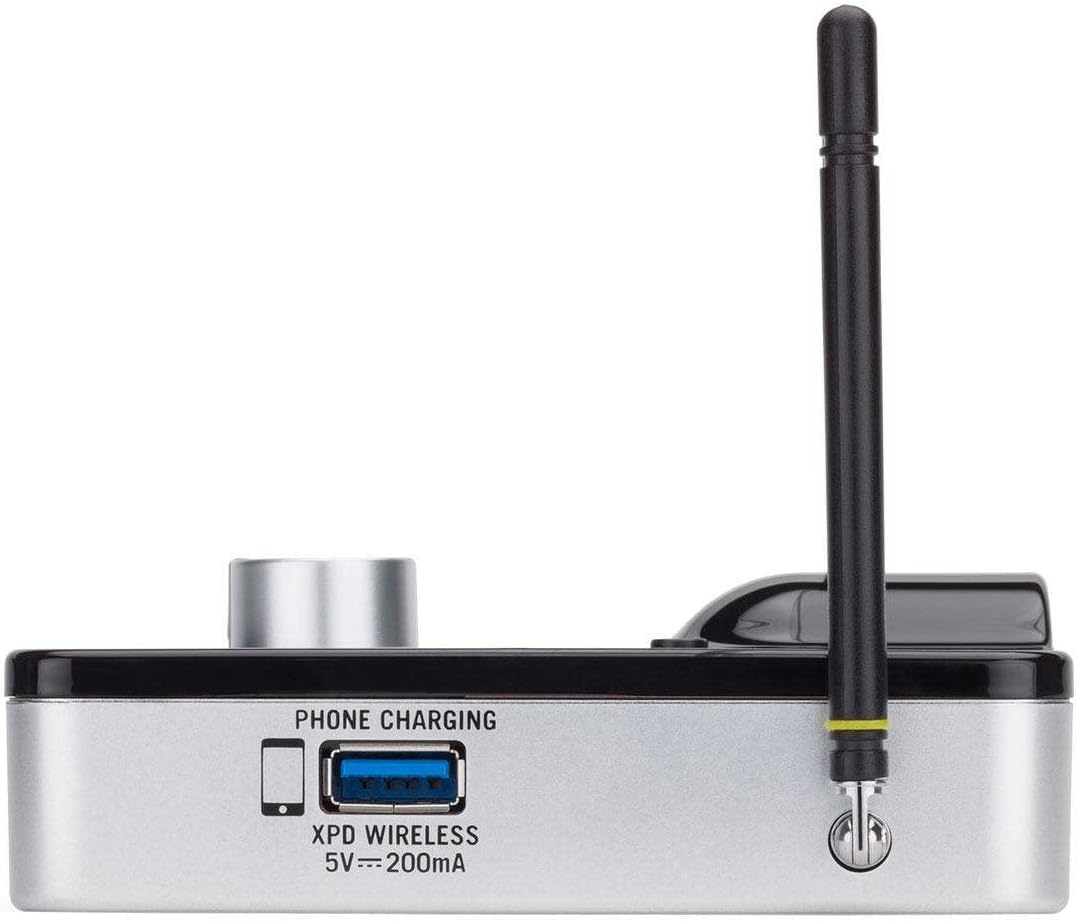
شڪل 2.4: پاسي view of the AR99m micro receiver, highlighting the 'PHONE CHARGING' USB port (5V --- 200mA) and antenna connection.

شڪل 2.5: زاويه view of the AR99m micro receiver, showing the DC IN port, 1/8" unbalanced output, and XLR balanced output.

شڪل 2.6: ريڙهه view of the AH9 micro transmitter, showing the charging contacts and the integrated headset cable connection.

شڪل 2.7: ريڙهه view of the AR99m micro receiver, detailing the DC IN (15V === 600mA), 1/4" unbalanced output, and XLR balanced output ports.

شڪل 2.8: The DE10x headset microphone, showing its lightweight design and adjustable ear hooks.
3. سيٽ اپ جون هدايتون
3.1. Charging the AH9 Micro Transmitter
- Connect the supplied USB charging cable to the AH9 micro transmitter.
- USB ڪيبل جي ٻئي ڇيڙي کي معياري USB پاور اڊاپٽر (شامل نه آهي) يا طاقتور USB پورٽ ۾ لڳايو.
- The LED indicator on the AH9 will show charging status. A full charge provides up to 8 hours of operation.
3.2. Connecting the AR99m Micro Receiver
- Connect the included power adapter to the DC IN port (15V === 600mA) on the AR99m receiver.
- پاور اڊاپٽر کي AC آئوٽليٽ ۾ لڳايو.
- Connect the AR99m receiver to your audio mixer, PA system, or recording device using one of the following outputs:
- متوازن XLR آئوٽ: For professional audio equipment.
- Unbalanced 1/4" Output: For standard instrument inputs or line-level inputs.
- Unbalanced 1/8" Output: For consumer-grade audio devices or computer inputs.
- Extend the antennas on the AR99m receiver for optimal signal reception.
3.3. Wearing the DE10x Headset Microphone
- Carefully place the headset over your ears, ensuring a comfortable and secure fit.
- Position the microphone element approximately 1-2 inches from the corner of your mouth for best sound quality.
- Use the included windscreens to reduce plosives and wind noise, if necessary.
4. آپريٽنگ هدايتون
4.1. پاور آن/آف
- AH9 Micro Transmitter: Press and hold the power button on the transmitter until the LED illuminates. Press and hold again to power off.
- AR99m Micro Receiver: Turn the VOLUME knob clockwise to power on. Turn counter-clockwise until it clicks to power off.
4.2. چينل جي چونڊ ۽ جوڙو
The AirLine 99m system features 100 operating channels across a 24MHz bandwidth.
- Turn on the AR99m receiver. The channel display will show the current channel.
- کي دٻايو سيٽ button on the AR99m receiver to cycle through available channels. Select a clear channel with no interference.
- Once a channel is selected on the receiver, turn on the AH9 transmitter.
- The AH9 transmitter will automatically scan and pair with the receiver on the selected channel. The 'READY' indicator on the receiver will illuminate when a successful connection is established.
4.3. حجم کي ترتيب ڏيڻ
استعمال ڪريو حجم knob on the AR99m receiver to adjust the output level of the wireless system. Start with a low volume and gradually increase it to avoid sudden loud audio.
4.4. Monitoring Signal Status
- READY Indicator: Illuminates when the transmitter and receiver are successfully paired and receiving a signal.
- PEAK Indicator: Illuminates when the audio input from the transmitter is too high, indicating potential clipping. Reduce the input gain on your mixer or adjust the microphone position if this occurs.
- IR اشارو: Used during initial setup for infrared pairing (if applicable, though this model typically auto-pairs).
5. سار سنڀال
- صفائي: Use a soft, dry cloth to clean the surfaces of the transmitter and receiver. Avoid using abrasive cleaners or solvents.
- بيٽري جي سنڀال: Recharge the AH9 transmitter regularly. For long-term storage, ensure the battery is partially charged (around 50%) to prolong its lifespan.
- اسٽوريج: سسٽم کي سڌي سج جي روشني ۽ انتهائي گرمي پد کان پري ٿڌي، سڪل جاءِ تي ذخيرو ڪريو.
- ونڊ اسڪرين: Replace windscreens on the DE10x headset microphone as needed to maintain hygiene and acoustic performance.
6. مسئلا حل ڪرڻ
| مسئلو | ممڪن سبب | حل |
|---|---|---|
| رسيور مان ڪو به آواز نه آيو |
|
|
| مداخلت يا ڊراپ آئوٽ |
|
|
| خراب ٿيل آڊيو |
|
|
| مختصر بيٽري جي زندگي |
|
|
7. وضاحتون
| خاصيت | تفصيل |
|---|---|
| ماڊل نمبر | SW9A9SDE10-K |
| آپريٽنگ چينلز | 100 (across 24MHz bandwidth) |
| آپريٽنگ رينج | 300 فوٽن تائين (نظر جي قطار) |
| AH9 Transmitter Battery Life | Up to 8 hours (Lithium-Ion, rechargeable) |
| AR99m Receiver Outputs | Balanced XLR, Unbalanced 1/4", Unbalanced 1/8" |
| مائڪروفون جو قسم | DE10x Headset Microphone |
| شامل لوازمات | 4 Windscreens, USB charging cable, Power adapter |
| شيءِ جو وزن | 1 پائونڊ |
| پيداوار جي ماپ | 3 x 3 x 3 انچ |
| مواد جو قسم | پلاسٽڪ |
| طاقت جو ذريعو | بيٽري سان هلندڙ |
| مطابقت رکندڙ ڊوائيسز | Mixers, Audio Interfaces, PA Systems, Computers, Recording Devices |
8. وارنٽي ۽ سپورٽ
وارنٽي جي معلومات ۽ ٽيڪنيڪل سپورٽ لاءِ، مھرباني ڪري سرڪاري سامسن ٽيڪنالاجيز جو حوالو ڏيو. webسائيٽ تي وڃو يا سڌو سنئون انهن جي ڪسٽمر سروس سان رابطو ڪريو. ڪنهن به وارنٽي دعوائن لاءِ خريداري جي ثبوت طور پنهنجي خريداري جي رسيد رکو.
آن لائين وسيلا: جو دورو ڪريو Samson Brand Store on Amazon اضافي پراڊڪٽ جي معلومات ۽ مدد لاءِ.