1. تعارف
هي دستور العمل ڪيبا ڪي ٽاپ T50-xxx/67641/06 صنعتي ڪنٽرول پينل جي محفوظ ۽ ڪارآمد آپريشن، سيٽ اپ، سار سنڀال ۽ مسئلن جي حل لاءِ ضروري معلومات فراهم ڪري ٿو. ڪي ٽاپ T50-xxx/67641/06 صنعتي ماحول ۾ مضبوط ڪارڪردگي لاءِ ٺاهيو ويو آهي، مختلف ڪنٽرول ايپليڪيشنن لاءِ انساني-مشين انٽرفيس (HMI) طور ڪم ڪري ٿو.
مھرباني ڪري ڊوائيس کي هلائڻ کان اڳ ھن دستوري کي چڱي طرح پڙھو ته جيئن صحيح استعمال کي يقيني بڻائي سگھجي ۽ نقصان يا زخم کان بچي سگھجي.
2. حفاظت جي ڄاڻ
ذاتي زخم يا سامان کي نقصان کان بچڻ لاءِ هميشه هيٺ ڏنل حفاظتي احتياطن تي عمل ڪريو:
- قابل عملو: تنصيب، آپريشن، ۽ سار سنڀال صرف قابل ۽ بااختيار اهلڪارن پاران ڪئي وڃي.
- پاور ڪنيڪشن: ڪنهن به انسٽاليشن، سار سنڀال، يا مرمت جي ڪم کي انجام ڏيڻ کان اڳ هميشه بجلي بند ڪريو.
- ماحولياتي حالتون: ڊوائيس کي مخصوص ماحولياتي حدن (درجه حرارت، نمي، وغيره) اندر هلايو.
- ايمرجنسي اسٽاپ: ڊوائيس ۽ ڳنڍيل سسٽم تي ايمرجنسي اسٽاپ بٽڻ جي جڳھ ۽ آپريشن سان پاڻ کي واقف ڪريو.
- ڪيبل جو انتظام: پڪ ڪريو ته سڀئي ڪيبل صحيح طرح سان روٽ ٿيل ۽ محفوظ آهن ته جيئن ٽرپنگ جي خطرن يا نقصان کي روڪي سگهجي.
3. پراڊڪٽ ختمview
ڪيبا ڪي ٽاپ T50-xxx/67641/06 هڪ مضبوط هٿ ۾ رکيل ڪنٽرول پينل آهي جيڪو صنعتي ايپليڪيشنن لاءِ ٺهيل آهي. ان ۾ هڪ ڊسپلي اسڪرين، مختلف ڪنٽرول بٽڻ، ۽ هڪ ايمرجنسي اسٽاپ بٽڻ شامل آهن، جيڪي سڀ هڪ ايرگونومڪ هائوسنگ ۾ ضم ٿيل آهن.

شڪل 1: سامهون view ڪي ٽاپ T50-xxx/67641/06 ڪنٽرول پينل جو، ڊسپلي، ڪنٽرول بٽڻ، ۽ ڳنڍيل ڳاڙهي ڪنيڪشن ڪيبل ڏيکاريندي.
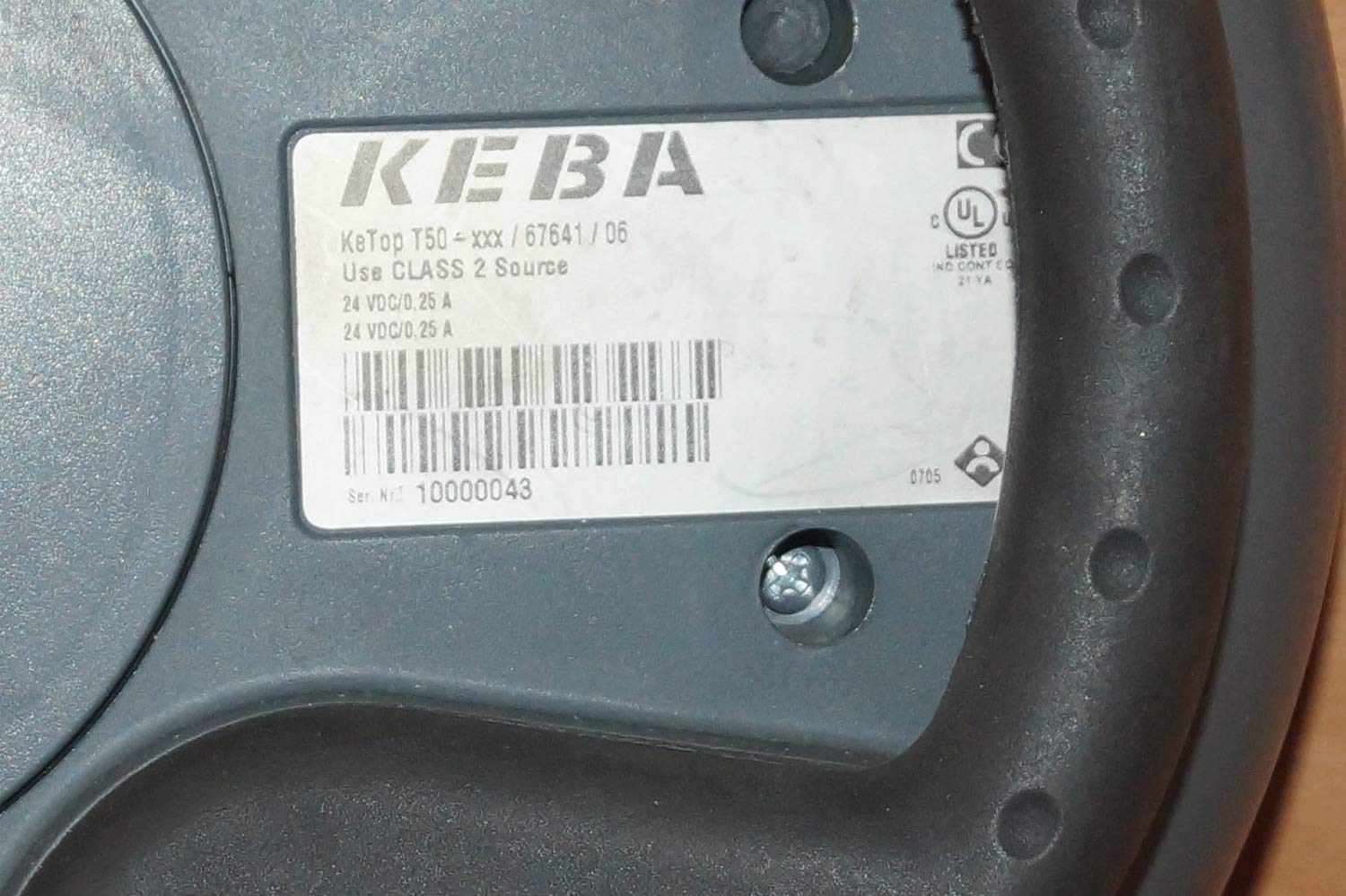
شڪل 2: ڪي ٽاپ T50-xxx/67641/06 جو پوئين ليبل، ماڊل جي تفصيل ۽ بجلي جي گهرجن کي ظاهر ڪري ٿو.
4. سيٽ اپ ۽ تنصيب
KeTop T50-xxx/67641/06 کي ڳنڍڻ کان اڳ، پڪ ڪريو ته هوسٽ سسٽم بند ۽ محفوظ آهي.
- ڊوائيس جو جائزو وٺو: ڪنٽرول پينل کي کوليو ۽ ٽرانزٽ دوران ڪنهن به نظر ايندڙ نقصان لاءِ ان جو معائنو ڪريو.
- ڪيبل ڳنڍيو: KeTop T50-xxx/67641/06 کان ڳاڙهي ملٽي پن ڪيبل کي پنهنجي صنعتي ڪنٽرول سسٽم تي لاڳاپيل پورٽ سان ڳنڍيو. پڪ ڪريو ته ڪنيڪشن محفوظ ۽ صحيح طرح سان رکيل آهي.
- بجلي جي فراهمي: تصديق ڪريو ته ڪنٽرول سسٽم لاءِ پاور سپلائي KeTop T50-xxx/67641/06 (24 VDC/0.25 A) پاران گهربل وضاحتن کي پورو ڪري ٿي.
- چڙهڻ (اختياري): جيڪڏهن لاڳو ٿئي ته، پينل کي آسان جڳهه تي محفوظ ڪرڻ لاءِ مربوط ماؤنٽنگ پوائنٽس استعمال ڪريو، يا پڪ ڪريو ته اهو هٿ ۾ نه هجڻ تي مستحڪم مٿاڇري تي رکيل آهي.
- شروعاتي پاور اپ: هڪ دفعو سڀئي ڪنيڪشن محفوظ ٿي وڃن، هوسٽ سسٽم تي پاور. KeTop T50-xxx/67641/06 ڊسپلي روشن ٿيڻ گهرجي، جيڪو ڪامياب پاور اپ جي نشاندهي ڪري ٿو.
5. آپريٽنگ هدايتون
ڪي ٽاپ T50-xxx/67641/06 صنعتي مشينري کي ڪنٽرول ڪرڻ لاءِ هڪ انٽرفيس طور ڪم ڪري ٿو. مخصوص آپريشن ڳنڍيل سسٽم جي پروگرامنگ تي منحصر هوندا.
- ڏيکاريو نيويگيشن: مينيو ذريعي نيويگيٽ ڪرڻ ۽ معلومات ڏيکارڻ لاءِ هدايتي بٽڻ (جيڪڏهن موجود هجي) يا ٽچ اسڪرين (جيڪڏهن لاڳو هجي) استعمال ڪريو.
- فنڪشن بٽڻ: ڊسپلي جي چوڌاري مختلف بٽڻ عام طور تي سسٽم انٽيگريٽر پاران مخصوص ڪم تفويض ڪيا ويندا آهن. بٽڻ جي اسائنمنٽس لاءِ پنهنجي سسٽم جي دستاويزن جو حوالو ڏيو.
- ايمرجنسي اسٽاپ: ڪنهن به ايمرجنسي جي صورت ۾، فوري طور تي وڏي ڳاڙهي ايمرجنسي اسٽاپ بٽڻ کي دٻايو. اهو عام طور تي سڀني ڳنڍيل مشين جي آپريشن کي روڪي ڇڏيندو. آپريشن ٻيهر شروع ڪرڻ کان اڳ پڪ ڪريو ته بٽڻ ري سيٽ ٿيل آهي.
- ڊيٽا ان پٽ: ايپليڪيشن جي ضرورت مطابق ڊيٽا انٽري لاءِ مربوط ڪي پيڊ يا آن اسڪرين ڪي بورڊ استعمال ڪريو.
- راءِ: ڊسپلي تي بصري اشارن ۽ ڊوائيس يا ڳنڍيل سسٽم مان ڪنهن به ٻڌڻ لائق سگنلن تي ڌيان ڏيو.
6. سار سنڀال
باقاعده سار سنڀال توهان جي KeTop T50-xxx/67641/06 جي ڊگهي عمر ۽ قابل اعتماد آپريشن کي يقيني بڻائي ٿي.
- صفائي:
- صاف ڪرڻ کان اڳ بجلي بند ڪريو.
- ٻاھرين سطحن کي نرم سان صاف ڪريو، ڊيamp ڪپڙو.
- گھڙڻ وارا صاف ڪندڙ، محلول، يا وڌيڪ نمي استعمال نه ڪريو.
- پڪ ڪريو ته ڪو به مائع ڊوائيس ۾ داخل نه ٿئي.
- ڪيبل جي چڪاس: وقتي طور تي ڪنيڪشن ڪيبل جو معائنو ڪريو ته جيئن خراب ٿيڻ، ڪٽجڻ يا نقصان جي نشانين لاءِ. خراب ٿيل ڪيبل فوري طور تي تبديل ڪريو.
- بٽڻ جي ڪارڪردگي: ايمرجنسي اسٽاپ سميت سڀني بٽڻن کي باقاعدي طور تي جانچيو ته جيئن اهي صحيح جواب ڏين.
- اسٽوريج: جڏهن استعمال ۾ نه هجي، ته ڊوائيس کي صاف، سڪل ماحول ۾ رکو، انتهائي گرمي پد ۽ سڌي سج جي روشني کان پري.
7. مسئلا حل ڪرڻ
هي حصو عام مسئلن جا حل فراهم ڪري ٿو. وڌيڪ پيچيده مسئلن لاءِ، قابل سروس اهلڪارن سان رابطو ڪريو.
| مسئلو | ممڪن سبب | حل |
|---|---|---|
| ڊوائيس تي طاقت نه آهي. | هوسٽ سسٽم مان بجلي نه ملي رهي آهي؛ ڪيبل ڪنيڪشن ڍلو آهي؛ بجلي جي فراهمي ناقص آهي. | هوسٽ سسٽم پاور چيڪ ڪريو؛ پڪ ڪريو ته ڪيبل محفوظ طور تي ڳنڍيل آهي؛ پاور سپلائي آئوٽ پُٽ جي تصديق ڪريو. |
| ڊسپلي خالي آهي يا ٽمٽار آهي. | ڪافي بجلي نه هجڻ؛ ڪيبل جو مسئلو؛ اندروني خرابي. | بجلي جي فراهمي جي تصديق ڪريو؛ ڪيبل جي سالميت چيڪ ڪريو؛ جيڪڏهن مسئلو برقرار رهي، ته سپورٽ سان رابطو ڪريو. |
| بٽڻ غير جوابي آهن. | هوسٽ سسٽم تي سافٽ ويئر جو مسئلو؛ جسماني بٽڻ کي نقصان. | هوسٽ سسٽم کي ٻيهر شروع ڪريو؛ جسماني نقصان لاءِ بٽڻن جو معائنو ڪريو. |
| ايمرجنسي اسٽاپ بٽڻ ڦاسي پيو آهي. | بٽڻ جي ميڪانيزم جو مسئلو. | زبردستي نه ڪريو. فوري طور تي قابل سروس اهلڪارن سان رابطو ڪريو. |
8. وضاحتون
| خاصيت | تفصيل |
|---|---|
| ماڊل | ڪي ٽاپ ٽي 50-xxx/67641/06 |
| برانڊ | ڪيبا |
| پاور ان پٽ | 24 وي ڊي سي / 0.25 اي (ڊوائيس ليبل جي مطابق) |
| ASIN | B07NSF65HM |
| ٺاهيندڙ ريفرنس | 2186 |
| پهرين دستياب تاريخ | مئي 10، 2019 |
| اسپيئر پارٽس جي دستيابي | معلومات دستياب ناهي |
9. وارنٽي ۽ سپورٽ
ڪيبا ڪي ٽاپ T50-xxx/67641/06 لاءِ مخصوص وارنٽي شرطن ۽ ضابطن بابت معلومات پراڊڪٽ جي تفصيلن ۾ مهيا نه ڪئي وئي آهي. مھرباني ڪري اصل خريداري دستاويزن جو حوالو ڏيو يا وارنٽي جي تفصيلن لاءِ پنھنجي سپلائر سان رابطو ڪريو.
ٽيڪنيڪل سپورٽ يا سروس جي پڇا ڳاڇا لاءِ، مھرباني ڪري ٺاھيندڙ، ڪيبا، يا پنھنجي مجاز ورهائيندڙ سان رابطو ڪريو. سپورٽ سان رابطو ڪرڻ وقت پڪ ڪريو ته توھان وٽ ماڊل نمبر (ڪيٽاپ T50-xxx/67641/06) ۽ سيريل نمبر (جيڪڏهن قابل اطلاق هجي) تيار آھي.


