تعارف
The Official Luna Wireless Controller is designed to provide an optimal gaming experience with Amazon's cloud gaming service, Luna, and offers versatile connectivity options for a wide range of devices. This manual provides detailed instructions for setup, operation, and maintenance to ensure you get the most out of your controller.
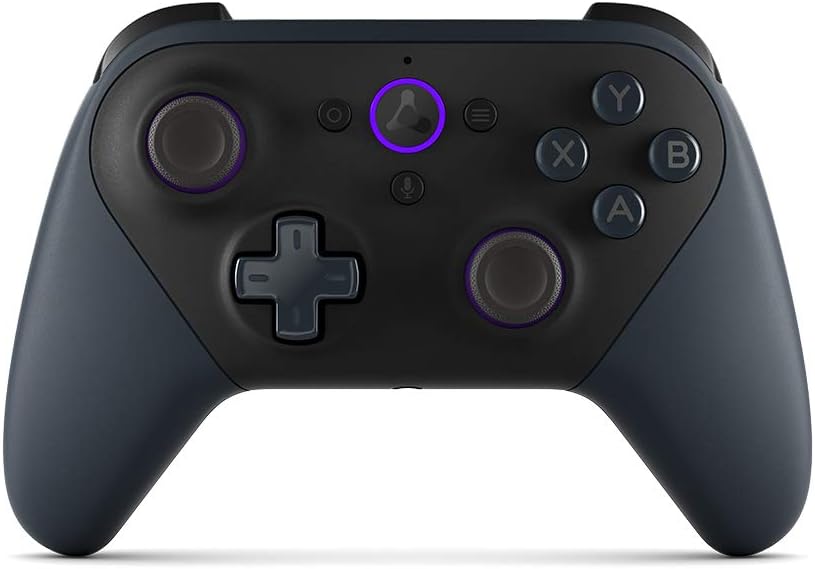
تصوير: سامهون view of the Luna Wireless Controller, showcasing its ergonomic design and button layout. The controller is black with purple accents on the thumbsticks and the Luna button.
اهم خاصيتون
- Cloud Direct Technology: Connects directly to Amazon’s custom game servers via Wi-Fi for low-latency gameplay on Luna.
- ملٽي ڊوائيس مطابقت: Works across Windows, Mac, Fire TV, Fire tablet, iPhone, iPad, Chromebook, and Android devices.
- Seamless Screen Switching: Pause your game on one screen and resume on another when playing on Luna.
- گھڻن ڪنيڪشن جا اختيار: Supports Wi-Fi, Bluetooth, and USB connections.
- Ergonomic ڊيزائن: Features offset thumbsticks, easy-access bumpers, precise triggers, and responsive action buttons for comfortable and accurate control.
- Integrated Alexa: Press the microphone button to ask Alexa to launch games and more on Fire TV.

Image: The Luna Controller with graphical icons illustrating its core features: low-latency gameplay, Wi-Fi connectivity, Bluetooth connectivity, USB connectivity, and seamless screen switching support.
سيٽ اپ ڪريو
1. Unboxing and Battery Installation
Your Luna Wireless Controller comes with 2 AA Amazon Basics batteries. To install:
- ڪنٽرولر جي پوئين پاسي بيٽري جي خاني کي ڳوليو.
- ڪمري جو ڍڪ کوليو.
- ٻه AA بيٽريون داخل ڪريو، صحيح پولارٽي (+/-) کي يقيني بڻائي.
- بيٽري جي ڪمري واري ڍڪ کي محفوظ طور تي بند ڪريو.
2. Setting Up with the Luna Controller App
The Luna Controller app is essential for connecting your controller to Wi-Fi for Cloud Direct gameplay. Download the app from:
- اينڊرائيڊ لاءِ ايميزون ايپ اسٽور
- Google Play Store
- iOS ايپ اسٽور
Follow the in-app instructions to connect your controller to your Wi-Fi network. This enables Cloud Direct functionality for optimal Luna gaming.
3. ڊوائيسز سان ڳنڍڻ
The Luna Controller offers multiple ways to connect to your devices:
- Cloud Direct (Wi-Fi): For the best Luna experience, connect your controller to Wi-Fi via the Luna Controller app. This reduces latency by connecting directly to Amazon's game servers.
- بلوٽوٿ: Use Bluetooth Low Energy 5.0 for gameplay on Windows PC, Mac, Fire Tablets, Chromebooks, Fire TV, Android devices, or select Samsung Smart TVs. For Windows PC support outside of Luna, a specific Windows driver may be required (downloadable from Amazon's support page).
- USB-سي: Connect directly to your Windows PC or Mac using a USB-C cable (sold separately) for wired gameplay.
ڪنٽرولر کي هلائڻ
Controller Layout and Inputs
The Luna Controller features a standard gaming controller layout for intuitive use:
- ايڪشن بٽڻ: ايڪس، يو، اي، بي
- Triggers & Bumpers: LT (Left Trigger), LB (Left Bumper), RT (Right Trigger), RB (Right Bumper)
- ٿمب اسٽڪ: Two offset thumbsticks (left and right) for precise movement and camera control.
- هدايتي پيڊ (ڊي-پيڊ): 4-way directional pad (up, down, left, right).
- System Buttons: Home, Action, Menu, Microphone.

تصوير: هڪ ويجهو تصوير view of the Luna Controller's top-right side, highlighting the precise and responsive triggers (RT) and bumpers (RB) designed for gaming.
Haptic موٽ
The controller includes vibration motors that provide tactile feedback during gameplay, enhancing immersion and responsiveness to in-game actions.
LED ڊسپلي
An LED indicator on the controller displays its connectivity status, low battery warnings, and software update notifications.
Alexa انضمام
Press the dedicated microphone button on the controller to activate Alexa. You can use voice commands to launch games and perform other actions on compatible Fire TV devices.
آڊيو آئوٽ
A 3.5 mm stereo audio output jack is available for connecting a headset, allowing for private audio and communication during gameplay.

تصوير: هڪ پاسي view of the Luna Controller, emphasizing its textured grip and contoured shape, designed for comfort during extended gaming sessions.
سار سنڀال
To ensure the longevity and optimal performance of your Luna Wireless Controller, follow these maintenance guidelines:
- صفائي: ڪنٽرولر کي صاف ڪرڻ لاءِ نرم، سڪل ڪپڙو استعمال ڪريو. ضدي مٽيءَ لاءِ، ٿورو ڊيampڪپڙو پاڻي سان ڍڪيو. سخت ڪيميڪل يا رگڙيندڙ صاف ڪندڙ استعمال ڪرڻ کان پاسو ڪريو.
- اسٽوريج: ڪنٽرولر کي سڌي سج جي روشني ۽ انتهائي گرمي پد کان پري ٿڌي، سڪل جاءِ تي ذخيرو ڪريو.
- بيٽري جي سنڀال: If the controller will not be used for an extended period, remove the batteries to prevent leakage and potential damage.
- قطرن کان پاسو ڪريو: While durable, repeated drops can damage internal components. Handle the controller with care.
مشڪلاتون
If you encounter issues with your Luna Wireless Controller, try the following solutions:
- ڪنٽرولر جواب نه ڏنو:
- بيٽري جي سطح چيڪ ڪريو ۽ تبديل ڪريو جيڪڏھن ضروري ھجي.
- پڪ ڪريو ته ڪنٽرولر آن آهي.
- Try re-pairing the controller via Wi-Fi (Luna app) or Bluetooth.
- Connect via USB-C cable to check if it functions in wired mode.
- High Latency/Lag:
- For Luna gameplay, ensure your controller is connected via Cloud Direct (Wi-Fi) and your Wi-Fi network is stable and strong.
- Reduce interference by moving closer to your Wi-Fi router or reducing other network activity.
- If using Bluetooth, ensure your device's Bluetooth is enabled and there are no other interfering Bluetooth devices nearby.
- بلوٽوٿ ڪنيڪشن جا مسئلا:
- Ensure your device's Bluetooth is on and discoverable.
- Forget the controller from your device's Bluetooth settings and attempt to pair again.
- Update Bluetooth drivers on your PC if applicable.
- Buttons/Thumbsticks Not Working:
- Ensure no debris is lodged around the buttons or thumbsticks.
- Restart the controller and the device it's connected to.
For further assistance, refer to the official Amazon Luna support resources.
وضاحتون
| خاصيت | تفصيل |
|---|---|
| رنگ | ڪارو |
| وائي فائي ڪنيڪشن | Cloud Direct gameplay supports dual-band 802.11 a/b/g/n (2.4 and 5 GHz) networks |
| بلوٽوت ڪنيڪشن | Supports Bluetooth Low Energy 5.0 for gameplay on Windows PC, Mac, Fire Tablets, Chromebooks, Fire TV, Android device, or select Samsung Smart TV |
| USB-C پورٽ | For wired gameplay on Windows PC and Mac (cable sold separately) |
| ماپ | 156.4 x 107.6 x 58.5 ملي ميٽر |
| وزن | 235.5 g (without batteries), 281.5 g (with batteries) |
| داخلائون | 12 buttons (home, action, menu, microphone, X, Y, A, B, LT, LB, RT, RB), 1 direction pad, 2 offset thumbsticks |
| هيپٽڪ | Vibration motors for tactile feedback |
| ڏيکاريو | LED for connectivity status, low battery, software updates |
| آڊيو | 3.5 mm stereo audio output for headset |
| اسپيڪر | ڪو به |
| Alexa | Press and ask Alexa to launch games and more on Fire TV |
| مطابقت | Works on compatible Windows PC, Mac, Fire TV, Fire Tablet, iPhone, iPad, Android Phones, and select Samsung Smart TVs via Cloud Direct. Does not work with gaming consoles. |
| ان باڪس لوازمات | 2 AA Amazon Basics batteries, setup guide |
وارنٽي ۽ سپورٽ
Your Luna Wireless Controller comes with a 1 سال محدود وارنٽي ۽ سهولت. Optional 1-year, 2-year, and 3-year extended warranties are available for U.S. customers, sold separately. Use of the Amazon Luna Controller is subject to these terms.
For detailed warranty information, technical support, or to purchase extended warranty options, please visit the official Amazon Luna support webسائيٽ يا Amazon ڪسٽمر سروس سان رابطو ڪريو.


