1. تعارف
Thank you for choosing the Tacklife PES01A Circular Saw. This powerful and versatile tool is designed for efficient and precise cutting of various materials, including wood and plastic. Featuring a robust 1500W motor, laser guide, and adjustable cutting capabilities, it is an ideal tool for both professional and DIY projects. Please read this manual thoroughly before operation to ensure safe and effective use of your new circular saw.

Figure 1.1: Tacklife PES01A Circular Saw overview.
2. عام حفاظت جون هدايتون
Always follow basic safety precautions when using electrical tools to reduce the risk of fire, electric shock, and personal injury. Keep this manual for future reference.
2.1. ڪم واري علائقي جي حفاظت
- ڪم واري علائقي کي صاف ۽ روشن رکو. گندا يا اونداهي علائقا حادثن کي دعوت ڏين ٿا.
- ڌماڪيدار ماحول ۾ بجلي جا اوزار نه هلايو، جهڙوڪ ٻرندڙ مائع، گيس، يا مٽي جي موجودگي ۾. بجلي جا اوزار چمڪ پيدا ڪن ٿا جيڪي مٽي يا ڌنڌ کي روشن ڪري سگھن ٿا.
- پاور اوزار هلائڻ دوران ٻارن ۽ ويهندڙن کي پري رکو. پريشانيون توهان کي ڪنٽرول وڃائي سگهن ٿيون.
2.2. برقي حفاظت
- پاور ٽول پلگ ان آئوٽليٽ سان ملن ٿا. ڪنهن به طريقي سان پلگ ان کي تبديل نه ڪريو.
- زمين يا زمين جي سطحن سان جسماني رابطي کان پاسو ڪريو، جهڙوڪ پائپ، ريڊيٽرز، رينج، ۽ ريفريجريٽر. جيڪڏهن توهان جو جسم مٽي يا گرائونڊ آهي ته برقي جھٽڪو جو خطرو وڌي ويو آهي.
- مينهن يا گندي حالتن ۾ پاور اوزار کي ظاهر نه ڪريو. بجليءَ جي اوزار ۾ داخل ٿيندڙ پاڻي برقي جھٽڪو جو خطرو وڌائيندو.
- ڪنڊ کي غلط استعمال نه ڪريو. پاور ٽول کي کڻڻ، ڇڪڻ، يا ان پلگ ڪرڻ لاءِ ڪڏهن به ڪنڊ استعمال نه ڪريو. تار کي گرمي، تيل، تيز ڪنڊن، يا هلندڙ حصن کان پري رکو.
2.3. ذاتي حفاظت
- هميشه اکين جي حفاظت ڪريو. حفاظتي چشمو يا چشمو استعمال ڪريو.
- اوزار کي گهڻي وقت تائين هلائڻ وقت ٻڌڻ جي حفاظت پائڻ.
- مناسب لباس. ٿلها ڪپڙا يا زيور نه پائڻ. پنھنجا وار ۽ ڪپڙا ھلندڙ حصن کان پري رکو.
- هوشيار رهو، ڏسو ته توهان ڇا ڪري رهيا آهيو، ۽ عام فهم استعمال ڪريو جڏهن پاور اوزار هلائي رهيا آهيو.
- Use safety clamps or a vise to secure the workpiece. This is safer than using your hand and it frees both hands to operate the tool.
2.4. Circular Saw Specific Safety
- هٿن کي ڪٽڻ واري علائقي ۽ بليڊ کان پري رکو. توهان جو ٻيو هٿ معاون هينڊل، يا موٽر هائوسنگ تي رکو. جيڪڏهن ٻئي هٿ آري کي پڪڙي رهيا آهن، انهن کي بليڊ سان ڪٽي نه ٿو سگهجي.
- workpiece جي هيٺان پهچي نه ڪريو. گارڊ توهان کي ڪمپيس جي هيٺان بليڊ کان بچائي نٿو سگهي.
- ڪٽڻ جي کوٽائي کي workpiece جي ٿلهي کي ترتيب ڏيو. بليڊ جي مڪمل ڏند کان به گھٽ ڪم پيس جي ھيٺان ڏسڻ گھرجي.
- ڪٽڻ دوران ڪڏهن به پنهنجي هٿن ۾ يا پنهنجي ٽنگ جي وچ ۾ ورڪ پيس نه رکو. هڪ مستحڪم پليٽ فارم تي workpiece محفوظ.
- پاور ٽول کي موصلي ٿيل گرفت واري سطحن ذريعي رکو جڏهن آپريشن ڪيو وڃي جتي ڪٽڻ وارو سامان لڪيل وائرنگ يا ان جي پنهنجي ڪنڊ سان رابطو ڪري سگهي ٿو.
- Always ensure the lower guard is closed before placing the saw down.
3. جزا ۽ خاصيتون
Familiarize yourself with the parts of your Tacklife PES01A Circular Saw before operation.

Figure 3.1: Key components of the circular saw.
- 1. طاقتور موٽر: Ensures good heat dissipation.
- 2. Laser Switch: Activates the laser guide.
- 3. 3M Power Cord & Cable Tie: Convenient for storage and use.
- 4. ٻٽي حفاظتي سوئچ: Requires pressing both buttons to start, preventing accidental injury.
- 5. رٻڙ وارو هٿ: For comfortable and secure grip.
- 6. Support Handle: Provides additional control.
- 7. Aluminum Alloy Cover: Durable housing.
- 8. Iron Base Plate: Sturdy base for cutting.
- 9. Iron Blade Guard: Protects the blade.
شامل لوازمات:

Figure 3.2: Standard accessories included with the saw.
- 1 x Tacklife PES01A Circular Saw
- 1 x 185mm 24-Tooth TCT Blade (for wood/plastic)
- 1 x 185mm 40-Tooth TCT Blade (for wood/plastic)
- 1 x Hex Wrench (for blade changes)
- 1 x Parallel Guide Ruler
- 1 x Dust Port Adapter (35mm diameter)
- 1 x استعمال ڪندڙ دستياب
- 1 x وارنٽي ڪارڊ
4. سيٽ اپ ۽ اسيمبلي
4.1. Blade Installation/Removal
- ڪنهن به بليڊ ۾ تبديلي جي ڪوشش ڪرڻ کان اڳ پڪ ڪريو ته آري پاور سورس کان ان پلگ ٿيل آهي.
- اسپنڊل لاڪ بٽڻ کي دٻايو ۽ رکو.
- Using the hex wrench, loosen the blade bolt by turning it counter-clockwise.
- هيٺيون بليڊ گارڊ مٿي ڪريو ۽ احتياط سان پراڻي بليڊ کي هٽايو.
- Place the new blade onto the spindle, ensuring the teeth are pointing in the direction of the arrow on the saw's guard.
- Replace the blade bolt and tighten it securely with the hex wrench while holding the spindle lock button.
- Release the spindle lock and check that the blade rotates freely and the guard moves smoothly.
4.2. Attaching the Parallel Guide Ruler
The parallel guide ruler helps achieve straight cuts parallel to the edge of the workpiece.
- Slide the guide ruler into the slot on the front of the saw's base plate.
- Adjust the ruler to the desired cutting width.
- Tighten the locking screw to secure the ruler in place.
4.3. مٽي ڪڍڻ کي ڳنڍڻ
For a cleaner work environment, connect a vacuum cleaner to the dust port.
- Attach the 35mm dust port adapter to the dust outlet on the saw.
- Connect your vacuum cleaner hose to the adapter.
5. آپريٽنگ هدايتون
5.1. ڪٽڻ جي کوٽائي کي ترتيب ڏيڻ
The cutting depth can be adjusted to match the thickness of your material. The maximum cutting depth at 90° is 65mm (2.5 inches).

Figure 5.1: Adjusting cutting depth for straight and bevel cuts.
- Loosen the depth adjustment lever located at the rear of the saw.
- Raise or lower the base plate to the desired cutting depth. Ensure only a small portion of the blade teeth extends below the workpiece.
- Tighten the depth adjustment lever firmly.
5.2. Adjusting Bevel Angle (Miter Cut)
The saw can make bevel cuts up to 45°. The maximum cutting depth at 45° is 45mm (1.8 inches).
- Loosen the bevel adjustment knob/lever at the front of the saw.
- Tilt the base plate to the desired angle (0° to 45°).
- Tighten the bevel adjustment knob/lever securely.
5.3. ليزر گائيڊ استعمال ڪندي
The integrated laser guide provides a visual line for precise cutting.

Figure 5.2: The laser guide assists in making straight cuts.
- Locate the laser switch on the saw.
- Flip the switch to turn the laser on. A red laser line will project onto your workpiece, indicating the cutting path.
- Align the laser line with your marked cut line on the material.
- Turn off the laser when not in use to conserve battery (if applicable) or prevent accidental activation.
5.4. ڪٽ ڪرڻ
هميشه پڪ ڪريو ته ورڪ پيس محفوظ طور تي ڪل آهيampڪٽڻ کان اڳ ايڊ.

Figure 5.3: Cutting a wooden board with the circular saw.

Figure 5.4: Cutting a plastic sheet with the circular saw.
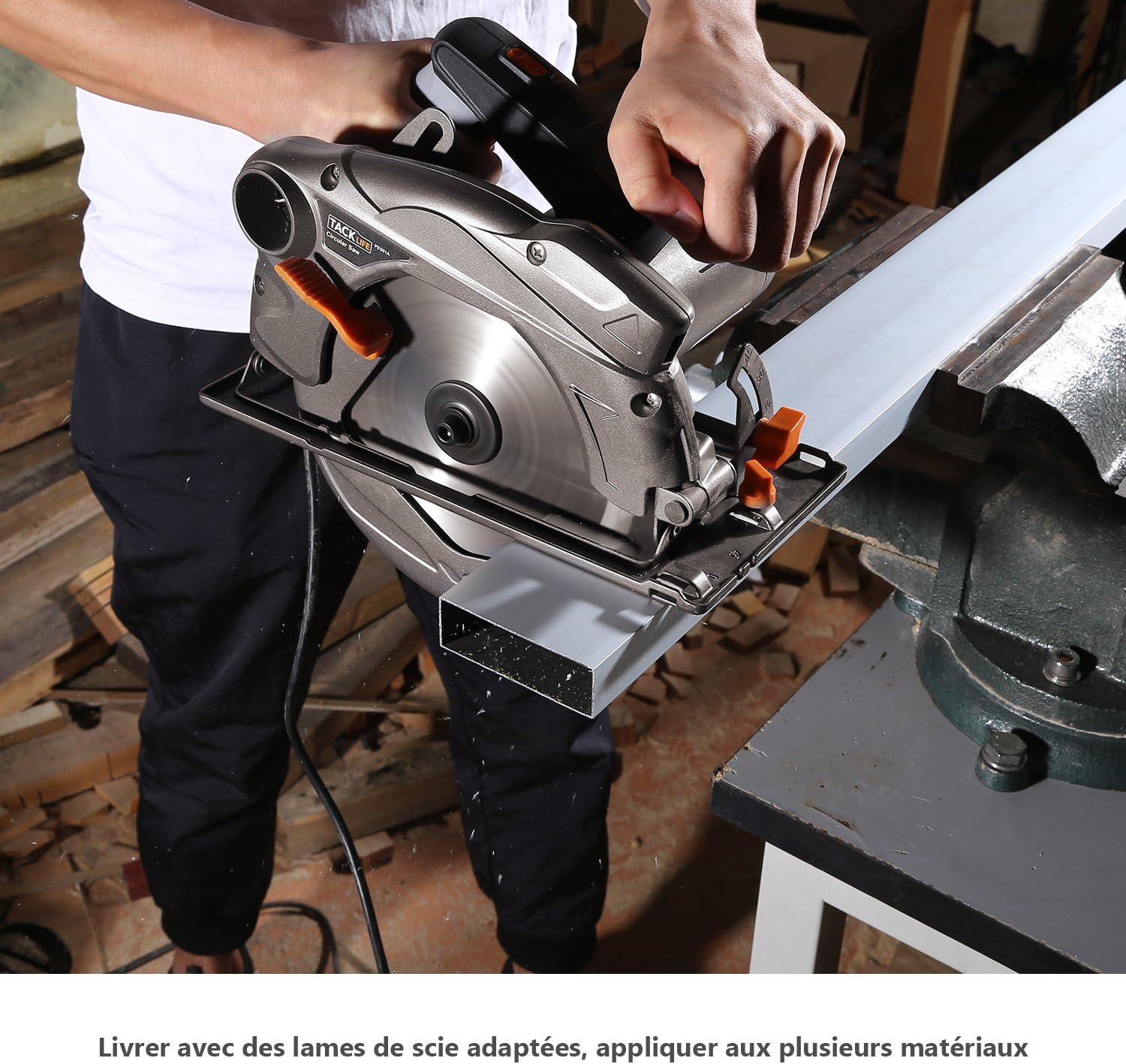
Figure 5.5: Cutting a metal profile with the circular saw (ensure appropriate blade is used).
- آري کي مناسب پاور آئوٽليٽ ۾ لڳايو.
- Hold the saw firmly with both hands, ensuring a stable grip on the main and auxiliary handles.
- To start the saw, press the double safety switch (requires pressing both buttons simultaneously for safety).
- ڪٽڻ شروع ڪرڻ کان پهريان بليڊ کي مڪمل رفتار تائين پهچڻ جي اجازت ڏيو.
- Guide the saw smoothly and steadily along your marked line. Do not force the saw; let the blade do the work.
- Maintain a consistent feed rate.
- هڪ دفعو ڪٽ مڪمل ٿي وڃي، ٽرگر کي ڇڏي ڏيو ۽ بليڊ کي مڪمل طور تي بند ٿيڻ ڏيو ان کان اڳ جو آري کي ورڪ پيس مان ڪڍيو وڃي.
- Unplug the saw after use.
6. سار سنڀال
باقاعده سار سنڀال توهان جي سرڪيولر آري جي ڊگهي عمر ۽ محفوظ آپريشن کي يقيني بڻائي ٿي.
6.1. صفائي
- صاف ڪرڻ کان اڳ هميشه آري کي ان پلگ ڪريو.
- Use a soft brush or compressed air to remove dust and debris from the motor vents and blade guard.
- Wipe down the exterior of the saw with a damp ڪپڙو. استعمال نه ڪريو سخت ڪيميائي يا گھڻائي صاف ڪندڙ.
- Keep the base plate clean to ensure smooth gliding over the workpiece.
6.2. بليڊ جي سنڀال
- Inspect blades regularly for dullness, cracks, or missing teeth. Replace damaged blades immediately.
- Clean resin and pitch buildup from blades using a suitable blade cleaner.
- نقصان ۽ زنگ کان بچڻ لاءِ بليڊن کي صحيح طرح سان ذخيرو ڪريو.
6.3. اسٽوريج
- آري کي ٻارن جي پهچ کان ٻاهر سڪل ۽ محفوظ جاءِ تي رکو.
- اسٽوريج دوران بجلي جي تار کي نقصان کان بچايو.
7. مسئلا حل ڪرڻ
هي حصو عام مسئلن کي حل ڪري ٿو جيڪي توهان کي پنهنجي سرڪلر آري سان منهن ڏيڻا پوندا.
| مسئلو | ممڪن سبب | حل |
|---|---|---|
| سارو شروع نٿو ٿئي. | No power supply; Safety switch not engaged; Faulty power cord. | Check power outlet and circuit breaker; Ensure both safety switch buttons are pressed; Inspect power cord for damage. |
| Blade not cutting smoothly or burning wood. | Dull or dirty blade; Incorrect blade for material; Overfeeding the saw. | Replace or clean blade; Use appropriate blade for the material; Reduce feed rate. |
| وڌ ۾ وڌ وائبريشن. | Loose blade; Damaged blade; Worn bearings. | Tighten blade bolt; Replace blade; Contact customer support if bearings are suspected. |
| Laser guide not working. | Laser switch off; Laser lens dirty; Laser module faulty. | Turn on laser switch; Clean laser lens; Contact customer support. |
| Dust collection is poor. | Dust port clogged; Vacuum not powerful enough; Hose not properly connected. | Clear dust port; Use a more powerful vacuum; Ensure hose is securely attached. |
8. ٽيڪنيڪل وضاحتون
| خاصيت | تفصيل |
|---|---|
| ماڊل | PES01A |
| پاور ان پٽ | 1500 ڊبليو |
| جلدtage | 230 وولٽ |
| نه- لوڊ رفتار | 4700 RPM |
| بليڊ قطر | 185 ملي ايم (7-1/4 انچ) |
| وڌ ۾ وڌ ڪٽڻ جي کوٽائي (90°) | 65 ملي ميٽر (2.5 انچ) |
| وڌ ۾ وڌ ڪٽڻ جي کوٽائي (45°) | 45 ملي ميٽر (1.8 انچ) |
| بيول ظرفيت | 0° - 45° |
| وزن | 4.9 ڪلوگرام (10.8 پائونڊ) |
| ليزر ھدايت | ها |
| ڊسٽ پورٽ قطر | 35 ملي ميٽر |
9. وارنٽي ۽ سپورٽ
Tacklife products are manufactured to high-quality standards and are warranted against defects in materials and workmanship. Please refer to the included warranty card for specific terms and conditions, including the warranty period and registration process.
شڪل 9.1: مثالample of included warranty card.
ڪسٽمر سپورٽ:
For technical assistance, troubleshooting, or warranty claims, please contact Tacklife customer support. Contact information can typically be found on the warranty card or the official Tacklife webسائيٽ.
- Webسائيٽ: www.tacklife.com (مهرباني ڪري سرڪاري چيڪ ڪريو web(تازه ترين رابطي جي معلومات لاءِ سائيٽ.)
- اي ميل: Refer to your warranty card or product packaging.
When contacting support, please have your product model (PES01A) and purchase date ready.


