1. تعارف
Thank you for choosing the Hoco E30 Wireless Earphone. This manual provides essential information for setting up, operating, and maintaining your earphone. Please read it carefully before use to ensure optimal performance and longevity of your device.
2. حفاظت جي ڄاڻ
To prevent damage to your device or injury to yourself and others, please observe the following safety precautions:
- ٻڌڻ جي نقصان کي روڪڻ لاء اعلي حجم جي سطح تي ڊگهي نمائش کان بچاء.
- Do not use the earphone while driving or in situations where you need to be aware of your surroundings.
- ڊوائيس کي پاڻي، نمي، ۽ انتهائي گرمي کان پري رکو.
- Do not attempt to disassemble, repair, or modify the earphone. This will void the warranty.
- صرف مهيا ڪيل يا تصديق ٿيل چارجنگ ڪيبل ۽ اڊاپٽر استعمال ڪريو.
- ٻارن ۽ پالتو جانورن جي پهچ کان پري رکو.
3. پيڪيج مواد
مھرباني ڪري ھيٺ ڏنل شين لاءِ دٻي کي چيڪ ڪريو:
- Hoco E30 Wireless Earphone
- USB چارجنگ ڪيبل
- استعمال ڪندڙ دستي
4. پراڊڪٽ ختمview
Familiarize yourself with the components of your Hoco E30 Wireless Earphone:

شڪل 4.1: پاسي view of the Hoco E30 Wireless Earphone, highlighting its sleek design and ear hook.

شڪل 4.2: The Hoco E30 Wireless Earphone positioned next to a smartphone, illustrating its compact size and wireless connectivity.
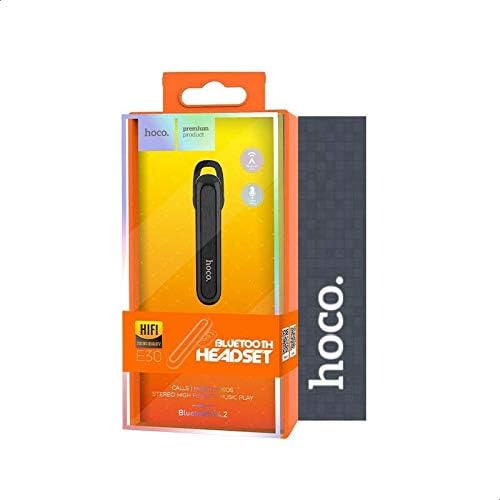
شڪل 4.3: The retail packaging for the Hoco E30 Wireless Earphone, displaying branding and key features.
5. سيٽ اپ
5.1 Charging the Earphone
Before first use, fully charge your Hoco E30 earphone.
- Connect the provided USB charging cable to the charging port on the earphone.
- Connect the other end of the USB cable to a DC 5V power source (e.g., a USB wall adapter or computer USB port).
- چارجنگ انڊيڪيٽر لائيٽ روشن ٿيندي.
- Charging typically takes approximately 2 hours. The indicator light will change or turn off once charging is complete.
5.2 ڊوائيس سان جوڙڻ
To connect your Hoco E30 earphone to your smartphone or other Bluetooth-enabled device:
- Ensure the earphone is fully charged and turned off.
- Press and hold the multi-function button on the earphone until the indicator light flashes red and blue alternately, indicating it is in pairing mode.
- توهان جي ڊوائيس تي، بلوٽوت کي فعال ڪريو ۽ دستياب ڊوائيسز جي ڳولا ڪريو.
- Select "Hoco E30" from the list of found devices.
- Once paired, the indicator light on the earphone will flash blue slowly, and you will hear a confirmation tone.
- The earphone has a transmission range of up to 10 meters (33 feet).
6. آپريٽنگ هدايتون
6.1 پاور آن/آف
- پاور آن: Press and hold the multi-function button for approximately 3 seconds until the blue indicator light flashes and you hear a power-on tone.
- بجلي بند: Press and hold the multi-function button for approximately 5 seconds until the red indicator light flashes and you hear a power-off tone.
6.2 ڪال مئنيجمينٽ
- جواب ڏيو ڪال: Briefly press the multi-function button when an incoming call rings.
- ڪال ختم ڪريو: Briefly press the multi-function button during a call.
- ڪال رد ڪريو: Press and hold the multi-function button for 2 seconds when an incoming call rings.
- ريڊل آخري نمبر: Double-press the multi-function button when not on a call.
6.3 ميوزڪ پلے بیک
- راند/روڪ: Briefly press the multi-function button to play or pause music.
- اڳيون ٽريڪ: Press and hold the multi-function button for 2 seconds to skip to the next track.
- پويون ٽريڪ: Press and hold the multi-function button for 2 seconds (during playback) to go to the previous track.
Note: The Hoco E30 supports A2DP and AVRCP protocols for high-quality audio streaming and remote control. Volume control is typically managed via the connected device.
6.4 Battery Status Display
The Hoco E30 earphone supports battery level display on compatible Apple iOS devices and some Android smartphones. Check your device's notification bar or Bluetooth settings for this feature.
7. سار سنڀال
- صفائي: Use a soft, dry cloth to clean the earphone. Do not use harsh chemicals or abrasive materials.
- اسٽوريج: Store the earphone in a cool, dry place away from direct sunlight and extreme temperatures.
- بيٽري جي سنڀال: To prolong battery life, avoid fully discharging the earphone frequently. Charge it regularly, even if not in use for extended periods.
8. مسئلا حل ڪرڻ
If you encounter issues with your Hoco E30 earphone, try the following solutions:
| مسئلو | حل |
|---|---|
| Earphone does not power on. | Ensure the earphone is fully charged. Connect it to a power source and try again. |
| ڊوائيس سان جوڙو نه ٿو ٺاهي سگهجي. |
|
| ڪابه آواز يا خراب آواز جي معيار ناهي. |
|
| چارجنگ ڪم نه ڪري رهي آهي. |
|
9. وضاحتون
| خاصيت | تفصيل |
|---|---|
| ماڊل | E30 |
| بلوٽوت ورزن | V4.2 WT |
| سپورٽ پروٽوڪول | هيڊ سيٽ، هينڊ فري، A2DP، AVRCP |
| ٽرانسميشن جي حد | 10 ميٽر (33 فوٽ) |
| ٽرانسميشن فريڪئنسي | 2.4 GHz |
| وولٽ چارج ڪرڻtage | ڊي سي 5V |
| چارج ڪرڻ وقت | لڳ ڀڳ. 2 ڪلاڪ |
| بيٽري جي گنجائش | 60 mAh |
| ڳالهائڻ جو وقت | لڳ ڀڳ. 3.5 ڪلاڪ |
| ميوزڪ پلے بیک وقت | لڳ ڀڳ. 3.5 ڪلاڪ |
| اسٽينڊ بائي ٽائيم | لڳ ڀڳ. 110 ڪلاڪ |
| خالص پيداوار وزن | 6 گرام |
| طول و عرض (L x W x H) | 58mm x 14mm x 25mm |
| مواد | پلاسٽڪ |
| ڪنٽرول جو طريقو | ڇڪڻ |
| رنگ | ڪارو ۽ چاندي |
10. وارنٽي ۽ سپورٽ
Hoco products are designed and manufactured to the highest quality standards. This product is covered by a limited warranty from the date of purchase. Please refer to the warranty card included in your package for specific terms and conditions.
For technical support or warranty claims, please contact your local Hoco distributor or visit the official Hoco webو moreيڪ معلومات لاءِ سائيٽ.


