1. تعارف
This user manual provides detailed instructions for the safe and efficient operation of your Veidoo 10-inch Android Tablet PC. Please read this manual thoroughly before using the device and retain it for future reference. This tablet is designed for various uses, including communication, entertainment, and productivity.

This image shows the Veidoo 10-inch Android Tablet PC. The front of the tablet displays the home screen with the current time, date, and various application icons such as Camera, Gallery, Settings, and Music. The rear of the tablet, visible behind the front, is black with a subtle textured design and features the rear camera module.
2. حفاظت جي ڄاڻ
- ڊوائيس کي انتهائي گرمي پد، سڌي سج جي روشني، يا وڌيڪ نمي جي سامهون نه رکو.
- ڊوائيس کي مضبوط اثرن لاءِ ڇڏڻ يا تابع ڪرڻ کان پاسو ڪريو.
- صرف ٺاهيندڙ طرفان منظور ٿيل چارجر ۽ لوازمات استعمال ڪريو.
- پاڻ ڊوائيس کي ڌار ڪرڻ يا مرمت ڪرڻ جي ڪوشش نه ڪريو. قابل سروس اهلڪارن سان رجوع ڪريو.
- ڊوائيس ٻارن ۽ پالتو جانور کان پري رکو.
- مقامي ضابطن جي مطابق ڊوائيس ۽ ان جي بيٽري کي ذميواري سان ختم ڪريو.
3. پراڊڪٽ ختمview
3.1 جسماني خاصيتون
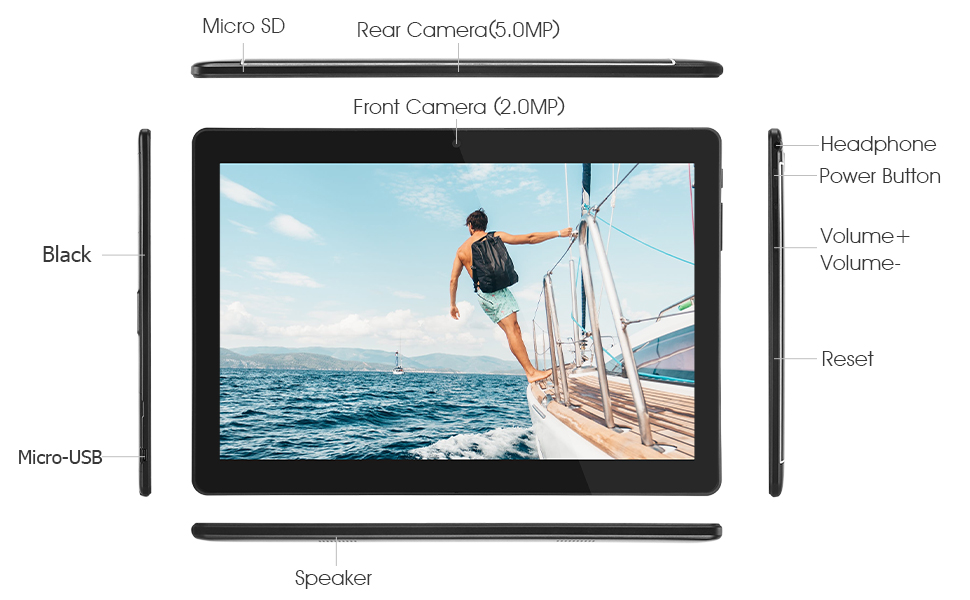
Familiarize yourself with the various ports and buttons on your Veidoo Tablet PC:

This diagram illustrates the various physical components and ports of the Veidoo 10-inch Android Tablet PC. It clearly labels the Micro SD card slot, the 5.0MP rear camera, the 2.0MP front camera, the headphone jack, the power button, the volume up and down buttons, the reset pinhole, the Micro-USB charging port, and the speaker.
- مائڪرو ايس ڊي سلاٽ: وڌائڻ واري اسٽوريج لاءِ.
- Rear Camera (5.0MP): تصويرون ۽ وڊيوز ڪڍڻ لاءِ.
- Front Camera (2.0MP): وڊيو ڪالن ۽ سيلفيز لاءِ.
- هيڊ فون جڪ 3.5mm هيڊ فون جوڙيو.
- پاور بٽڻ: پاور آن/آف ڪرڻ لاءِ دٻايو ۽ رکو، سمهڻ/جاڳڻ لاءِ مختصر دٻايو.
- حجم بٽڻ: آڊيو جي مقدار کي ترتيب ڏيو.
- پنهول ري سيٽ ڪريو: Use a thin object to reset the device if unresponsive.
- مائڪرو USB پورٽ: چارج ڪرڻ ۽ ڊيٽا جي منتقلي لاء.
- اسپيڪر: آڊيو آئوٽ.
3.2 پيڪيج مواد
پڪ ڪريو ته سڀئي شيون توهان جي پراڊڪٽ باڪس ۾ موجود آهن:

This image displays the items typically found inside the Veidoo 10-inch Android Tablet PC product box. It includes the tablet itself, a black protective case, a power adapter (wall charger), a USB charging and data cable, a service warranty card, and a leaflet containing frequently asked questions and support information.
- Veidoo 10-inch Android Tablet PC
- پاور اڊاپٽر
- USB ڪيبل
- Protective Case (optional, may vary by package)
- استعمال ڪندڙ جو دستياب (ھي دستاويز)
- سروس وارنٽي ڪارڊ
- FAQ Leaflet
4. سيٽ اپ
4.1 بيٽري کي چارج ڪرڻ
Before first use, fully charge the tablet. Connect the USB cable to the tablet's Micro-USB port and the other end to the power adapter. Plug the adapter into a wall outlet. The charging indicator will show the charging status. A full charge typically takes 3-4 hours.

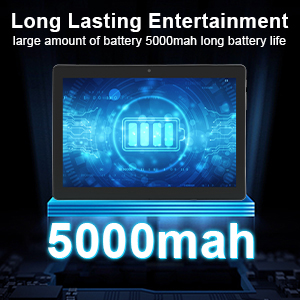
This image focuses on the Veidoo 10-inch Android Tablet PC's battery capacity, prominently displaying a battery icon and '5000mAh'. This signifies the tablet's 5000mAh battery, designed to provide extended usage time for entertainment and productivity.
4.2 پاور آن/آف
- پاور آن ڪرڻ: Press and hold the Power button until the Veidoo logo appears on the screen.
- پاور آف ڪرڻ: Press and hold the Power button until a menu appears. Select "Power off" and confirm.
- سمهڻ/ جاڳڻ: Briefly press the Power button to put the tablet to sleep or wake it up.
4.3 Inserting SIM and Micro SD Cards
The tablet supports dual SIM cards for 3G phone calls and a Micro SD card for expandable storage.
- Locate the SIM/SD card slot on the side of the tablet.
- Carefully open the slot cover.
- Insert the SIM card(s) and/or Micro SD card into the designated slots with the gold contacts facing down. Ensure they are correctly seated.
- سلاٽ ڪَوَر کي محفوظ طور تي بند ڪريو.
This image demonstrates the storage capabilities of the Veidoo 10-inch Android Tablet PC, showing multiple applications and content open. It highlights the device's 16GB internal storage (ROM) and its ability to expand storage up to 32GB via a Micro SD card, allowing for ampايپس، فوٽوز ۽ وڊيوز لاءِ جاءِ.
4.4 شروعاتي سيٽ اپ
پهرين پاور آن ٿيڻ تي، ٽيبليٽ توهان کي شروعاتي سيٽ اپ جي عمل ذريعي رهنمائي ڪندو:
- پنھنجي پسند جي ٻولي چونڊيو.
- وائي فائي نيٽ ورڪ سان ڳنڍيو.
- Sign in with your Google account or create a new one. This is necessary to download apps from the Google Play Store.
- اسڪرين لاڪ سيٽ اپ ڪريو (پن، پيٽرن، پاسورڊ).
- Review ۽ شرطن ۽ ضابطن کي قبول ڪريو.
5. ٽيبليٽ هلائڻ
5.1 بنيادي نيويگيشن
- ٽيپ ڪريو: ڪا شيءِ چونڊيو يا ڪا ايپ کوليو.
- ٽيپ ڪريو ۽ رکو: ڪنٽيڪٽ مينيو تائين رسائي ڪريو يا آئڪن کي منتقل ڪريو.
- سوائپ اسڪرينن يا فهرستن ذريعي اسڪرول ڪريو.
- زوم ڪرڻ لاءِ پنچ: تصويرن کي زوم ان يا آئوٽ ڪريو ۽ web صفحا.
5.2 Connectivity (Wi-Fi & Bluetooth)
- وائي فائي: ڏانهن وڃو سيٽنگون > نيٽ ورڪ ۽ انٽرنيٽ > وائي فائي. Turn Wi-Fi on, select your network, and enter the password.
- بلوٽوٿ: ڏانهن وڃو سيٽنگون > ڳنڍيل ڊوائيسز > بلوٽوٿ. Turn Bluetooth on, scan for devices, and pair with your desired accessory.
5.3 Making Phone Calls (3G)
With a valid SIM card inserted, you can make and receive 3G phone calls:

This image shows a group of four individuals participating in a video call using the Veidoo 10-inch Android Tablet PC. This illustrates the tablet's capability for video conferencing and its 3G phone call functionality, allowing users to connect with others remotely.
- کوليو فون ايپ.
- Dial the number using the keypad or select a contact.
- ڪال شروع ڪرڻ لاءِ ڪال بٽڻ تي ٽيپ ڪريو.
5.4 ڪئميرا استعمال ڪرڻ
The tablet is equipped with a front and rear camera for photos and videos.
- کوليو ڪئميرا ايپ.
- ڪئميرا آئڪن استعمال ڪندي اڳيان ۽ پوئين ڪئميرا جي وچ ۾ سوئچ ڪريو.
- فوٽو ڪڍڻ يا وڊيو رڪارڊنگ شروع/بند ڪرڻ لاءِ شٽر بٽڻ کي دٻايو.
5.5 Managing Storage
توهان ڪري سگهو ٿا view and manage your tablet's internal and external storage:
- ڏانهن وڃو سيٽنگون> اسٽوريج.
- Here you can see storage usage and free up space by deleting unnecessary fileيا ايپس کي انسٽال ڪرڻ.
5.6 Installing and Uninstalling Apps
This image features the Veidoo 10-inch Android Tablet PC showcasing its Android 10 operating system with a multitude of application icons. This highlights that the device is GMS (Google Mobile Services) certified, ensuring access to Google Play Store and other Google services.
- انسٽال ڪريو: کوليو Google Play Store ايپ، پنهنجي گهربل ايپ جي ڳولا ڪريو، ۽ ٽيپ ڪريو انسٽال ڪريو.
- انسٽال ڪريو: ڏانهن وڃو سيٽنگون > ايپس ۽ اطلاع > سڀ ايپس ڏسو. Select the app you wish to uninstall and tap انسٽال ڪريو.
6. سار سنڀال
- صفائي: اسڪرين ۽ باڊي کي صاف ڪرڻ لاءِ نرم، لِنٽ کان پاڪ ڪپڙو استعمال ڪريو. رگڙيندڙ ڪلينر يا محلولن کان پاسو ڪريو.
- سافٽ ويئر اپڊيٽ: باقاعدي طور تي سسٽم اپڊيٽس جي جانچ ڪريو سيٽنگون> سسٽم> سسٽم اپڊيٽ بهترين ڪارڪردگي ۽ سيڪيورٽي کي يقيني بڻائڻ لاءِ.
- بيٽري جي سنڀال: To prolong battery life, avoid fully discharging the battery frequently. Store the tablet in a cool, dry place when not in use for extended periods.
- ڊيٽا بيڪ اپ: Regularly back up important data to a cloud service or external storage device to prevent data loss.
7. مسئلا حل ڪرڻ
| مسئلو | ممڪن حل |
|---|---|
| ٽيبليٽ آن نٿو ٿئي | Ensure the battery is charged. Connect the charger and wait a few minutes before attempting to power on. If unresponsive, try pressing the reset pinhole. |
| اسڪرين غير جوابدار آهي | Restart the tablet by holding the Power button. If that doesn't work, use the reset pinhole. Ensure the screen is clean and dry. |
| وائي فائي سان ڳنڍجي نٿو سگھي | Check if Wi-Fi is enabled in settings. Ensure the Wi-Fi password is correct. Restart your router and the tablet. |
| ايپس ڪريش ٿي رهيون آهن يا منجمد ٿي رهيون آهن | Close and reopen the app. Clear the app's cache in سيٽنگون> ايپس ۽ اطلاع. Update the app or uninstall and reinstall it. Ensure sufficient storage space. |
| غريب بيٽري جي زندگي | Reduce screen brightness. Close unused apps running in the background. Turn off Wi-Fi, Bluetooth, and GPS when not in use. Limit background data usage. |
8. وضاحتون
Key technical specifications for the Veidoo 10-inch Android Tablet PC (Model T10):

This image provides a visual summary of the Veidoo Tablet PC's key specifications. It highlights features such as 1GB RAM, a 2MP front and 5MP rear camera setup, a 10.1-inch IPS HD display with 1280x800 resolution, 16GB of internal storage, Android 10 operating system, Wi-Fi connectivity, a Quad-Core CPU, and dual SIM card support.
| خاصيت | تفصيل |
|---|---|
| ماڊل نالو | Touch (T10) |
| اسٽينڊنگ اسڪرين ڊسپلي سائيز | 10.1 انچ |
| اسڪرين جي قرارداد | 800 x 1280 (IPS) |
| رام | 1 GB (DDR3 SDRAM) |
| هارڊ ڊرائيو / فليش ميموري سائيز | 16 GB (expandable up to 32GB via Micro SD) |
| وائرليس جو قسم | 802.11b, 802.11b/g (Wi-Fi), Bluetooth |
| سراسري بيٽري جي زندگي | 6 Hours (5000mAh Lithium Polymer) |
| هارڊويئر پليٽ فارم | Android |
| آپريٽنگ سسٽم | Android 6.0 Marshmallow (GMS Certified) |
| شيءِ جو وزن | 2.86 پائونڊ |
| پيداوار جي ماپ | 9.49 x 6.69 x 0.37 انچ |
| ريڙهه Webڪئميرا جي قرارداد | 5 ايم پي |
| سامهون Webڪئميرا جي قرارداد | 2 ايم پي |
| پروسيسرز جو تعداد | 4 (Quad-Core) |
| طاقت جو ذريعو | بيٽري تي هلندڙ، بجليءَ جو تار |
9. وارنٽي ۽ سپورٽ
Your Veidoo Tablet PC comes with a service warranty. Please refer to the included Service Warranty Card for specific terms and conditions, including warranty period and coverage details.
For technical support, troubleshooting assistance, or warranty claims, please contact Veidoo customer service. Contact information can typically be found on the warranty card or the official Veidoo website. When contacting support, please have your model number (T10) and purchase information ready.
You can also visit the official Veidoo store on Amazon for more information and support resources: Veidoo Store


