1. تعارف
The Autel MaxiDiag MD906 PRO is a professional diagnostic scan tool designed for comprehensive vehicle system analysis and maintenance. This device offers full system diagnostics, a variety of service functions, and supports advanced vehicle communication protocols. This manual provides detailed instructions for setting up, operating, and maintaining your MD906 PRO scanner.
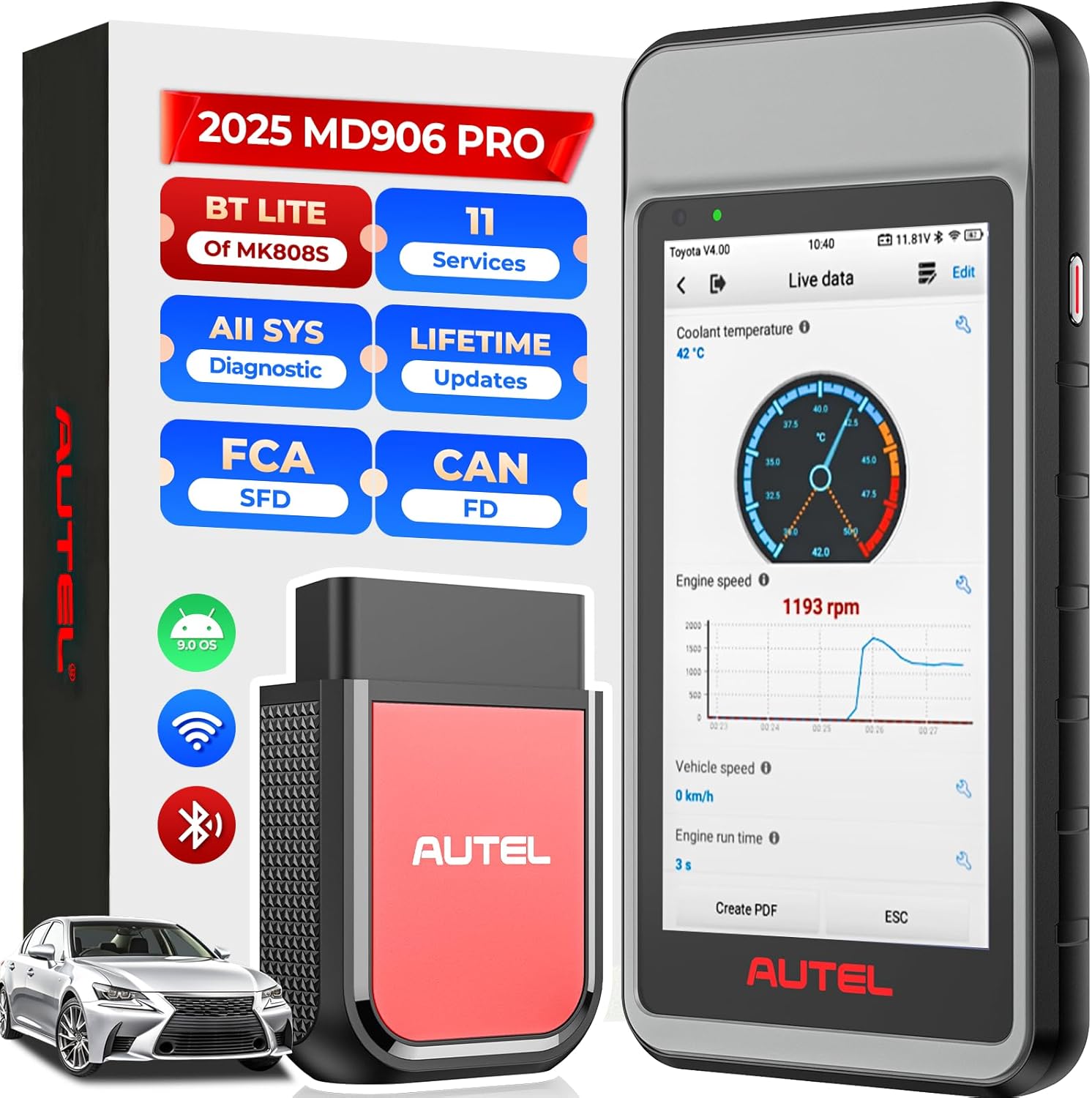
Figure 1: The Autel MaxiDiag MD906 PRO diagnostic tablet and its VCI (Vehicle Communication Interface) unit.
2. پيڪيج مواد
پڪ ڪريو ته هيٺ ڏنل سڀئي شيون توهان جي پيڪيج ۾ شامل آهن:
- Autel MaxiDiag MD906 PRO Diagnostic Tablet
- VCI150 Lite Bluetooth Vehicle Communication Interface
- مين ڪيبل
- USB ڪيبل
- پاور اڊاپٽر
- استعمال ڪندڙ دستي

Figure 2: Illustration of the items included in the MD906 PRO package.
3. پراڊڪٽ ختمview ۽ وضاحتون
The MD906 PRO is equipped with advanced hardware and software features to provide efficient and accurate vehicle diagnostics.
3.1 اهم خاصيتون
- Full System Diagnostics: Accesses all available vehicle systems.
- 11+ Service Functions: Performs common maintenance and reset procedures.
- Enhanced OBD2 Modes: Supports all 10 OBD2 test modes.
- CAN FD Protocol Support: Compatible with newer vehicle models.
- FCA AutoAuth & VW-SFD Access: Enables secure gateway access for specific brands.
- Wireless VCI: Bluetooth connectivity for flexible operation.
- Wi-Fi Printing & Cloud Report: Facilitates report management and sharing.
- Lifetime Free Updates: Ensures continuous access to the latest software and vehicle coverage.
3.2 هارڊويئر جون خاصيتون
- آپريٽنگ سسٽم: Android 9.0
- Processor: Advanced Quad-core Processor
- ياداشت: 2GB ريم ، 64 GB روم
- Display: 5.5-inch LCD touchscreen with 1280x720 resolution
- Battery: 5000mAh Lithium-Polymer battery
- Connectivity: Bluetooth VCI150 Lite, Wi-Fi (2.4G)

شڪل 3: ختمview of the MD906 PRO's hardware components and specifications.
4. سيٽ اپ
4.1 ڊوائيس چارج ڪرڻ
Before initial use, fully charge the MD906 PRO tablet using the provided power adapter. The 5000mAh battery provides extended operating time.
4.2 پاور آن/آف
- To Power On: Press and hold the Power button until the Autel logo appears.
- To Power Off: Press and hold the Power button, then select 'Power Off' from the options.
4.3 Initial Setup and VCI Connection
- Upon first startup, follow the on-screen prompts to select your preferred language and region.
- Connect the MD906 PRO to a Wi-Fi network for software updates and online features.
- Plug the VCI150 Lite unit into the vehicle's OBD2 port. The VCI will automatically establish a Bluetooth connection with the tablet. Ensure the VCI indicator light is solid blue, indicating a successful connection.
4.4 سافٽ ويئر اپڊيٽ
The MD906 PRO includes lifetime free software updates. Regularly check for updates to ensure optimal performance and the latest vehicle coverage. To update, navigate to the 'Update' application on the tablet's main menu and follow the instructions.
5. آپريٽنگ هدايتون
5.1 گاڏي سان ڳنڍڻ
Locate the vehicle's 16-pin OBD2 Data Link Connector (DLC), typically found under the dashboard on the driver's side. Plug the VCI150 Lite unit into the DLC. Ensure the vehicle's ignition is in the 'ON' position or the engine is running, as required by the diagnostic procedure.
5.2 مڪمل سسٽم تشخيص
The MD906 PRO can perform OE-level diagnostics on all available electronic systems, including Engine, ABS, SRS, Transmission, EPB, HVAC, and more.
- ڊي ٽي سي پڙهو/صاف ڪريو: Retrieve and erase Diagnostic Trouble Codes from all control modules.
- View لائيو ڊيٽا: Display real-time data streams from various sensors and components.
- فريم ڊيٽا منجمد ڪريو: View a snapshot of vehicle conditions at the time a fault code was set.
- ECU جي معلومات حاصل ڪريو: Access specific information about the Electronic Control Unit.
- آٽو اسڪين 2.0: Automatically identify the vehicle and scan all systems for faults, providing a quick overview of vehicle health.

Figure 4: The MD906 PRO interface displaying an all-system diagnostic scan, showing various vehicle modules.
5.3 خاص سروس جا ڪم
The MD906 PRO supports over 11 common maintenance and reset services. Note that the availability of specific functions may vary by vehicle make, model, and year.
- تيل ري سيٽ: Resets the oil life system after an oil change.
- اي پي بي ري سيٽ: Resets the Electronic Parking Brake system after brake pad replacement.
- SAS ري سيٽ: اسٽيئرنگ اينگل سينسر کي ڪيليبريٽ ڪري ٿو.
- بيٽري رجسٽريشن: گاڏي جي ECU سان نئين بيٽري رجسٽر ڪري ٿو.
- ٿروٽل ري لرن: ٿروٽل پوزيشن سينسر کي ترتيب ڏئي ٿو.
- ABS رت وهڻ: بريڪ بليڊنگ جي طريقيڪار کي انجام ڏئي ٿو.
- انجڪٽر ڪوڊنگ: ECU ۾ نوان انجيڪٽر نمبر ڪوڊ ڪري ٿو.
- TPMS ري سيٽ: Resets Tire Pressure Monitoring System sensors.
- اي ايف ايس هيڊلamp: Adapts the Adaptive Front Lighting System.
- A/F Adjustment: Adjusts air/fuel ratio parameters.
- ڊي پي ايف جي بحالي: ڊيزل پارٽيڪيوليٽ فلٽر جي بحالي شروع ڪري ٿو.

Figure 5: A visual representation of the various service functions available on the MD906 PRO.
5.4 OBD2 ٽيسٽ موڊس
The MD906 PRO supports all 10 modes of OBD2 tests for emissions-related diagnostics on most OBD2-compliant vehicles (1996 and newer).
- ڪوڊ پڙهو/صاف ڪريو
- لائيو ڊيٽا
- فريم ڊيٽا منجمد ڪريو
- آءِ/ايم تياري جي حالت
- O2 مانيٽر ٽيسٽ
- آن بورڊ مانيٽر ٽيسٽ
- جز جو امتحان
- گاڏين جي ڄاڻ
- ماڊلز موجود
- DTC ڳوليو
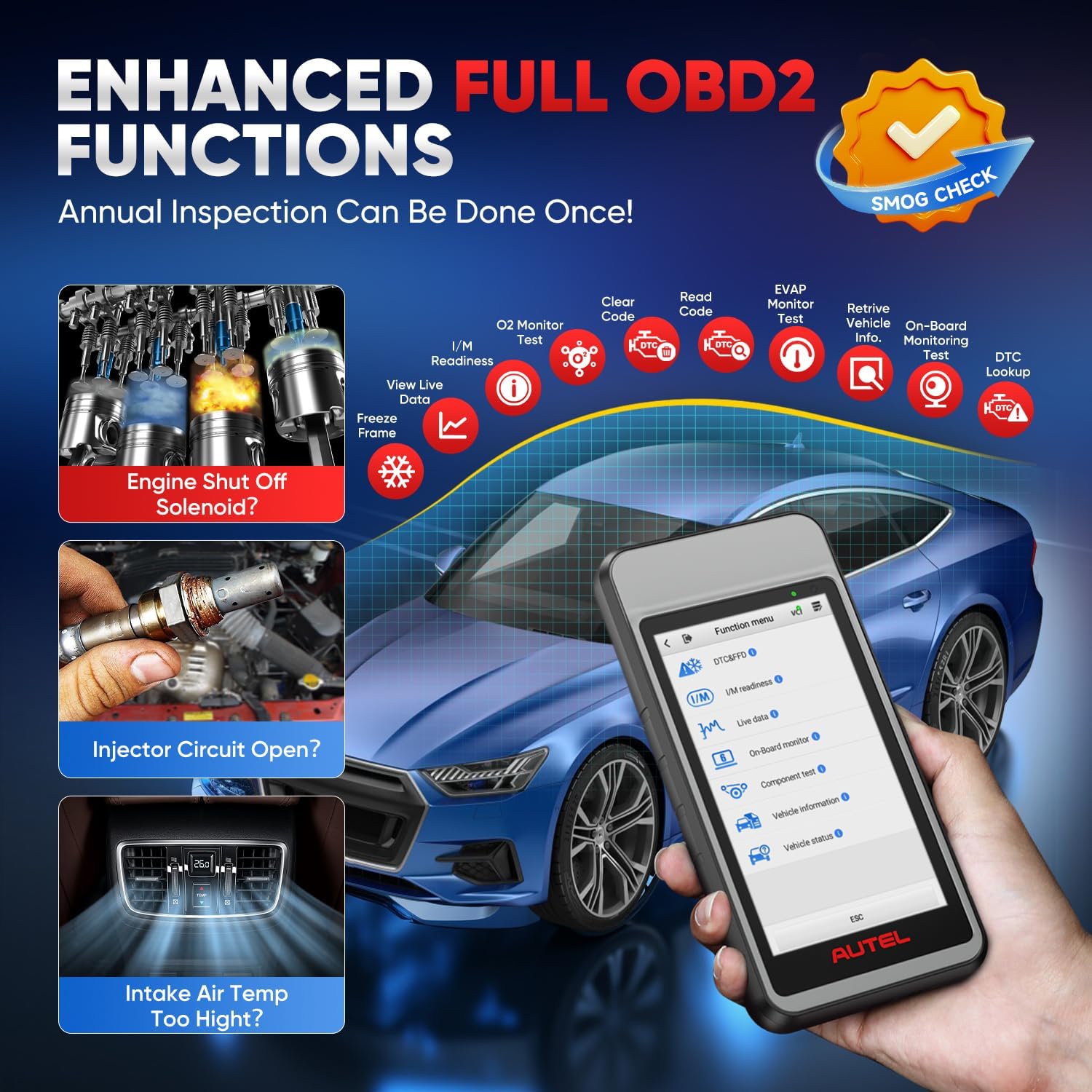
Figure 6: The MD906 PRO interface illustrating the various enhanced OBD2 functions available for vehicle inspection.
5.5 Live Data Display
The device offers multiple ways to view live data, aiding in the diagnosis of intermittent vehicle problems:
- ٽيڪسٽ موڊ: Displays parameters as a list.
- Waveform Graph Mode: Presents data in waveform graphs for visual analysis and comparison.
- Analog Gauge Mode: Shows parameters in gauge charts.

شڪل 7: مثالamples of live data display modes on the MD906 PRO, including text, graph, and analog gauge.
5.6 CAN FD and FCA AutoAuth Support
The MD906 PRO supports the latest CAN FD protocol, offering faster data transmission for newer vehicle models (e.g., 2020+ GM and 2021+ Chrysler vehicles). It also provides access to secure gateways for FCA (2018+ Chrysler/Dodge/Jeep/Alfa Romeo/Fiat) and VW-SFD (2020+ VAG models) vehicles. Access to these secure gateways typically requires an AutoAuth account.

Figure 8: Information on CAN FD protocol support and secure gateway access for FCA and VW-SFD vehicles.
5.7 Reporting and Printing
Diagnostic reports can be generated and managed directly from the device:
- وائي فائي پرنٽنگ: Print diagnostic reports directly to a Wi-Fi enabled printer.
- Upload Report to Cloud: Automatically synchronize diagnostic information to the cloud, allowing for easy access and sharing via SMS, QR codes, or email.

Figure 9: The MD906 PRO demonstrating its Wi-Fi printing capability for diagnostic reports.

Figure 10: The MD906 PRO's feature for uploading diagnostic reports to the cloud for storage and sharing.
6. سار سنڀال
6.1 سافٽ ويئر اپڊيٽ
Regularly update the software to ensure the scanner operates with the latest vehicle data and features. Connect the device to Wi-Fi and use the 'Update' application.
6.2 بيٽري جي سنڀال
To prolong battery life, avoid fully discharging the device frequently. Charge the device when the battery level is low. Store the device in a cool, dry place when not in use for extended periods.
6.3 صفائي
ڊوائيس کي نرم سان صاف ڪريو، ڊيamp ڪپڙو. رگڙيندڙ ڪلينر يا سالوينٽس استعمال ڪرڻ کان پاسو ڪريو جيڪي اسڪرين يا سي کي نقصان پهچائي سگهن ٿاasing.
7. مسئلا حل ڪرڻ
7.1 ڊي ٽي سي جي ڳولا
The MD906 PRO includes a built-in DTC library. When a Diagnostic Trouble Code is displayed, use the 'DTC Lookup' function to retrieve detailed definitions and potential causes, facilitating faster diagnosis.
7.2 عام مسئلا
- ڊوائيس تي طاقت نه آهي: پڪ ڪريو ته بيٽري چارج ٿيل آهي. پاور اڊاپٽر کي ڳنڍيو ۽ ٻيهر ڪوشش ڪريو.
- VCI ڳنڍي نه رهيو آهي: Verify the VCI is securely plugged into the vehicle's OBD2 port and the vehicle's ignition is on. Check Bluetooth settings on the tablet.
- رابطي جون غلطيون: Ensure the vehicle's ignition is on. Check for loose connections. Verify vehicle compatibility for the specific function being performed.
- Software freezing: Restart the device. Ensure the software is up to date.
8. وارنٽي ۽ سپورٽ
Autel provides comprehensive support for the MD906 PRO:
- لائف ٽائيم مفت اپڊيٽس: Enjoy continuous software updates without additional cost.
- 1 سال وارنٽي: The device is covered by a one-year warranty from the date of purchase.
- 30-Day Replacement/Return Policy: Refer to your purchase agreement for details on returns and replacements.
- گهڻ لساني حمايت: The MD906 PRO supports over 15 languages. To change the language, please contact Autel support with your device's serial number.
شڪل 11: ختمview of Autel's commitment to customer support, including updates and warranty.


