1. تعارف
This manual provides comprehensive instructions for the setup, operation, and maintenance of your Drawmer CMC2 Compact Monitor Controller. Please read this manual thoroughly before using the device to ensure proper functionality and to maximize its performance.
2. حفاظت جي ڄاڻ
- بجلي جي فراهمي: Use only the factory-supplied 15V DC power supply. Using an incorrect power supply may damage the unit and void the warranty.
- وينٽيليشن: يونٽ جي چوڌاري مناسب وينٽيليشن کي يقيني بڻايو. وينٽيليشن جي سوراخن کي بند نه ڪريو.
- نمي: يونٽ کي مينهن، نمي، يا گهڻي نمي جي سامهون نه آڻيو.
- صفائي: صفائي ڪرڻ کان اڳ بجلي بند ڪريو. سڪل، نرم ڪپڙو استعمال ڪريو. مائع صاف ڪندڙ يا ايروسول استعمال نه ڪريو.
- خدمت ڪرڻ: سڀني خدمتن کي قابل سروس اهلڪارن جي حوالي ڪريو. يونٽ کي پاڻ کولڻ يا مرمت ڪرڻ جي ڪوشش نه ڪريو.
3. پيڪيج مواد
تصديق ڪريو ته توھان جي پيڪيج ۾ ھيٺيون شيون شامل آھن:
- Drawmer CMC2 Compact Monitor Controller
- 15V DC Power Supply Unit
- استعمال ڪندڙ جو دستياب (ھي دستاويز)
4. پراڊڪٽ ختمview
4.1 فرنٽ پينل ڪنٽرول
The front panel provides all primary controls for audio monitoring and source selection.

شڪل 4.1: سامهون view of the Drawmer CMC2 Compact Monitor Controller, showing all knobs and buttons for input selection, speaker selection, master volume, headphone control, and mix check functions.
- AUX INPUT Knob: Adjusts the level of the auxiliary input.
- SOURCE SELECT Buttons (I/P1, I/P2, AUX): فعال آڊيو ان پٽ ذريعو چونڊيندو آهي.
- SPEAKER SELECT Buttons (A, B, SUB): Activates the selected speaker outputs.
- ماسٽر واليوم نوب: Controls the overall output level to the selected speakers.
- MUTE بٽڻ: Mutes all speaker outputs.
- HEADPHONE Knob: هيڊ فون آئوٽ پُٽ لاءِ حجم کي ترتيب ڏئي ٿو.
- MIX CHECK Buttons (ØREV, MONO, DIM): Provides phase reverse, mono sum, and dim functions for mix analysis.
- AUX INPUT (3.5mm Jack): Front panel auxiliary input for portable devices.
- HEADPHONE Output (6.35mm Jack): Front panel headphone output.
4.2 ريئر پينل ڪنيڪشن
The rear panel houses all audio input and output connectors, along with the power input.

شڪل 4.2: پوئتي view of the Drawmer CMC2 Compact Monitor Controller, displaying the DC power input, speaker outputs (Mono/Sub, R-B-L, R-A-L), and inputs (R-2-L, R-1-L).
- ڊي سي = 15 وي ان پٽ: Connect the supplied 15V DC power adapter here.
- پاور سوئچ: Toggles the unit's power on/off.
- SPEAKER OUTPUTS (MONO/SUB, R-B-L, R-A-L): Balanced XLR outputs for connecting up to two pairs of stereo monitors (A and B) and a mono subwoofer.
- INPUTS (R-2-L, R-1-L): Balanced XLR inputs for two stereo audio sources.
5. سيٽ اپ
Follow these steps to set up your CMC2 controller:
- پاور ڪنيڪشن: Connect the supplied 15V DC power adapter to the 'DC=15V' input on the rear panel. Plug the adapter into a suitable power outlet. Do not power on the unit yet.
- ان پٽ ڪنيڪشن:
- Connect your primary audio source (e.g., audio interface, mixer) to the 'INPUTS R-1-L' using balanced XLR cables.
- Connect a secondary audio source to the 'INPUTS R-2-L' using balanced XLR cables.
- For portable devices, connect to the front panel 'AUX INPUT' (3.5mm jack) or the rear panel RCA auxiliary inputs (if available on your model, refer to specific product documentation).
- اسپيڪر رابطا:
- Connect your main studio monitors to the 'SPEAKER OUTPUTS R-A-L' using balanced XLR cables.
- If using a second pair of monitors, connect them to 'SPEAKER OUTPUTS R-B-L'.
- If using a subwoofer, connect it to the 'SPEAKER OUTPUTS MONO/SUB'.
- هيڊ فون ڪنيڪشن: If desired, connect your headphones to the front panel 'HEADPHONE' 6.35mm jack.
- پاور آن: Once all connections are secure, press the power switch on the rear panel to turn on the CMC2.
6. آپريٽنگ هدايتون
This section details the functions of the CMC2's controls.
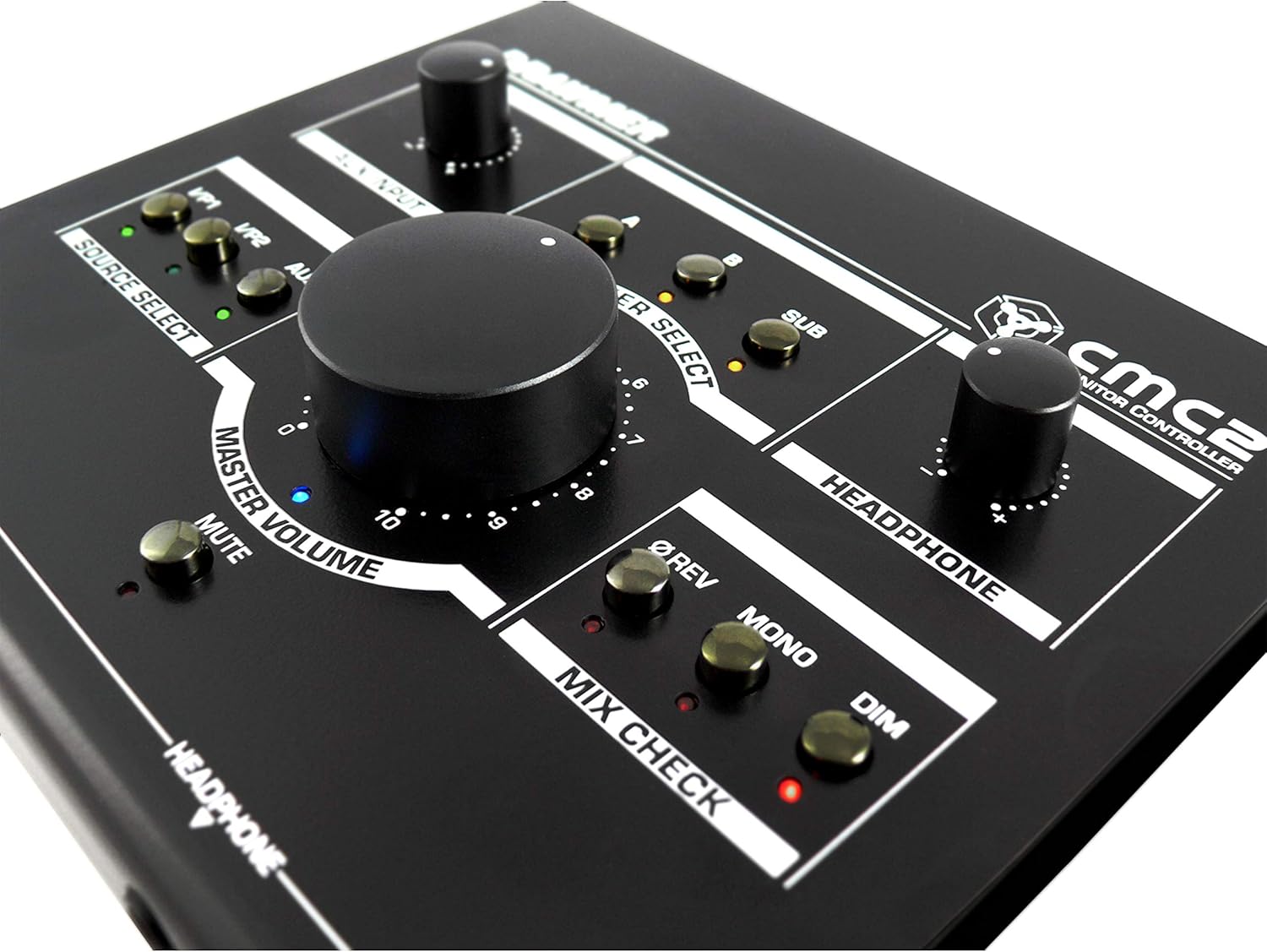
شڪل 6.1: بند اپ view of the Drawmer CMC2 front panel, highlighting the master volume, source select, speaker select, headphone, and mix check controls.
6.1 ماخذ جي چونڊ
- کي دٻايو I/P1 button to select the audio source connected to Input 1.
- کي دٻايو I/P2 button to select the audio source connected to Input 2.
- کي دٻايو AUX button to select the auxiliary input (front panel 3.5mm jack).
- Only one source can be active at a time. The LED next to the selected button will illuminate.
6.2 اسپيڪر جي چونڊ
- کي دٻايو A button to route the selected source to Speaker Output A.
- کي دٻايو B button to route the selected source to Speaker Output B.
- کي دٻايو SUB button to route the selected source to the Subwoofer Output.
- Multiple speaker outputs can be active simultaneously (e.g., A and SUB). The LEDs indicate active outputs.
6.3 حجم ڪنٽرول
- وڏي کي گھمايو ماسٽر حجم knob clockwise to increase the output level to the selected speakers, and counter-clockwise to decrease it.
- گھمايو هيڊ فون knob to adjust the listening level for connected headphones.
- گھمايو ويڪس انپٽ knob to adjust the input level of the auxiliary source.
6.4 Mix Check Functions
- کي دٻايو ØREV button to reverse the phase of the right channel, useful for checking phase compatibility.
- کي دٻايو مونو button to sum the stereo signal to mono, allowing you to check for mono compatibility issues in your mix.
- کي دٻايو ڊي ايم button to temporarily reduce the output volume by a fixed amount, useful for quick listening level changes without losing your main volume setting.
6.5 خاموش فنڪشن
- کي دٻايو خاموش button to instantly silence all active speaker outputs. The LED will illuminate when mute is active. Press again to unmute.
7. سار سنڀال
The Drawmer CMC2 is designed for reliable operation with minimal maintenance.
- صفائي: يونٽ کي سڪل، نرم، لِنٽ فري ڪپڙي سان صاف ڪري صاف رکو. رگڙيندڙ صاف ڪندڙن يا محلولن کان پاسو ڪريو.
- ماحول: Operate the unit in a clean, dry environment, away from direct sunlight, heat sources, and excessive dust.
- وينٽيليشن: پڪ ڪريو ته وينٽيليشن سلاٽ بند نه آهن ته جيئن وڌيڪ گرم ٿيڻ کان بچي سگهجي.
8. مسئلا حل ڪرڻ
If you encounter issues with your CMC2, refer to the following common problems and solutions:
- طاقت ناهي:
- Ensure the 15V DC power adapter is securely connected to the unit and a working power outlet.
- Check that the rear panel power switch is in the 'ON' position.
- ڪوبه آڊيو آئوٽ:
- Verify that the correct input source (I/P1, I/P2, or AUX) is selected and its LED is illuminated.
- Ensure that at least one speaker output (A, B, or SUB) is selected and its LED is illuminated.
- Check that the MASTER VOLUME knob is turned up and the MUTE button is not active (LED off).
- Confirm all audio cables are securely connected to both the CMC2 and your speakers/audio sources.
- Test with different cables or audio sources to isolate the problem.
- تحريف ٿيل آڊيو:
- Reduce the input level from your audio source.
- Lower the MASTER VOLUME on the CMC2.
- خراب ٿيل آڊيو ڪيبلز جي جانچ ڪريو.
- Headphone Output Not Working:
- Ensure headphones are fully plugged into the front panel jack.
- Adjust the HEADPHONE volume knob.
- Test with a different pair of headphones.
If the problem persists, contact Drawmer customer support or your authorized dealer for assistance.
9. وضاحتون
| ماڊل نالو | سي ايم سي 2 |
| برانڊ | ڊرامر |
| تجويز ڪيل استعمال | آڊيو مانيٽرنگ |
| رابطي ٽيڪنالاجي | XLR, RCA (Auxiliary) |
| آڊيو آئوٽ پٽ موڊ | اسٽيريو |
| اسپيڪر جو قسم | مانيٽر |
| پيداوار جي ماپ | 13 x 9 x 3 انچ (33 x 22.86 x 7.62 سينٽي) |
| شيءِ جو وزن | 3 پائونڊ (1.36 ڪلوگرام) |
| ٺاهيندڙ | ڊرامر |
10. وارنٽي ۽ سپورٽ
The Drawmer CMC2 Compact Monitor Controller is covered by a manufacturer's warranty. Please refer to the warranty card included with your product or visit the official Drawmer webتفصيلي وارنٽي شرطن ۽ ضابطن لاءِ سائيٽ.
For technical support, service, or further inquiries, please contact your authorized Drawmer dealer or the Drawmer customer support team through their official channels.


